How to Create a Content Strategy Step by Step
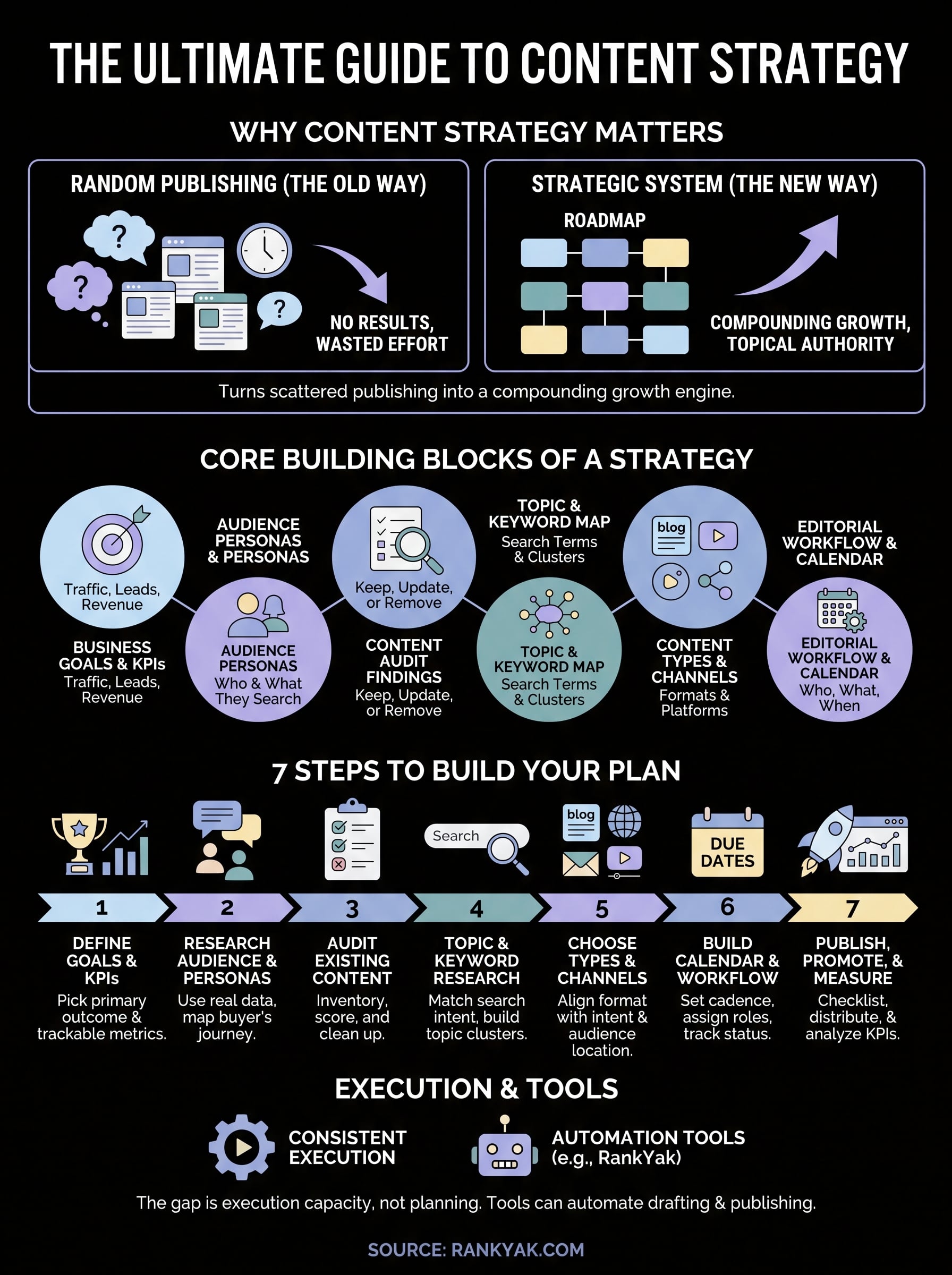
Most businesses publish content without a plan and wonder why nothing ranks. You write a blog post when you feel like it, target a keyword that sounded good at the time, and six months later you have thirty articles with no traffic to show for them. A real content strategy fixes this by turning random publishing into a system built around your audience and your business goals.
So what actually goes into one? A content strategy is a documented plan that connects your target audience's search intent to specific topics, keywords, formats, and a publishing schedule, all pointed at a measurable outcome like organic traffic or leads. It's the difference between guessing and following a roadmap that compounds over time.
In this guide, we'll walk through the exact steps: defining your goals, researching your audience and keywords, auditing existing content, mapping topic clusters, building a content calendar, and setting up a consistent publishing rhythm. If you'd rather skip the manual grind, tools like RankYak can automate most of this process once your strategy is in place, but the framework below works no matter how you execute it.
What is a content strategy and why it matters
A content strategy is not a spreadsheet of blog titles. It's the plan that answers four questions before you write a single word: who you're creating content for, what problems you're solving for them, which formats and channels you'll use, and how you'll know it worked. Skip any one of those questions and you end up with content that reads fine but doesn't move the business forward. Google itself stresses that content should be built for people first, with a clear purpose and demonstrated expertise, not produced to chase rankings. That's the exact mindset a real content strategy forces you to adopt.
Content strategy vs. a content calendar
Many teams confuse a content calendar with a content strategy, and that mix-up is where most SEO efforts stall, so it helps to be clear on what a content calendar is in the first place. A calendar tells you what publishes on what date. A strategy tells you why that piece exists at all, which stage of the buyer's journey it targets, and what happens after it's live. Think of the strategy as the architecture and the calendar as the construction schedule. You need both, but the calendar is worthless without the plan behind it.
The core building blocks
Every working content strategy, regardless of industry, includes the same set of components. Leave one out and the rest tend to fall apart:
- Business goals and KPIs: traffic, leads, signups, or revenue targets tied to content
- Audience personas: who you're writing for and what they search for
- Content audit findings: what you already have and what's underperforming
- Topic and keyword map: the search terms and clusters you'll target
- Content types and channels: blog posts, videos, guides, social repurposing
- Editorial workflow and calendar: who creates what, and when it ships
- Distribution and promotion plan: how content reaches people beyond organic search
- Measurement framework: how you'll track whether it's working
Why it matters
Businesses that treat content as a system instead of a series of one-off posts see compounding returns. A single article ranking for one keyword is nice. A cluster of twenty interlinked articles built around a documented content strategy captures an entire topic, sends internal links between pages, and signals topical authority to Google. That's the difference between a blog that plateaus at a few hundred visits a month and one that keeps climbing year over year.
A content strategy turns scattered publishing into compounding organic growth.
There's also a cost argument. Writing without a plan means paying for articles that never rank, never get shared, and never convert. Every wasted post is wasted budget, whether you're paying a freelancer, an agency, or your own time. A documented strategy filters out low-value topics before you spend a dollar producing them, and it gives you a clear reason to say no to random keyword ideas that don't serve your actual goals.
Finally, a strategy protects you from burnout and inconsistency, which are the two biggest reasons SEO content programs fail. When you know exactly what to publish next and why, you stop staring at a blank calendar wondering what to write about this week. The seven steps that follow will help you build that plan from scratch, whether you're starting a blog for the first time or trying to rescue one that's been publishing without direction for years.
Step 1. Define your goals and KPIs
Before you touch a keyword tool, decide what "working" actually looks like for your business. Vague goals like "get more traffic" don't tell you which topics matter or when to declare a piece a failure. Specific goals shape every decision that comes after this step, from which keywords you chase to how long you wait before rewriting a post that isn't performing.
Pick a primary business outcome
Organic traffic is a vanity metric unless you tie it to something the business actually needs. Start by choosing one primary outcome and one or two supporting metrics, not a wishlist of ten things you'd like to see improve.
- Lead generation: form fills, demo requests, or email signups from content pages
- Direct revenue: sales attributed to organic content, common for ecommerce and SaaS free trials
- Brand visibility: rankings for category-defining terms, mentions in AI chat answers
- Customer education: reduced support tickets, higher activation for existing users
Write this outcome down in one sentence: "Our content strategy exists to generate 50 qualified demo requests per month by the end of Q3." That sentence becomes the filter for every topic idea you consider later.
Set KPIs you can actually measure
Once you know the outcome, attach numbers to it. Good KPIs are specific, time-bound, and traceable back to a source you already have access to, like Google Search Console or your CRM.
| Goal type | Example KPI | Where you track it |
|---|---|---|
| Traffic growth | +40% organic sessions in 6 months | Google Analytics |
| Rankings | 15 keywords in top 10 within 90 days | Search Console |
| Lead generation | 25 content-sourced leads/month | CRM UTM tracking |
| Revenue | $10k/month attributed sales | Analytics + CRM |
Pick one primary KPI, or you'll optimize for none of them.
Set a realistic timeline alongside each KPI. Organic content typically takes three to six months to show meaningful movement, and Google has confirmed that helpful, people-first content needs time to earn trust and rankings. Anyone promising first-page results in two weeks is selling you something.
Align goals with stakeholders early
If you're not the only decision-maker, get sign-off on these goals before building anything else. Marketing teams often assume traffic is the win, while sales leadership only cares about pipeline. Stakeholder alignment now saves you from rebuilding the entire strategy three months in when someone asks why traffic went up but revenue didn't move. Document the agreed goals in a shared doc, and revisit them every quarter as the business shifts, because a strategy set in stone stops serving anyone.
Step 2. Research your audience and build personas
Goals tell you what you're chasing, but you can't hit a target you can't see. Audience research tells you who actually reads your content, what they type into Google when they have a problem, and what convinces them to trust you over a competitor. Skip this step and you end up writing for an imaginary reader who sounds a lot like you, not the person actually searching for answers.
Talk to real customers before you guess
Pull up five to ten recent customer conversations, support tickets, or sales call recordings before you write a single persona. Look for the exact words people use to describe their problem, not the polished language from your own website. Those raw phrases often become your best keyword targets later, because they match how people actually search rather than how marketers describe a product category.
Build personas from data, not assumptions
A persona isn't a fictional bio with a stock photo and a made-up name. It's a working document that shapes topic selection and tone. Keep it lean and focused on what actually changes your content decisions:
- Role and context: job title, industry, company size, or life stage
- Primary problem: the specific pain point they're trying to solve right now
- Search behavior: the terms they use, and whether they search on Google or ask an AI chat tool
- Objections: what makes them hesitate to buy or act
- Content preference: do they want a quick answer, a deep guide, or a comparison table
Three well-researched personas beat ten vague ones. If you're a B2B SaaS company running B2B SaaS content marketing, you might have a hands-on user, a budget-holding manager, and a technical evaluator, each searching for different things at different stages.
A persona built on real customer language beats one built on assumptions every time.
Map the buyer's journey to content needs
Once personas exist, map what each one needs at every stage, because a first-time visitor and a returning prospect ready to buy need completely different content.
| Stage | Reader intent | Content type |
|---|---|---|
| Awareness | "What is this problem?" | Educational blog posts, definitions |
| Consideration | "What are my options?" | Comparison guides, how-tos |
| Decision | "Which one should I pick?" | Case studies, product pages |
| Retention | "How do I get more value?" | Tutorials, feature deep-dives |
This mapping matters just as much for search intent as it does for sales. Google's own guidance on helpful content makes clear that content earns trust when it demonstrably serves the person reading it, not when it's built to catch traffic regardless of relevance. Personas keep you honest about who that person is, and every topic you pick in the next step should trace back to one of them.
Step 3. Audit your existing content
Skip this step and you'll waste months rewriting topics you've already covered, or worse, publishing a new article that competes with one you forgot existed. A content audit gives you a clear inventory of what's live, what's ranking, and what's quietly dragging down your domain's credibility. Do this before you research a single new keyword, because half the answers to "what should we write next" are already sitting in your existing content.
Inventory everything you've published
Pull every published URL into a spreadsheet using Google Search Console or a crawler, then tag each one with its topic, publish date, and word count. This sounds tedious, but a full inventory is the only way to spot duplicate coverage, outdated stats, and pages that never got indexed in the first place. Most businesses find at least a dozen posts they'd completely forgotten about.
Score each piece against performance data
Once you have the list, layer in performance numbers so you're making decisions on evidence, not gut feel.
| Metric | Where to find it | What it tells you |
|---|---|---|
| Organic clicks (90 days) | Search Console | Whether the page attracts any search traffic |
| Average position | Search Console | How close it is to page one |
| Conversions or leads | Analytics + CRM | Whether traffic turns into business results |
| Backlinks | Ahrefs, Semrush, or similar | Authority signals pointing at the page |
| Last updated | CMS metadata | Whether facts, stats, or screenshots are stale |
A content audit turns your archive into a roadmap instead of a liability.
Decide what to keep, fix, or kill
Every page falls into one of three buckets once you've scored it, and sorting them now saves you from dragging dead weight through the rest of your strategy.
- Keep and leave alone: ranking well, converting, no action needed
- Update and expand: decent traffic potential but thin, outdated, or missing search intent match
- Consolidate or remove: multiple posts competing for the same keyword, which a keyword cannibalization audit surfaces, or pages with zero traffic and no backlinks after a year live
Document your decision for each URL, because this list becomes your first batch of content tasks before you write anything new. Google's own guidance on helpful content notes that removing or improving low-value pages can lift trust across your entire site, not just the pages you touch. Treat the audit as ongoing maintenance too. Revisit it every six months, since content that ranked well last year can quietly decay as competitors publish fresher, more thorough pages.
Step 4. Research topics and keywords
Now that you know your goals, your audience, and what's already published, you're ready to find the actual topics worth writing about. Keyword research isn't about hunting for the highest search volume number you can find, whether you do it by hand or lean on automated keyword discovery. It's about matching real search intent to a topic your business can credibly answer, then organizing those topics so they reinforce each other instead of competing for the same rankings.
Start from search intent, not volume
Open a keyword tool and you'll see thousands of options sorted by volume, but volume alone tells you nothing about whether a searcher is ready to buy, learn, or compare. Group every keyword you find by search intent first: informational, navigational, commercial, or transactional. A term like "what is a content strategy" is informational and belongs at the top of the funnel, while "best content strategy software" is commercial and belongs much closer to a conversion page. Mixing these up produces articles that rank but attract the wrong reader entirely.
Build topic clusters, not random posts
Organize your validated keywords into topic clusters, a pillar and cluster structure where one broad pillar page is supported by several narrower articles that each target a specific subtopic and link back to the pillar. This structure is what signals topical authority to Google, far more than any single high-ranking post ever could.
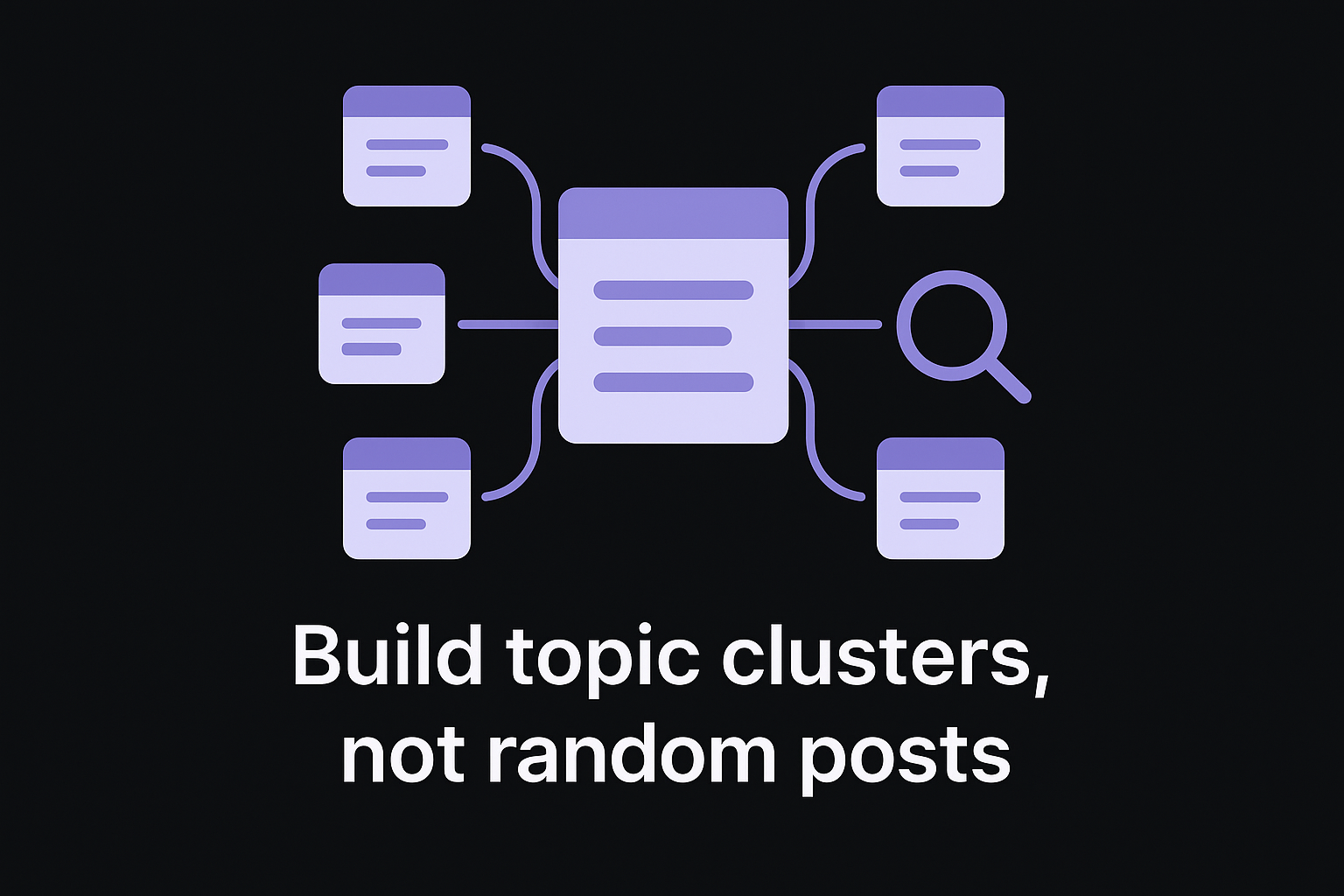
- Pick a broad pillar topic your business genuinely knows well, then build a topical map around it
- List 8 to 15 supporting subtopics that answer specific questions within it
- Map every keyword from your research to either the pillar or a supporting article, or cluster a keyword list automatically
- Plan internal links from each supporting article back to the pillar, and vice versa
One pillar page surrounded by well-linked supporting articles outranks a dozen disconnected posts every time.
Validate demand before you commit
Enthusiasm for a topic isn't the same as proof people search for it. Run every candidate keyword through a tool like Google Trends or your keyword platform of choice to confirm there's steady demand, not just a passing spike.
| Signal | What to check | Green light |
|---|---|---|
| Search volume | Monthly searches for the term | Enough volume to justify the effort, even if modest |
| Competition | Who currently ranks in the top 10 | You can realistically compete or differentiate |
| Trend direction | Rising, flat, or declining over 12 months | Flat or rising, not a fading trend |
| Intent match | What searchers actually want | Matches the content type you plan to create |
Validated topics go straight into your content calendar in the next step. Everything else gets parked in a backlog for later, because a strategy that chases every possible keyword ends up as scattered as having no strategy at all.
Step 5. Choose your content types and channels
A validated keyword doesn't tell you what to build. It tells you what problem to solve, and you still need to pick the format that solves it best and the channel where your audience actually spends time. Content format decisions matter as much as the topic itself, because a comparison table crammed into a video script performs worse than the same information in a scannable blog post, and a quick tutorial buried in a 4,000-word guide loses readers who just wanted three steps.
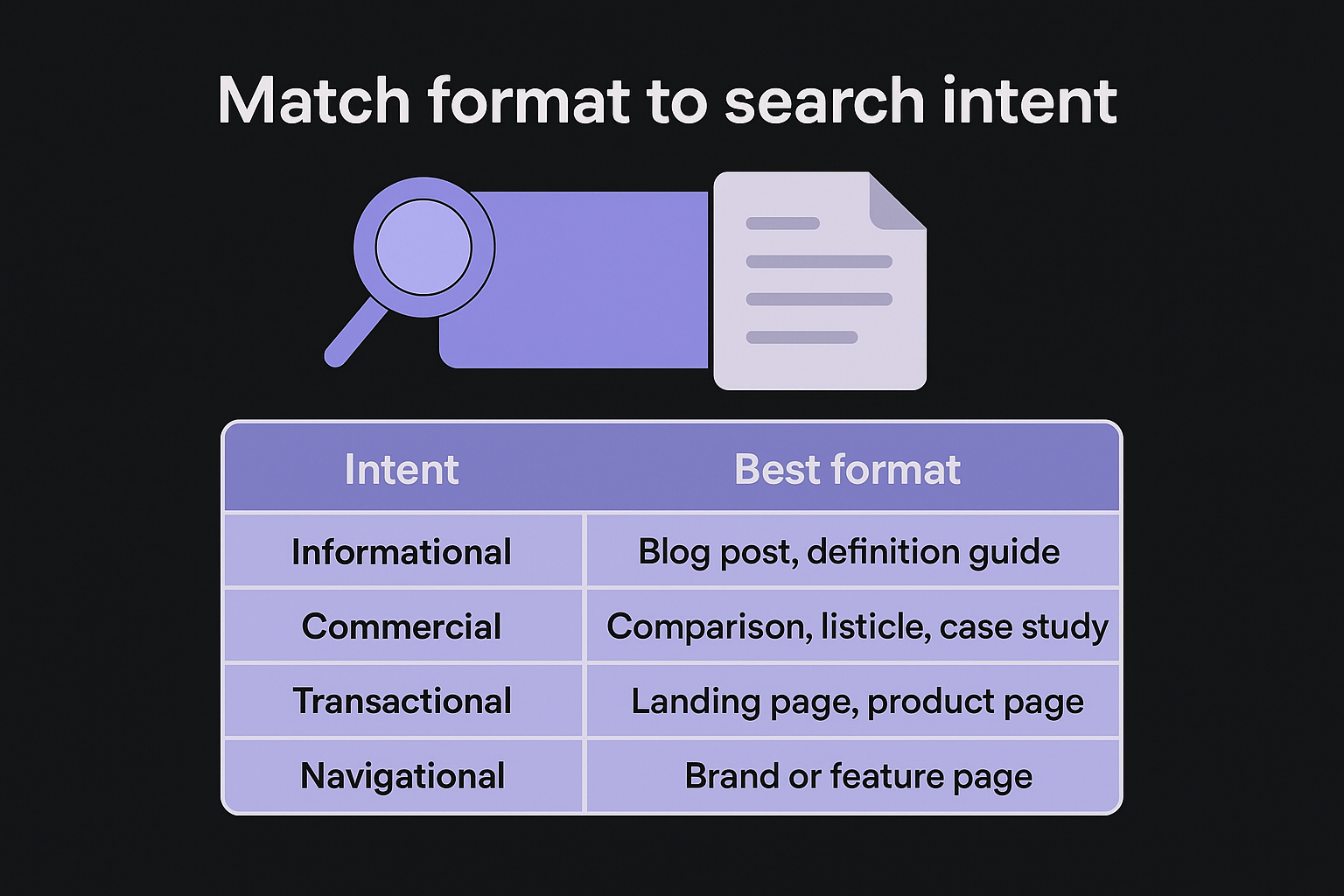
Match format to search intent
Go back to the intent labels you assigned during keyword research and let them drive the format, not your personal preference for writing long guides. Informational queries usually want a clear blog post or explainer. Commercial queries want comparisons, reviews, or case studies. Transactional queries want a product or landing page that removes friction fast.
| Intent | Best format | Example |
|---|---|---|
| Informational | Blog post, definition guide | "What is a content strategy" |
| Commercial | Comparison, listicle, case study | "Best SEO tools for small business" |
| Transactional | Landing page, product page | "SEO software free trial" |
| Navigational | Brand or feature page | "RankYak pricing" |
Format follows intent, never the other way around.
Pick channels where your audience actually shows up
Your blog is the foundation, but it's rarely the only one of the channels for distributing content worth your time. Look at where your personas from Step 2 already spend attention before committing resources anywhere new.
- Owned blog: your primary channel for SEO-driven organic growth, and the hub every other channel points back to
- Email: repurpose published articles into a weekly digest to keep existing subscribers engaged
- Social repurposing: pull key stats or steps from long-form content into LinkedIn or X posts that link back to the source
- AI chat visibility: structure content with clear headings and direct answers so it gets pulled into ChatGPT, Gemini, and Perplexity responses, not just traditional search results
- Video or podcast: worth adding only if your audience research shows they actually consume that format
Don't spread yourself across every channel at once
Picking three or four channels and doing them well beats a thin presence across ten. Most SMBs get the best return by treating the blog as the engine, publishing consistently there, and repurposing that same content into one or two secondary channels rather than creating original content for each one separately. That approach keeps production sustainable and lets you scale up channels only after the core blog is proving its ROI against the KPIs you set in Step 1.
Step 6. Build a content calendar and workflow
You now have validated topics organized into clusters and matched to the right formats. Without a content calendar, that list stays a wishlist instead of a production schedule. A calendar assigns a publish date, an owner, and a status to every piece, turning your strategy into work that actually gets done week over week instead of whenever someone finds time.
Set a realistic publishing cadence
Choose a frequency you can sustain for a full year, not the frequency that sounds impressive in a planning meeting. One well-researched article per week beats four rushed ones that skip the search intent and E-E-A-T signals you mapped out earlier. Factor in the time each format actually takes: a 2,000-word how-to guide with original screenshots takes longer than a 600-word news update, so mix formats deliberately rather than committing to the same word count every time.
Consistency at a sustainable pace beats a burst of content followed by months of silence.
Assign clear roles in the workflow
Every piece needs an owner at each of the editorial workflow stages, or work stalls in a shared drive that nobody checks. Map out who handles what before content starts moving through the pipeline:
- Topic brief: who writes the outline, target keyword, and intent notes
- Drafting: who produces the first version, in-house writer, freelancer, or AI article drafting
- Editing: who checks accuracy, brand voice, and internal links
- SEO review: who confirms on-page elements match the keyword research from Step 4
- Publishing: who uploads to the CMS and schedules the live date
- Promotion: who repurposes it into email or social per your Step 5 channel plan
Use a simple tracking structure
A spreadsheet or project board works fine as long as it captures status at a glance. Keep the columns minimal so the team actually updates it:
Title | Target Keyword | Persona | Status | Owner | Due Date | Publish Date
Status values like "Brief," "Drafting," "Editing," "Scheduled," and "Published" give you an instant view of bottlenecks. If everything sits in "Drafting" for three weeks, you know where the workflow is breaking before deadlines slip further. This is also where automation earns its keep. Platforms like RankYak handle automated content planning and draft articles directly, which removes most of the manual coordination this step normally demands and keeps the calendar moving even when your team is stretched thin.
Step 7. Publish, promote, and measure results
Publishing a piece of content isn't the finish line, it's the starting gun. Too many teams treat the publish button as the last task on a checklist and move straight to the next brief, then wonder why traffic never shows up. A content strategy only pays off if you close the loop between what you shipped and what actually happened after it went live, which means building publishing, promotion, and measurement into the same workflow you set up in Step 6.
Run a pre-publish checklist
Before anything goes live, confirm the basics that determine whether Google and readers can even find and trust the page. Skipping these steps is the fastest way to waste a well-researched article.
- Title tag and meta description match the target keyword and search intent, confirmed in a SERP snippet preview
- Internal links point to and from related cluster articles
- Images have descriptive alt text, verified with an image alt text checker, and compressed file sizes
- The page is submitted for indexing in Google Search Console
- Author bio or byline is present, supporting the E-E-A-T signals Google looks for
Promote beyond the publish button
Organic rankings take months, so a content promotion plan is what gets eyes on content in the meantime. Send new articles to your email list, repurpose the key points into social posts per your Step 5 channel plan, and drop relevant links into existing community threads or partner newsletters where it genuinely helps. None of this replaces SEO, but it compresses the gap between publishing and your first real readers.
Measure against the KPIs you set in Step 1
Quarterly reviews are where a strategy proves itself or reveals what needs to change. Pull the KPIs you defined at the start and check actual performance against them, not against vague impressions of
Turning your plan into consistent content
A documented strategy only matters if it survives contact with a busy week. You now have goals, personas, an audit, validated topics, formats, a calendar, and a measurement loop, which is more structure than most competitors ever build. The gap between a strategy on paper and one that actually ships content is almost always execution capacity, not planning quality.
Executing this every week by hand is exactly where most teams stall, even with a solid plan in hand. That's the gap RankYak was built to close: it takes your keyword research, builds the daily content plan, drafts optimized articles, and publishes them straight to your CMS without you touching a spreadsheet. If you're managing this workload for multiple clients, RankYak for agencies handles it at scale. Put your content strategy on autopilot and watch it turn into published pages instead of another abandoned doc.
Allan de Wit is a co-founder of RankYak and has worked in SEO since 2015: inside agencies, alongside them, for clients directly, and in-house on the products being ranked. He came to it as a software engineer building for marketers, which is why the platform is built the way it is. He went on to start companies of his own, two of which were acquired. At RankYak he sets the product direction and owns the features, the quality bar, the design, and the UX.
