12 Best AI for Content Creation Tools and Workflows (2026)
Most content teams are still doing things the hard way, manually researching keywords, writing drafts from scratch, and publishing one piece at a time. Meanwhile, AI for content creation has matured well past the "generate a rough draft" stage. The tools available in 2026 can handle entire workflows, from topic research to publishing, with minimal hand-holding.
But not every AI tool is built the same. Some excel at copywriting. Others focus on video or social media. A few, like RankYak, automate the full SEO content lifecycle, keyword discovery, article writing, optimization, and publishing, so you're not stitching together five different platforms to get one blog post live, which is what SEO content automation at scale really means. The right choice depends on what you're actually trying to accomplish and how much of the process you want to hand off.
This guide breaks down 12 of the best AI content creation tools and workflows worth your attention right now. For each one, you'll get a clear look at what it does, where it fits in your stack, and what kind of results to expect. Whether you need a writing assistant for ad copy or a full autopilot system for organic growth, there's something here that matches your setup. Let's get into it.
1. RankYak
RankYak is the only tool on this list built specifically to automate the full SEO content lifecycle. While most ai for content creation tools handle one piece of the puzzle, RankYak covers keyword discovery, article writing, SEO optimization, and publishing under one roof.
What it does
RankYak starts by analyzing your website and niche to surface high-potential keywords scored by volume and difficulty that your target audience is actively searching for on Google and AI chat platforms like ChatGPT. From there, it builds a rolling publishing schedule, deciding which keywords to target in what order to maximize your site's growth trajectory.
Each day, the platform writes a researched, ready-to-rank article of up to 5,000 words, fully SEO-optimized. It handles search intent matching, competitor research, internal linking, topic clusters, factual citations, and brand voice adaptation automatically. The output goes straight to your CMS, since RankYak publishes directly to WordPress, Shopify, Webflow, and more, without you touching a single button.
Best workflow to try
Connect your website to RankYak, let the platform scan your existing content and niche, and set your publishing preferences. From that point, your daily article goes live automatically. Review the published pieces weekly to track rankings in Google Search Console and refine your brand voice settings as needed.
The biggest compounding advantage here is consistency: RankYak publishes every single day, which is the clearest driver of organic growth for most sites.
Who it fits best
RankYak fits small to medium-sized businesses, solo founders, and content marketers who want a steady stream of ranking content without hiring an agency or assembling an in-house team. It's especially strong for anyone running multiple websites, since you can manage each site under one account with its own keyword plan and publishing schedule.
If you need hands-on creative control over every sentence, a more manual writing assistant might suit you better. But if your goal is scalable organic traffic with minimal time investment, RankYak is the most direct path to get there.
Pricing
What RankYak costs covers every feature on the platform: keyword discovery, daily article generation, automatic publishing, and backlink exchange. There's no tiered pricing or feature gating. New users get a 3-day free trial with no commitment required.
2. ChatGPT and Claude
ChatGPT (OpenAI) and Claude (Anthropic) are the two most widely used general-purpose AI writing assistants available right now. Both cover a broad range of ai for content creation tasks, from drafting blog posts and emails to summarizing research and rewriting existing copy.
What they do
Both tools generate text based on your prompts, and they handle long-form drafts, tone adjustments, and brainstorming well, though drafting and editing copy in ChatGPT takes a specific approach to get consistent results. Claude manages longer documents with less drift, while ChatGPT has a wider ecosystem of plugins and integrations through the GPT store. Neither tool researches keywords, tracks rankings, or publishes content automatically.
Best workflow to try
Use these tools as a first-draft accelerator. Feed them a clear brief with your target keyword, audience, and desired word count, then edit the output to add your own perspective and verified sources. A repeatable prompt template helps here:
- Specify the topic, target keyword, and audience
- Set the tone and approximate length
- Ask for a structured outline before the full draft
The output quality scales directly with the specificity of your prompt, so vague inputs produce vague drafts.
Who they fit best
ChatGPT and Claude suit copywriters, marketers, and solo creators who want a fast writing partner they can direct manually. They work best when you already know what you want to say and need help getting it onto the page faster. Teams that need automated SEO workflows will find both tools require significant manual effort to bridge the gap between a raw draft and published, ranking content.
Pricing
ChatGPT offers a free tier with limited access, and ChatGPT Plus runs $20 per month. Claude's Pro plan also costs $20 per month, with free access available at reduced capacity.
3. Jasper
Jasper is a dedicated ai for content creation platform built around marketing use cases. It combines a large language model with pre-built templates and workflows specifically designed for blog posts, ads, email campaigns, and social content.
What it does
Jasper's features, pricing, and use cases center on generating marketing copy across a wide range of formats. Its Brand Voice feature lets you feed in sample content so the AI learns your tone, and its Campaigns workflow lets you produce multiple interconnected assets from a single brief. It doesn't handle keyword research or automatic publishing, but it integrates with Surfer SEO for on-page optimization guidance.
Best workflow to try
Start with Jasper's Blog Post template: input your target keyword, audience, and a short description, then let the platform generate a structured draft. From there, run the content through Surfer SEO's integration to check optimization scores and fill any gaps before you publish manually.
Jasper's biggest strength is speed on marketing assets, not end-to-end SEO automation.
Who it fits best
Jasper works well for marketing teams and agencies that produce high volumes of campaign content across multiple channels. If your workload includes landing pages, ad copy, and email sequences alongside blog posts, Jasper's template library and brand controls make it a reasonable centralized writing tool.
Pricing
Jasper's Creator plan starts at $49 per month for one user and one brand voice. The Pro plan runs $69 per month and adds five brand voices along with team collaboration features. Both prices apply to annual billing; monthly billing costs more across both tiers.
4. Copy.ai
Copy.ai started as a short-form copywriting tool and has since expanded into a broader ai for content creation platform with workflow automation features. It targets marketing and sales teams that need to generate consistent, on-brand content across multiple channels without building everything from scratch.
What it does
Copy.ai's core strength is automating repetitive marketing copy, including product descriptions, email sequences, social posts, and sales enablement content, which puts it alongside the other AI copywriting tools for ads, emails, and blogs. Its Workflows feature lets you chain together multiple AI tasks, so you can build a pipeline that takes a product URL as input and outputs a full suite of copy assets in one run. It doesn't handle keyword research, SEO scoring, or direct CMS publishing.
Best workflow to try
The most practical starting point is Copy.ai's Workflows builder. Define your content type, input your brand guidelines and target audience, and let the workflow generate multiple asset variations in parallel. You can then compare outputs side by side and push the strongest version through your existing approval and publishing process.
Copy.ai's workflows save the most time when you're producing the same content type repeatedly across many products or campaigns.
Who it fits best
Copy.ai fits e-commerce brands and sales-driven marketing teams that crank out high volumes of product copy, outreach emails, and campaign assets on a regular cycle. It's less suited for long-form SEO content or anyone who needs automated publishing and keyword targeting built into the same platform.
Pricing
Copy.ai offers a free plan capped at 2,000 words per month. The Starter plan runs $49 per month (billed annually), and the Advanced plan runs $249 per month for larger teams with higher output demands.
5. Surfer SEO
Surfer SEO focuses specifically on on-page optimization, bridging the gap between raw ai for content creation output and content that actually performs in search. It analyzes top-ranking pages for your target keyword and tells you exactly what your article needs to compete.
What it does
Surfer's core feature is its Content Editor, which scores your draft in real time based on keyword usage, word count, headings, and content structure pulled from competitor analysis. It also includes a keyword research tool and an AI writing assistant called Surfer AI that generates optimization-aware drafts directly inside the editor. The platform integrates with Google Docs and WordPress, so you can optimize content inside tools you already use.
Surfer's real value is clarity: it converts vague SEO advice into a concrete checklist you can act on before you publish.
Best workflow to try
Open a new Content Editor in Surfer, enter your target keyword, and let the platform analyze the top-ranking pages. Use the suggested terms and structural guidelines to either write a fresh draft or revise an existing one. Run your content score to 70 or above before publishing, and revisit older posts using the same workflow to lift underperforming pages.
Who it fits best
Surfer works best for SEO writers and content teams that already produce blog content and want a reliable way to optimize each piece before it goes live. If you're looking for full automation from keyword research to publishing, Surfer requires pairing with other tools to cover those gaps, which is the core difference in a content score versus a written and published article.
Pricing
Surfer's Essential plan starts at $99 per month, and the Scale plan runs $219 per month. Both tiers are billed monthly, with discounts available on annual plans.
6. Grammarly
Grammarly sits at the editing and polishing end of the ai for content creation spectrum. Rather than generating drafts, it focuses on making your existing writing clearer, more consistent, and error-free across every platform you write on.
What it does
Grammarly checks for grammar, spelling, punctuation, and style issues in real time as you write, and its AI assist actions and prompts go further than a plain grammar pass. Its browser extension works across Gmail, Google Docs, LinkedIn, and most web-based editors, so you get instant feedback without switching tools. The premium tier adds tone detection, clarity rewrites, and plagiarism checks, while the Business plan layers in brand style guides and team consistency settings.
Best workflow to try
Install Grammarly's browser extension and desktop app so it runs passively across all your writing environments. For longer pieces, paste your final draft into the Grammarly Editor and work through the suggestions before publishing. Pay close attention to the clarity and tone scores, which flag sentences that are technically readable but still land awkwardly with a target audience.
Grammarly is most useful as a final quality gate, not as a replacement for substantive editing or strategic content decisions.
Who it fits best
This tool fits any writer or team that publishes content regularly and wants a fast, reliable safety net for errors and inconsistencies. It's especially valuable for non-native English speakers who want to tighten their writing without leaning on a human editor for every piece.
Pricing
The free plan covers core grammar and spelling checks. Premium runs $30 per month (billed monthly) or roughly $12 per month on an annual plan. The Business plan starts at $15 per member per month on annual billing.
7. HubSpot
HubSpot combines a full CRM and marketing platform with built-in AI content tools, making it different from every other tool on this list. Rather than operating as a standalone writing assistant, it connects content creation directly into your marketing, sales, and customer management workflows.
What it does
HubSpot's Content Assistant generates blog drafts, email copy, social captions, and landing page content inside the same platform you use to run campaigns and manage contacts. The AI pulls context from your CRM data, which means you can personalize content at scale based on contact segments rather than writing one-size-fits-all copy. For teams that want ai for content creation connected directly to their pipeline and audience data, HubSpot covers that ground without adding another tool to the stack.
Best workflow to try
Open HubSpot's blog editor and use the Content Assistant to generate a draft based on your topic and target audience. Then pull personalization tokens from your CRM to tailor related email and landing page copy for specific segments before you publish.
HubSpot's edge is the direct connection between your content tools and your contact database, something a standalone writing assistant simply cannot replicate.
Who it fits best
HubSpot works best for marketing teams already running HubSpot's CRM or Marketing Hub who want AI writing built into their existing setup. If you're managing contacts, campaigns, and content in one place, the built-in AI features reduce friction significantly. Teams outside the HubSpot ecosystem will find the platform hard to justify on content features alone.
Pricing
HubSpot's Marketing Hub Starter begins at $20 per month. The Professional plan runs $890 per month, where most advanced AI and automation features become available.
8. Canva
Canva brings AI-powered design tools to the visual side of ai for content creation, covering everything from social graphics and presentations to short video clips and brand kits. It's built for people who aren't designers but still need to produce polished visual assets on a consistent schedule.
What it does
Canva's Magic Design and Magic Write features generate visual layouts and short copy based on your input, letting you produce branded content without starting from a blank canvas. The platform includes thousands of templates across formats like Instagram posts, YouTube thumbnails, pitch decks, and email headers. Its AI background remover, image generator, and text-to-presentation tool round out a suite that handles most standard marketing visuals in one place.
Best workflow to try
Set up your Brand Kit first by uploading your logo, brand colors, and fonts so every template you touch stays on-brand automatically. Then use Magic Design to generate a layout from a photo or topic, swap in your copy, and export directly to your social scheduler or CMS.
Your Brand Kit is the single setting that most reduces back-and-forth edits across every Canva asset you create.
Who it fits best
Canva fits marketers, social media managers, and small business owners who need visual content fast without a dedicated designer. It works well as a companion to any writing-focused AI tool because it covers the image and design layer those tools leave out entirely.
Pricing
Canva offers a free plan with core design features included. The Pro plan runs $15 per month per person, and Canva Teams starts at $10 per person per month with a minimum of three users.
9. Descript
Descript takes a different angle on ai for content creation by treating audio and video editing as a text problem. Instead of working with a traditional timeline, you edit the auto-generated transcript, and the media updates to match.
What it does
Descript transcribes your recordings in minutes and lets you cut, rearrange, and clean up audio or video by editing the transcript text directly. Its Overdub feature generates a voice clone so you can fix mispronounced words or fill small gaps without re-recording. The platform also handles screen recording, filler word removal, and short-form clip creation, making it a practical all-in-one tool for podcasters and video creators who don't want to learn professional editing software.
Descript's transcript-based editing removes the biggest time barrier most non-editors face when working with video or audio content.
Best workflow to try
Record your raw audio or video, import it into Descript, and let the AI transcription run. Once the transcript is ready, read through it and delete any sections you want to cut. Then use the Remove Filler Words tool to strip out "um," "uh," and repeated phrases in one click before you export the final file.
Who it fits best
Descript suits podcasters, YouTubers, and marketers who produce regular audio or video content and want a faster editing process without hiring a dedicated editor. If your content strategy relies heavily on written formats only, this tool adds limited value to your stack.
Pricing
Descript's free plan supports up to one hour of transcription per month. The Hobbyist plan runs $24 per month, and the Creator plan costs $40 per month, both billed annually.
10. Synthesia
Synthesia is an AI video generation platform that converts text scripts into professional-looking videos featuring realistic AI avatars. It's one of the most practical tools for anyone who wants to add video to their ai for content creation strategy without appearing on camera themselves.
What it does
Synthesia lets you type a script, choose an AI avatar from its library, and generate a polished video in minutes. The platform supports over 140 languages, includes customizable avatar options, and lets you add branded slides, screen recordings, and background music directly inside the editor. You don't need a camera, microphone, or video editing experience to produce a finished product.
Best workflow to try
Write your script in a document first, then paste it into Synthesia's editor and select your preferred avatar and language. Add branded slides between talking-head segments to break up the format, then export and upload directly to YouTube or embed on your website. Keep individual videos under five minutes to maintain viewer attention on training or explainer content.
Synthesia removes the camera-shyness barrier that stops many businesses from adding video to their content mix at all.
Who it fits best
Synthesia fits corporate training teams, SaaS companies, and content marketers who need a consistent volume of explainer or onboarding videos without recurring production costs. If your content strategy relies primarily on written articles or social copy, the per-video cost structure makes it harder to justify for most small teams.
Pricing
Synthesia's Starter plan begins at $29 per month (billed annually) and covers up to 120 video minutes per year. The Creator plan runs $89 per month with expanded avatar options and higher output limits.
11. Perplexity
Perplexity positions itself as an AI-powered answer engine rather than a traditional writing tool, making it a distinct addition to any ai for content creation workflow. It pulls real-time information from the web and cites its sources directly, which separates it from tools that rely on a static training cutoff.
What it does
Perplexity answers questions by searching the web in real time and synthesizing results into a concise, cited response. Every answer includes numbered source links you can click through to verify the underlying information, which makes it far more useful for research tasks than a standard chatbot. It also offers a follow-up question interface so you can dig deeper into any topic without starting a new search from scratch.
Perplexity's cited sources make it one of the most reliable research starting points available for content teams that care about factual accuracy.
Best workflow to try
Use Perplexity at the research and briefing stage of your content process. Run your target topic through the answer engine to pull together key facts, statistics, and angles quickly, then feed those findings into a writer-ready content brief before you move into drafting. Cross-reference the cited sources directly to confirm accuracy before any claim makes it into a published piece.
Who it fits best
Perplexity suits writers and content strategists who spend significant time sourcing information before they write. It complements any drafting tool well but adds the least value for teams that primarily need automated publishing or design capabilities.
Pricing
Perplexity offers a free tier with standard search access. The Pro plan runs $20 per month, unlocking faster responses, advanced AI models, and higher usage limits.
Next Steps
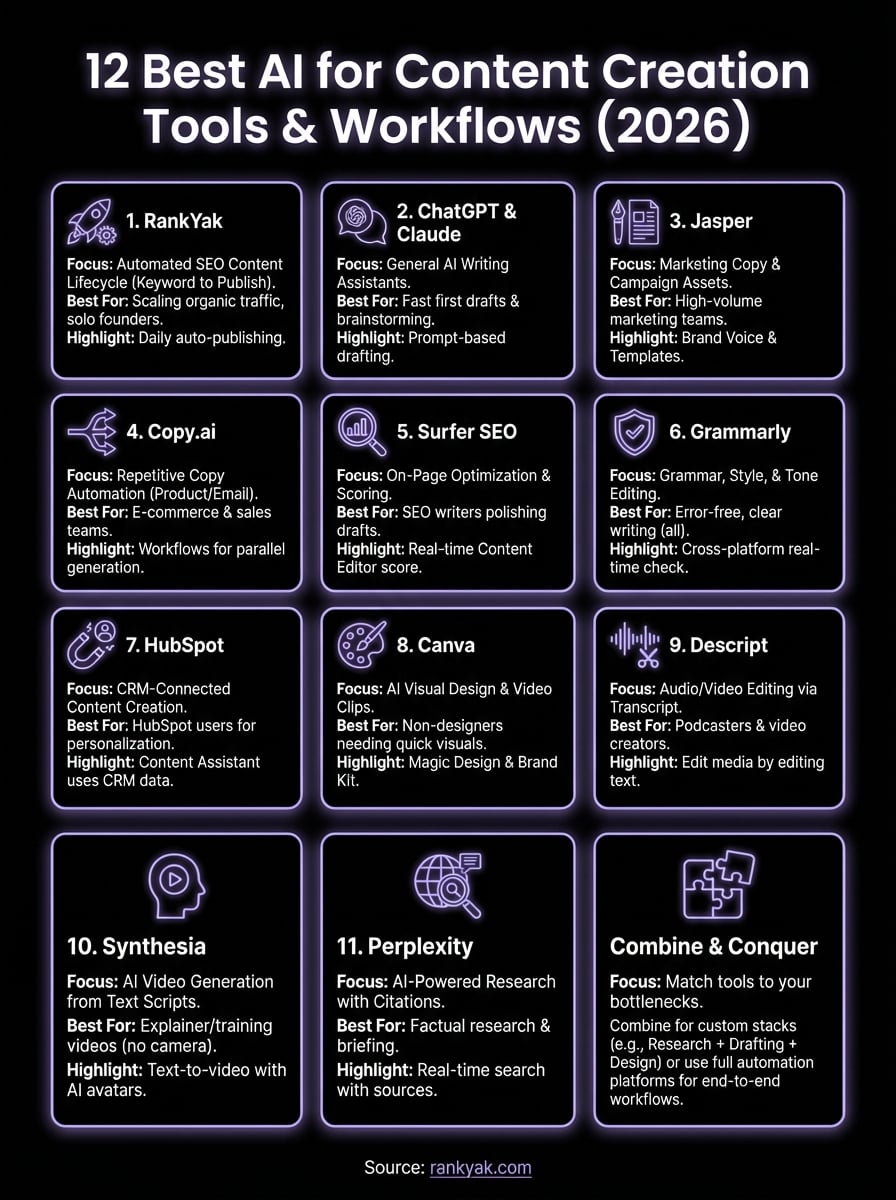
You now have a clear picture of what ai for content creation looks like across the full spectrum, from research and writing to video, design, and editing. Most of these tools solve one layer of the content process well, which means you'll likely stack two or three together depending on your specific workflow.
The smartest starting point is to match a tool to your biggest bottleneck. If you're losing the most time to keyword research and consistent publishing, a step-by-step AI workflow that automates content creation eliminates both problems at once. If you need polished visuals or video, Canva or Synthesia cover that gap without requiring technical experience.
For teams that want organic traffic on autopilot without managing multiple disconnected tools, RankYak handles the entire SEO content lifecycle from keyword discovery to daily publishing. See how automated SEO from keyword to published article works, and what consistent, optimized content does for your rankings inside the first week.
Allan de Wit is a co-founder of RankYak and has worked in SEO since 2015: inside agencies, alongside them, for clients directly, and in-house on the products being ranked. He came to it as a software engineer building for marketers, which is why the platform is built the way it is. He went on to start companies of his own, two of which were acquired. At RankYak he sets the product direction and owns the features, the quality bar, the design, and the UX.
