
13 Best Marketing Automation Tools For Small Business

Running a small business means wearing too many hats. Email sequences, social posts, lead nurturing, SEO content, doing it all manually eats hours you don't have. That's exactly why marketing automation for small business has gone from nice-to-have to non-negotiable. The right tool handles repetitive tasks on autopilot so you can focus on actually growing your business.
But here's the problem: there are hundreds of platforms out there, each claiming to be "the one." Some cover email only. Others handle social scheduling but ignore your website. Few tackle the full picture, and even fewer do it without requiring a dedicated team to manage. Choosing the wrong tool means wasted budget and another subscription collecting dust, so getting this decision right matters.
We built RankYak to automate one of the most time-consuming pieces of the marketing puzzle, SEO content, from keyword research to publishing. So we know a thing or two about what good automation looks like. In this guide, we break down 13 of the best marketing automation tools built for small businesses, covering what each one does best, what it costs, and who it's actually for. Whether you need help with email, content, CRM, or all of the above, you'll find a solid fit here.
1. RankYak
RankYak is an SEO automation platform built for small businesses that want to grow organic traffic without hiring an agency or assembling an in-house content team. It handles the entire SEO content lifecycle, from keyword discovery and content planning to article writing and automatic publishing, all without manual input.
Best for
Small business owners, entrepreneurs, and content marketers who want consistent organic growth without spending hours on SEO every week are the ideal fit for RankYak. If you run a business on WordPress, Shopify, Webflow, or a custom CMS and want your site ranking on both Google and AI chat platforms like ChatGPT, RankYak is built for exactly that use case.
If you need a broader marketing suite that also covers email campaigns or social scheduling, RankYak is not the right match. But if SEO content is your primary growth channel, the platform's sharp focus works in your favor.
Standout features
RankYak handles every key piece of marketing automation for small business SEO. It identifies high-potential keywords based on your niche, builds a daily content roadmap, writes fully optimized articles up to 5,000 words, and publishes them directly to your CMS without any manual steps.
- Smart keyword discovery: Finds keywords suited for Google and AI chats
- Automated content plan: Schedules daily publishing for consistent growth
- High-quality article creation: Writes structured articles with internal linking, topic clusters, citations, and brand voice adaptation
- Auto-publishing: Delivers finished articles directly to your CMS
- Backlink exchange: Connects your site with relevant niche sites to build authority
- Multi-site management: Manages multiple websites under one account
RankYak's ability to go from keyword research to a published, optimized article every single day without human intervention is what separates it from tools that only partially automate the process.
Pros and cons
RankYak's biggest strength is how much it removes from your plate. Keyword research, content writing, publishing, and backlink building all run without you lifting a finger. It also supports 40+ languages and integrates with Google Search Console to keep your strategy grounded in real data.
The focused scope means email marketing, paid ads, and social scheduling are outside what RankYak does. For businesses where SEO is the core channel, that tradeoff is straightforward to accept.
Pricing
RankYak offers one flat plan at $99 per month with no upsells or feature tiers. Everything, including daily article generation, auto-publishing, backlink exchange, and multi-site management, is included. You also get a 3-day free trial that you can cancel anytime, no questions asked.
2. HubSpot Marketing Hub
HubSpot Marketing Hub is one of the most recognized all-in-one marketing platforms, combining email automation, CRM, landing pages, and reporting under a single roof. Small businesses that want to handle multiple marketing channels without managing separate tools often land on HubSpot first.
Best for
HubSpot fits small businesses focused on inbound marketing and lead nurturing, especially those that want their sales and marketing data in one place. If you're building contact lists, running email sequences, and tracking leads through a funnel, the platform's built-in CRM makes that process smoother than stitching separate tools together.
Teams that already use HubSpot's free CRM and want to expand into automation without switching platforms will find the upgrade path straightforward.
Standout features
This platform covers the core pieces of marketing automation for small business teams well, from email workflows to landing page testing.
- Email automation: Build behavior-triggered workflows without writing code
- CRM integration: Contact and deal data feed directly into marketing workflows
- Landing page builder: Create and A/B test pages without a developer
- Analytics dashboard: Track campaign performance across channels in one view
HubSpot's CRM-native design keeps your marketing data and sales data in sync automatically, removing a major manual task for small teams.
Pros and cons
HubSpot's free plan covers real functionality, including email, forms, and CRM at no cost. The interface is clean, and most users get functional workflows running without a long onboarding process.
Costs jump sharply once you go beyond the basics. Advanced automation sits behind the Professional tier, and the price jump from Starter to Professional is large enough to strain a lean small business budget.
Pricing
HubSpot Marketing Hub offers a free plan for basic use. The Starter plan starts at $20/month per seat, and the Professional plan runs $890/month, a significant step up that catches many small businesses off guard.
3. ActiveCampaign
ActiveCampaign is a customer experience automation platform that combines email marketing, CRM, and advanced automation workflows in one place. It has built a strong reputation among small businesses that want more than basic email blasts and need behavior-based triggers and segmentation to nurture leads effectively.
Best for
ActiveCampaign fits small businesses that run complex email funnels and need precise control over how and when messages reach contacts. If your growth depends on lead scoring, conditional logic, or multi-step automation sequences, this platform handles those scenarios without requiring deep technical expertise.
Standout features
ActiveCampaign is a strong choice for marketing automation for small business teams that want email and CRM working together out of the box.
- Visual automation builder: Drag-and-drop workflows with conditional branching
- Lead scoring: Automatically rank contacts based on behavior and engagement
- Built-in CRM: Manage deals and contacts without a separate tool
- Site and event tracking: Trigger automations based on what visitors do on your site
ActiveCampaign's combination of deep segmentation and a built-in CRM gives small teams a level of precision that typically requires two separate platforms.
Pros and cons
ActiveCampaign's automation depth is genuinely impressive at its price point, and the platform scales well as your contact list grows. The interface takes time to learn, and new users often need several sessions to get comfortable with the workflow builder before things feel intuitive.
Pricing
ActiveCampaign starts at $15/month for the Starter plan, which covers basic email automation. The Plus plan, which unlocks CRM features and lead scoring, starts at $49/month based on your contact count.
4. Keap
Keap (formerly Infusionsoft) is a CRM and marketing automation platform built from the ground up for small businesses. It combines contact management, email marketing, invoicing, and payment collection into one tool, which makes it especially appealing for service-based businesses that want client management and marketing handled in the same place.
Best for
Service-based small businesses, including consultants, coaches, and local agencies, get the most out of Keap. If your workflow regularly involves sending quotes, collecting payments, and running follow-up sequences after client calls, the all-in-one setup saves you from jumping between separate tools every day.
Standout features
This platform covers core pieces of marketing automation for small business teams that run sales and client work at the same time.
- CRM with pipeline management: Track leads and clients through a visual sales pipeline
- Email and text automation: Send behavior-triggered messages across email and SMS
- Invoicing and payments: Create quotes and collect payments without leaving the platform
- Appointment scheduling: Let clients book directly through a shareable link
Keap's built-in payment and scheduling tools give service businesses a single platform to replace what would otherwise be three or four separate subscriptions.
Pros and cons
The bundled approach saves service businesses real money compared to running separate CRM, email, and invoicing tools. Keap also provides dedicated onboarding coaches for new users, which cuts down the learning curve significantly compared to platforms that drop you into a complex dashboard with no guidance.
Product-based or ecommerce-focused businesses will find the feature set less relevant since the platform centers on service workflows. Pricing also runs higher than email-only tools at the same contact tier.
Pricing
Keap starts at $299/month for up to 2 users and 1,500 contacts. A 14-day free trial is available so you can test the platform before committing.
5. Brevo
Brevo (formerly Sendinblue) is an email and SMS marketing platform that bundles automation, transactional email, and a basic CRM at a price point built for small business budgets. It has gained traction as an affordable alternative to pricier platforms without stripping out the core features small teams actually need.
Best for
Brevo fits small businesses that want email and SMS automation in one place without paying per-contact fees that scale up fast. If you send high-volume campaigns or transactional emails and want predictable monthly costs, Brevo's pricing model works in your favor compared to list-size-based billing.
Standout features
Brevo covers the key pieces of marketing automation for small business use cases, from automated workflows to transactional messaging.
- Automation workflows: Trigger emails and SMS based on contact behavior
- Transactional email: Send receipts, confirmations, and alerts through SMTP or API
- Landing pages: Build simple pages to capture leads without extra tools
- Contact segmentation: Group contacts based on attributes and activity
Brevo's per-email pricing instead of per-contact pricing gives high-volume senders a real cost advantage over platforms that charge based on list size.
Pros and cons
Brevo's free plan allows up to 300 emails per day, which gives small teams a genuine way to test the platform before spending anything. The automation builder covers standard multi-step workflows without requiring technical knowledge to set up.
The platform's CRM is basic compared to dedicated tools, and the template library is smaller than what you get from competitors at similar price points.
Pricing
Brevo offers a free plan with daily sending limits. Paid plans start at $9/month for the Starter tier, with higher tiers unlocking full automation and advanced reporting.
6. Mailchimp
Mailchimp is one of the most recognized email marketing platforms available, and it has expanded well beyond basic newsletters into automation, landing pages, and audience management over the years. Its familiar name and beginner-friendly interface make it a common starting point when you are exploring marketing automation for small business for the first time.
Best for
Mailchimp works best for small businesses and solo entrepreneurs getting started with email marketing who want a platform they can learn without a steep learning curve. If your primary need is building an email list and sending campaigns without complex CRM workflows, it covers those basics cleanly.
Standout features
Mailchimp's feature set gives you the essentials needed to run reliable email campaigns without complicated setup.
- Email automation: Trigger welcome sequences, abandoned cart emails, and follow-ups based on contact behavior
- Audience segmentation: Filter contacts by behavior, location, and purchase history
- Landing page builder: Capture leads without a separate tool
- Basic reporting: Track opens, clicks, and campaign performance in one dashboard
Mailchimp's combination of a free tier and a visual email builder makes it one of the lowest-friction ways for a small business to start automating outreach.
Pros and cons
The free plan supports up to 500 contacts, giving new businesses a real on-ramp before committing to a paid tier. Your first campaign can go live within minutes thanks to the platform's extensive template library and straightforward drag-and-drop editor.
Advanced automation features and multivariate testing tools are locked behind higher-priced plans, and your monthly costs scale up quickly as your contact list grows past the lower tiers.
Pricing
Mailchimp's free plan covers up to 500 contacts and 1,000 monthly sends. Paid plans start at $13/month for the Essentials tier, with higher tiers unlocking more contacts and advanced automation.
7. Klaviyo
Klaviyo is an email and SMS marketing platform built specifically for ecommerce businesses. It pulls in real purchase data, browsing behavior, and customer history to power highly targeted automation that generic email tools simply can't replicate.
Best for
Ecommerce small businesses running on Shopify, WooCommerce, or BigCommerce get the most out of Klaviyo. If you sell products online and want your marketing automation for small business strategy to respond to actual buying behavior, such as abandoned carts, repeat purchases, or browse abandonment, Klaviyo's data-driven approach gives you that level of precision.
Standout features
Klaviyo connects directly to your store data to make every automated message relevant to each customer's actual activity.
- Pre-built ecommerce flows: Ready-to-use automation for cart abandonment, post-purchase follow-ups, and win-back sequences
- Predictive analytics: Forecasts customer lifetime value and next purchase date
- SMS and email together: Run coordinated campaigns across both channels from one platform
- Deep segmentation: Filter contacts based on real purchase history and product interactions
Klaviyo's native ecommerce integrations let you launch revenue-driving automations within hours of connecting your store.
Pros and cons
Klaviyo's segmentation and reporting tools stand out compared to most platforms at a similar price point. The revenue attribution dashboard makes it easy to see exactly which flows and campaigns drive actual sales, so you know where your results are coming from.
The platform is built around ecommerce, which means service businesses or content-focused sites won't find the feature set particularly relevant. Costs also increase steadily as your contact list grows.
Pricing
Klaviyo offers a free plan for up to 250 contacts. Paid plans start at $20/month for email only, with SMS available as an add-on based on message volume.
8. Omnisend
Omnisend is an email and SMS marketing platform built for ecommerce businesses that want powerful automation without the complexity or cost of enterprise tools. It combines email, SMS, and push notifications in a single workflow, making it a practical choice for small online stores that want coordinated outreach without managing multiple platforms.
Best for
Omnisend fits small ecommerce businesses that want a step up from basic email tools but find Klaviyo's pricing steep as their contact list grows. If you run an online store and want your marketing automation for small business efforts to cover cart recovery, post-purchase follow-ups, and promotional campaigns without hiring a developer, Omnisend handles all of that cleanly.
Standout features
Omnisend brings together the core channels that ecommerce stores rely on to drive repeat purchases.
- Pre-built automation workflows: Cart abandonment, order confirmation, and win-back sequences ready to activate out of the box
- Omnichannel messaging: Combine email, SMS, and push notifications in a single workflow builder
- Product picker: Pull products directly from your store into emails without manual copy-pasting
- Segmentation tools: Filter contacts by purchase history, campaign activity, and browse behavior
Omnisend's omnichannel workflows let you reach shoppers through email, SMS, and push notifications without building separate sequences for each channel.
Pros and cons
Omnisend's free plan is generous for early-stage stores, covering up to 500 contacts and 500 emails per month. The pre-built automation library gets you running quickly without spending hours constructing flows from scratch.
The platform is built around ecommerce, so service businesses or B2B teams won't find the feature set particularly relevant. SMS credits also cost extra beyond what your base plan includes.
Pricing
Omnisend offers a free plan with limited monthly sends. Paid plans start at $16/month for the Standard tier, with Pro available at $59/month for higher send volume and advanced reporting.
9. Customer.io
Customer.io is a behavior-driven messaging platform that lets you send targeted emails, SMS, push notifications, and in-app messages based on what users actually do inside your product or on your site. It appeals to data-savvy small teams that want precise control over when and how messages reach their audience.
Best for
Customer.io works best for SaaS companies and app-based small businesses that want their messaging to respond to real user behavior rather than static contact lists. If your marketing automation for small business strategy depends on triggering messages based on specific product events, like a user completing a signup step or going inactive for a set number of days, Customer.io gives you that level of control without needing enterprise-level resources.
Standout features
Customer.io gives you the building blocks to run sophisticated, event-driven campaigns without relying on a large engineering team to maintain them.
- Event-triggered workflows: Send messages based on specific actions users take in your product
- Multi-channel messaging: Coordinate email, SMS, push, and in-app messages in one workflow
- Data pipeline integration: Connect directly with your data warehouse or analytics stack
- A/B testing: Test message variations and let data pick the winner automatically
Customer.io's event-based architecture makes it a strong fit for product-led businesses that need messaging tied directly to user behavior, not just email activity.
Pros and cons
Customer.io's granular segmentation and event tracking put it ahead of standard email platforms for product-focused teams. The platform does carry a steeper learning curve than simpler tools, and setup often requires developer involvement to pipe event data correctly.
Pricing
Customer.io's Essentials plan starts at $100/month for up to 5,000 profiles. A free trial is available so you can test the platform before committing.
10. ConvertKit
ConvertKit (now rebranded as Kit) is an email marketing and creator monetization platform built specifically for bloggers, podcasters, newsletter writers, and digital product sellers. It strips away the complexity of broad marketing suites and focuses on what individual creators and solopreneurs actually need to build and monetize an audience.
Best for
ConvertKit fits creators and solopreneurs who want to grow an email list, sell digital products, and run simple automations without learning a complicated platform. If your marketing automation for small business strategy centers on audience building through content, newsletters, or online courses, ConvertKit's creator-focused feature set matches that workflow closely.
Standout features
ConvertKit keeps its toolset tight but covers the pieces that matter most for creator-driven businesses.
- Visual automation builder: Map out subscriber journeys based on tags, form submissions, and link clicks
- Landing pages and forms: Build simple opt-in pages and embedded forms without a separate tool
- Commerce tools: Sell digital products and paid newsletter subscriptions directly through the platform
- Subscriber tagging: Organize contacts with tags and segments instead of rigid lists
ConvertKit's built-in commerce tools let you monetize your audience without connecting a separate payment processor or ecommerce platform.
Pros and cons
ConvertKit's clean interface and straightforward automation builder make it one of the easier platforms to get productive on quickly. The built-in digital product sales feature is a genuine differentiator for creators who want to sell without adding more tools to their stack.
Businesses that need advanced CRM features or multi-channel workflows will hit the platform's limits fast, as ConvertKit stays firmly focused on email and creator tools.
Pricing
ConvertKit offers a free plan for up to 1,000 subscribers. The Creator plan starts at $25/month, with pricing scaling based on your subscriber count.
11. GetResponse
GetResponse is an email marketing and automation platform that bundles landing pages, webinar hosting, and a basic website builder alongside its core automation tools. Small businesses that want to run live events alongside their campaigns find this all-in-one approach genuinely useful.
Best for
GetResponse fits small businesses and content marketers that want email automation paired with webinar hosting and landing pages without adding separate subscriptions. If your marketing automation for small business plan includes live product demos or online workshops to nurture leads, GetResponse handles that without requiring a standalone webinar tool.
Coaches, online educators, and service businesses that rely on live events for lead generation will get particular value from the platform's integrated setup.
Standout features
GetResponse packs several tools into one subscription that would otherwise require multiple platforms to replicate.
- Email automation: Trigger workflows based on contact behavior, tags, and link clicks
- Webinar hosting: Run live and on-demand webinars directly inside the platform
- Landing page builder: Create opt-in and sales pages without a developer
- AI email generator: Draft and refine email content with built-in AI assistance
GetResponse's native webinar hosting removes the need for a separate tool when live events are part of your lead generation strategy.
Pros and cons
GetResponse's bundled feature set delivers solid value per dollar compared to paying separately for email, webinar, and landing page tools. The free plan supports up to 500 contacts, giving new users a real way to test the platform before spending anything.
Deliverability can vary by account, and the automation builder is less intuitive than dedicated platforms like ActiveCampaign at comparable price points.
Pricing
GetResponse offers a free plan for up to 500 contacts with basic sending limits. Paid plans start at $19/month for the Email Marketing tier.
Advanced features including full marketing automation and webinar hosting unlock at the Plus tier and above.
12. Zapier
Zapier is a workflow automation platform that connects over 7,000 apps without requiring any code. Rather than replacing your existing tools, it acts as the connector between them, automatically passing data from one platform to another whenever a specific trigger fires.
Best for
Zapier fits small businesses that already use multiple tools and want those tools to communicate without manual data entry in between. If your marketing automation for small business stack includes separate apps for email, CRM, forms, and project management, Zapier handles the handoffs so nothing falls through the gaps.
Small teams that want to eliminate repetitive copy-paste tasks across disconnected platforms will find Zapier particularly useful for keeping everything in sync.
Standout features
Zapier's strength comes from the breadth of its integrations and the flexibility of its automation logic.
- 7,000+ app integrations: Connect virtually any combination of tools you already use
- Multi-step Zaps: Build workflows that trigger actions across several apps in sequence
- Filters and conditional logic: Run automations only when specific conditions are met
- Zapier Tables and Interfaces: Native data storage and form tools built directly into the platform
Zapier's trigger-and-action model lets you build cross-app workflows in minutes that would otherwise require a developer to set up manually.
Pros and cons
Zapier's no-code interface makes it accessible to non-technical users, and the free plan covers 100 tasks per month so you can test automations before spending anything. Simple workflows go live quickly, often in under ten minutes.
Complex multi-step Zaps can get expensive fast, and task limits reset monthly, meaning high-volume automations push you into pricier tiers faster than you might expect.
Pricing
Zapier offers a free plan capped at 100 tasks per month. Paid plans start at $19.99/month for the Professional tier, with team and enterprise tiers available at higher price points for larger task volumes and shared workspaces.
13. Salesforce Marketing Cloud
Salesforce Marketing Cloud is an enterprise-grade marketing automation platform that covers email, mobile, social, advertising, and customer journeys at scale. While it primarily targets large organizations, some scaling small businesses evaluate it when mid-market tools stop meeting their needs and they want a platform with serious long-term headroom.
Best for
Salesforce Marketing Cloud fits businesses already inside the Salesforce ecosystem that need advanced multi-channel automation and have the internal resources to manage a complex platform. If your marketing automation for small business operations have grown sophisticated enough that simpler tools can't handle your segmentation or journey logic, this platform becomes worth evaluating.
Teams without a dedicated marketing operations person will likely struggle to extract full value from what the platform offers at its price point.
Standout features
Salesforce Marketing Cloud delivers some of the most comprehensive automation and data capabilities available in any platform today.
- Journey Builder: Design multi-step customer journeys across email, SMS, and paid ads
- Einstein AI: Optimize send times and predict engagement with built-in AI tools
- Cross-channel advertising: Coordinate campaigns across email, social, and display
- Data extensions: Store and segment detailed contact data at scale
Salesforce Marketing Cloud's Einstein AI layer gives you predictive recommendations that most platforms at lower price points simply don't offer.
Pros and cons
The platform's native Salesforce CRM integration and feature depth make it genuinely powerful for businesses already invested in the ecosystem. Implementation takes time and typically requires dedicated technical resources.
Lean small teams rarely extract full value from the platform relative to what they pay, which makes it a poor fit for early-stage businesses.
Pricing
Salesforce Marketing Cloud uses quote-based pricing with no standard public rates. Costs typically start well above $1,000 per month depending on which modules your business needs.
Next steps
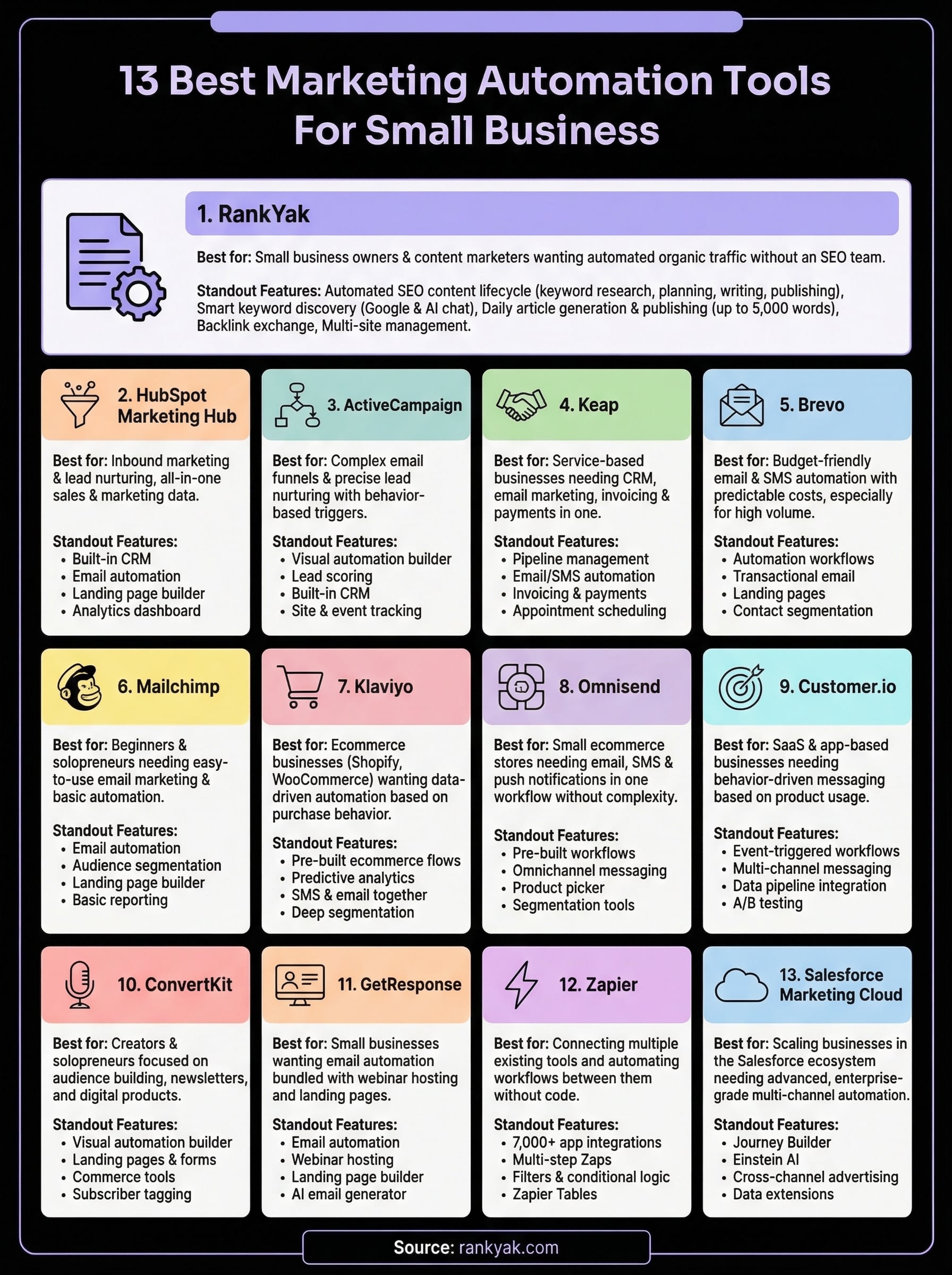
Every tool on this list solves a real problem, but none of them solve all your problems at once. The right pick depends on what channel drives the most growth for your business right now. If email is your focus, ActiveCampaign or Brevo gets you there. If you sell products online, Klaviyo or Omnisend fits that use case well. But if organic search traffic is where you want to invest, most tools on this list won't touch it at all.
That's exactly the gap RankYak fills. Marketing automation for small business doesn't stop at email sequences and social posts. Your website needs fresh, optimized content every day to compete in search, and doing that manually takes more time than most small teams have. RankYak handles keyword research, article writing, and publishing on autopilot so your site keeps ranking while you focus elsewhere. Start your free 3-day trial and see what consistent SEO automation actually looks like in practice.

Get Google and ChatGPT traffic on autopilot.
Start today and generate your first article within 15 minutes.

SEO revenue calculator
How much revenue is your website leaving on the table?
Take a quick quiz and see exactly how much organic revenue you're missing out on, along with personalized tips to fix it.
-
4 questions, under 1 minute
-
See traffic and revenue potential
-
No email required
Free · takes 1 minute · no signup needed
Question 1 of 4
Question 2 of 4
Question 3 of 4
Question 4 of 4
Your SEO growth potential
Extra visitors / month
after 6-12 months of consistent publishing
Revenue potential / year
at your niche's avg. conversion rate
Articles needed (12 mo)
to reach this traffic level
ROI with RankYak
on the Professional plan ($129/mo)
To hit that number, you'd need to:
- Build a topical authority strategy for your niche
- Research keywords & map out a full topical cluster
- Write, edit & publish an article every single day
- Build backlinks to the articles you publish
RankYak handles all of this automatically, every day.
* Estimates based on industry averages. Results vary by niche, competition, and domain authority. Most SEO results become visible after 3-6 months of consistent publishing.