16 AI Writing Tool Reviews: Pricing, Pros & Cons for 2026
There are dozens of AI writing tools on the market right now, and every one of them claims to produce the best content. Some actually deliver. Most don't. If you've been searching for ai writing tool reviews that go beyond surface-level feature lists, or for AI writing tools tested and ranked, you're in the right place. We've spent serious time testing these tools, not just clicking around their dashboards, but evaluating the actual output against what it takes to rank on Google and get cited in AI chat platforms.
Picking the wrong tool doesn't just waste your subscription fee. It wastes months of content effort on articles that sit on page five and never drive a single visitor. The right tool, on the other hand, can turn SEO from a grind into a genuine growth channel. That's exactly why this comparison exists, to help you skip the trial-and-error and land on software that fits your workflow, budget, and goals.
At RankYak, we build automated SEO content that actually ranks, so we know firsthand what separates useful AI writing from filler. Below, you'll find 16 tools broken down by pricing, strengths, weaknesses, and who each one is best for, so you can make a confident decision without signing up for a dozen free trials first.
1. RankYak
RankYak is built specifically for SEO automation, which puts it in a different category than general AI writing tools. While most tools hand you a text editor and expect you to run your own strategy, RankYak handles everything from keyword discovery to publishing without you needing to manage each step manually.
What RankYak does best
RankYak's core strength is full-cycle SEO automation. You connect your website, and the platform finds high-potential keywords in your niche automatically, builds a daily content plan, writes optimized articles up to 5,000 words, and publishes them directly to your CMS. Most ai writing tool reviews focus on the writing step alone; RankYak folds keyword research, content strategy, and distribution into one continuous workflow so nothing falls through the cracks.
Standout features
The platform publishes straight into WordPress, Shopify, Webflow, and Wix, plus custom setups via API and webhooks, so you never have to copy-paste content manually. Articles are structured around Google's E-E-A-T guidelines, competitor research, search intent, internal linking, and topic clusters, and they're built to rank in both traditional search and AI chat platforms like ChatGPT and Perplexity. RankYak also supports 40+ languages and adapts to your brand voice, which makes it a strong fit for international sites or businesses with a specific tone.
RankYak generates one fully optimized article per day, giving your site consistent content output without you spending hours at a keyboard.
Pros and cons to know
No tool is perfect, and RankYak's focused scope is both its biggest strength and its main limitation. If you need SEO blog content written on autopilot, it delivers. If you need ad copy, social captions, or fiction, look elsewhere.
- Pros: Automates the full SEO workflow, publishes directly to your CMS, includes a built-in backlink exchange network, supports multi-site management, and targets both Google rankings and AI chat visibility
- Cons: Focused entirely on SEO content, so it's not designed for ad copy or creative writing; one article per day means it's not suited for bulk content sprints
Pricing and trial
RankYak runs on a flat-rate plan at $99 per month, which covers all features: keyword discovery, daily article generation, CMS publishing, backlink exchange, and multi-site support. There are no tiered plans or feature lockouts at lower price points. You can start with a 3-day free trial and cancel anytime, which gives you enough time to see a live article generated and published for your actual site.
2. ChatGPT
ChatGPT is probably the most recognized name in AI writing, and for good reason. OpenAI built it to handle a massive range of tasks, from answering quick questions to drafting long-form content, which makes it one of the most flexible tools you'll encounter in any ai writing tool reviews roundup.

What ChatGPT does best
ChatGPT excels at rapid drafting and conversational content generation, and a few prompts show how to draft, edit, and improve copy with it. You give it a prompt, and it returns a coherent, readable response in seconds. It handles a wide range of formats well:
- Blog post drafts and outlines
- Email copy and social content
- Brainstorming and ideation
- Summarizing and rewriting existing text
Standout features
ChatGPT supports custom instructions and memory, so it learns your tone and preferences across sessions. The GPT-4o model handles both text and image inputs, and the web browsing feature pulls in current information when your content needs to reflect recent events or data.
ChatGPT is a strong drafting assistant, but it won't manage your keyword strategy, content calendar, or CMS publishing without significant manual setup on your end.
Pros and cons to know
Understanding the tradeoffs helps you decide whether ChatGPT fits your workflow or leaves too many gaps.
- Pros: Versatile across content types, easy to use, improves with custom instructions, and handles dozens of use cases out of the box
- Cons: No built-in SEO optimization, no CMS publishing, and turning raw output into a publish-ready article still requires your time and judgment
Pricing and trial
ChatGPT offers a free tier with access to GPT-4o mini. The Plus plan costs $20 per month and unlocks GPT-4o with higher usage limits. A Pro plan is available at $200 per month for users who need maximum output capacity.
3. Claude
Claude is Anthropic's AI assistant, and it shows up frequently in ai writing tool reviews because it handles long-form content with a level of nuance that sets it apart from many competitors. Where ChatGPT leans conversational, Claude tends to produce more structured, thoughtful output, especially for complex or sensitive topics.
What Claude does best
Claude performs particularly well on longer documents and detailed analysis. If you need to draft a comprehensive guide, summarize a dense report, or produce content that requires careful reasoning, Claude handles that kind of extended context better than most general-purpose AI tools.
Standout features
Claude's most practical standout is its large context window, which lets you feed in long documents and get coherent responses based on all that material at once. It also takes your instructions seriously, meaning if you specify a tone, format, or structure, the output typically reflects those requirements without much correction needed on your end.
Claude's ability to follow complex, multi-part instructions makes it a reliable drafting partner when your content requirements are detailed or nuanced.
Pros and cons to know
Understanding where Claude fits in your workflow helps you avoid paying for a subscription that doesn't match your actual needs.
- Pros: Handles long-form content well, follows detailed instructions reliably, and produces clean, readable prose with minimal editing required
- Cons: No native SEO optimization, no CMS publishing, and no built-in keyword research, so it functions as a writing assistant rather than a complete content workflow
Pricing and trial
Claude offers a free tier with access to its standard model. The Pro plan costs $20 per month and unlocks Claude's most capable models with higher usage limits and priority access during peak demand periods.
4. Jasper
Jasper built its reputation as an enterprise-focused AI writing platform, and Jasper's features, pricing, and use cases explain why it shows up consistently in ai writing tool reviews aimed at marketing teams. It positions itself as a brand-safe content solution, with features designed to maintain consistency across larger organizations where multiple writers produce content under the same brand.
What Jasper does best
Jasper performs best when a team needs to produce marketing copy at scale while keeping brand guidelines intact. It handles blog posts, ad copy, email sequences, and landing pages with a level of output consistency that solo general-purpose tools struggle to match, especially when different people contribute to the same content pipeline.
Standout features
Jasper includes a Brand Voice feature that stores your tone, style preferences, and company information so every output reflects how your business actually communicates. It also supports integrations with third-party SEO tools, which add on-page optimization signals to your drafts if search rankings are part of your content goals.
Jasper's marketing-first design makes it a capable tool for ad and email copy, but it does not automate keyword research, content scheduling, or CMS publishing natively.
Pros and cons to know
Before committing to Jasper, weigh these real tradeoffs against your actual workflow requirements.
- Pros: Strong brand voice controls, handles multiple content formats, team collaboration features, and connects with external SEO tools
- Cons: Expensive relative to simpler alternatives, no built-in SEO automation, and full-cycle content publishing still demands manual work outside the platform
Pricing and trial
Jasper's Creator plan starts at $49 per month for individual users, while the Pro plan runs $69 per month. Enterprise pricing is available for larger teams through a custom contract arrangement.
5. Writesonic
Writesonic's AI writer appears regularly in ai writing tool reviews as a mid-market option that bridges general content creation and basic SEO assistance. It targets bloggers, small marketing teams, and content creators who want more than a blank text box but don't need a full enterprise platform.
What Writesonic does best
Writesonic handles blog drafts, product descriptions, and ad copy without much setup friction. Its interface is straightforward, which makes it a reasonable choice if you produce a variety of content formats and want a single tool to cover most of them quickly.
Standout features
The platform includes Chatsonic, a conversational interface similar to ChatGPT that pulls in real-time information via web search. Writesonic also offers an AI Article Writer that generates longer pieces with basic outline structuring, reducing the time you spend organizing a draft from scratch.
Writesonic covers a wide range of content formats, but it still relies on you to handle keyword research, CMS publishing, and content strategy separately.
Pros and cons to know
Matching Writesonic's capabilities to your actual workflow saves you from paying for features you won't use.
- Pros: Covers multiple content formats, includes real-time web search via Chatsonic, and has a straightforward learning curve for new users
- Cons: No automated publishing, no built-in keyword discovery or content planning, and SEO optimization requires external tools to be effective
Pricing and trial
Writesonic's Individual plan starts at $20 per month, with a Small Team plan at $19 per seat per month. A free trial is available with limited credits.
6. Copy.ai
Copy.ai started as a short-form copy generator and has since expanded into a broader go-to-market automation platform. It appears in ai writing tool reviews mostly because of its workflow automation angle, which separates it from tools that simply hand you a text editor and wait for your next prompt.
What Copy.ai does best
Copy.ai performs best when you need repeatable content workflows for sales and marketing teams. It handles product descriptions, email sequences, and social copy without requiring you to restart from scratch each time. The workflow builder lets you string together an automated content creation workflow, which cuts repetitive manual work across campaigns.
Standout features
The platform's standout feature is its workflow automation engine, which lets you build multi-step content pipelines that run on your data. You can connect it to your CRM or data sources and generate personalized outreach or marketing copy at scale without touching each piece individually.
Copy.ai's workflow builder works well for sales and marketing copy pipelines, but it does not handle keyword research, content strategy, or CMS publishing for SEO purposes.
Pros and cons to know
Knowing Copy.ai's actual limitations helps you decide whether it fits your specific content production goals before committing to a paid plan.
- Pros: Workflow automation for repeatable copy tasks, handles multiple marketing formats, and reduces manual effort on outbound content
- Cons: No built-in SEO optimization, no keyword discovery, and publishing to your CMS still requires separate tools and manual steps outside the platform
Pricing and trial
Copy.ai offers a free plan with limited credits. The Starter plan runs $49 per month, with advanced plans available for larger teams at custom pricing through direct contact with their sales team.
7. Rytr
Rytr is a budget-friendly AI writing assistant that shows up in ai writing tool reviews aimed at solo content creators, freelancers, and small businesses that need to produce short-form copy quickly without spending much. It covers a wide range of use cases but keeps its interface simple and its price point low.
What Rytr does best
Rytr performs best when you need short content fast, whether that's email subject lines, product descriptions, blog introductions, or social captions. The platform offers over 40 use cases and templates, which means you can switch between content types without rebuilding your setup from scratch each time you start a new project.
Standout features
Rytr includes a built-in plagiarism checker powered by Copyscape, which is a practical addition that most tools at this price point skip entirely. It also supports 30+ languages, making it a workable option if you produce content for audiences outside the United States and need basic multilingual output without a separate translation tool.
Rytr covers short-form writing tasks well, but you still need external tools for keyword research, content strategy, and CMS publishing if SEO is part of your content goals.
Pros and cons to know
Weighing these real tradeoffs against your workflow needs helps you avoid overpaying for a tool that doesn't match what you actually produce.
- Pros: Low cost, covers multiple short-form content formats, includes plagiarism checking, and supports a broad range of languages
- Cons: Output quality drops on longer or more complex content, and it offers no built-in SEO automation, keyword discovery, or direct CMS publishing
Pricing and trial
Rytr offers a free plan limited to 10,000 characters per month. The Unlimited plan costs $9 per month, and the Premium plan runs $29 per month, adding a custom use-case builder and a dedicated account manager.
8. Grammarly
Grammarly shows up in many ai writing tool reviews more as a writing improvement tool than a content generation platform. It does not create articles from scratch; it catches errors, improves clarity, and tightens your prose as you write or edit across your browser, desktop, and mobile devices.
What Grammarly does best
Grammarly's core strength is real-time feedback from its AI writing assistant. It flags grammar mistakes, punctuation errors, and unclear sentences as you type, delivering instant corrections without interrupting your workflow. This makes it a practical fit for anyone who writes across multiple platforms and wants consistent quality control without opening a separate editing tool each time.
Standout features
The platform goes beyond basic spell-checking with tone detection and clarity suggestions that help you match your writing style to your audience. Its browser extension works across Gmail, Google Docs, LinkedIn, and most web-based editors, so your feedback follows you wherever you write rather than sitting locked inside a single application.
Grammarly improves what you write but does not generate content, manage keywords, or publish directly to your CMS.
Pros and cons to know
Before adding Grammarly to your stack, weigh these real tradeoffs against what your workflow actually requires.
- Pros: Works across browsers and apps, catches grammar and style issues in real time, and sets up quickly with a minimal learning curve
- Cons: Not an AI content generator, includes no keyword research, offers no CMS publishing, and the free plan restricts access to advanced suggestions
Pricing and trial
Grammarly offers a free plan covering basic grammar checks. The Premium plan costs $12 per month billed annually, and the Business plan runs $15 per member per month for teams that need centralized style guides and admin controls.
9. ProWritingAid
ProWritingAid is a writing improvement and editing platform that appears in ai writing tool reviews aimed at authors, bloggers, and business writers who want deeper feedback than a basic grammar checker delivers. It focuses on helping you refine existing content rather than generating new material from scratch, which suits a structured content editing process.
What ProWritingAid does best
The platform excels at in-depth manuscript and document editing, offering over 20 different writing reports that analyze readability, sentence length variation, overused words, and passive voice frequency. This makes it a strong fit if you write long-form content regularly and want structured feedback that sharpens your writing over time rather than just patching surface-level errors.
Standout features
Its style and consistency reports go well beyond standard grammar checking, breaking down your writing habits so you can spot patterns that weaken your content. ProWritingAid also integrates with Google Docs, Scrivener, and Microsoft Word, so you can run analysis inside the tools you already use without switching applications mid-edit.
ProWritingAid's depth of editorial feedback makes it a practical long-term investment for writers who want to sharpen their craft, not just catch typos.
Pros and cons to know
Before adding ProWritingAid to your editing stack, consider these clear tradeoffs:
- Pros: Detailed writing reports, integrates with major writing platforms, and offers lifetime licensing as an alternative to subscription billing
- Cons: No content generation, no keyword research, and no CMS publishing, making it a complement to your content workflow rather than a standalone solution
Pricing and trial
ProWritingAid offers a free version with limited document checks. The Premium plan costs $30 per month or $120 per year, and a one-time lifetime license is available if you prefer to avoid recurring charges.
10. Surfer SEO
Surfer SEO appears in many ai writing tool reviews as an on-page optimization platform built for content teams that want data-driven guidance on how to structure and optimize articles before and during the writing process. It is not a general-purpose AI writer, but it earns its place in any SEO-focused content stack, and it helps to see Surfer SEO and RankYak side by side.

What Surfer SEO does best
Surfer SEO specializes in content scoring and on-page optimization, analyzing top-ranking pages for a given keyword and telling you exactly which terms, headings, and word counts your article needs to compete. If you already produce content regularly and want to close the gap between what you write and what actually ranks, Surfer's data layer adds real signal to your editorial decisions.
Standout features
The platform's Content Editor grades your article in real time as you write, showing you target keyword usage, missing terms, and structural recommendations based on live competitor analysis. Surfer also includes a keyword research module that surfaces related terms and topic clusters, helping you plan content that covers a subject thoroughly rather than in isolation.
Surfer SEO improves the optimization layer of your content workflow, but you still need a separate tool to handle actual content generation and CMS publishing.
Pros and cons to know
- Pros: Real-time content scoring, competitor-based optimization data, and integrates with Google Docs for in-editor guidance
- Cons: No automated content generation, no direct CMS publishing, and the pricing can feel steep if you are producing only occasional articles
Pricing and trial
Surfer SEO's Essential plan starts at $99 per month, with the Scale plan at $219 per month for higher article volumes. A seven-day free trial is available on select plans.
11. Frase
Frase earns consistent attention in ai writing tool reviews because it sits at the intersection of content research and SEO writing assistance. It is built for content marketers and bloggers who want to combine competitor research with the writing process in a single workspace, rather than jumping between multiple tools to gather data and then draft.
What Frase does best
Frase performs best when you need to research a topic and generate an SEO content brief quickly. It pulls in data from top-ranking pages for your target keyword, summarizes what competitors cover, and helps you build a content outline grounded in what is already ranking. This makes it particularly useful when you are working through a high volume of content briefs that require research before writing starts.
Standout features
The platform's AI Answer Engine generates content directly inside the research view, so you move from competitor analysis to a working draft without switching tabs. Frase also includes a content score that measures how well your article covers the relevant topics compared to the top results, giving you a clear target to hit before you publish.
Frase's research-to-draft workflow reduces the back-and-forth between discovery and writing, which saves time on brief creation and initial drafting.
Pros and cons to know
Matching Frase's strengths to your workflow helps you avoid paying for features that do not fit your actual production process.
- Pros: Combines research and writing in one interface, includes competitor analysis, and surfaces topic coverage gaps you can address before publishing
- Cons: No automated CMS publishing, no keyword discovery automation, and full SEO optimization still requires external tools for deeper on-page analysis
Pricing and trial
Frase's Solo plan starts at $15 per month, with the Basic plan at $45 per month. A five-day trial is available for $1.
12. Clearscope
Clearscope is one of the platforms built to optimize content for SEO and focuses specifically on keyword relevance scoring, and it appears in ai writing tool reviews aimed at editorial teams and SEO-focused content managers who want data-driven guidance on what their articles are missing before they publish.
What Clearscope does best
Clearscope specializes in content grading and keyword coverage analysis. It pulls data from top-ranking pages for your target keyword and shows you exactly which related terms and concepts your article needs to include to match the depth and relevance of what is already ranking.
Standout features
The platform's standout tool is its Content Report, which assigns a letter grade to your article in real time as you add or remove terms. It integrates directly with Google Docs and WordPress, so you can optimize your draft inside the tools you already use without switching between applications mid-edit.
Clearscope's letter-grade system gives you a concrete benchmark to hit before you publish, removing the guesswork from on-page optimization.
Pros and cons to know
Clearscope delivers reliable optimization data, but its narrow scope means you still need separate tools to handle content generation, keyword research, and CMS publishing at scale.
- Pros: Clean interface, precise keyword grading, and direct integrations with Google Docs and WordPress that fit neatly into existing editorial workflows
- Cons: No AI content generation, no automated publishing, and pricing sits well above most alternatives in this list
Pricing and trial
Clearscope's Essentials plan starts at $189 per month, placing it firmly in enterprise-adjacent territory. No public free trial is offered, but you can request a demo through their website before committing to a paid plan.
13. Sudowrite
Sudowrite stands out in ai writing tool reviews because it targets a completely different use case than most tools in this list. It is built specifically for fiction writers and novelists, not marketers or SEO content teams, which makes it a focused tool with a genuinely useful purpose for creative writers.
What Sudowrite does best
Sudowrite performs best when you are writing or developing long-form fiction. It helps you push past writer's block by generating scene continuations, character descriptions, and dialogue options that match the style and tone of your existing manuscript. If you write novels or short stories regularly, it functions as a genuine drafting partner rather than a generic AI text box.
Unlike general-purpose tools, Sudowrite builds its suggestions around your existing text, so continuations carry the voice and rhythm of what you have already written rather than defaulting to a bland, universal style.
Standout features
The platform includes a "Write" mode that extends your current scene based on context, and a "Describe" feature that generates sensory details to make scenes more vivid. Both tools are calibrated for narrative fiction, which means the output reads differently from what a general-purpose AI produces when given a creative writing prompt.
Sudowrite's creative tools are purpose-built for fiction, which makes them genuinely useful for novelists but irrelevant if your goal is SEO content or business copy.
Pros and cons to know
Sudowrite's narrow focus is both its biggest strength and its clearest limitation. It serves fiction writers well, but it brings nothing to the table if your content goals involve rankings, marketing, or publishing articles to a website.
- Pros: Purpose-built for fiction, generates narrative-aware continuations, and reduces creative blocks during long manuscript projects
- Cons: No SEO features, no CMS publishing, and no use for marketing or business content
Pricing and trial
Sudowrite's Hobby and Student plan starts at $19 per month, with the Professional plan at $29 per month. A free trial is available when you first create an account.
14. Hypotenuse AI
Hypotenuse AI focuses on e-commerce content generation, which makes it stand out in most ai writing tool reviews that lump all content tools into the same category. It is built specifically for retailers, catalog managers, and e-commerce teams that need to produce large volumes of product descriptions, category pages, and marketing copy without starting each piece from scratch.

What Hypotenuse AI does best
The platform performs best when you need AI-generated product descriptions at scale. Feed it your product attributes and it returns polished, brand-consistent copy across hundreds or thousands of SKUs simultaneously, which is a task most general-purpose AI tools handle poorly when applied at true catalog volume.
Standout features
Hypotenuse AI includes a bulk content generation workflow that processes entire product catalogs in one run, cutting hours of repetitive writing down to minutes. It also offers a content studio for one-off blog posts and marketing copy, giving you a secondary use case beyond product pages if your team handles multiple content formats.
Hypotenuse AI's catalog-scale generation makes it a practical fit for e-commerce teams, but it does not handle keyword discovery, content planning, or CMS publishing for SEO blog content.
Pros and cons to know
- Pros: Handles bulk product description generation, maintains brand consistency across large catalogs, and supports multiple output formats for both e-commerce and marketing use cases
- Cons: Narrow focus on e-commerce content, no built-in SEO automation for blog articles, and no direct publishing workflow for standard CMS platforms
Pricing and trial
Hypotenuse AI's Starter plan begins at $29 per month, with higher tiers available for larger teams and greater content volumes. A free trial with limited credits is available when you first create an account.
15. QuillBot
QuillBot earns its spot in most ai writing tool reviews as the go-to tool for paraphrasing and rewriting existing content. It does not generate articles from scratch; instead, it takes your text and restructures it while preserving your original meaning, which makes it genuinely useful for editing, academic writing, and content repurposing.
What QuillBot does best
QuillBot performs best when you need to rephrase or tighten content you have already written, and QuillBot's paraphrasing features and pricing show how far that goes. Its paraphrasing engine offers multiple modes, including Formal, Academic, and Creative, so you can shift your text toward the right register for your audience without manually rewriting every sentence yourself.
Standout features
The platform includes a built-in summarizer that condenses long documents into key points, which saves time when you are pulling insights from research material before drafting. QuillBot also offers a grammar checker and citation generator, giving you a small suite of editing tools in one interface rather than spreading that work across multiple applications.
QuillBot's paraphrasing modes give you real control over output tone, which most basic rewriting tools skip entirely.
Pros and cons to know
Before adding QuillBot to your workflow, weigh these tradeoffs against your actual content needs.
- Pros: Fast paraphrasing across multiple tone modes, includes a summarizer and grammar checker, and works well for editing and academic writing tasks
- Cons: No content generation from scratch, no SEO automation, and no CMS publishing capability
Pricing and trial
QuillBot offers a free plan with limited paraphrasing capacity. The Premium plan costs $9.95 per month or drops to roughly $4.17 per month on an annual subscription.
16. Reword
Reword rounds out this set of ai writing tool reviews as a collaborative writing assistant built specifically for content teams that want AI to learn and reflect their brand voice over time. Rather than treating every article as a blank-slate generation task, Reword trains on your existing published content and uses that as the foundation for everything it helps you write.
What Reword does best
Reword performs best when a team wants to produce consistent, on-brand content without spending time correcting generic AI output that sounds nothing like their publication. It analyzes your past articles, absorbs your editorial voice, and uses that learning to keep new drafts aligned with how your team actually communicates, which separates it from tools that treat every user's output identically.
Standout features
The platform's key feature is its collaborative editor, which lets multiple team members work on the same article with AI suggestions woven directly into the writing interface. Reword also generates fact-based research assistance as you draft, surfacing supporting information alongside your content rather than requiring you to gather it separately before writing starts.
Reword's brand voice learning model means the more you use it, the more the output sounds like your team rather than a generic AI assistant.
Pros and cons to know
- Pros: Learns your brand voice from existing content, supports team collaboration, and integrates research assistance directly into the writing workflow
- Cons: No automated keyword discovery, no direct CMS publishing, and the brand voice training requires a library of existing content to work effectively
Pricing and trial
Reword's paid plans start at $38 per month, with higher tiers available for larger teams. A free trial is offered when you first create an account.
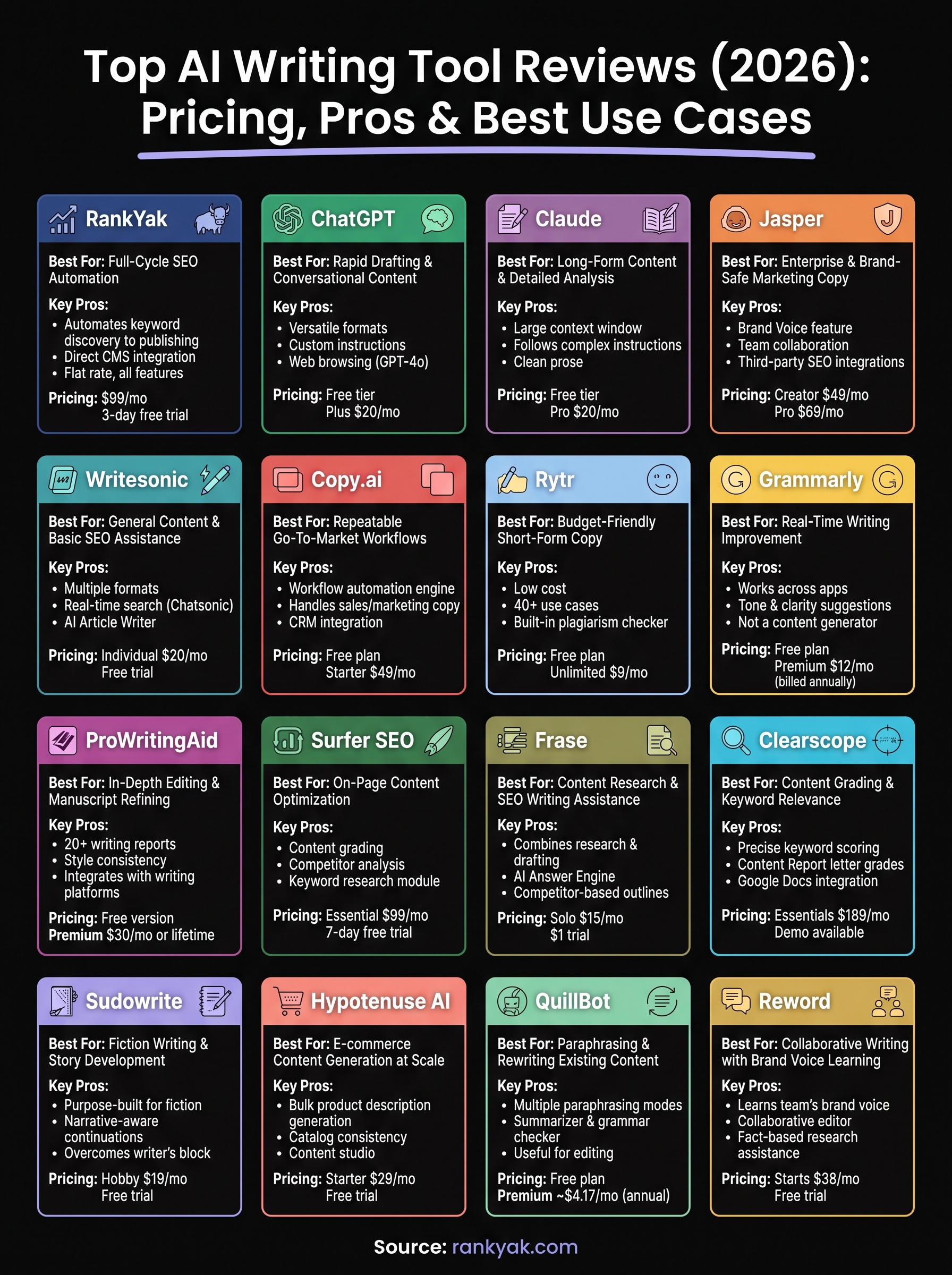
Your next step
These ai writing tool reviews cover a wide range of tools, but the right choice comes down to what you actually need your content to do. If you need fiction tools, grammar checkers, or paraphrasing help, several options in this list cover those use cases well. If your goal is to grow organic traffic through consistent, optimized blog content, most tools here still leave the heavy lifting to you.
RankYak is built for that second goal. It handles keyword discovery, daily article creation, and direct CMS publishing in one automated workflow, so you stop managing a fragmented stack and start seeing content go live without spending hours at a keyboard each week. The pricing is straightforward at $99 per month, with no feature tiers to decode.
If consistent SEO content is what your site actually needs, see what RankYak publishes for your site on a free 3-day trial and get a fully optimized article live before the trial ends.
Allan de Wit is a co-founder of RankYak and has worked in SEO since 2015: inside agencies, alongside them, for clients directly, and in-house on the products being ranked. He came to it as a software engineer building for marketers, which is why the platform is built the way it is. He went on to start companies of his own, two of which were acquired. At RankYak he sets the product direction and owns the features, the quality bar, the design, and the UX.
