8 Best Content Distribution Platform Tools to Scale Content

You've spent hours crafting valuable content, but if nobody sees it, what's the point? A content distribution platform solves this exact problem by helping you push your content across multiple channels without the manual grind. Whether you're publishing blog posts, videos, or social media updates, these tools ensure your work actually reaches your target audience.
Here's the reality: creating content is only part of the equation. At RankYak, we handle the SEO-optimized content creation and automatic publishing to your site. But once that content goes live, you still need to amplify its reach beyond organic search. That's where automated content distribution tools come in, and what content distribution really involves is syndicating, scheduling, and sharing your content across platforms like social media, email, and third-party networks without duplicating effort. Whether you need an article distribution platform, an AI content distribution platform, or a social media distribution tool, the best content distribution platforms in 2026 cover the full range of channels that grow reach.
This guide breaks down the 8 best content distribution platform tools available right now. You'll learn what each tool does best, who it's built for, and how to pick the right one based on your budget and workflow. Let's get into it.
1. RankYak
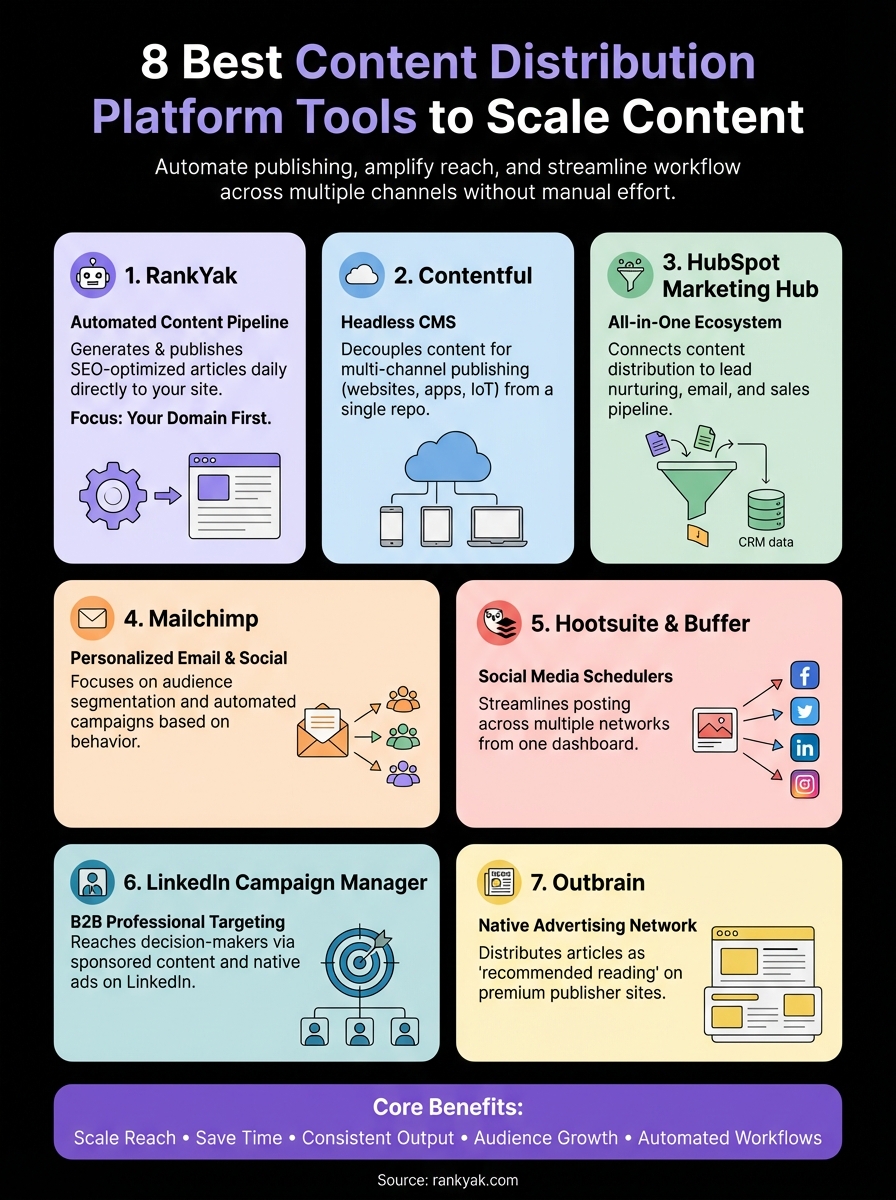
RankYak takes a different approach to content distribution by automating the entire content pipeline from keyword research to publishing. Unlike traditional distribution platforms that focus on pushing existing content across channels, RankYak generates SEO-optimized articles daily and publishes them directly to your website. This means you're not just distributing content, you're automatically creating and deploying it where it matters most: your own domain.
What it does
RankYak acts as your automated content factory and publisher. The platform identifies high-potential keywords based on your niche, creates fully optimized articles up to 5,000 words, and publishes them directly to your CMS without manual intervention. Each piece follows advanced SEO frameworks, considering search intent, competitor research, and Google's helpful content guidelines. You get one SEO article researched, written, and optimized every day, complete with featured images, internal linking, and structured formatting. As an AI content distribution platform, it handles the research, writing, and deployment pipeline that agencies typically charge thousands for.
Who it fits
This platform works best for small to medium-sized businesses and entrepreneurs who need consistent content output without hiring writers or agencies. If you're managing multiple websites, running an agency that automates content for every client site, or simply tired of the content creation grind, RankYak eliminates that bottleneck. You need basic website management skills, but the platform handles the heavy lifting.
Channels and formats
RankYak distributes content to your website only, with publishing integrations for every major CMS including WordPress, Shopify, Webflow, Wix, WordPress.com, and custom platforms via API. The format is long-form blog articles optimized for both Google search and AI chat platforms like ChatGPT. You can also connect via Zapier or Make to extend distribution to other channels after publishing, making it one of the strongest AI platforms with APIs or integrations for content publishing and distribution.
"RankYak focuses on owning your content real estate first, before syndicating elsewhere."
Core workflow
The system starts by analyzing your website and industry, using automatic keyword discovery and difficulty scoring to build a keyword list. Then it generates a daily content roadmap on a publishing calendar it maintains for you, automatically selecting which keywords to target. Each morning, a new article goes live on your site without your input. You can review drafts before publishing or let it run completely hands-off.
Analytics and governance
RankYak integrates with Google Search Console to track performance and adjust your content strategy based on real ranking data. Distribution channel analytics let you see which keywords are gaining traction. You maintain full control over brand voice, content direction, and publishing schedules. Multi-site management lets you oversee multiple domains from one dashboard, each with its own subscription and content plan.
Pricing notes
The platform costs $99 per month per website, which includes all features with no tiers or hidden costs. You get a 3-day free trial to test the system with no credit card required and can cancel anytime. Compared to hiring writers or agencies, this represents a fraction of the cost while delivering consistent daily output.
2. Contentful
Contentful operates as a headless CMS that doubles as a content distribution platform by decoupling your content from the presentation layer. This means you create content once and push it across multiple digital properties simultaneously without rebuilding it for each channel.
What it does
The platform stores your content in a centralized repository and delivers it via API to websites, mobile apps, digital kiosks, or any connected device. You build structured content models that define how your content looks and behaves, then Contentful distributes those assets wherever you need them. This approach works particularly well for brands managing complex content ecosystems across multiple touchpoints and supports personalized content delivery at scale.
Who it fits
Contentful targets enterprise teams and developers who need technical flexibility. You should have developer resources available because the platform requires API integration and custom front-end builds. Marketing teams with strong technical support get the most value from this system.
Channels and formats
You can distribute content to websites, mobile applications, IoT devices, and digital signage through RESTful or GraphQL APIs. Contentful supports all content types including text, images, videos, and structured data. The platform adapts to any front-end framework like React, Vue, or Angular.
"Contentful lets you publish once and display everywhere without content duplication."
Core workflow
You create content entries using their web-based editor, define relationships between content pieces, and configure delivery rules. Developers then pull that content through API calls to populate your various applications. The system maintains version history and supports collaborative editing.
Analytics and governance
Contentful provides role-based access controls and content approval workflows but relies on third-party tools for analytics. You track performance through your own analytics setup on each distribution channel. Audit logs record all content changes for compliance purposes.
Pricing notes
Pricing starts at $300 per month for the Team plan with limited users and requests. Enterprise pricing varies based on API calls and content entries. You get a free tier for testing with restricted features.
3. HubSpot Marketing Hub
HubSpot Marketing Hub combines inbound marketing automation with content distribution capabilities inside a unified CRM system. The platform treats content distribution as part of a larger marketing ecosystem where every piece of content connects to lead nurturing, email campaigns, and customer relationship data.
What it does
HubSpot lets you create and distribute content across email, social media, landing pages, and blogs from one dashboard. The platform automatically tracks how prospects interact with your content at every touchpoint, feeding that data back into your CRM. You can schedule social posts, send targeted email campaigns, and publish blog articles without switching between tools. For teams that need personalized content delivery at scale, HubSpot's smart content features dynamically adjust what visitors see based on their CRM data.
Who it fits
This content distribution platform works best for B2B companies and marketing teams focused on lead generation and nurturing. You need someone dedicated to managing the platform because HubSpot offers extensive features that require regular attention and optimization. It's also a strong option as a multichannel content distribution platform for agencies managing multiple client accounts.
Channels and formats
HubSpot distributes content through email newsletters, social networks (LinkedIn, Facebook, Twitter, Instagram), blog posts, landing pages, and automated workflows. You can also push content to connected tools via API integrations. The platform supports text, images, videos, and downloadable assets.
"HubSpot connects content distribution directly to your sales pipeline."
Core workflow
You build content inside HubSpot's editor, schedule distribution across channels, and set up automated follow-up sequences based on engagement. The system tracks which contacts view your content and scores leads accordingly. Workflows trigger additional content delivery when prospects meet specific criteria.
Analytics and governance
The platform provides detailed attribution reporting that shows which content drives conversions and revenue. You see engagement metrics across all channels in unified dashboards with full distribution channel analytics. Team permissions control who can publish, edit, or approve content before distribution.
Pricing notes
Pricing starts at $800 per month for Marketing Hub Professional with full distribution features. The Starter plan costs $20 per month but lacks automation and advanced reporting. Enterprise plans exceed $3,200 per month depending on contact volume.
4. Mailchimp
Mailchimp started as an email marketing tool but evolved into a multi-channel content distribution platform that handles email campaigns, social media posts, and marketing automation. The platform focuses on audience segmentation and personalized content delivery at scale, making it particularly effective for businesses that prioritize customer communication over broad content syndication.
What it does
The platform lets you create and distribute email newsletters, automated campaigns, and social posts from a unified interface. Mailchimp stores your audience data and segments subscribers based on behavior, demographics, and engagement history. You build content once and the system delivers variations to different audience segments automatically.
Who it fits
Mailchimp works best for e-commerce businesses and small marketing teams who need reliable email distribution with basic social integration. You don't need technical skills because the platform offers drag-and-drop editors and pre-built templates. Businesses with growing email lists between 500 and 50,000 contacts get the most value.
Channels and formats
You distribute content through email campaigns, transactional messages, social media (Facebook, Instagram, Twitter), and landing pages. The platform supports text, images, product catalogs, and embedded videos. API connections extend distribution to connected apps and services.
"Mailchimp excels at personalizing content based on subscriber behavior patterns."
Core workflow
You upload contacts, create audience segments, design your content using templates, and schedule distribution across chosen channels. The system tracks opens, clicks, and conversions, then adjusts future sends based on engagement data. Automated workflows trigger content delivery when subscribers perform specific actions.
Analytics and governance
Mailchimp provides real-time reporting on campaign performance including open rates, click-through rates, and revenue attribution. You access audience insights that show subscriber growth, engagement trends, and segment performance. Team roles control who can send campaigns or access sensitive data.
Pricing notes
The free plan supports 500 contacts and 1,000 monthly emails with basic features. Paid plans start at $13 per month for 500 contacts with automation and advanced analytics. Pricing scales based on contact count, reaching $350+ monthly for 10,000 contacts on the Premium tier.
5. Hootsuite and Buffer
Hootsuite and Buffer represent the dominant social media distribution platforms that turned content distribution into a streamlined process. Both tools solve the same core problem by letting you schedule posts across multiple social networks from a single dashboard, but they approach the workflow differently. Hootsuite offers more comprehensive features for larger teams, while Buffer focuses on simplicity and ease of use.
What it does
Both platforms let you compose social media posts once and distribute them across connected accounts automatically. Hootsuite provides a multi-column dashboard that displays all your social feeds simultaneously, while Buffer uses a queue system that spaces out your posts based on optimal timing. You upload content, set your schedule, and both tools publish to your social channels without requiring manual posting. Both also support distributing marketing videos across multiple channels, letting you schedule video content alongside text and image posts.
Who it fits
Hootsuite works best for marketing teams and agencies managing multiple client accounts with complex approval workflows. Buffer suits solopreneurs and small teams who prioritize quick setup and straightforward scheduling. You need basic social media knowledge for either platform but no technical expertise.
Channels and formats
Both tools distribute content to Facebook, Twitter, LinkedIn, Instagram, Pinterest, and TikTok. Hootsuite adds support for YouTube and Google My Business. You can schedule text posts, images, videos, and links across these networks. TikTok and Instagram Reels support makes both platforms viable for short-form video distribution as well.
"Both platforms reduce social media management time by batching content creation and automating distribution."
Core workflow
You connect your social accounts, create posts in the unified composer, and schedule them for specific times or add them to Buffer's queue. Hootsuite lets you monitor mentions and conversations directly in the platform, while Buffer keeps the focus on content publishing.
Analytics and governance
Hootsuite provides detailed analytics dashboards with custom reports and team performance tracking. Buffer offers simpler analytics focused on engagement metrics per post. Both platforms support team collaboration with approval workflows and user permissions.
Pricing notes
Buffer starts at $6 per month per social channel with basic features. Hootsuite begins at $99 per month for one user managing 10 accounts with full analytics. Both offer free trials to test core features before committing.
6. LinkedIn Campaign Manager
LinkedIn Campaign Manager operates as a B2B-focused content distribution platform built directly into the world's largest professional network. The platform targets decision-makers and professionals through native advertising and sponsored content, making it particularly effective for businesses that sell to other companies rather than consumers.
What it does
Campaign Manager lets you create and distribute sponsored posts, text ads, and video content to LinkedIn's 1 billion+ professional users. The platform uses LinkedIn's profile data to target audiences based on job titles, company size, industry, seniority, and professional interests. You upload your content, set targeting parameters, and the system displays your content in feeds, sidebars, and messaging inboxes. It's also one of the best platforms for sales content delivery, putting your materials directly in front of buyers.
Who it fits
This tool works best for B2B companies and enterprise sales teams with a B2B content marketing framework behind their push to reach specific professional audiences. You need someone familiar with LinkedIn advertising because the platform requires budget management and campaign optimization. Companies with high-value offerings and longer sales cycles see the strongest returns.
Channels and formats
You distribute content exclusively through LinkedIn's advertising network, which includes the main feed, LinkedIn messaging, and the audience network. The platform supports image ads, video ads, carousel formats, document uploads, and lead generation forms.
"LinkedIn Campaign Manager excels at reaching decision-makers who rarely engage with traditional advertising channels."
Core workflow
You create campaigns inside the platform, define your target audience using professional criteria, set daily or lifetime budgets, and launch your content. The system delivers your content to matching profiles and adjusts bid prices based on competition and performance.
Analytics and governance
Campaign Manager provides detailed performance metrics including impressions, clicks, conversions, and cost per result. You track lead quality and can export data to your CRM. Role-based access controls manage who can create or approve campaigns.
Pricing notes
LinkedIn uses a bidding system with minimum budgets of $10 per day. Average cost per click ranges from $5 to $12 depending on targeting and competition. You set maximum bids and total budget caps to control spending.
7. Outbrain
Outbrain operates as a native advertising network, a paid model that works differently from content marketing, distributing your content across thousands of premium publisher websites. The platform places your articles, videos, and sponsored content at the bottom of news sites and blogs as recommended reading, driving traffic back to your website through content discovery rather than direct promotion. It functions as both a network for syndicating articles to publishers and an article distribution platform.
What it does
The platform takes your existing content and displays it as recommendations on major news sites, blogs, and digital publications. Outbrain matches your content to relevant articles that readers are already consuming, positioning your pieces as natural next steps in their browsing experience. You pay each time someone clicks through to your content, making it performance-based distribution.
Who it fits
This content distribution platform works best for publishers and media companies looking to increase pageviews and ad revenue. Brands with strong editorial content like case studies, guides, and thought leadership pieces also see success. You need compelling headlines and quality content because Outbrain competes directly with other recommendations.
Channels and formats
You distribute content across Outbrain's publisher network, which includes CNN, MSN, The Guardian, and thousands of smaller sites. The platform supports article links, video content, and image-based recommendations that appear in widgets below articles.
"Outbrain puts your content in front of readers already engaged with similar topics."
Core workflow
You create campaigns by uploading content URLs and headlines, set targeting preferences based on geography and interests, and establish bid amounts per click. The system tests multiple headline variations and optimizes delivery toward the best-performing combinations automatically.
Analytics and governance
Outbrain provides real-time dashboards showing clicks, conversions, and cost per engagement across publishers. You track which sites deliver the highest quality traffic and adjust bids accordingly. Campaign spending caps prevent budget overruns.
Pricing notes
The platform requires a $1,000 minimum spend to start campaigns. Average cost per click ranges from $0.25 to $0.80 depending on targeting and competition. You control daily budgets and pause campaigns anytime.
Next steps
Picking the right content distribution platform depends on your specific needs and where your audience actually spends time. Social media distribution tools like Hootsuite and Buffer work for broad reach, while LinkedIn Campaign Manager targets professionals, and Outbrain gets your content in front of readers on major news sites as a paid distribution channel. Each tool solves a different piece of the distribution puzzle.
When choosing, consider these factors: channels your audience uses (social, email, paid networks), whether you need multichannel distribution from one dashboard, your budget, and whether you need built-in analytics or can rely on third-party tracking. Agencies managing multiple clients should look at platforms with team permissions and multi-account support. Businesses distributing marketing videos across multiple channels need tools like Hootsuite or LinkedIn that handle video natively.
Before you invest in distribution tools, make sure you have content worth distributing. That's where automated content creation becomes critical. RankYak handles the entire process by generating SEO-optimized articles daily and publishing them directly to your site. You get consistent content output without the manual work, giving you actual material to push through distribution channels.
Start by connecting your website and letting RankYak research, write, and publish an article every day. Once articles start publishing automatically, you'll have fresh content to distribute across the platforms covered in this guide. The combination of automated creation and strategic distribution scales your reach without scaling your workload.
