Home / Blog / 15 Notion Content Calendar Template Examples (Free+How-To)

15 Notion Content Calendar Template Examples (Free+How-To)

Lars Koole
Lars Koole
·
December 19, 2025

You know you need a content calendar. You keep hearing about Notion. But staring at a blank Notion page wondering how to structure everything feels paralyzing. Building a content planning system from scratch takes hours you don't have, and most templates you find are either overcomplicated or missing key features you actually need.

This guide walks you through 15 ready to duplicate Notion content calendar templates. You'll find options for social media planning, blog editorial calendars, multi brand management, and agency workflows. Each template includes a clear overview of what it does, who it's built for, and simple instructions to set it up in your workspace. Pick one that matches your needs and start organizing your content today.

1. RankYak content calendar workflow in Notion

This workflow connects RankYak's automated SEO content generation directly to your Notion planning system. Instead of manually tracking when articles publish or scrambling to organize your automated content strategy, you create a centralized dashboard where RankYak's daily articles flow into your broader content calendar. The setup lets you see your complete content pipeline in one place, combining automated SEO articles with manually planned social posts, email campaigns, and other marketing initiatives.

How this RankYak workflow works

RankYak generates and publishes one SEO optimized article daily to your WordPress, Shopify, or Webflow site. You build a Notion database that tracks these automated articles alongside your manual content pieces. Each entry includes the target keyword, publish date, article status, and performance metrics you want to monitor. When RankYak publishes a new article, you add it to your Notion database with a single row entry, keeping your entire content strategy visible at a glance.

A unified content calendar eliminates the disconnect between your automated SEO strategy and your manual marketing efforts.

Who should use this setup

You benefit most from this workflow if you run multiple content initiatives beyond just blog articles. Marketing teams juggling social media, newsletters, and automated blog content need this centralized view. Small business owners using RankYak who also create supplementary content types gain clarity on how everything connects. The workflow works particularly well when you coordinate automated SEO articles with product launches, seasonal campaigns, or content upgrades.

How to build this workflow in Notion

Create a new database in Notion with columns for title, publish date, content type, target keyword, status, and traffic metrics. Add a select property to differentiate RankYak automated articles from manual content. Set up filtered views showing only automated articles, only social content, or everything scheduled for the current week. Connect this notion content calendar template to your task management system by linking each content piece to related promotion tasks, ensuring your automated articles get the social media amplification they deserve.

2. Notion basic content calendar

The official Notion basic content calendar template gives you a straightforward starting point without overwhelming features or complex databases. This template focuses on the core elements you need: a database tracking content pieces, their status, and publication dates. You find a clean layout that lists all your content in one table view, with columns for title, author, publish date, and content type. The simplicity makes it ideal for testing Notion before committing to more elaborate systems.

2. Notion basic content calendar

Template overview

This notion content calendar template includes a single database with essential properties like title, status, author, publish date, category, and notes. You get two default views: a table showing all content entries sorted by date, and a calendar view displaying when each piece goes live. The status property uses select options like draft, in review, scheduled, and published, letting you track progress through your content pipeline. Notion provides this template free through their template gallery, requiring no payment or credit card to duplicate.

A minimal content calendar removes friction, making it easier to maintain consistency when you're just starting out.

Best for

You benefit from this template if you produce moderate content volumes across one or two channels, typically 10 to 30 pieces monthly. Solo creators and small teams who need visibility into upcoming content without managing multiple brands or complex approval workflows find this structure sufficient. The template works well when your content creation process stays relatively simple, with straightforward collaboration between writers and editors.

How to duplicate and customize

Open the Notion template gallery and search for content calendar. Click the basic template, then select duplicate to add it to your workspace. Customize the database by adding custom properties that match your workflow, such as SEO focus keyword, word count target, or distribution channels. Create filtered views showing only content scheduled for this week or content stuck in draft status. Link your content calendar to a separate ideas database where you capture future topics before moving them into active production.

3. Notion social media calendar with AI

Notion's social media calendar template with AI integrates their native AI features directly into your content planning workflow. This template combines a database tracking social posts across platforms with built-in AI writing assistance that helps you draft captions, generate post variations, and brainstorm content ideas without leaving your calendar. You get a structured system for scheduling posts to multiple social channels while leveraging AI tools to speed up the writing process.

Template overview

The template includes a database with properties for post copy, platform selection, publish date and time, status, and visual assets. Each row represents one social post, with dedicated fields for caption text, hashtags, and links. The calendar view displays posts by scheduled date, while board views organize content by platform or status. Notion AI integration lets you highlight any text field and generate alternative versions, expand short ideas into full captions, or adjust tone for different audiences. The template tracks content across Facebook, Instagram, LinkedIn, Twitter, and TikTok through a select property.

AI assistance directly in your calendar removes the context switching between writing tools and planning systems.

Best for

You benefit from this notion content calendar template when managing high volume social content across multiple platforms, typically scheduling 50 plus posts monthly. Social media managers who need help generating caption variations or overcoming writer's block find the AI integration valuable. Teams that batch create content benefit from using AI to quickly adapt core messages for different platforms without manually rewriting everything.

How to duplicate and customize

Access this template through Notion's official template gallery by searching social media calendar. Duplicate it to your workspace and modify the platform options to match your active channels. Add custom properties for content themes, campaign tags, or approval status if you work with multiple stakeholders. Create filtered views showing this week's scheduled posts or content needing captions. Connect the calendar to a content ideas database where you store inspiration before developing full posts.

Notion maintains an official template gallery dedicated to content calendars, featuring dozens of community created options with varying complexity levels and feature sets. Instead of building from scratch, you browse this curated collection to find templates matching your specific workflow needs. Each gallery template includes a preview screenshot, description of key features, and the creator's intended use case, letting you evaluate options before duplicating anything to your workspace.

Template overview

The gallery categorizes templates by content type and complexity. You find options focused exclusively on social media, blog editorial planning, video content scheduling, or comprehensive systems tracking multiple channels. Most templates include database properties for title, status, publish date, author, and content category. Advanced options incorporate linked databases connecting your calendar to separate idea repositories, asset libraries, or task management systems. Gallery templates range from single table layouts to multi database workspaces with custom dashboards.

Best for

You benefit from gallery templates when starting fresh with Notion and wanting proven structures rather than experimental designs. Teams seeking inspiration for workflow improvements find value in exploring how other organizations structure their planning systems. The gallery works particularly well when you need a specialized template addressing niche requirements like podcast episode planning or newsletter scheduling that basic templates overlook.

Browsing curated templates saves hours of trial and error while exposing you to workflow patterns you might not have considered.

How to choose the right gallery template

Evaluate templates based on your content volume and team size first. Check whether the template tracks single or multiple channels, supports collaboration features you need, and includes views matching how you prefer seeing information. Read creator notes explaining the intended workflow, then duplicate the notion content calendar template to a test workspace before committing. Customize the duplicated version by removing unnecessary properties and adding missing fields your specific process requires.

5. Benny Builds It 2025 content calendar

Benny Builds It created a comprehensive content and social media planner specifically designed for content creators managing multiple platforms throughout 2025. This notion content calendar template combines monthly planning views with detailed weekly breakdowns, giving you both big picture strategy visibility and granular execution details. The template incorporates separate databases for content ideas, scheduled posts, and performance tracking, all connected through a unified dashboard that shows your complete content ecosystem.

Template overview

The template structures content planning around monthly and weekly calendar views showing your publishing schedule across all channels. You get dedicated properties for platform selection, content type, post status, deadline dates, and performance metrics. The monthly view helps you spot gaps in your content strategy and plan themed campaigns, while the weekly view focuses your attention on immediate execution tasks. A linked idea database captures future content concepts before you move them into active production. The template includes pre built filters showing content by platform, status, or campaign tag.

Monthly and weekly views together give you strategic planning power without losing sight of daily execution needs.

Best for

You benefit from this template when managing consistent content output across multiple social platforms and blog channels simultaneously. Content creators producing 30 to 100 pieces monthly find the dual view system particularly valuable. The template works well if you batch create content during dedicated planning sessions then execute throughout the month. Solo creators and small teams who need visibility into upcoming deadlines while maintaining a backlog of ideas get the most value from this structure.

How to duplicate and customize

Find the template through Notion's community gallery by searching Benny Builds It content calendar. Duplicate it to your workspace and adjust the platform options to match your active channels. Customize status labels to reflect your approval workflow, adding stages like client review or final edits if needed. Create custom filtered views showing only this week's content or posts missing required assets. Link your content calendar to a separate task database tracking specific production steps like writing, editing, and graphic design for each piece.

6. Buffer content team calendar in Notion

Buffer's team publicly shares the actual Notion workspace they use for planning content on the Buffer blog. This notion content calendar template gives you a real world example of how an established marketing team structures their editorial process. You see their complete content pipeline from ideation through publication, including properties for tracking author assignments, publication status, content channels, and SEO focus areas. The template provides insight into workflows that successfully produce consistent, high quality blog content.

6. Buffer content team calendar in Notion

Template overview

The database includes properties for content title, author, status, publish date, content type, channel, and SEO keyword. Buffer structures their calendar around multiple filtered views that segment content by status, author, or publication timeline. You find views showing all content in draft, pieces scheduled for the next 30 days, and completed articles for reference. Each content entry includes space for notes about content strategy, target audience, and related internal linking opportunities. The template uses Notion's relation properties to connect blog posts with related social media promotion tasks.

Seeing how a successful content team structures their Notion workspace provides validated patterns you can adapt rather than guess.

Best for

You benefit from this template when managing blog focused content with multiple writers and editors collaborating on each piece. Marketing teams producing 15 to 40 blog posts monthly find this structure manageable without becoming overwhelming. The template works particularly well if you coordinate content publication with related promotion activities across social channels and email newsletters. Teams that value transparency and want all stakeholders seeing the complete editorial pipeline get the most from Buffer's approach.

How to adapt it for your workflow

Duplicate the template and modify the status options to match your approval process, adding stages like client review or legal approval if needed. Adjust the channel property to reflect your actual distribution platforms rather than Buffer's specific channels. Create custom filtered views showing content gaps by topic category or posts missing required assets. Link the calendar to separate databases tracking keyword research, content briefs, or performance analytics depending on your team's needs.

7. Iconosquare quarterly social calendar

Iconosquare provides a quarterly social media calendar pre-populated with international events, holidays, hashtag days, and special observances across three month periods. This notion content calendar template comes from a social media analytics platform, so it focuses specifically on timely posting opportunities that drive engagement. You get a ready made calendar eliminating research time for awareness days and trending hashtags, with entries formatted for easy adaptation to your content strategy.

Template overview

The template delivers a three month calendar packed with dates like National Pizza Day, Earth Hour, and major cultural celebrations worldwide. Each entry includes the event name, date, and suggested hashtags for social media promotion. You can duplicate the Notion version directly, add it to Google Calendar, or export as PDF, HTML, or Markdown formats. Iconosquare updates the calendar quarterly, publishing the next three months toward the end of each current quarter. Access to the full 12 month calendar requires an Iconosquare paid account, but the free quarterly version provides sufficient planning runway for most teams.

A pre-populated calendar of awareness days removes the research burden while ensuring you never miss relevant posting opportunities.

Best for

You benefit from this template when creating timely social content tied to cultural moments and trending topics. Social media managers who struggle finding daily content angles get instant inspiration from event based posting opportunities. The template works well if you plan content in quarterly batches rather than mapping out entire years upfront.

How to duplicate and customize

Access the template through Iconosquare's website and select the Notion duplicate option. Add your own content ideas to existing event dates, creating posts that tie your brand message to trending moments. Create filtered views showing only events relevant to your industry or audience, removing entries that don't align with your brand positioning.

8. Reddit community Notion content calendar

A creator on the Notion subreddit shared a free content and social media planner template designed specifically for collecting ideas and organizing them into publishable posts. This community built notion content calendar template focuses on the complete content lifecycle from initial brainstorming through publication and performance tracking. You get a practical system that addresses the common problem of scattered content ideas never making it to your actual calendar. The template includes built in workflows for moving concepts from raw ideas to fully scheduled posts.

Template overview

The template structures content around two connected databases: an idea collection space and a production calendar. Your content ideas live in the first database with properties for topic, potential platform, and priority level. When you promote an idea to active production, it moves to the calendar database with fields for publish date, status, assigned creator, and required assets. The creator included video walkthroughs explaining the workflow and customization options. You find views organized by content stage, platform type, and monthly timeline.

Community templates often solve specific pain points that official templates overlook, making them immediately practical for similar workflows.

Best for

You benefit from this template when struggling to convert ideas into published content consistently. Creators who capture inspiration throughout the week but need a system to evaluate and schedule those ideas find this structure valuable. The template works well for solo creators and small teams managing 20 to 60 pieces monthly across multiple platforms.

How to duplicate and customize

Find the template through the Notion subreddit by searching free content calendar. Duplicate it to your workspace and adjust the idea database properties to capture information you actually need for evaluation. Modify status options to match your production workflow, adding stages like research completed or assets ready. Create filtered views showing high priority ideas or content scheduled for the next two weeks.

9. YouTube tutorial Notion content calendar

Several content creators publish free notion content calendar templates alongside detailed YouTube walkthroughs that guide you through every setup step. These tutorial based templates combine downloadable Notion structures with video explanations showing exactly how to customize databases, create views, and establish workflows. You get both a starting framework and visual instruction on making it work for your specific needs, eliminating confusion about property types or relation structures.

9. YouTube tutorial Notion content calendar

Template overview

Tutorial templates typically include a basic database structure with properties for content title, publish date, status, platform, and content type. Creators build these templates to demonstrate Notion fundamentals while solving real content planning problems. You find accompanying YouTube videos ranging from 10 to 30 minutes that walk through database creation, property configuration, and view setup. The templates intentionally stay simple so beginners can follow along without getting overwhelmed by advanced Notion features.

Best for

You benefit from tutorial templates when new to Notion and needing hands on guidance beyond written instructions. Visual learners who grasp concepts faster through demonstration rather than reading find video walkthroughs particularly valuable. These templates work well if you want to understand why specific structures exist rather than just duplicating someone else's system blindly.

Video tutorials transform template adoption from copying structure to understanding workflow logic you can apply elsewhere.

How to follow the tutorial step by step

Start by watching the complete video once without pausing to understand the overall workflow. Duplicate the template to your workspace, then replay the tutorial while building your version alongside the creator. Pause after each major step to implement changes in your duplicated template. Skip sections covering features you don't need, focusing on core functionality matching your content volume and team size.

10. Simple editorial calendar in Notion

A simple editorial calendar strips away complex features to give you a focused tool for planning blog posts, articles, and written content. This notion content calendar template works around a single database with just enough properties to track what matters: article titles, publication dates, writing status, and assigned authors. You avoid the overwhelm of multi database systems while maintaining clear visibility into your publishing pipeline. The minimalist approach helps you establish consistent content habits before expanding into more elaborate workflows.

Template overview

This template centers on one content database with core properties including title, publish date, status, author, category, and target keyword. You get straightforward table and calendar views showing your editorial schedule without nested databases or complex relations. The status property tracks progress stages like pitch, draft, editing, scheduled, and published, giving you instant visibility into where each piece stands. Most versions include a notes field for capturing content angle, target audience, or internal linking opportunities without creating separate documentation.

A minimal editorial calendar removes decision paralysis, letting you focus on consistent publishing rather than system management.

Best for

You benefit from this template when producing written content exclusively, typically 10 to 25 blog posts or articles monthly. Solo bloggers and small editorial teams who need clear publication schedules without managing video, social, or other content types find this structure sufficient. The template works particularly well when starting your content operation and needing proof that consistent planning actually improves output before investing time in elaborate systems.

Key properties and views to set up

Start with essential properties: title, publish date, status, author, and category. Add a select property for content stage using options like idea, outline, first draft, editing, and published. Create a calendar view displaying when articles go live and a table view sorted by status to identify bottlenecks. Build filtered views showing content due this week or articles stuck in draft longer than 14 days, helping you spot problems before they derail your schedule.

11. Multi brand campaign calendar in Notion

Managing content for multiple brands requires a calendar system that keeps each brand's strategy distinct while showing your complete workload across all properties. This notion content calendar template uses nested databases and relation properties to separate brand specific content while maintaining a unified view of campaign timelines. You see which brands need attention, identify content gaps across your portfolio, and coordinate cross brand campaigns when strategic opportunities arise.

Template overview

The template builds around a master content database linked to a separate brands database through relation properties. Each content entry connects to its parent brand, inheriting that brand's visual identity markers, target audience details, and channel preferences. Properties include brand name, campaign tag, content type, publish date, status, platform, and assigned creator. You get filtered views showing content by individual brand, views displaying all brands side by side in monthly timelines, and campaign focused views grouping related content across multiple brands. Color coding helps you distinguish brands at a glance when viewing the complete calendar.

Best for

You benefit from this structure when managing three to ten brands simultaneously, each with distinct audiences and content strategies. Marketing directors overseeing brand portfolios need visibility into resource allocation across properties. The template works particularly well when coordinating seasonal campaigns that touch multiple brands or identifying when one brand gets neglected while others dominate your content calendar.

A unified multi brand view prevents resource imbalances while maintaining strategic clarity for each individual property.

How to structure brands and channels

Create a brands database first, listing each property with fields for brand name, primary channels, content frequency targets, and visual identity notes. Build your content calendar database second, adding a relation property connecting each post to its parent brand. Set up filtered views for each brand showing only that property's content, then create a combined view displaying all brands with color coded labels identifying which property each piece serves.

12. Agency client content calendar in Notion

Running an agency means juggling content strategies across multiple client accounts while maintaining clear boundaries between each client's workflow. This notion content calendar template structures your workspace around client based organization, giving each account its own content pipeline while providing agency level oversight of all projects simultaneously. You set granular permissions controlling what clients see in shared workspaces versus what stays internal to your team, protecting sensitive strategy discussions and resource allocation details.

Template overview

The template builds around a clients database linked to individual content calendars for each account. Your master dashboard shows all client content in one view, with filters separating projects by client name, campaign status, or deadline urgency. Each client gets dedicated properties tracking deliverable types, approval stages, revision rounds, and final publication dates. You assign team members to specific client accounts through relation properties, making workload distribution visible. The structure includes internal notes sections where your team discusses strategy without clients accessing those conversations.

Best for

You benefit from this template when managing five to twenty client accounts with varying content volumes and complexity levels. Digital marketing agencies producing 50 to 200 pieces monthly across all clients need this organizational structure. The template works particularly well when clients require approval visibility into their content pipeline but shouldn't see your internal production notes or other client projects.

Client specific workspaces with controlled permissions maintain professionalism while giving your team the internal collaboration space needed for honest feedback.

How to set up clients and permissions

Create your clients database first, listing each account with contact information, retainer details, and brand guidelines links. Build separate content calendar databases for each client or use one master calendar with client relations. Configure workspace permissions by inviting clients as guests with access limited to their specific pages. Set up filtered views showing each client only their content, while your team views span all accounts for resource planning purposes.

13. Personal brand content OS in Notion

A personal brand content OS transforms your Notion workspace into a complete operating system connecting every stage of content creation. This notion content calendar template goes beyond simple scheduling by linking your idea capture system, writing drafts, and publication calendar into one interconnected workflow. You maintain context across all content stages, seeing how random ideas evolve into published pieces while tracking what performs best. The integrated approach eliminates scattered notes across multiple tools and ensures nothing valuable gets lost between inspiration and execution.

13. Personal brand content OS in Notion

Template overview

This template structures your workspace around three interconnected databases: an ideas inbox, a drafts workspace, and your publication calendar. Your ideas database captures raw concepts with properties for topic, potential format, and priority score. When you develop an idea into active content, it moves to the drafts database where you write and refine the piece. Published content lives in your calendar database with properties tracking publish date, platform, performance metrics, and audience feedback. Relation properties connect all three databases, letting you trace each published piece back to its original inspiration and see which idea types convert into successful content most consistently.

Best for

You benefit from this system when building a personal brand across multiple platforms like blogs, newsletters, social media, and video channels simultaneously. Content creators who generate 30 to 80 pieces monthly need this level of organization to maintain creative flow without losing track of promising ideas. The template works particularly well if you batch your content creation process, spending dedicated time on ideation separate from writing sessions and publication scheduling.

How to connect ideas, drafts, and calendar

Start by creating your ideas database with a relation property pointing to drafts. Add a second relation in your drafts database connecting to the calendar. When you promote an idea to active writing, create the relation link between databases so you maintain the connection. Set up rollup properties showing idea performance metrics, letting you identify which types of initial concepts generate the best published content results.

Connected databases reveal patterns in your creative process, showing which ideas deserve development time and which to abandon early.

14. Evergreen content library plus calendar

An evergreen content library connected to your publishing calendar solves the problem of constantly searching for content to repurpose or reshare. This notion content calendar template maintains a separate database storing your best performing content pieces that stay relevant year round, linked directly to your active publishing schedule. You build a system where scheduling gaps get filled automatically by pulling proven content from your library instead of scrambling to create something new under deadline pressure.

Template overview

The template structures your workspace around two linked databases: your evergreen library storing timeless content and your active publishing calendar. Your library includes properties for content title, original publish date, topic category, performance metrics, and platform. Each library entry notes when you last reshared that piece, preventing you from repeating content too frequently. The calendar database connects to your library through relation properties, letting you schedule evergreen pieces alongside new content creation. You maintain separate views showing your complete library sorted by performance and another view displaying your upcoming schedule with both new and reshared content mixed together.

Best for

You benefit from this structure when producing consistent content volume across platforms like social media, newsletters, or blogs where repurposing makes sense. Content teams managing libraries of 50 to 200 evergreen pieces need this organization to maximize content ROI without constant creation pressure. The template works particularly well if you build content around timeless topics, educational material, or foundational concepts rather than trending news that expires quickly.

A connected library transforms past content investments into ongoing assets rather than one time publications that disappear into archives.

How to link the library to your calendar

Create your evergreen library database first with entries for your best content pieces. Add a relation property in your calendar database connecting to the library. When planning your schedule, select library pieces to fill scheduling gaps by creating the relation link. Set up a formula property calculating days since last use, helping you identify content ready for resharing based on your preferred rotation schedule.

15. Content calendar linked to Notion tasks

Connecting your content calendar directly to your task management system transforms disconnected planning into an integrated production workflow. This notion content calendar template links each scheduled content piece to its required subtasks, sprint assignments, and team member workload views. You track not just when content publishes but also the specific tasks needed to deliver each piece on time, giving you visibility into production bottlenecks before deadlines slip.

Template overview

The template structures your workspace around two interconnected databases: your content calendar and a tasks database. Each calendar entry represents a published content piece with properties for title, publish date, status, and assigned owner. The tasks database breaks each content piece into component steps like research, drafting, editing, graphic design, and final approval. Relation properties connect tasks to their parent content pieces, while rollup properties show task completion percentages directly in your calendar view. You get filtered views displaying tasks by team member, sprint timeline, or urgency level.

Linked tasks reveal the real production timeline behind your publishing schedule, exposing resource constraints spreadsheets hide.

Best for

You benefit from this structure when managing complex content production involving multiple contributors and approval stages for each piece. Editorial teams producing 20 to 60 pieces monthly with dedicated specialists for writing, editing, design, and SEO need this task visibility. The template works particularly well during sprint based workflows where you batch content creation in two week cycles and need to balance workloads across team members.

How to connect tasks, sprints, and publishing

Create your tasks database first with properties for task name, assignee, due date, status, and estimated hours. Add a relation property connecting tasks to your content calendar database. When planning a new content piece, break it into component tasks and create the relation links. Set up filtered views showing each team member's current task list and another view displaying all tasks due this sprint to identify overallocation before it causes delays.

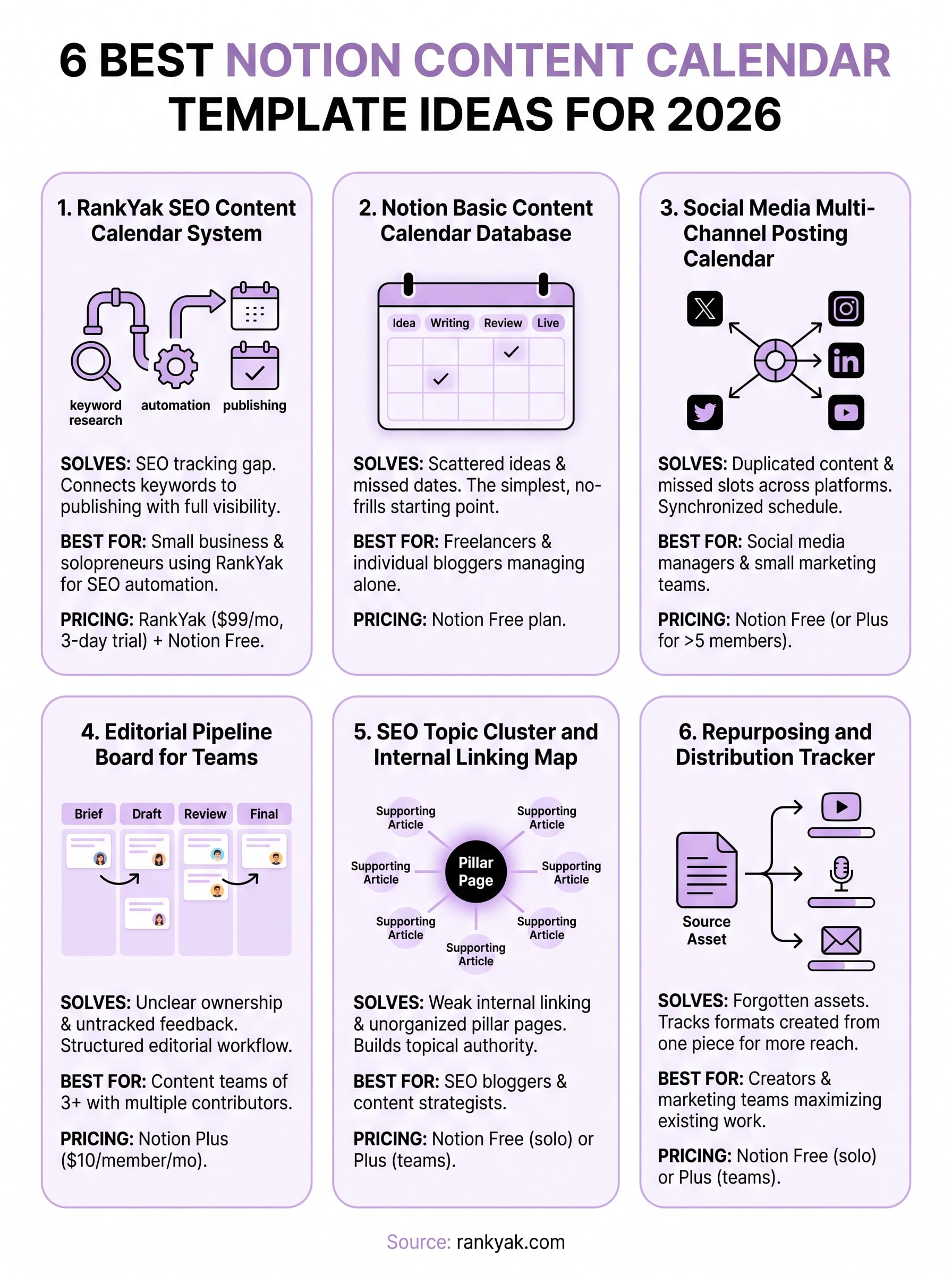
notion content calendar template infographic

Next steps

You now have fifteen notion content calendar template options to choose from, each solving different planning challenges across social media, blogs, and multi channel strategies. Pick the template matching your content volume and team structure, duplicate it to your workspace, and customize the properties to fit your specific workflow. Most templates take 15 to 30 minutes to configure properly, giving you an operational system today.

Building your calendar solves organization problems but doesn't create the content itself. Filling your schedule with consistent, high quality articles that actually rank requires ongoing keyword research, content creation, and publication effort. If manual content production drains your time and budget, RankYak automates your entire SEO workflow from keyword discovery through article writing to automatic publishing. You get one fully optimized article daily without manual intervention, freeing your calendar for strategic planning instead of endless content production. Start your free three day trial today.

Background

Automate your SEO and increase your ranking

Start today and generate your first article within 15 minutes.

Start your free trial