12 SEO Writing Techniques To Create Content That Ranks
Most content never sees page one of Google. It gets published, indexed, and buried, not because the topic is wrong, but because the writing itself wasn't built to rank. Knowing the right SEO writing techniques is what separates content that drives traffic from content that collects dust. And the gap between the two often comes down to a handful of deliberate choices made during the writing process.
The good news: these techniques aren't complicated. They don't require a technical background or years of SEO experience. They do require understanding how search engines evaluate content and what makes a reader actually stay on the page. Getting both right at the same time, that's the real skill, and it's exactly what we focus on at RankYak when our platform generates SEO-optimized articles on autopilot every day.
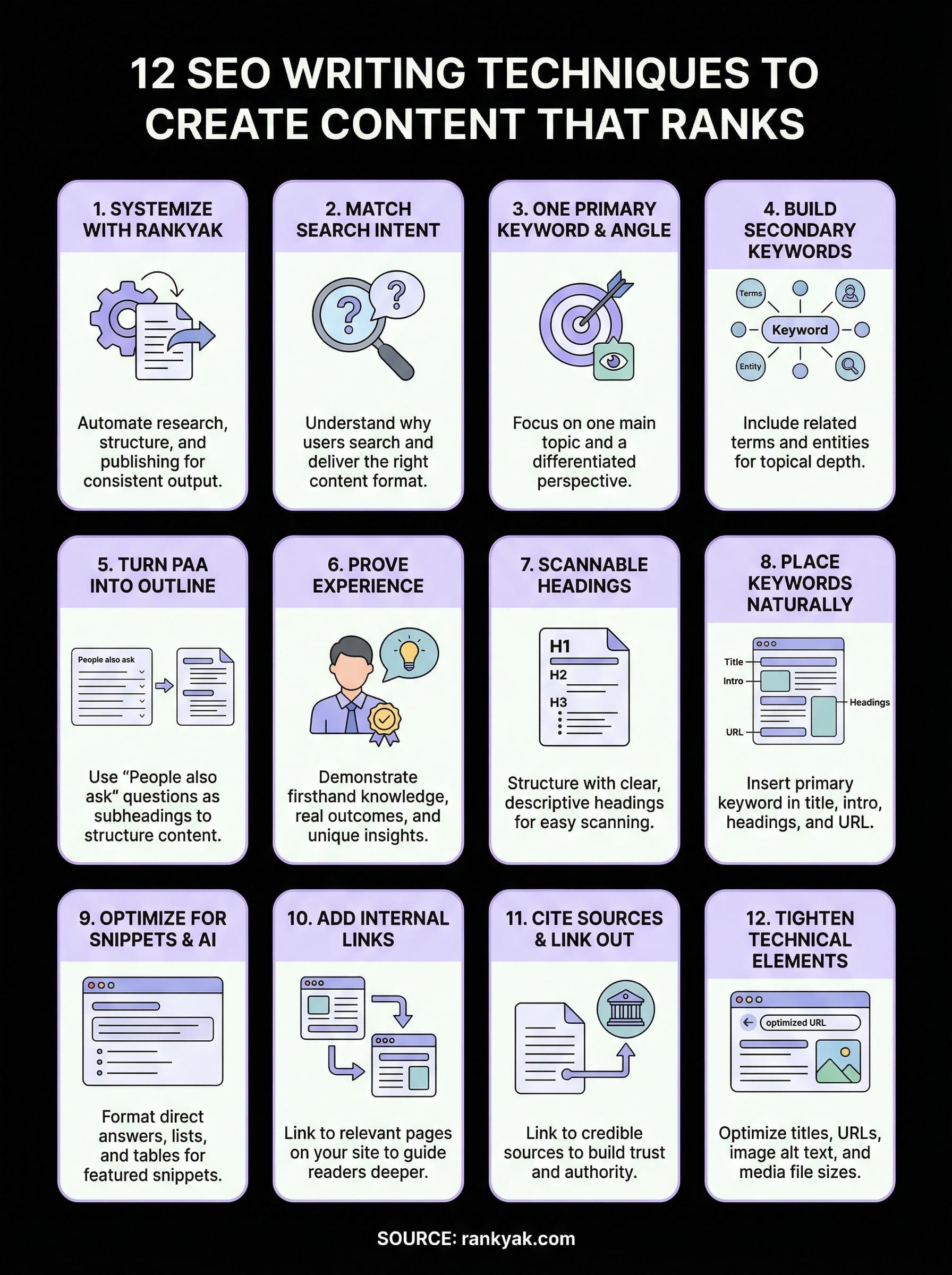
Below, you'll find 12 specific, actionable techniques you can apply to your next piece of content. Each one is designed to improve your rankings while keeping your writing clear and useful for real people, because that's what Google rewards. Whether you're writing manually or letting automation handle the heavy lifting, these fundamentals apply.
1. Use RankYak to systemize SEO writing
Most writers treat SEO as an afterthought, adding keywords after the draft is done and hoping for the best. RankYak flips that approach by building every SEO writing technique into the content creation process from the start, so nothing gets missed and every article goes out fully optimized.
What it does for rankings and readers
RankYak automates the research and structure that most writers skip because it takes too long. It analyzes your niche and target audience, identifies high-potential keywords, and generates a full content plan so you always know what to write next. For readers, this means every article answers a real question with depth and clarity, rather than just padding a page with generic information.
When your content creation process is systematic, your output becomes consistent, and consistency is what compounds organic traffic over time.
How to apply it step by step
Setting up RankYak takes only a few minutes. You connect your website, and the platform scans your domain and niche to surface the right keyword opportunities automatically. From there, it builds a daily content roadmap and writes a fully SEO-optimized article of up to 5,000 words each day, then publishes it directly to WordPress, Shopify, Webflow, or your custom CMS without any manual steps.
- Connect your website and define your niche
- Review the auto-generated keyword and content plan
- Let RankYak write and publish your daily article
- Track performance inside Google Search Console
Examples you can copy
A small e-commerce brand in the fitness space can use RankYak to publish one product-focused article per day. Within 90 days, organic sessions grow steadily because the content plan targets long-tail keywords with clear buyer intent. Another example: a B2B SaaS site covers topic clusters systematically, building topical authority faster than any manual writing schedule could realistically achieve.
Mistakes to avoid
The biggest mistake is treating RankYak as a zero-oversight button you never revisit. You should review your content plan regularly to confirm that the keyword targets still match your current business goals. Avoid publishing articles without at least a quick check on brand voice and factual accuracy, especially for sensitive topics where trust signals matter most to both readers and Google.
2. Match search intent before you draft
Search intent tells you why someone typed a query, not just what they typed. If your content answers the wrong question, Google will swap it out for a page that actually satisfies the searcher, regardless of how well-written your article is.

What it does for rankings and readers
Matching intent keeps readers on your page longer and signals to Google that your content delivers what the query promised, one of the clearest reasons on-page SEO matters for visibility. It's one of the most foundational seo writing techniques you can apply, and it costs nothing but a few minutes of upfront research before you write a single word.
Get the intent wrong, and no amount of keyword placement or internal linking will protect your rankings.
How to apply it step by step
Google the keyword before you draft anything. Study the top five results and identify their content format (listicle, how-to, product page) and their dominant angle (beginner guide, comparison, specific use case). Then match that format while adding original value.
- Search your target keyword
- Note the format and angle in the top results
- Mirror that structure in your own piece
Examples you can copy
For "best running shoes," every top result is a product listicle, not a brand history. For "how to tie a bowline knot," results are step-by-step guides. Follow the pattern the SERP shows you, then add something the existing results lack.
Mistakes to avoid
The most common mistake is writing an opinion piece when searchers clearly want a practical how-to. Never assume you know what people want without checking the actual search results first.
3. Choose one primary keyword and a clear angle
Every strong article starts with one clear target, not five, which is why keyword analysis comes before drafting. Picking a single primary keyword forces you to define exactly what your page is about, which makes it far easier for Google to understand and rank your content. This is one of the core seo writing techniques that separates focused, high-performing articles from scattered pages that never gain traction.
What it does for rankings and readers
When your article commits to one primary keyword and one specific angle, the entire piece stays coherent. Readers get a clear, direct answer to what they searched for, and Google's systems can match your page to the right queries with confidence.
Trying to rank for too many keywords at once dilutes your focus and confuses both readers and search engines.
How to apply it step by step
Start with the keyword that best reflects what your target reader needs at that moment. Then define your angle, the specific take or perspective that makes your article distinct from the dozens already on page one.
- Pick one primary keyword with clear search demand
- Read the top-ranking pages to identify the dominant angle
- Choose a differentiated angle that fills a gap those pages leave open
- Write your title and intro around both elements before you draft anything else
Examples you can copy
For the keyword "email marketing tips," a crowded angle is "10 general tips." A sharper, differentiated angle is "email marketing tips for SaaS free trial users." Narrowing the angle reduces competition and serves a more specific reader.
Mistakes to avoid
Avoid stuffing multiple primary keywords into one article hoping to capture more traffic. Each keyword with distinct intent deserves its own dedicated page. Splitting focus across two primary keywords weakens both.
4. Build a list of secondary keywords and entities
Your primary keyword gives you focus, but secondary keywords and entities fill in the full semantic picture that Google uses to understand your page. Entities are the people, places, concepts, and related tools tied to your topic, and including them signals that your article covers the subject with genuine depth rather than surface-level repetition.
What it does for rankings and readers
Secondary keywords, especially low-competition variations, help your page rank for related queries without requiring separate articles. Entities signal topical authority to Google's systems, which evaluate content based on how comprehensively it covers a subject, not just how often a single phrase appears. For readers, this means your article feels thorough and complete rather than oddly narrow.
Pages that satisfy multiple related queries in one place earn stronger rankings and lower bounce rates over time.
How to apply it step by step
Building this list takes roughly ten minutes, and a content brief that names the entities to cover strengthens every other seo writing technique you apply after. Use these steps:
- Search your primary keyword and scan the "Related searches" section at the bottom of Google
- Note recurring terms, brand names, and concepts across the top five ranking pages
- Weave those terms naturally into your subheadings, body copy, and image alt text
Examples you can copy
For "content marketing strategy," secondary keywords include "editorial calendar" and "content distribution." Relevant entities include platforms like Google Search Console and concepts like conversion funnel, both of which appear consistently in top-ranking content on that topic.
Mistakes to avoid
Avoid forcing secondary keywords into sentences where they feel unnatural. Forced repetition hurts readability and sends weak quality signals to Google, which can drag down an otherwise well-written piece.
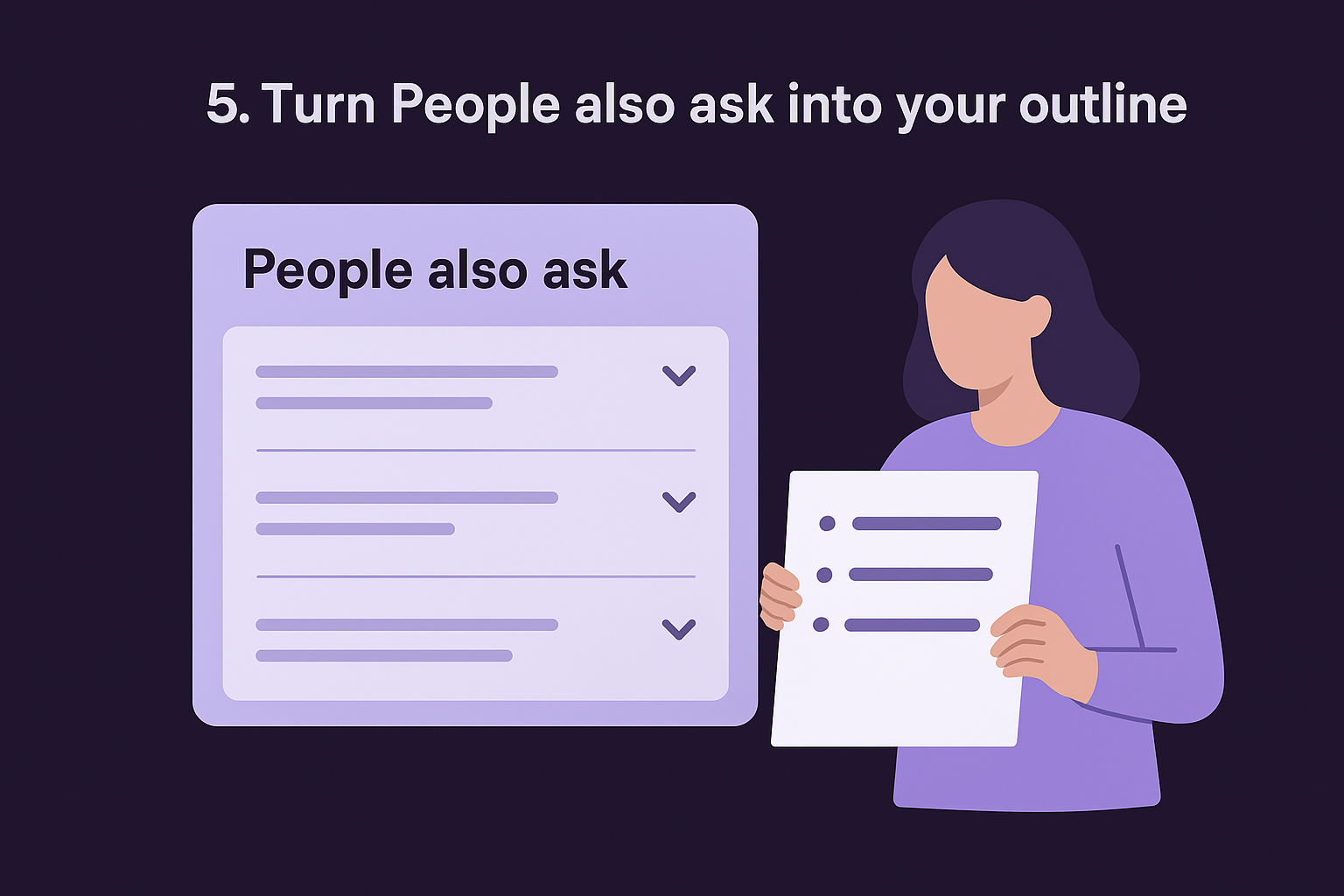
5. Turn People also ask into your outline
The "People also ask" box on Google is a free research tool that most writers scroll past without a second look. It shows you the exact follow-up questions real searchers ask after typing your target keyword, which means it's also a ready-made outline for your article's subheadings.
What it does for rankings and readers
Using PAA questions as subheadings helps your page match multiple related queries in one article, increasing your chances of appearing for both your primary keyword and the surrounding questions. For readers, it creates a logical, well-paced structure that mirrors the way they actually think about a topic. This is one of the most underused seo writing techniques that pays off immediately in both structure and reach.
When your subheadings reflect the questions people are already asking, you reduce the chance that readers leave to find a better answer somewhere else.
How to apply it step by step
This process takes less than five minutes before you write your first heading.
- Search your primary keyword on Google
- Screenshot or copy every PAA question that appears
- Group related questions together and use them as your H2 or H3 subheadings
- Answer each question directly in the first two sentences under that heading
Examples you can copy
For "remote work productivity," PAA questions often include "How do I stay focused working from home?" and "What tools help with remote work?" These become ready-made subheadings that already carry search demand.
Mistakes to avoid
Avoid copying PAA questions word for word as headings without adapting them to your article's tone and angle. Forcing them in without context makes the structure feel choppy and disconnected rather than purposeful.
6. Write people-first content that proves experience
Google's helpful content systems reward pages that show real experience and genuine depth, not just keyword presence. If your content reads like it was assembled from search results rather than lived knowledge, both readers and search engines will notice, which is why a workflow for AI writing tools still needs a human pass.
What it does for rankings and readers
People-first content builds the trust signals Google measures through E-E-A-T: experience, expertise, authoritativeness, and trustworthiness. Readers who sense real experience in your writing stay longer and return more often, which strengthens your page's ranking signals over time.
This is also one of the most durable seo writing techniques available. Pages built on genuine insight are harder for competitors to replicate than pages built on recycled summaries.
Generic content that anyone could pull from a quick search will never consistently outrank content that shows you've actually done the work.
How to apply it step by step
You can add demonstrable experience to your writing with a few deliberate moves.
- Open with a specific observation only a practitioner would make
- Reference real outcomes, numbers, or edge cases from your actual work
- Challenge a common misconception that hands-on experience reveals
Examples you can copy
A software review that includes real screenshots and specific friction points beats a generic pros-and-cons list every time.
A tutorial that warns readers "this step catches most beginners off-guard because..." signals firsthand knowledge that no amount of secondary research can replicate.
Mistakes to avoid
Avoid filling paragraphs with vague, unverifiable claims like "many experts believe." Replace them with specific outcomes or concrete examples drawn from real situations, and your content will instantly read with more authority.
7. Structure the page with scannable headings
Most readers don't read your article from top to bottom. They scan the page first, decide if it's worth their time, and then read the sections that matter to them. Your heading structure controls that experience entirely.
What it does for rankings and readers
Clear, descriptive headings give Google a map of your content's structure, making it easier to index each section accurately. For readers, a well-organized page reduces friction and keeps them moving forward instead of bouncing. This is one of the seo writing techniques that improves both time-on-page and crawlability in a single move.
When readers can find what they need in under ten seconds, they stay, and that engagement signals quality to Google.
How to apply it step by step
Build your heading hierarchy before you write the body copy, and pull the heading outline from any URL to see how the ranking pages structured theirs. A clean structure speeds up your drafting process and keeps your argument from drifting.
- Use your H1 for the page title only, never repeat it as an H2
- Assign H2s to major sections and H3s to supporting points within each section
- Write headings as specific statements or questions, not vague labels like "Overview"
Examples you can copy
Instead of "Benefits," use "Three ranking benefits of descriptive headings." Instead of "Tips," use "How to write headings that match search intent." Specificity helps both readers and crawlers.
Mistakes to avoid
Avoid nesting H4s and H5s unless your content genuinely requires that depth. Over-complicated heading trees confuse readers and dilute the structural clarity that makes your page easy to scan.
8. Place keywords naturally in high-signal spots
Keyword placement isn't about frequency, it's about location, and a keyword density check shows you where your phrases actually sit. Google weighs certain spots on your page more heavily than others, and putting your target keyword in the right places sends a stronger relevance signal than repeating it ten times in the body.
What it does for rankings and readers
Placing keywords in high-signal locations tells Google's crawlers exactly what your page is about before they process the full content. For readers, it creates a sense of immediate relevance at every natural entry point, whether they start at the title, skim the intro, or land mid-page from a featured snippet.
Keyword placement in the right spots does more for your rankings than any arbitrary density target ever will.
How to apply it step by step
These seo writing techniques work best when keyword placement is intentional from the start, not patched in after drafting. Work through this checklist before you publish:
- Put your primary keyword in the H1 title, as close to the beginning as possible
- Include it in the first 100 words of your introduction
- Use it in at least one H2 subheading that fits naturally
- Add it to your meta title and meta description
- Include it in the URL slug, keeping the slug short and clean
Examples you can copy
For a page targeting "project management templates," the URL becomes /project-management-templates, the H1 opens with that phrase, and the intro's first paragraph names the keyword directly. Supporting H2s use related phrases like "free project management templates" or "editable templates for teams."
Mistakes to avoid
Avoid front-loading keywords awkwardly just to hit a placement rule. If your intro reads like a keyword list rather than a useful opening, readers leave fast and bounce rates rise, which signals the opposite of quality to Google.
9. Optimize sections for featured snippets and AI
Featured snippets and AI answer boxes pull directly from specific formats on your page. If you structure key sections correctly, Google or an AI platform like Perplexity can lift your content verbatim, placing your site at position zero above all standard results.
What it does for rankings and readers
Snippet-optimized sections boost your visibility beyond standard rankings by placing your content directly in the answer box. For readers arriving from AI platforms, this structure creates instant clarity and reinforces trust in your page as a reliable source.
Structured, direct answers are what AI systems and featured snippet algorithms pull first, so formatting for them is one of the highest-leverage seo writing techniques you can apply.
How to apply it step by step
You can format any section for snippets with a few deliberate choices before you hit publish.
- Open your answer with a direct definition or summary in two to three sentences
- Follow immediately with a numbered list or short table when steps or comparisons are involved
- Keep each step under 15 words so it displays cleanly in snippet format
Examples you can copy
For "what is anchor text," open with a clean one-sentence definition, then list three examples below it. For a how-to query, lead with the core action in the first sentence before adding any supporting context.
Mistakes to avoid
Avoid burying your direct answer three paragraphs deep into a section. If the answer isn't visible near the top of the heading, AI systems and snippet algorithms will skip your page entirely and pull from a competitor who formatted it correctly.
10. Add internal links that move readers forward
Internal links do two things at once: they pass authority between pages on your site and give readers a logical next step when they want to go deeper. Most sites underuse them, leaving both ranking power and reader engagement on the table.
What it does for rankings and readers
A deliberate internal linking strategy distributes PageRank across your site, helping Google discover and prioritize your most important pages. For readers, a well-placed internal link feels like a natural extension of what they're already reading, not an interruption.
Internal links are one of the most overlooked seo writing techniques because the benefit compounds quietly across your entire site over time.
How to apply it step by step
Add internal links during your editing pass, not during drafting. This keeps your writing focused and your link placement purposeful rather than scattered throughout the draft.
- Identify two to three pages on your site that directly extend the current topic
- Link from a descriptive anchor text phrase, never from generic text like "click here"
- Place links where the reader is most likely to want more detail, typically right after you introduce a new concept
Examples you can copy
If your article covers content strategy, link to your dedicated page on how to do keyword research when you first mention keyword selection. Link to your content calendar guide the moment you discuss publishing frequency.
Another strong pattern: link to a product or service page when you describe a problem it solves, so readers move naturally from learning to acting.
Mistakes to avoid
Avoid dropping five or more internal links into a single paragraph. Dense linking signals low-quality content to Google and overwhelms readers who are still working through your main argument.
11. Cite sources and link out with purpose
Linking out to authoritative external sources isn't just a courtesy. It's a direct signal to Google that your content is grounded in credible information and written with the reader's trust in mind. This is one of the seo writing techniques that many writers skip entirely, leaving a clear quality gap between their content and the pages that outrank them.
What it does for rankings and readers
External citations reinforce your E-E-A-T signals and your topical authority by connecting your claims to recognized, trustworthy institutions. For readers, a well-placed source removes doubt at the exact moment a stat or claim might otherwise feel unverifiable.
Citing credible sources tells both readers and Google that your content is built on real evidence, not guesswork.
How to apply it step by step
You don't need to cite every sentence, but any statistic, study finding, or specific claim should point somewhere authoritative. Work through this pattern on every article before publishing.
- Identify every specific claim or data point in your draft
- Link each one to a primary source such as Google Search Central, a government site, or a recognized research institution
- Set all external links to open in a new tab so readers stay on your page
Examples you can copy
If you cite click-through rate data, link to a published study or official platform report, not a blog summarizing it. When referencing Google's ranking guidelines, link directly to the source.
Mistakes to avoid
Avoid linking out to competitor blogs or commercial tools in place of primary sources. Those links transfer authority away from your site without giving readers the credibility boost that a genuine authoritative citation delivers.
12. Tighten titles, URLs, images, and media
The technical elements around your body copy carry real ranking weight. Page titles, URL slugs, image alt text, and media file sizes each send signals Google processes before it reads a single word of your content.
What it does for rankings and readers
Optimized metadata and clean URLs help Google categorize your page faster and more accurately. Readers also judge credibility before they click, so a precise URL slug and a clear title directly improve your click-through rate from search results.
Every element readers and crawlers encounter before reaching your body copy shapes how your page performs.
Including descriptive alt text on images extends your keyword relevance signals without adding a word to your main copy, giving you another ranking touchpoint most competitors skip.
How to apply it step by step
Work through this checklist before every publish to cover all four elements quickly.
- Write your meta title between 50 and 60 characters with the primary keyword near the front
- Keep your URL slug short, lowercase, and hyphenated with no stop words
- Write descriptive alt text for every image as part of your image SEO, placing a relevant keyword where it fits naturally
- Compress images to under 100KB to protect page speed
Examples you can copy
For a page built around these seo writing techniques, the slug becomes /seo-writing-techniques and every image alt tag describes the visual specifically rather than using filler like "photo1."
A strong meta title leads with the primary keyword and sets a clear expectation for the reader before they even land on the page.
Mistakes to avoid
Avoid writing clickbait titles that overpromise what your content delivers. Readers who click and leave fast drive up your bounce rate, which tells Google your page failed to satisfy the query.
Put these techniques to work
These 12 seo writing techniques give you a complete system for creating content that earns rankings rather than hoping for them. Each one targets a specific gap between content that sits on page five and content that consistently drives organic traffic.
You don't need to apply all twelve perfectly on your first article. Start with search intent, keyword selection, and heading structure, and build from there. The results compound as each new piece reinforces your site's topical authority and internal link network.
If you want to skip the manual work entirely and let a proven system handle keyword research, content creation, and publishing on autopilot, see what RankYak costs and start your free trial to find out how fast a daily article cadence changes your organic traffic. Your next ranking article doesn't have to take all week to produce.
Lars Koole is a co-founder of RankYak and has worked in SEO since 2021, on the side where a strategy has to become a live page: inside agencies, alongside them, for clients directly, and in-house on the products being ranked. He is a software engineer by trade, which is how that page gets built. Before RankYak he founded companies of his own, two of which were acquired. At RankYak he owns the engineering and everything AI, and works out the solution and the implementation of each new feature.
