ChatGPT Writing Tool: How To Draft, Edit, And Improve Copy
ChatGPT has become one of the most popular writing tools available, and for good reason. Whether you need to brainstorm blog ideas, draft marketing copy, or polish an existing piece, the ChatGPT writing tool gives you a capable assistant that's available around the clock.
But there's a gap between having access to ChatGPT and actually using it well. Most people type a vague prompt, get a mediocre response, and walk away thinking AI-generated content isn't worth the effort. The difference comes down to knowing the right techniques, from structuring prompts to leveraging features like Canvas and custom GPTs for specific writing tasks.
This guide walks you through how to draft, edit, and improve copy using ChatGPT step by step. And if you'd rather skip the manual process entirely, we'll also show how tools like RankYak automate the full content pipeline, from keyword research to automatic SEO article writing and publishing, so your SEO content gets created and posted without the back-and-forth.
What the ChatGPT writing tool can do
The ChatGPT writing tool covers a wide range of tasks that writers and marketers deal with every day. You can use it to brainstorm topics, generate outlines, write full drafts, rewrite weak sentences, adjust tone, summarize long documents, and produce copy in multiple formats, all from a single chat interface. This breadth is what makes it genuinely useful rather than a novelty.
ChatGPT isn't just a drafting tool. It's an iterative writing partner that responds to your feedback in real time.
Core writing capabilities
The core capabilities break down into three broad areas: generation, editing, and transformation. Generation means producing new content from a prompt, whether that's a blog post, product description, or email sequence. Editing means refining existing text you paste in, fixing awkward phrasing, cutting filler, or tightening arguments. Transformation means converting content from one format or tone to another, such as turning a bullet-point outline into flowing prose.
Here's a quick breakdown of what each task looks like in practice:
| Task | What you give ChatGPT | What you get back |
|---|---|---|
| Drafting | Topic, audience, tone | Full draft or section |
| Editing | Existing copy | Revised, cleaner version |
| Tone shifting | Copy + target tone | Rewritten for new audience |
| Summarizing | Long document or article | Condensed key points |
| Brainstorming | Theme or question | Ideas, angles, or outlines |
Custom GPTs and Canvas
Beyond the standard chat interface, you can access custom GPTs trained for specific writing tasks, such as academic writing, SEO content, or copywriting frameworks like AIDA and PAS. The Canvas feature (available on ChatGPT Plus) opens a side-by-side editor where you highlight specific passages and request targeted edits without regenerating the whole piece. Both tools narrow the gap between raw AI output and copy that's actually ready to publish.
Step 1. Set up your writing brief and prompt
Before you type anything into the ChatGPT writing tool, you need a clear brief, and a free content brief generator can put one together from a single target keyword. A vague prompt like "write a blog post about coffee" produces a generic draft that requires heavy editing. A structured prompt that specifies audience, tone, format, and goal gives ChatGPT the context it needs to produce output that's actually close to ready.
The quality of your output is directly tied to the quality of your input. A weak prompt creates more work, not less.
Build your prompt template
Use this starting template for any writing task:
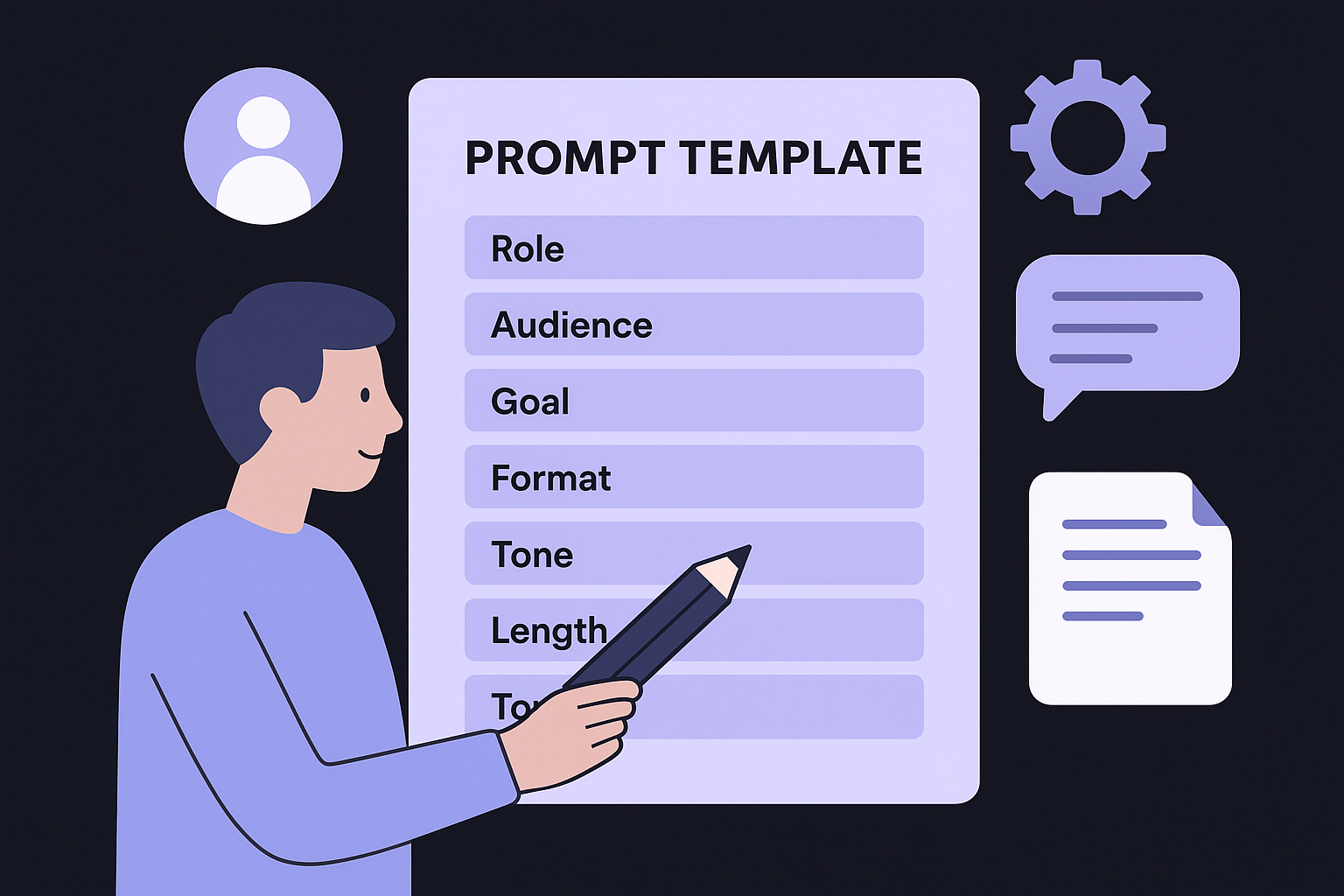
Role: You are a [role, e.g., B2B copywriter].
Audience: [Who will read this?]
Goal: [What should the reader do or feel?]
Format: [Blog post, email, product description, etc.]
Tone: [Conversational, formal, authoritative, etc.]
Length: [Word count or approximate length]
Topic: [Specific subject or angle]
Filling in each field takes about two minutes and significantly cuts your revision time. For example, specifying "conversational tone for first-time homebuyers" produces a very different draft than leaving tone undefined. Always include your target word count, which you can measure against competing pages with a word and reading time counter, so ChatGPT does not cut the piece short or pad it with filler.
Step 2. Draft faster with iterative prompting
Once you have your prompt template ready, don't expect a single response to give you the final draft. The ChatGPT writing tool works best when you treat each response as a rough layer and then send follow-up prompts to refine specific sections one at a time, the same practical workflow for AI writing tools that applies to any assistant.
Iterative prompting turns one mediocre draft into a polished piece through targeted, sequential requests.
How to sequence your prompts
Start by requesting a full outline. Once you approve the structure, ask ChatGPT to expand each section individually. This keeps responses focused and easier to evaluate than a 1,500-word block you have to read all at once.
Here's a simple sequence that works for most content types:
- "Write an outline for [topic] targeting [audience]."
- "Expand the introduction using [tone] and [word count]."
- "Write section two following the approved outline."
- "Make paragraph three more concise without losing the key point."
- "Rewrite the conclusion with a stronger call to action."
Each follow-up prompt builds on the previous response, so you're steering the draft rather than starting over. If a section misses the mark, tell ChatGPT exactly what's wrong, such as "too formal," "missing an example," or "cuts off too early," and it corrects only that specific issue.
Step 3. Edit in Canvas and polish style
Once you have a solid draft, open Canvas by clicking the Canvas icon in the ChatGPT interface (available on ChatGPT Plus and Team plans). Canvas splits your screen into a chat panel and a live editor side by side, letting you make targeted edits without regenerating the entire piece, which pairs well with a step-by-step editing checklist. This side-by-side view is where most of the real polishing happens.
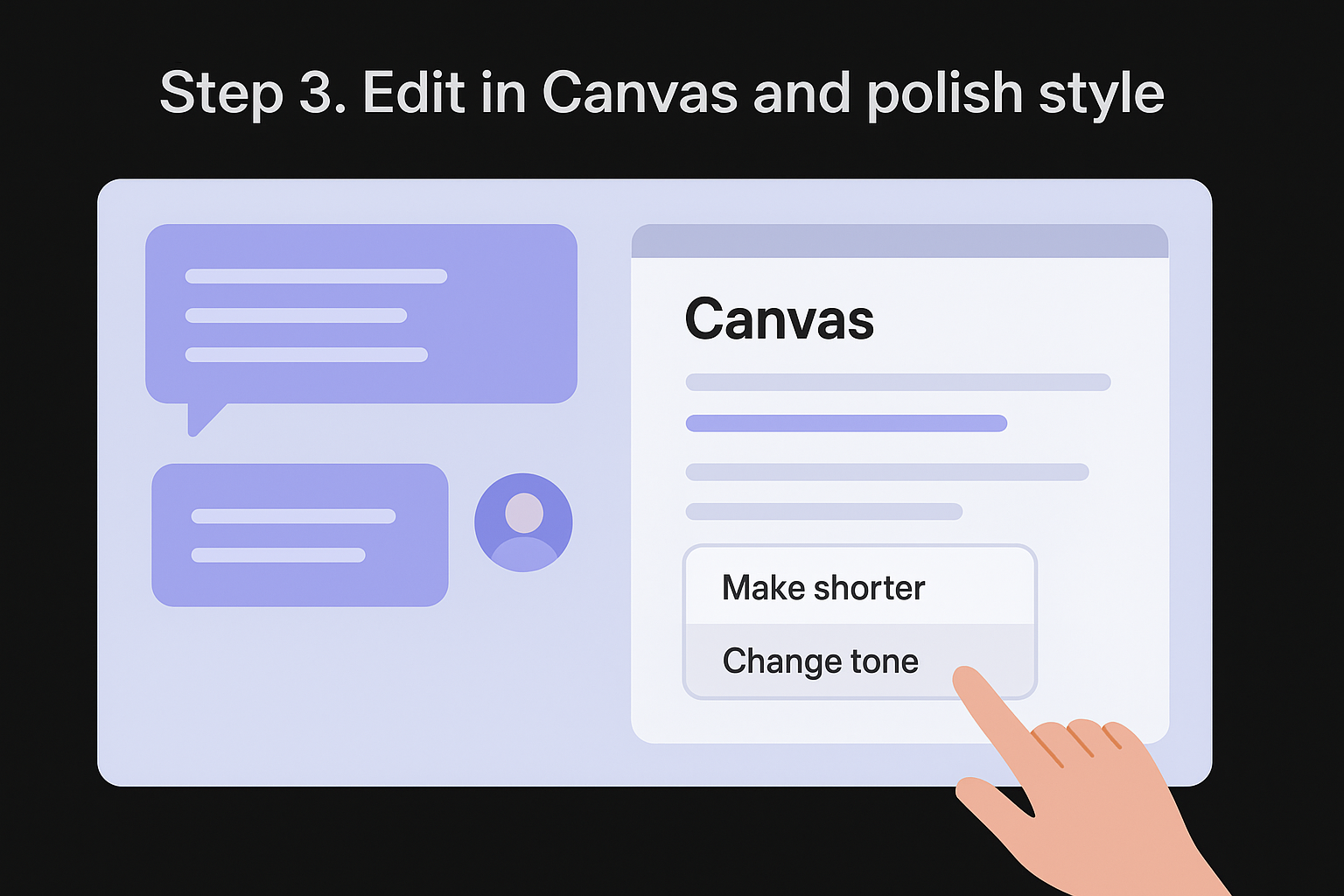
Canvas turns the chatgpt writing tool from a response generator into a precise editor you can steer line by line.
Make targeted edits by selecting text
Highlight any passage and a small action menu appears with options like "Make shorter" or "Change tone." These fix specific problem areas without touching surrounding text. For style consistency, paste a standing instruction into the chat panel before you start editing:
Conversational tone, second-person ("you"), no passive voice.
Polish at the sentence level
Work through the document section by section and give one focused instruction per round, such as "tighten paragraph two" or "remove the filler sentence here." This keeps changes controlled and prevents ChatGPT from over-correcting parts that already work. Run these checks before calling the piece done:
- Cut any sentence longer than 25 words, and use a reading level checker to find the ones dragging the grade up
- Replace passive constructions with active ones
- Remove filler phrases like "it is important to note"
Step 4. Fact-check, cite, and stay ethical
The ChatGPT writing tool can produce confident-sounding claims that are simply wrong. ChatGPT draws from training data with a knowledge cutoff, so statistics, quotes, and recent events all need independent verification before you publish. Treat every factual statement in your draft as a claim, not a confirmed fact.
Publishing unverified AI-generated claims damages your credibility far more than a delayed publish date.
Verify and attribute your sources
Run each specific claim through a reliable primary source, such as a government database, peer-reviewed publication, or an organization's official site. If you can't find a credible source, cut the claim or rewrite it as an observation rather than a stated fact.
Use this checklist before finalizing any piece:
- Statistics and data: Confirm the number and link directly to the original study or report
- Quotes: Check that the quote is real and attributed to the correct person
- Dates and events: Cross-reference against news archives or official records
- Product claims: Verify against the manufacturer's current documentation
Disclose when you use AI assistance in your content where your audience or platform expects it. Transparency builds reader trust and keeps you aligned with emerging editorial standards.
Next steps
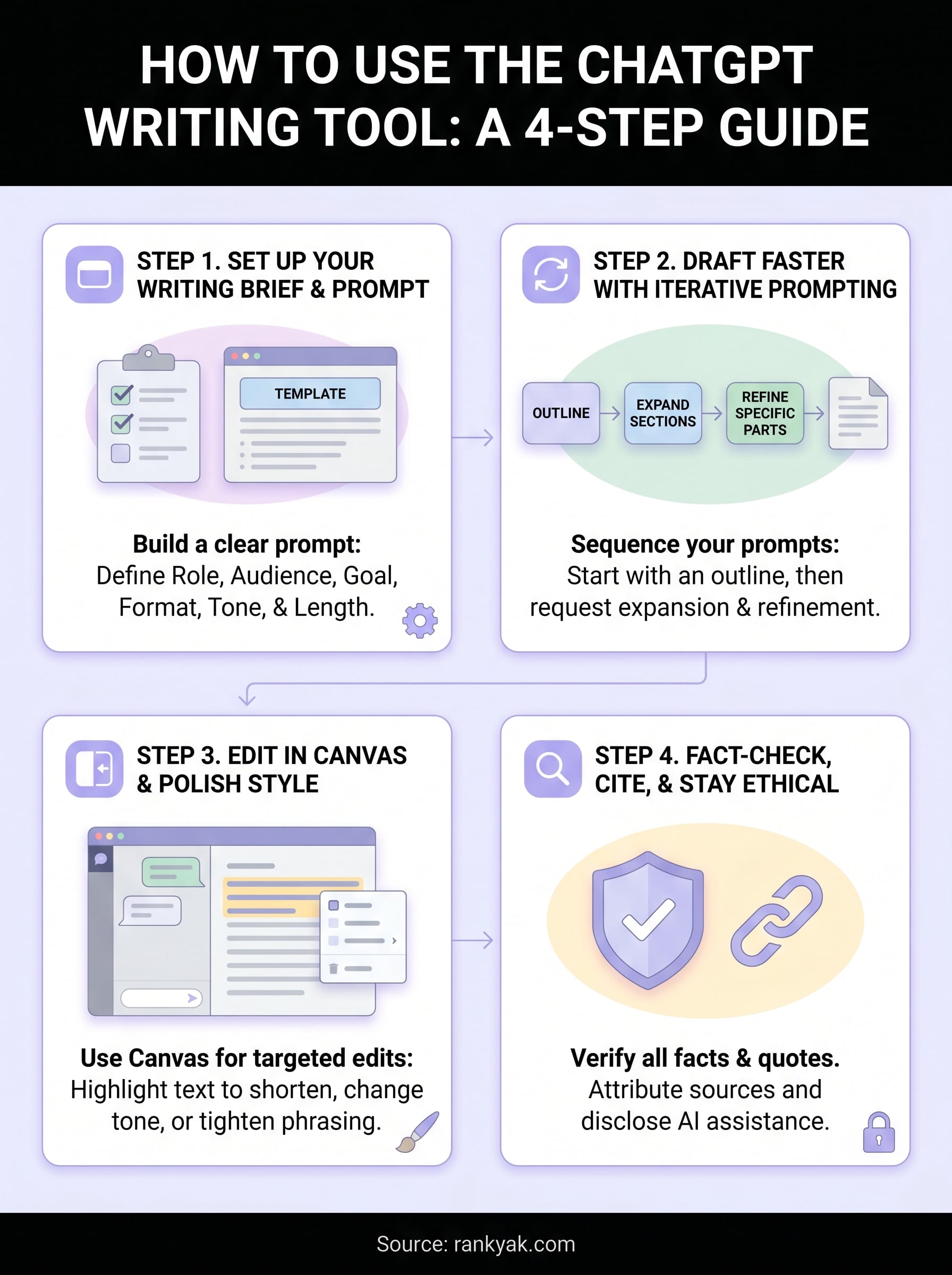
You now have a repeatable system for using the ChatGPT writing tool to draft, edit, and polish copy from start to finish. The four-step process covers everything from building a structured prompt to verifying facts before you hit publish. Put the sequence into practice on your next piece and you'll notice significant time savings compared to starting from a blank page.
That said, even a well-run ChatGPT workflow still requires you to manage prompts, fact-check output, and handle publishing manually. If you want that entire process handled automatically, RankYak takes care of keyword research, article creation, and publishing on autopilot, every single day. You don't have to juggle prompts or coordinate tools yourself.
If you run an agency and need to scale content across multiple clients, see how RankYak manages SEO for every client site from one account and handles the full pipeline without adding to your team's workload.
Allan de Wit is a co-founder of RankYak and has worked in SEO since 2015: inside agencies, alongside them, for clients directly, and in-house on the products being ranked. He came to it as a software engineer building for marketers, which is why the platform is built the way it is. He went on to start companies of his own, two of which were acquired. At RankYak he sets the product direction and owns the features, the quality bar, the design, and the UX.
