Small Business SEO Checklist: 11 Steps To Rank Higher
You know your business deserves to show up when local customers search for what you sell, but you're stuck on page three of Google wondering why nothing's working. A small business seo checklist gives you a clear path instead of another vague "do more content" recommendation that doesn't tell you what to actually do this week.
This article lays out 11 concrete steps, in order, so you know exactly what to fix first and what to build on later. No fluff about "SEO best practices" in the abstract. Just the actions that move a small site from invisible to ranking, covering everything from technical fixes to content strategy and the backlinks that convince Google your site matters.
We wrote this checklist for owners who don't have an in-house SEO team or the budget for a $3,000 a month agency retainer. Each step includes what to do and why it matters, so you can knock out quick wins today and tackle the bigger projects, like consistent content publishing and keyword targeting, over the coming weeks. By the end, you'll have a repeatable system instead of a one time cleanup.
1. Know your audience and set clear SEO goals
Before you touch a single keyword tool or plugin, figure out who you're actually trying to reach and what you want them to do once they find you. Every small business seo checklist falls apart when it skips this step, because you end up optimizing for traffic instead of customers. Skipping straight to tactics without this foundation, instead of building an SEO strategy framework first, is the single biggest reason small business SEO efforts stall out after a few months.
What it involves
This step is about defining your ideal customer profile and connecting it to specific, measurable outcomes. You're not writing a vague mission statement here. You need to know their location, the problem they're trying to solve, and the exact words they'd type into Google when they're ready to buy. Then you pair that with a goal you can actually track, like 20 more calls a month or a 15% jump in booking form submissions by the end of the quarter.
Why it matters
Without a defined audience, you'll chase keywords that bring visitors who never convert. A roofing company in Austin doesn't need traffic from people researching roofing materials for a school project. They need homeowners with storm damage searching for emergency repair, right now, in their zip code. Clear goals also give you a way to judge whether your SEO work is paying off, instead of guessing based on gut feeling three months in.
If you can't describe your ideal customer's search in one sentence, your SEO plan doesn't have a target yet.
How to get it done
Sit down for an hour and answer these questions honestly, ideally with input from whoever answers your phones or handles your inbox, since they hear the real language customers use.
- Who buys from you? Write down age range, location, budget, and the problem that sends them looking for you.
- What do they search first? List 5-10 phrases a real customer would type, not industry jargon.
- What's the one action you want? Pick a single primary conversion, like a call, quote request, or purchase.
- What number proves success? Set a specific target tied to a timeframe, such as 30 qualified leads by month three.
- Who's the competition showing up for those searches, and what are they doing that you're not?
Write the answers down somewhere you'll actually revisit, because every later step in this checklist depends on them.
2. Research the right keywords for your business
Once you know who you're targeting, translate that into the actual phrases they type into Google. Learning how to find keywords for SEO is where most small business seo checklist guides get too technical too fast, but you don't need enterprise software to do this well. You need a clear picture of the terms with real buying intent behind them.
What it involves
Start by listing the services or products you offer, then expand each one into how a customer would phrase a search, including their location. "Emergency plumber Dallas" and "licensed plumber near me" behave very differently than "how does a water heater work." You're sorting keywords into buckets: transactional keywords that signal someone ready to hire or buy, and informational ones that bring in browsers who aren't ready yet. Both have a place, but they need different treatment.
Why it matters
Targeting the wrong keywords wastes months of content production on traffic that never converts. A bakery ranking for "history of sourdough bread" gets visitors, sure, but few of them are ordering a birthday cake. Prioritizing commercial intent keywords first gets you customers faster, even if the search volume looks smaller on paper.
Rankings on the wrong keywords are just traffic with no destination.
How to get it done
Build your keyword list with this simple process:
- Write down every service or product you sell in plain language.
- Add your city, neighborhood, or service area to each core term, the core move in keyword research for local SEO.
- Use Google's autocomplete and "People also ask" boxes to find real phrasing.
- Check what pages currently rank for those terms, and judge if they're a business like yours or just blogs.
- Rank your list by buying intent first, search volume second.
A tool like RankYak can automate this discovery step and hand you a prioritized list tied to your site's niche.
3. Claim and optimize your Google Business Profile
Google Business Profile is often the first thing a local customer sees, sometimes before they ever click through to your website. Any small business seo checklist that skips this step is ignoring the single highest-visibility real estate you control for free, sitting right at the top of local search results and Google Maps.
What it involves
Claiming your profile through Google Business Profile verifies you as the rightful owner, but optimizing it means filling out every section completely: business category, service areas, hours, phone number, photos, and a description that uses the same language your customers search with. Optimizing a Google Business Profile also means a system for collecting and responding to reviews, since Google treats review volume and recency as ranking signals.
Why it matters
Local pack results, the map and three listings that show above organic results, drive a huge share of local clicks before anyone scrolls further, which is why local SEO for small business starts here. A thin or unclaimed profile hands that visibility to a competitor who bothered to fill theirs out. Complete profiles with recent reviews consistently outrank sparse ones, even when the competitor's website is weaker.
Your Google Business Profile often gets seen before your website does, so treat it like a landing page, not an afterthought.
How to get it done
- Claim and verify your listing if you haven't already.
- Fill in every field: categories, service area, hours, attributes.
- Upload real photos of your location, team, and work.
- Ask satisfied customers for reviews weekly, and respond to every one.
- Post updates or offers monthly to keep the profile active.
4. Fix technical SEO fundamentals on your website
Google can't rank a page it can't crawl or load quickly, so technical health comes before you write another word of content. Plenty of small business owners follow every other step in a small business seo checklist and still stall out because their site takes eight seconds to load on a phone or throws errors Google can't parse.
What it involves
Technical SEO basics cover the plumbing behind your site: page speed, mobile usability, secure HTTPS connections, a clean XML sitemap, and making sure Google can actually crawl and index your pages. It also includes fixing broken links, redirect chains, and duplicate content that confuses search engines about which page to rank.
Why it matters
Slow, broken, or uncrawlable sites lose visitors and rankings before a single word gets read. Core Web Vitals, Google's page experience metrics, factor directly into ranking, and mobile-first indexing means Google mostly judges your site by how it performs on a phone, so mobile SEO best practices are not optional. A beautifully written page nobody can load is invisible.
A site that loads slowly or breaks on mobile loses the ranking battle before content even matters.
How to get it done
- Run your site through Google's PageSpeed Insights and fix flagged issues.
- Confirm HTTPS is active sitewide, with no mixed-content warnings.
- Submit a current XML sitemap through Google Search Console.
- Test key pages on an actual phone, not just a desktop browser.
- Fix broken links and redirect chains using a crawler tool.
- Check that Google isn't blocked from important pages in your robots.txt file.
Handle these fixes once and revisit them quarterly, since plugin updates and theme changes tend to reintroduce problems quietly.
5. Optimize on-page elements on every page
Every page on your site sends Google signals through its title tag, headings, and image alt text, and most small business sites leave these blank or stuffed with the same generic phrase. This step in the small business seo checklist turns pages you already have into pages that actually compete for the terms you researched in step two.
What it involves
On-page optimization, worked through as a 20-step on-page SEO checklist, means writing a unique title tag and meta description for every page, using your target keyword naturally in the H1 and at least one subheading, and adding descriptive alt text to images instead of leaving them blank or auto-named. It also includes internal links between related pages, so a service page links to relevant blog posts and vice versa.
Why it matters
Search engines still rely heavily on these on-page signals to understand what a page is about and who should see it. Pages with vague titles like "Home" or "Services" give Google nothing to match against a search query. Clear, specific titles paired with strong internal linking help both search engines and visitors find their way to the page that actually answers their question.
A page without a specific, keyword-matched title is asking Google to guess what it's for.
How to get it done
- Write a unique title tag under 60 characters for every page, leading with the main keyword.
- Draft a meta description under 155 characters that includes a reason to click.
- Use one clear H1 per page, and work related terms into subheadings.
- Add descriptive alt text to every image, describing what it actually shows, then list every image on a page with its alt text to catch the ones you missed.
- Link to 2-3 related pages from within your content, using descriptive anchor text.
6. Create content that matches search intent
Google ranks pages that satisfy what the searcher actually wants, not just pages that mention the right keyword a certain number of times. Matching search intent is the step most small business seo checklist guides gloss over, yet it decides whether your content ever climbs past page two.

What it involves
Content built around search intent means checking what already ranks for a keyword before you write a single word, then turning that keyword into a writer-ready brief. If the top results are product pages, Google wants a product page, not a 2,000-word blog post. If they're how-to guides, you need a step-by-step format, not a sales pitch. You're matching the format, depth, and angle that the current results already prove Google wants for that query.
Why it matters
Mismatched content rarely ranks, no matter how well written it is, which is why writing SEO articles that rank starts with intent rather than words. A landscaping company writing a personal essay for the keyword "cost to install sod" will lose to a competitor who publishes a clear price breakdown, because that's what searchers actually want. Intent match beats word count and even beats backlinks in many cases.
Writing the wrong type of content for a keyword guarantees it never ranks, no matter how well you write it.
How to get it done
- Search your target keyword and note the format of the top five results.
- Identify whether intent is informational, transactional, or navigational.
- Match that format: guide, product page, comparison, or local service page.
- Add specifics competitors skip, like pricing ranges, timelines, or local examples.
- Answer the follow-up questions searchers ask next, right on the same page.
7. Keep your business listings consistent everywhere
Google cross-checks your business name, address, and phone number against every directory that mentions you, and mismatches quietly erode trust in your local rankings. This step in the small business seo checklist rarely gets attention because it feels tedious, but inconsistent listings confuse both Google and customers trying to reach you.
What it involves
NAP consistency means your business name, address, and phone number appear identically across your website, Google Business Profile, Yelp, Facebook, Bing Places, and industry-specific directories. Even small differences, like "St." versus "Street" or an old suite number, count as inconsistencies. You're auditing every place your business appears online and correcting anything that doesn't match your official listing exactly, which is the bulk of what local SEO services for small businesses handle.
Why it matters
Search engines use citation consistency as a trust signal for local rankings, since conflicting information suggests the business moved, closed, or was never verified properly. A customer who finds your old phone number on a directory and gets a disconnected line won't try calling again. Accurate citations across the web reinforce that you're a real, stable business worth ranking.
A wrong phone number on one directory can cost you more customers than a missing backlink ever will.
How to get it done
- List every directory and platform where your business currently appears.
- Compare each listing against your official NAP format.
- Correct mismatches directly through each platform's business dashboard.
- Claim unclaimed listings on major directories like Yelp, Bing Places, and Apple Maps.
- Recheck citations twice a year, since directories update or duplicate listings without warning.
8. Earn quality local and industry backlinks
Backlinks still tell Google that other sites vouch for yours, and this remains one of the harder items on any small business seo checklist to check off. You can't buy your way to good ones cheaply, and the shortcuts that promise hundreds of links overnight usually do more harm than good.
What it involves
Quality backlink building means getting other relevant, legitimate websites to link to your pages, ideally sites with some local relevance or connection to your industry. Think chamber of commerce directories, local news coverage, supplier or manufacturer partner pages, industry associations, and guest posts on niche blogs that actually serve your audience, all proven link building tactics for local SEO. It's the opposite of link farms or paid link networks that Google actively penalizes.
Why it matters
Backlinks act as a vote of confidence, and Google weighs votes from relevant, trustworthy sites far more than sheer volume. A single link from your local newspaper or an industry publication can outweigh dozens of low-quality directory links. Sites with zero backlinks struggle to outrank competitors who've earned even a modest, relevant link profile.
One link from a site your customers already trust beats fifty links from sites nobody visits.
How to get it done
- Join your local chamber of commerce and industry associations that list members online.
- Pitch local reporters or bloggers a genuine story angle, not a press release.
- Ask suppliers, manufacturers, or partners to link to you from their site.
- Sponsor a local event or team in exchange for a website mention.
- Consider RankYak's automated backlink exchange to connect with relevant niche sites faster.
9. Track rankings and measure your results
You can't improve what you don't measure, and skipping this step is why so many small business owners abandon SEO after a few months, convinced it "doesn't work." A small business seo checklist without tracking is just a list of tasks you hope are helping, with no way to prove it one way or the other.
What it involves
Tracking SEO performance means setting up a simple system to watch three things over time: keyword rankings, organic traffic, and conversions from that traffic. You don't need enterprise dashboards. Free tools like Google Search Console and Google Analytics show you exactly which pages get impressions, which keywords bring clicks, and where visitors drop off before converting.
Why it matters
Without data, you can't tell if your homepage rewrite actually moved the needle or if that new backlink helped at all. Consistent tracking turns SEO from guesswork into a feedback loop, showing you which pages deserve more investment and which tactics from earlier steps are underperforming. It also catches problems early, like a sudden ranking drop after a site change.
If you're not tracking rankings and conversions, you're doing SEO blind.
How to get it done
- Connect Google Search Console and Google Analytics to your site if you haven't already.
- Pick 10-15 priority keywords from step two and check their positions monthly.
- Watch organic traffic trends by page, not just site-wide totals.
- Track conversions tied to organic visitors, like form fills or calls.
- Review the data on a set schedule, monthly at minimum, and adjust your priorities based on what's actually working.
10. Refresh and update your content regularly
Old content quietly rots, even when nothing about your business has changed. Prices shift, services expand, and competitors publish newer, more thorough pages that push yours down the results. This step in the small business seo checklist is the one owners skip most often, because it feels like finishing work you already did once.
What it involves
Refreshing content means revisiting your existing pages, especially your top traffic and top ranking ones, and optimizing content by updating outdated facts, adding new sections, and tightening anything that reads thin compared to current competitors. You're not rewriting from scratch every time. Sometimes it's a new pricing table, an updated statistic, or a section answering a question customers started asking this year that wasn't relevant when you first published.
Why it matters
Google favors pages that stay accurate and comprehensive over time, and stale content loses ground to freshly updated competitors even when nothing else about the page changed. A service page from three years ago that still lists an old phone number or discontinued offering actively hurts trust with both visitors and search engines. Regular updates also give you a reason to resubmit pages through Search Console and catch new keyword opportunities.
A page you haven't touched in two years is losing ground to one your competitor updated last month.
How to get it done
- Pull your top 20 pages by traffic from Google Search Console.
- Check each for outdated prices, dates, or discontinued services.
- Add new sections answering questions you're hearing from customers now.
- Compare against current top-ranking competitors for gaps you're missing.
- Set a recurring quarterly reminder to repeat this review, rather than a one-time cleanup.
Turning this checklist into steady growth
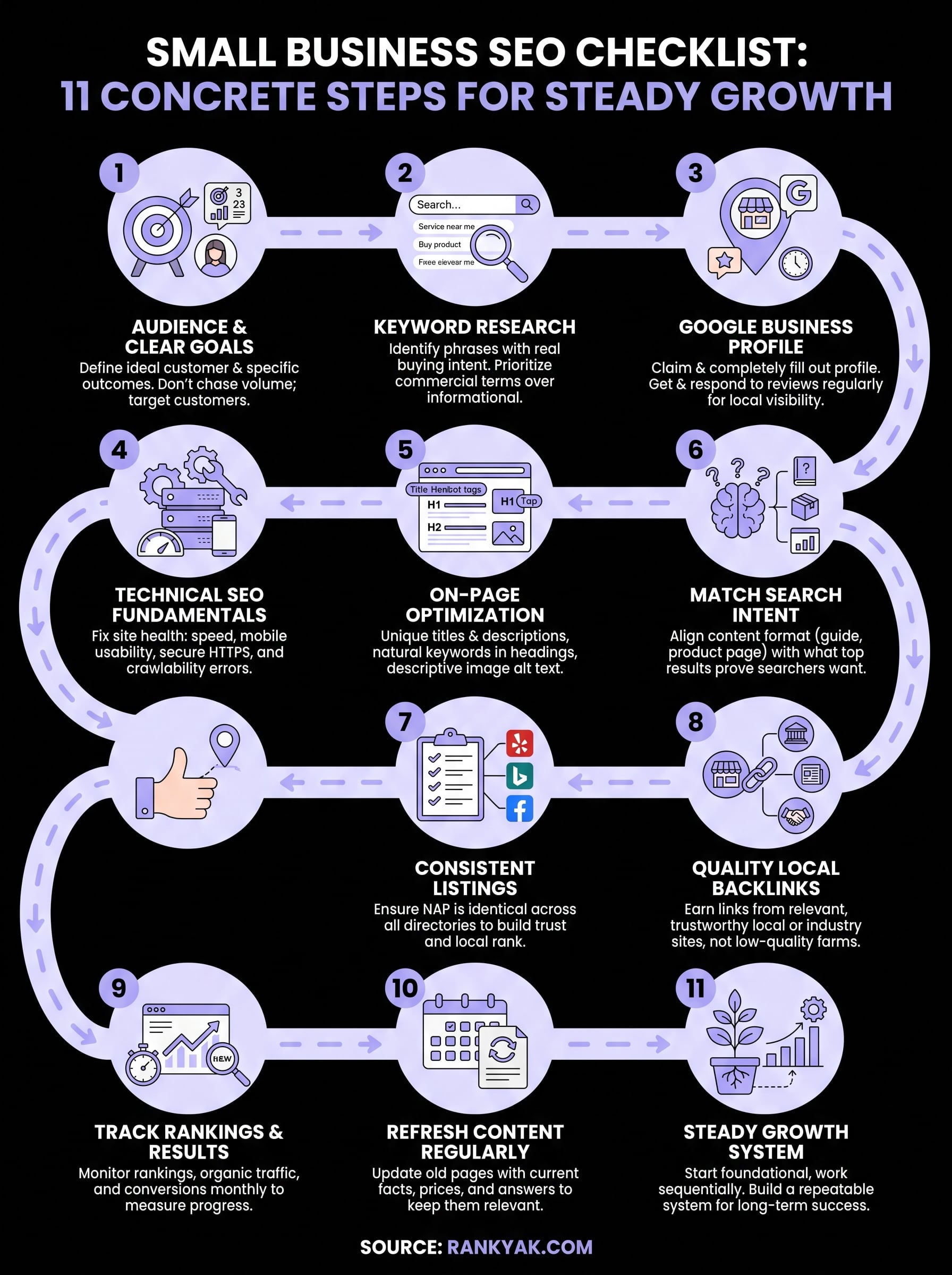
Eleven steps looks like a lot when you're staring at it as a to-do list, but you don't need to finish everything this weekend. Start with your audience and goals, fix the technical basics, then work through the rest in order. Each step builds on the last, and skipping ahead usually means redoing work later.
The real challenge isn't knowing what to do, it's sticking with it long enough to see results. Keyword research goes stale, content needs refreshing, and rankings need tracking every single month. That's the part most small business owners burn out on, not the strategy itself.
If you'd rather hand off the repetitive parts, like keyword discovery, content creation, and publishing, let RankYak run the checklist for you so you can stay focused on running your business while it keeps executing in the background.
Allan de Wit is a co-founder of RankYak and has worked in SEO since 2015: inside agencies, alongside them, for clients directly, and in-house on the products being ranked. He came to it as a software engineer building for marketers, which is why the platform is built the way it is. He went on to start companies of his own, two of which were acquired. At RankYak he sets the product direction and owns the features, the quality bar, the design, and the UX.
