Local SEO Strategy: Step-By-Step Plan for Google Maps in 2026
Three out of every four people who search for a local business on their phone visit a store within 24 hours. That stat alone makes local SEO strategy one of the most valuable investments a small or medium-sized business can make, yet most businesses either ignore it entirely or execute it poorly. If your Google Business Profile is collecting dust and you're nowhere to be found on Google Maps, you're handing customers to competitors who showed up first.
The good news: local SEO isn't some mysterious black box. It's a set of concrete, repeatable steps that any business owner can follow, even without a dedicated marketing team or an agency on retainer. The key is consistency, and that's exactly what tools like RankYak are built for: automating the SEO grind (keyword research, content creation, publishing) so you can focus on running your business while your online visibility grows on autopilot.
This guide breaks down a complete, step-by-step local SEO checklist for small businesses built for 2026. You'll learn how to optimize your Google Business Profile, build local citations, earn reviews, create location-targeted content, and track your results. Whether you're a single-location shop or managing multiple storefronts, every tactic here is actionable and current. Let's get into it.
How Google ranks local results in 2026
Google's local ranking system operates separately from its standard organic algorithm, but the two overlap more than most people realize. When someone searches "best pizza near me" or "plumber in Austin," Google pulls results from two distinct places: the local pack (the map and the three business listings below it) and the standard organic results that appear underneath. Your local SEO strategy needs to account for both, because users click on both.
The three core ranking factors
Google has publicly confirmed three factors that determine where your business appears in local results: relevance, distance, and prominence. Relevance measures how well your business profile matches what a searcher is looking for. Distance is exactly what it sounds like: how far your location is from the searcher or the area they specified. Prominence reflects how well-known and credible your business is, both online and offline.
Of these three factors, prominence is the one you have the most direct influence over through consistent SEO work.
Relevance depends on the signals you feed Google: your business category, the keywords in your Business Profile description, your website content, and the services you list. Distance is largely outside your control, but you can target specific neighborhoods or service areas to make your profile relevant to searchers in those zones. Prominence pulls from your review count and rating, citation consistency, website authority, and even mentions in third-party sources like local news outlets or directories.
How the local pack and organic results connect
The local pack and the organic results below it are not totally independent systems. A business that ranks in the top three of the local pack often also ranks on page one for the same search in organic results. Google cross-references your website's on-page signals with your Business Profile data to decide how trustworthy and relevant you are. A weak website hurts your local pack ranking, and a weak Business Profile limits your organic reach for local queries.
In 2026, Google also factors in AI-powered intent signals more heavily than it did two years ago. If someone's search history and current query suggest they want to visit a business today, Google favors listings with complete hours, recent photos, and active reviews. Static, stale profiles get pushed down regardless of how long they've been live.
What changed in 2026
One of the most significant recent shifts is the weight Google now gives to behavioral engagement signals. Click-through rate from the local pack, requests for directions, calls made directly from the listing, and website visits from Maps all feed into Google's ranking model. A profile that gets more interactions from users signals to Google that it is more useful, which creates a self-reinforcing cycle. The businesses that actively manage their profiles and generate consistent engagement pull further ahead each month.
Google also continues to merge local data from its Search Generative Experience outputs, meaning businesses that appear in AI-generated summaries for local searches gain additional visibility. Getting there requires the same fundamentals: accurate data, strong reviews, and a trustworthy website. None of this requires a large budget or a technical background; it requires knowing what to fix, in what order, and then doing it consistently.
Step 1. Choose your locations, services, and keywords
Before you touch your Google Business Profile or write a single page of content, you need a clear map of what your business offers and where it operates. Skipping this step means optimizing for the wrong things and attracting traffic that never converts. A solid local SEO strategy starts with specificity: which locations, which services, and which exact search terms your ideal customers actually type.
Map your locations and service areas
If you have a physical storefront, your primary location is obvious. But most businesses serve a radius well beyond their front door. List every city, neighborhood, and zip code where you actively win customers, then sort those into tiers based on revenue potential. Tier 1 locations get dedicated pages and full profile optimization; Tier 2 locations get mentioned in supporting content and service descriptions.
Use this template to organize your locations before building anything:
| Location | Tier | Primary Service | Priority |
|---|---|---|---|
| Austin, TX (main) | 1 | HVAC repair | High |
| Round Rock, TX | 1 | HVAC repair | High |
| Cedar Park, TX | 2 | HVAC installation | Medium |
| Pflugerville, TX | 2 | AC tune-up | Low |
Find keywords that match real search behavior
Keyword research for local SEO shows that people searching locally use specific, intent-loaded phrases like "emergency plumber in Denver" or "dog groomer open Sunday near me." Your keyword list needs to mirror those patterns, not just broad terms like "plumbing" or "grooming." Start with your core service + city formula, then layer in modifiers: urgency words ("emergency," "same-day"), qualifiers ("affordable," "licensed"), and neighborhood names.
The closer your keywords mirror actual spoken and typed search queries, the more likely Google is to match your listing to those searches.
For each service, build a keyword set using this format:
- Primary: [Service] + [City] (e.g., "roof repair Chicago")
- Long-tail: [Qualifier] + [Service] + [City] (e.g., "affordable roof repair Chicago")
- Intent-based: [Service] + [City] + [Action trigger] (e.g., "roof repair Chicago free estimate")
Run this process for every Tier 1 location on your list. Your completed keyword map becomes the backbone for every profile update, landing page, and content piece you build in the steps ahead.
Step 2. Optimize your Google Business Profile
Your Google Business Profile is the single most visible element of your local SEO strategy, and most businesses treat it like a directory listing rather than a marketing asset. Google reads every field you fill in to determine relevance, so every blank field is a missed opportunity. This step walks you through turning a bare-bones profile into one that earns clicks, calls, and directions requests.
Complete every field in your profile
Start by logging into your profile and auditing what you have against what Google allows. Incomplete profiles rank lower because they give Google less data to match against search queries. Work through this checklist and fill in anything missing:
- Business name: Use your real-world name, no keyword stuffing
- Primary category: Choose the most specific option available (e.g., "Residential HVAC contractor," not just "Contractor")
- Secondary categories: Add up to nine that reflect additional services you offer
- Address or service area: List every city you serve if you don't have a public-facing storefront
- Phone number: Use a local number with your area code, not an 800 number
- Website: Link to a specific landing page for your primary location, not just your homepage
- Hours: Include holiday hours and mark temporary closures proactively
- Services and products: List each service individually with a short description and price range if applicable
- Attributes: Check every relevant attribute (women-owned, wheelchair accessible, free Wi-Fi, etc.)
Write a description that converts
Your business description gives you 750 characters to tell Google and potential customers what you do and where you do it. Use the space to include your primary service, city, and a clear differentiator. Do not use this field to cram in keywords; Google ignores keyword stuffing and actual readers find it off-putting.
Use this template as a starting point:
[Business name] provides [primary service] in [city] and surrounding areas,
including [Tier 2 locations]. [One sentence about your experience or
differentiator]. [One sentence about what makes working with you easy or
reliable]. Call us or request a quote directly from this listing.
Keep your profile active after launch
A profile you set up once and never touch will drift down rankings as competitors who post updates and collect reviews pull ahead.
Google treats recent activity as a freshness signal, so post an update, add a new photo, or answer a question at least once every two weeks. Use the Posts feature to share offers, seasonal services, or announcements. Fresh photos of real work, staff, or your location also drive higher engagement than stock images, and engagement directly feeds your ranking.
Step 3. Build trust with citations and entity signals
Citations are online mentions of your business name, address, and phone number (NAP) across directories, data aggregators, and review sites. Google cross-references these mentions to confirm that your business is real, legitimate, and located where you say it is. Inconsistent citations, even small discrepancies like "St." vs. "Street" in your address, create conflicting entity signals that erode your local SEO credibility and push your ranking down.
Fixing NAP inconsistencies is one of the highest-return actions in any local SEO strategy because the effort is finite and the trust signal is permanent.
Audit and fix your existing citations
Before building new citations, audit what already exists. Search your business name in Google and check the top directories that surface: Yelp, Yellow Pages, Apple Maps, Bing Places, and any industry-specific directories. Look for any listing where your address, phone number, or business name differs from what you use on your Google Business Profile. Fix mismatches by claiming those listings and updating them to match exactly, character for character.
Use this audit template to track your progress:
| Directory | Current NAP | Matches GBP? | Action Needed |
|---|---|---|---|
| Yelp | 123 Main St | Yes | None |
| Yellow Pages | 123 Main Street | No | Update to "St" |
| Apple Maps | Old phone number | No | Claim and update |
| Bing Places | Not listed | No | Create listing |
Build citations in the right order
Data aggregators feed dozens of smaller directories automatically, so start there rather than manually claiming hundreds of individual listings. In the US, the four primary aggregators are Data Axle, Neustar Localeze, Foursquare, and Factual. Submitting accurate NAP to these four sources multiplies your citation footprint without the manual overhead.
After the aggregators, target industry-specific directories relevant to your niche. A plumber gets more ranking authority from a listing on a home services platform than from a generic business directory. Relevance of the citation source to your industry signals to Google that your business belongs in a specific category, which reinforces your entity profile and strengthens the trust signals that feed directly into local pack rankings.
Step 4. Make your website the best local answer
Your Google Business Profile drives map visibility, but your website carries the on-page signals that Google needs to confirm relevance and authority for local organic results. A weak or generic website pulls your local pack ranking down even when your profile is fully optimized. The goal in this step is to make your site the clearest, most useful answer to every local search query you identified in Step 1.
Build location-specific landing pages
Every Tier 1 location on your list deserves its own dedicated landing page built on content localized for that market, not a homepage with a city name sprinkled in. Dedicated location pages give Google a specific URL to rank for each target market and give users a page that matches exactly what they searched for. Each page should focus on one service in one city and include your NAP data, a locally relevant headline, service details, and a clear call to action.
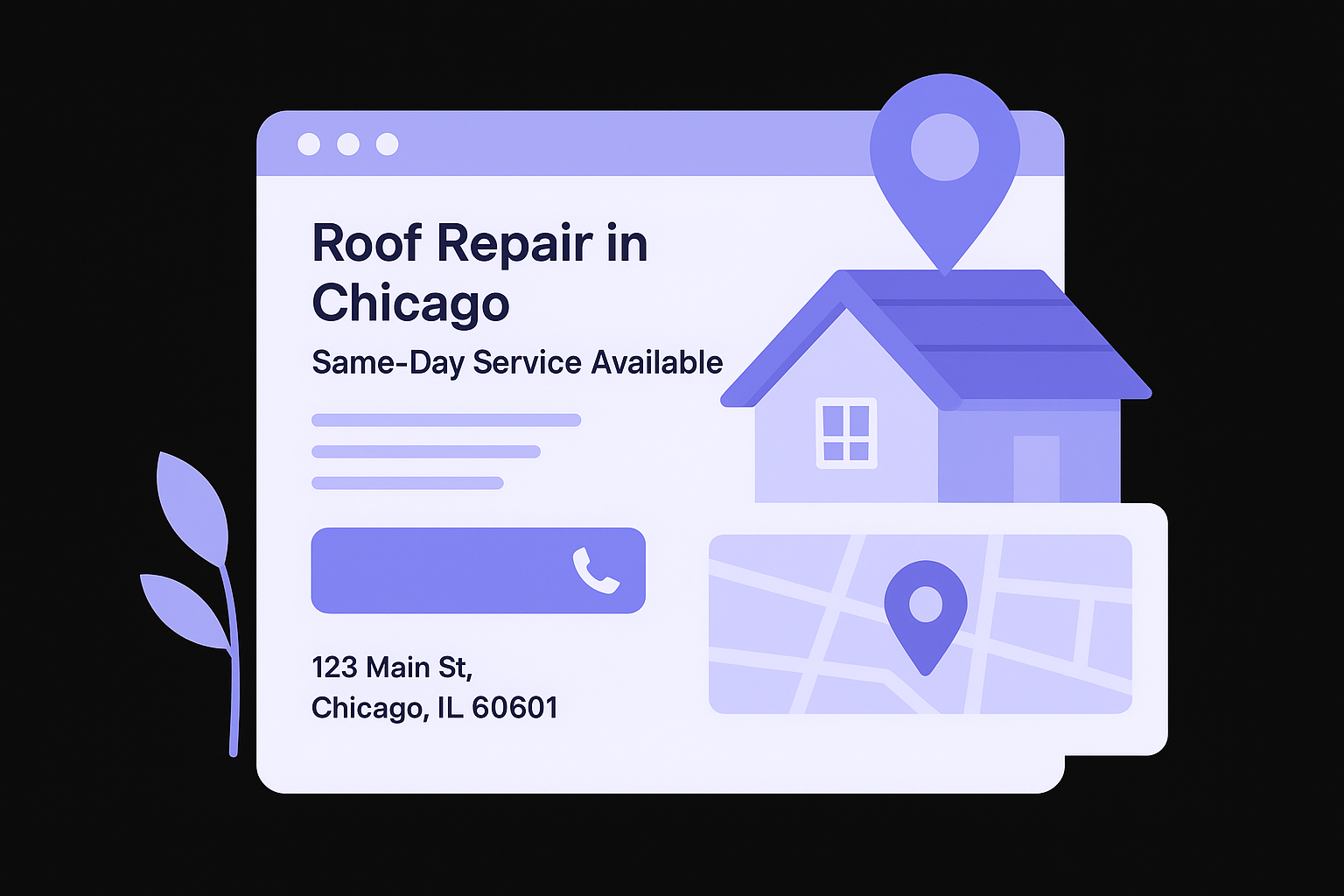
Use this page structure as a template for every location page you build:
H1: [Service] in [City] + [Differentiator]
Example: Roof Repair in Chicago, Same-Day Service Available

Paragraph 1: What you offer in this city, 2-3 sentences
Paragraph 2: Why locals choose you, include a specific detail about the area
Paragraph 3: What the process looks like, step by step
CTA: "Call [local phone number] or request a free quote below"
NAP block: Business Name | 123 Main St, Chicago, IL 60601 | (312) 555-0100
Embedded Google Map: iframe of your business location
Match on-page signals to your keywords
Google reads your title tag, meta description, H1, and the first 100 words of your page to determine what query the page answers. Each location page needs a unique title tag that follows this format: [Service] in [City] | [Business Name]. Do not use the same title tag across multiple location pages, as duplicate title tags split ranking signals and confuse Google's crawlers, so check your titles and descriptions in bulk before launch.
Schema markup for local businesses gives Google structured data to confirm your NAP, business type, and operating hours directly from your site code.
Add LocalBusiness schema to every location page. Generate valid LocalBusiness JSON-LD so your schema block matches your Google Business Profile exactly, including the business name, address format, and phone number, so both signals reinforce each other and strengthen your overall local SEO strategy.
Step 5. Reviews, links, and consistent local activity
Reviews and links are the two trust signals Google uses to compare your business against competitors who have already completed the foundational work in steps one through four. A fully optimized Google Business Profile and a well-structured website will plateau without these signals. Consistent local activity keeps your ranking from sliding backward as competitors publish content and collect reviews each month. This is the stage where your local SEO strategy either compounds into a dominant position or stalls out and gets passed.
Earn and manage reviews systematically
Reviews directly influence your local pack ranking and your click-through rate from Maps. Ask every satisfied customer for a review within 24 hours of completing a job, when the experience is still fresh. The easiest method is a direct link: log into your Google Business Profile, find the "Get more reviews" option, and copy the short link it generates. Send that link via text or email right after the transaction closes.
Responding to every review, positive or negative, signals to Google that your business is active and engaged, which feeds the behavioral signals that drive local rankings.
Use this follow-up text template to remove friction from the ask:
Hi [Name], thanks for choosing [Business Name]!
If you have a minute, a Google review would mean a lot to us: [short link]
Takes about 30 seconds and helps us reach more local customers.
Build local links that move the needle
Local backlinks carry more ranking weight than generic directory citations because they connect your business to a specific geographic community. Target three source types with these proven local link building tactics: local news outlets, community organizations, and local business associations like your city's Chamber of Commerce. Sponsor a neighborhood event and ask for a link on the event page. Offer to provide expert commentary to a local reporter covering your industry.
Each link you earn from a locally relevant domain reinforces your geographic authority in Google's understanding of your business and pushes your listing higher in results for that area. Track every outreach attempt in a simple spreadsheet with the target site, contact name, date sent, and current status so you follow up on a schedule rather than whenever you remember. Two to three new local links per month builds a meaningful authority gap between you and competitors who skip outreach entirely.
Next steps to keep your rankings
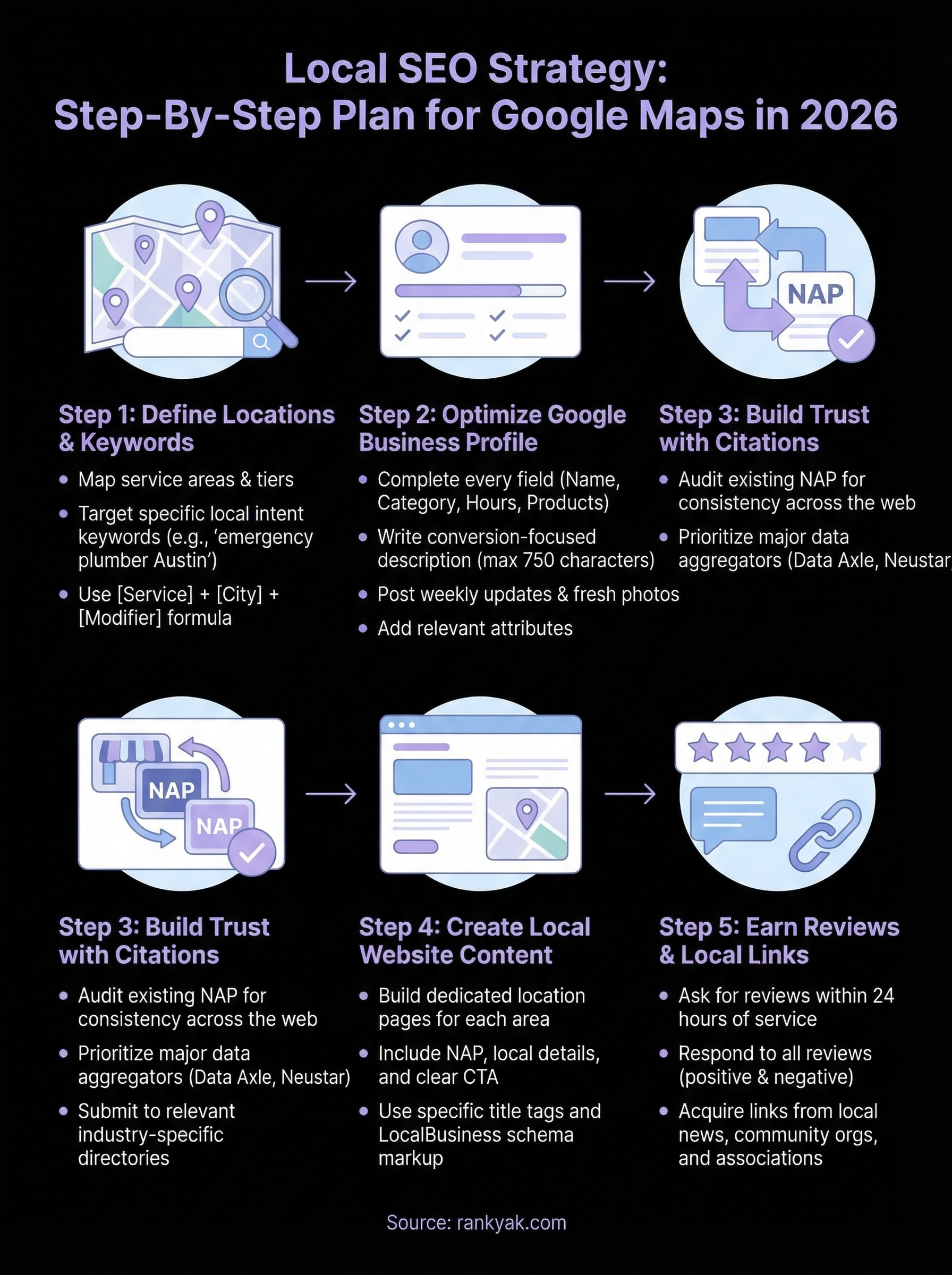
You now have a complete local SEO strategy built around the signals Google weights most in 2026: a fully optimized Google Business Profile, consistent citations, location-specific pages, and a steady flow of reviews and local links. The businesses that hold their rankings long-term are the ones that treat this as ongoing maintenance, not a one-time project. Set a monthly calendar reminder to add new photos, respond to any unaddressed reviews, publish a Google Post, and check for new citation inconsistencies.
Content is where most local businesses fall behind competitors over time. Producing one well-optimized article per week targeting local search queries compounds your authority and keeps Google crawling your site on a regular schedule. If you want that content output on autopilot without hiring a writer or spending hours at a keyboard, see how RankYak helps local businesses own the searches in your area by handling keyword research, writing, and publishing while you focus on the work that actually pays.
Allan de Wit is a co-founder of RankYak and has worked in SEO since 2015: inside agencies, alongside them, for clients directly, and in-house on the products being ranked. He came to it as a software engineer building for marketers, which is why the platform is built the way it is. He went on to start companies of his own, two of which were acquired. At RankYak he sets the product direction and owns the features, the quality bar, the design, and the UX.
