16 Best On-Page SEO Tools to Optimize Content in 2026
Getting your pages to rank takes more than just writing content and hoping for the best. You need to nail title tags, optimize headings, fix internal links, improve readability, and work through dozens of other items on an on-page SEO checklist, all while keeping up with how Google actually evaluates pages right now. Doing that manually across an entire site? That's where most teams fall behind.
The right best on-page SEO tools can close that gap fast. They analyze your pages against ranking factors, flag what's missing, and tell you exactly what to fix, so you're not guessing. Some handle technical audits. Others focus on content optimization or keyword placement. A few, like RankYak, go further by automating content creation and publishing with on-page SEO baked in from the start, so every article ships ready to compete.
This guide breaks down 16 tools worth considering in 2026, covering what each one does best, where it falls short, and what it costs. Whether you're optimizing existing pages or building new ones from scratch, you'll find options here that fit your workflow and budget.
1. RankYak
RankYak takes a different approach than most tools on this list. Instead of giving you a checklist to work through manually, it automates the entire content pipeline from keyword research to publishing, with on-page SEO built into every article it generates. That means your title tags, headings, internal links, and keyword placement are handled before the content ever goes live on your site.
What it helps you optimize on-page
RankYak focuses on content-level on-page factors that directly affect how on-page SEO works in practice and how Google evaluates a page. It handles keyword targeting, heading structure, internal linking, and topic clustering automatically. The platform analyzes search intent and competitor pages before writing, so the articles it produces are structured to match what Google already rewards for a given query, rather than what you assume it wants.
Your content also gets built around E-E-A-T principles, with facts, citations, and logical structure included by default. That's a meaningful difference from tools that simply flag missing keywords after you've already written the piece.
Standout features for 2026
RankYak publishes one fully SEO-optimized article per day, up to 5,000 words, including a featured image. It supports over 40 languages and adapts to your brand voice across every piece of content. The platform connects with major CMS platforms, including WordPress, Shopify, Webflow, and Wix, so articles go live without any manual steps from your team.
Among the best on-page SEO tools available in 2026, RankYak stands out for teams that want consistent, optimized output without the overhead of managing it manually.
Beyond Google, RankYak also optimizes content for AI chat platforms like ChatGPT and Perplexity. That dual focus matters because a growing share of organic discovery now happens outside traditional search results, and most tools haven't caught up to that shift yet.
Best fit and skill level
RankYak works well for small to medium-sized businesses, content marketers, and entrepreneurs who need consistent output but don't have the budget for an agency or a dedicated SEO team. You don't need deep technical SEO knowledge to use it. The platform handles strategy and execution, so your job is to review and approve, not to build content from scratch every week.
Pricing
RankYak offers a single all-in-one plan at $99 per month, which includes every feature on the platform. There's also a 3-day free trial that you can cancel anytime, no questions asked.
2. Google Search Console
Google Search Console is a free tool from Google that shows you how your site performs in search results. It pulls real data directly from Google's index, which makes it one of the most reliable starting points for on-page optimization. No third-party estimates, just actual performance data about how your pages appear and rank.
What it helps you optimize on-page
Search Console gives you direct insight into which queries trigger your pages, your click-through rates, and where you rank for specific keywords. That data tells you which title tags and meta descriptions are underperforming, so you can rewrite them and preview how they appear in Google to improve clicks without guessing.
- Keyword and query performance by page
- CTR and impressions data
- Indexing and coverage issues
Standout features for 2026
The URL Inspection tool lets you see exactly how Google crawls and renders any specific page. You can submit URLs for re-indexing directly from the interface, which tightens the feedback loop after you make on-page changes.
Among the best on-page SEO tools, Search Console is the only one that delivers data straight from Google itself, making it irreplaceable for validating your optimization work.
Core Web Vitals reporting is built into the platform, so you can monitor page experience scores across your entire site without adding another tool to your stack.
Best fit and skill level
Search Console suits beginners and experienced SEOs alike. It requires no technical setup beyond setting up Google Search Console and verifying your site, and Google's own documentation walks you through every report.
Pricing
Google Search Console is completely free with any Google account. There are no paid tiers or usage limits.
3. Ahrefs
Ahrefs is one of the most widely used SEO platforms on the market, built around a massive link index and a comprehensive set of tools for site auditing, keyword research, and content analysis. When it comes to on-page optimization, it gives you structured data about what's working on your pages and where your rankings are being held back.
What it helps you optimize on-page
The Site Audit tool crawls your entire site and surfaces on-page issues like missing title tags, duplicate content, thin pages, and broken internal links. You get a prioritized list of fixes, so you know exactly where to focus your time instead of reviewing pages one by one.
- Missing or duplicate title tags and meta descriptions
- Thin or low-quality page content
- Broken internal links and redirect chains
Standout features for 2026
The Content Gap tool lets you find keywords your competitors rank for that your pages don't target yet, giving you a clear path for expanding on-page coverage. Ahrefs also added AI-assisted content suggestions to help you spot missing subtopics on existing pages before you push updates live.
When evaluating the best on-page SEO tools, Ahrefs stands out for teams that want both technical audit data and keyword-level content insights in one platform.
Best fit and skill level
Ahrefs suits intermediate to advanced users who already understand core SEO concepts, so it helps to see Ahrefs compared with RankYak before committing. The data is dense, and getting full value from it requires knowing what to act on first in an audit report.
Pricing
The Lite plan starts at $129 per month. Higher tiers unlock more users, projects, and data limits, reaching up to $449 per month for the Advanced plan.
4. Semrush
Semrush is a comprehensive SEO platform that covers keyword research, site auditing, and content optimization in one dashboard. Its On Page SEO Checker gives you specific recommendations for each page based on your target keyword, competitors, and Google's current ranking signals, making it one of the best on-page SEO tools for data-driven teams.
What it helps you optimize on-page
The On Page SEO Checker pulls in data from top-ranking competitors and tells you exactly what to add, remove, or rework on each page you want to rank. You get recommendations for content length, semantic keywords, backlink gaps, and technical issues, all tied to a specific target keyword.
- Missing or weak title tags and meta descriptions
- Semantic keyword gaps compared to top competitors
- Content quality and internal linking recommendations
Standout features for 2026
Semrush's Content Marketing Toolkit includes a writing assistant that scores your content for readability, tone, and keyword usage in real time. The Site Audit tool flags technical on-page problems across your entire domain, including duplicate content, crawl errors, and internal linking gaps.
For teams that need a single platform to handle both content optimization and technical auditing, Semrush delivers one of the most complete feature sets available.
Best fit and skill level
Semrush suits intermediate to advanced users who manage multiple campaigns or large sites. Beginners can use it, but the volume of data and reports can feel overwhelming without some prior SEO experience.
Pricing
Semrush's Pro plan starts at $139.95 per month. The Guru and Business tiers reach up to $499.95 per month, with each tier adding more users, historical data, and content marketing features.
5. Screaming Frog SEO Spider
Screaming Frog SEO Spider is a desktop-based site crawler that pulls on-page data from every URL on your site in minutes. It gives you a raw, detailed view of your site's structure that browser-based tools often miss, making it a reliable option among the best on-page SEO tools for anyone who wants granular technical control.
What it helps you optimize on-page
Screaming Frog crawls your entire site and surfaces on-page problems at scale. You get a complete breakdown of title tags, meta descriptions, heading tags, and canonical URLs across every page it finds, all in one exportable spreadsheet.
- Duplicate or missing title tags and meta descriptions
- Broken internal links and redirect chains
- Orphaned pages with no internal links pointing to them
- Hreflang and canonical tag errors
Standout features for 2026
The tool connects directly with Google Search Console and Google Analytics, pulling in performance data alongside crawl results so you can cross-reference traffic with technical issues on the same page. Its custom extraction feature lets you scrape specific on-page elements using XPath or regex, which is useful when you need data that standard crawl reports don't surface.
Screaming Frog remains one of the most thorough crawl tools available for teams that need raw, exportable on-page data across large sites.
Best fit and skill level
Screaming Frog suits intermediate to advanced users who are comfortable working with spreadsheets and interpreting raw crawl data. It's less guided than audit tools built into platforms like Ahrefs or Semrush.
Pricing
The free version crawls up to 500 URLs. The paid license costs $259 per year and removes all crawl limits.
6. On-Page.ai
On-Page.ai is a content optimization tool built around NLP analysis and competitor research. It examines the top-ranking pages for your target keyword and tells you exactly what topics, terms, and structural elements your page needs to compete, without requiring you to manually audit competitors yourself.
What it helps you optimize on-page
On-Page.ai focuses on semantic content gaps and entity coverage across your pages. It scans top-ranking competitors and generates a list of missing topics and NLP terms that your content should include to better match what Google expects for a given query.
Standout features for 2026
The platform's NLP optimization scoring rates your content in real time as you write or paste it in, so you can see exactly how your page compares to competitors before publishing. It also includes a content brief generator that builds structured outlines based on what's already ranking, so you can turn a keyword into a writer-ready brief before you write a single word.
On-Page.ai is one of the best on-page SEO tools for writers who want NLP-driven guidance without switching between multiple platforms.
Best fit and skill level
Your team will get the most value from On-Page.ai if you work as a content writer or SEO specialist who wants data-backed direction on what to cover in each piece. The recommendations appear in plain language, so you don't need a technical background to act on them effectively.
Pricing
On-Page.ai offers a Solo plan starting at $40 per month. Higher tiers add more page optimizations and team seats, reaching up to $297 per month for agency-level access.
7. Surfer
Surfer is a content optimization platform that scores your pages against top-ranking competitors in real time. It analyzes hundreds of on-page signals and tells you exactly how to close the gap between your content and what's already ranking for your target keyword, all inside a built-in editor.

What it helps you optimize on-page
Surfer's Content Score measures how well your page covers the topic relative to the top results for your keyword. It tracks keyword usage, heading structure, word count, and NLP terms as you write, updating your score live so you can see whether your edits are moving in the right direction before you publish anything.
Standout features for 2026
Surfer's SERP Analyzer breaks down every on-page element across your competitors' ranking pages, from heading distribution to keyword density, giving you a data-backed baseline to write against. The platform also includes an AI-assisted content outline generator that builds structured briefs based on what the top pages actually cover, so you're not starting from a blank page.
Surfer is one of the best on-page SEO tools for writers who want a scoring system that reflects real competitor data rather than generic content rules.
Best fit and skill level
Surfer works well for content writers, SEO specialists, and small teams who produce articles regularly and want real-time feedback during the writing process, though it's worth weighing Surfer SEO next to RankYak if you'd rather have the article written for you. You don't need advanced technical knowledge to use it, but you do need to understand how to interpret content scores and apply changes effectively.
Pricing
Surfer's Essential plan starts at $99 per month. The Scale plan runs $219 per month and unlocks more articles, team seats, and additional features.
8. Clearscope
Clearscope is a content optimization tool built around keyword relevance and content quality scoring, sitting alongside the other content optimization tools for SEO worth comparing. It analyzes top-ranking pages for your target keyword and grades your content based on how thoroughly it covers relevant terms and topics, giving you a clear benchmark to write against.
What it helps you optimize on-page
The platform measures how well your page covers a topic by scoring your content against the terms that appear most frequently across top-ranking competitor pages. It surfaces missing keywords and topic gaps, helping you strengthen individual pages without rewriting everything from scratch.
Standout features for 2026
Clearscope's content grading system runs inside a clean editor that highlights which relevant terms you've used and which ones you're still missing. The platform integrates directly with Google Docs and WordPress, so your writers can optimize content inside the tools they already use instead of copying and pasting between platforms.
Among the best on-page SEO tools built around content grading, Clearscope stands out for its clean interface and direct CMS integrations.
Best fit and skill level
Your content team will get the most from Clearscope if you produce high volumes of articles and need a repeatable way to check keyword coverage before publishing. The grading system is straightforward enough that writers without deep SEO experience can act on the recommendations independently.
Pricing
Clearscope's Essentials plan starts at $189 per month, which includes a set number of content reports and keyword discovery runs. Higher tiers add more reports and team seats, though the entry cost makes it better suited for established teams with consistent content volume rather than solo operators just getting started.
9. Google PageSpeed Insights
Google PageSpeed Insights is a free tool from Google that measures how fast your pages load and how well they perform against Core Web Vitals on both mobile and desktop. Since page speed is one of the confirmed on-page ranking factors, it belongs in any serious workflow alongside the best on-page seo tools you use for content and keyword optimization.
What it helps you optimize on-page
PageSpeed Insights analyzes your URL and returns a performance score from 0 to 100, broken down into specific metrics like Largest Contentful Paint, Interaction to Next Paint, and Cumulative Layout Shift. Each metric comes with a direct explanation of what it measures and why it affects how users experience your page, so you're not left guessing what to fix.
Slow-loading pages cost you rankings and visitors at the same time, making page speed one of the most impactful on-page factors you can control.
Standout features for 2026
The tool provides field data from real Chrome users alongside lab data from a simulated test, so you can see how your page actually performs for visitors rather than relying only on synthetic benchmarks. It also surfaces prioritized recommendations like eliminating render-blocking resources, compressing images, and reducing unused JavaScript, each with an estimated impact on load time.
Best fit and skill level
PageSpeed Insights works for any skill level. Developers can dig into the technical recommendations, while non-technical users can pass the report directly to a developer with clear context on what needs fixing.
Pricing
Google PageSpeed Insights is completely free with no account required.
10. Lighthouse
Lighthouse is an open-source auditing tool built by Google that runs automated checks across performance, accessibility, SEO, and best practices for any web page. Unlike PageSpeed Insights, which tests a single URL against real-world data, it runs locally inside Chrome DevTools or via the command line, giving you more control over how and when you run audits.
What it helps you optimize on-page
Your pages get scored across five audit categories, including SEO-specific checks like missing meta descriptions, illegible font sizes, and pages blocked from indexing. Each failing audit comes with a clear explanation of what's wrong and direct guidance on what to fix, so you understand why each issue matters for your rankings.
Standout features for 2026
The SEO audit category flags on-page issues that directly affect how Google crawls and evaluates your pages, from missing title tags to unoptimized crawl directives, the same ground an automated site audit covers across every URL. It also runs accessibility checks that overlap with Google's quality signals, helping you catch problems that hurt both rankings and user experience at the same time.
Lighthouse is one of the best on-page seo tools for developers who want to test pages in a controlled local environment before pushing changes live.
Best fit and skill level
Developers and technically minded SEOs get the most value from Lighthouse when they want granular audit data without routing URLs through a third-party server. Running it inside Chrome DevTools requires no account or additional setup.
Pricing
Lighthouse is completely free and open source. You can access it directly through Chrome DevTools or as a command-line tool, with no paid tiers or usage limits of any kind.
11. Google Rich Results Test
Google Rich Results Test is a free tool that checks whether your pages are eligible for rich results in Google Search, including review stars, FAQs, product details, and recipe cards. Structured data for SEO is an on-page element that directly affects how your pages appear in the SERP, and this tool tells you exactly whether your markup is valid before you publish.
What it helps you optimize on-page
The tool validates the structured data markup on any URL you enter and flags any errors or warnings that would prevent Google from generating rich results for that page. You get a clear breakdown of which schema types Google detected, which ones passed validation, and which ones have issues that need fixing before they'll qualify for enhanced search features.
Structured data that fails validation never produces rich results, making this tool one of the most direct ways to protect the on-page work you've already done.
Standout features for 2026
Google Rich Results Test lets you test both live URLs and code snippets, so you can validate your markup before a page goes live rather than discovering errors after the fact. The interface shows you a preview of how the rich result will appear in search, giving you a practical sense of what users will see before you commit to a final implementation.
Best fit and skill level
This tool suits developers and SEO specialists who implement structured data on their sites. It's one of the more technical options among the best on-page seo tools on this list, though the interface itself is straightforward.
Pricing
Google Rich Results Test is completely free with no account required.
12. Schema.org Schema Markup Validator
The Schema.org Schema Markup Validator is a free tool that checks your structured data against the Schema.org vocabulary, which is the standard specification that Google, Bing, and other search engines use to interpret your markup. Unlike Google's Rich Results Test, which checks whether your markup qualifies for specific rich results, this tool validates your schema against the actual Schema.org specification itself, catching a broader category of issues before they affect how search engines read your pages.
What it helps you optimize on-page
The validator parses your page or code snippet and identifies any errors or warnings in your structured data markup. It catches issues like missing required properties, incorrect data types, and invalid nesting that would prevent search engines from reading your markup accurately.
Standout features for 2026
The tool supports validation for all Schema.org types, not just the handful that qualify for Google rich results. That makes it valuable when you're implementing less common schema types that Google's Rich Results Test won't cover. Using both tools together, or a free JSON-LD schema checker, gives you the most complete picture of your structured data health across every page you've marked up.
Among the best on-page seo tools for schema validation, this one checks your markup against the source specification rather than a platform-specific interpretation, which surfaces a wider range of structural errors.
Best fit and skill level
This tool suits developers and technical SEOs who implement structured data and want to validate markup against the full Schema.org standard, not just Google's supported subset.
Pricing
The Schema.org Schema Markup Validator is completely free with no account required and no usage limits of any kind.
13. Yoast SEO
Yoast SEO is one of the most widely installed WordPress plugins in existence, and for good reason, especially on sites that publish articles straight into WordPress. It gives you real-time on-page feedback directly inside the WordPress editor, so you can optimize each post or page before you hit publish rather than running audits after the fact.
What it helps you optimize on-page
Yoast analyzes your content as you write and scores it against your target keyword, checking for keyword placement in the title, meta description, opening paragraph, subheadings, and image alt text. It also runs a readability analysis that flags passive voice, long sentences, and poor paragraph structure, all of which affect how both users and Google evaluate your pages.
Standout features for 2026
The plugin's content analysis panel updates live as you edit, giving you a color-coded checklist of what's passing and what still needs attention on every page. Yoast also manages your XML sitemaps and canonical tags automatically, which keeps your technical setup clean without requiring separate tools for those tasks.
Among the best on-page seo tools built specifically for WordPress, Yoast covers more on-page checkpoints in a single plugin than most standalone content editors do.
Best fit and skill level
Yoast suits WordPress users of any skill level, from beginners publishing their first blog posts to experienced SEOs managing large content libraries. The traffic light scoring system makes its recommendations accessible without requiring technical SEO knowledge.
Pricing
Yoast SEO offers a free version with core on-page features. The premium plan costs $99 per year per site and adds AI-assisted title and meta description suggestions, internal linking recommendations, and redirect management.
14. Rank Math
Rank Math is a WordPress SEO plugin that competes directly with Yoast by packing advanced on-page optimization controls into the WordPress editor. It covers everything from schema markup to content analysis, and most of its standout features are available without upgrading to a paid plan.
What it helps you optimize on-page
Inside the WordPress editor, Rank Math analyzes your content against your target keyword and surfaces actionable recommendations before you publish. It checks key on-page elements and scores each one so you know exactly what to fix, though a bulk meta tag audit is still the faster way to catch duplicate titles across a whole site.
- Title tags and meta descriptions
- Heading usage and keyword placement
- Internal links and image alt attributes
- Canonical tags and indexing settings
Standout features for 2026
The plugin supports multiple focus keywords per page on its free tier, which puts it ahead of comparable tools that lock that feature behind a paywall. Its built-in schema markup library covers over 900 schema types, so you can add structured data without installing a separate plugin. Rank Math also pulls in Google Search Console data directly inside your WordPress dashboard, giving you keyword performance alongside your content editor.
Among the best on-page seo tools built for WordPress, Rank Math delivers more capabilities at no cost than most plugins charge a premium for.
Best fit and skill level
Rank Math works well for WordPress users at any experience level. Beginners can follow the color-coded scoring system, while advanced users can customize schema settings and meta controls that comparable plugins typically lock behind paid plans.
Pricing
The free version covers core on-page features without usage restrictions. The Pro plan starts at $6.99 per month (billed annually) and adds content AI credits, more keyword tracking, and expanded analytics tools.
15. ShortPixel Image Optimizer
ShortPixel is an image compression and optimization plugin that reduces file sizes across your site without visible quality loss. Since unoptimized images are one of the most common causes of slow page load times, ShortPixel directly affects the Core Web Vitals scores that Google uses as a ranking signal, making it a practical addition alongside the best on-page seo tools you use for content and keyword work.
What it helps you optimize on-page
ShortPixel compresses JPEG, PNG, GIF, and WebP images automatically as you upload them to WordPress, keeping your pages lean without requiring you to manually process each file. Smaller image files lower your Largest Contentful Paint score, one of the Core Web Vitals metrics Google factors directly into page rankings, which makes compression a core part of image SEO optimization.
Standout features for 2026
The plugin supports next-gen WebP and AVIF conversion, automatically serving modern image formats to browsers that support them while falling back to standard formats for older ones. It also processes your entire existing media library in bulk, so you can compress thousands of previously uploaded images without touching each one individually.
Among performance-focused tools, ShortPixel handles image optimization at a scale that manual compression workflows simply cannot match.
Best fit and skill level
ShortPixel works well for WordPress users of any experience level, from solo bloggers to large e-commerce sites running thousands of product images. The plugin handles compression automatically once you configure your initial settings, so no ongoing manual work is required after setup.
Pricing
ShortPixel offers a free plan covering 100 image credits per month. Paid plans start at $4.99 per month for 5,000 image credits, scaling up based on your site's volume.
16. Bing Webmaster Tools
Bing Webmaster Tools is Microsoft's free platform for monitoring how your site performs in Bing Search. While Google dominates overall search traffic, Bing powers results across Microsoft Edge, Yahoo, and other Microsoft products, giving it a meaningful share of desktop search that's worth tracking alongside the best on-page seo tools you already use for Google.
What it helps you optimize on-page
Bing Webmaster Tools gives you direct data on how Bing crawls and indexes your pages, surfacing on-page issues like missing meta tags, crawl errors, and pages blocked from indexing. The built-in SEO Analyzer scans individual URLs and returns structured recommendations across the following areas:
- Title tags and meta descriptions
- Heading structure and keyword usage
- Internal link quality and crawlability
- Pages blocked from indexing
Standout features for 2026
The platform includes a Site Scan feature that crawls your entire domain and prioritizes on-page issues by severity, similar to what Google Search Console provides for Google's index. Your dashboard also includes a keyword research tool built directly into the interface, letting you pull search demand data from Bing's own index without paying for a separate tool.
Monitoring your pages in Bing alongside Google gives you a more complete picture of how different search engines read and evaluate your on-page elements.
Best fit and skill level
Bing Webmaster Tools works well for any skill level, from beginners who want a straightforward audit report to experienced SEOs running multi-channel search strategies across both Google and Bing.
Pricing
Bing Webmaster Tools is completely free with a Microsoft account, with no paid tiers or usage limits.
Next steps
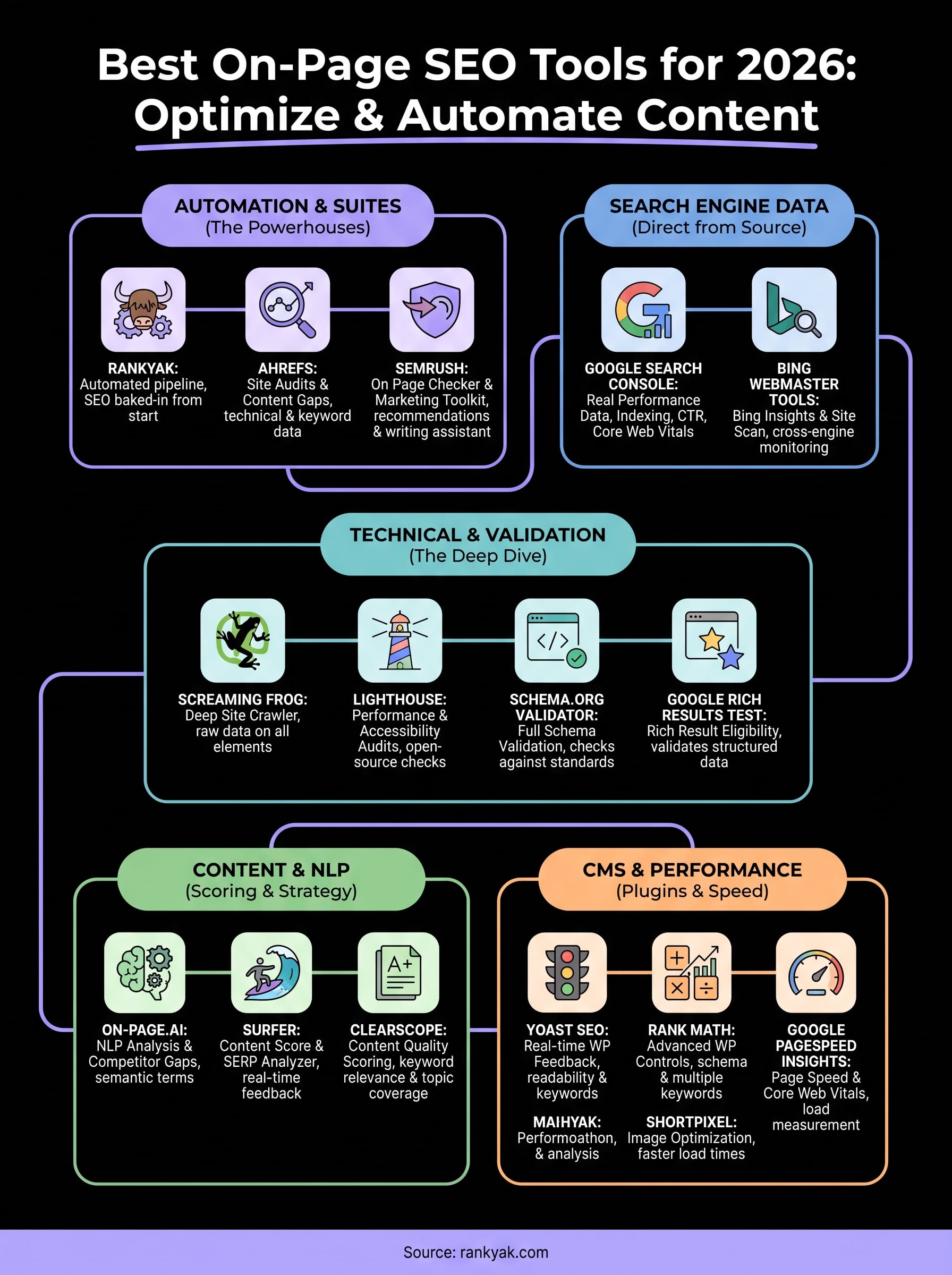
The best on-page SEO tools covered in this guide handle different parts of the optimization process, from crawling and schema validation to content scoring and image compression. Your next move is to identify which gaps actually exist on your site, then pick the tools that close them directly rather than stacking tools you won't use consistently.
If you want to skip the manual content workflow entirely, RankYak builds on-page optimization into every article it generates and publishes it to your site automatically. That means keyword targeting, heading structure, and internal linking are handled before your content goes live, and you get a fully optimized article every day without writing a single content brief yourself. Try RankYak's automated on-page SEO free for 3 days and see how much ground you can cover in a week.
Lars Koole is a co-founder of RankYak and has worked in SEO since 2021, on the side where a strategy has to become a live page: inside agencies, alongside them, for clients directly, and in-house on the products being ranked. He is a software engineer by trade, which is how that page gets built. Before RankYak he founded companies of his own, two of which were acquired. At RankYak he owns the engineering and everything AI, and works out the solution and the implementation of each new feature.
