Moz Keyword Explorer: Features, Metrics, And How To Use It
Moz Keyword Explorer is one of the most well-known keyword research tools in the SEO space, and for good reason. It gives you search volume, keyword difficulty, organic CTR, and SERP analysis all in one place, the kind of data you need to decide which keywords are actually worth pursuing.
Whether you're evaluating a single term or building out a full content strategy, understanding what Moz Keyword Explorer offers (and where it falls short) matters. The tool has evolved significantly over the years, and its metrics work differently than what you'll find in competing platforms like Ahrefs Keyword Explorer or Semrush. Knowing how to read those metrics correctly can mean the difference between chasing dead-end keywords and finding real opportunities.
At RankYak, we automate the entire keyword-to-published-article pipeline, from automatic keyword discovery and scoring through optimization and publishing. Tools like Moz Keyword Explorer play a role in how SEO professionals evaluate keywords, so it's worth breaking down how the tool works and what each feature actually does. This guide covers its core features, the metrics it tracks, how to use it effectively, and when you might want a more automated approach to keyword research and content creation.
What Moz Keyword Explorer is and who it helps
Moz Keyword Explorer is a keyword research and analysis tool built by Moz, a company that has been part of the SEO industry since the early 2000s. You type in a keyword, a URL, or a domain, and the tool returns data points that help you evaluate whether a keyword is worth targeting: how many people search for it, how difficult it is to rank for, how likely organic results are to get clicks, and what the SERP currently looks like. It sits inside the Moz Pro subscription but also offers a limited number of free searches per month for users without a paid account.
Who the tool is built for
Moz Keyword Explorer works for a wide range of people doing SEO, from solo bloggers trying to find low-competition topics to in-house marketing teams running competitive analysis across an entire industry. If you're managing a content calendar and need to validate whether a topic has enough search demand to justify the effort, the tool gives you volume estimates and priority scores that make those decisions faster. If you're an agency handling multiple client sites, you can use keyword lists and filtering options to compare opportunities across different niches.
The tool also works well if you're newer to SEO. Moz has historically focused on making its data readable and its interface clean, which means you're not overwhelmed by raw numbers before you understand what they mean. More experienced SEOs can dig into the SERP analysis and competitive breakdowns, while beginners can start with the Priority score to understand which keywords deserve attention first.
Moz Keyword Explorer is particularly useful when you need a quick, reliable snapshot of keyword opportunity without pulling data from multiple disconnected sources.
What sets it apart from other research tools
What makes Moz Keyword Explorer distinct is its proprietary scoring system. Rather than presenting only raw metrics, Moz translates search volume, difficulty, and CTR data into a single Priority score that reflects how attractive a keyword is overall. That scoring matters when you're working through a large list and need to triage quickly rather than manually weighing three or four metrics against each other for every term.
Another differentiator is the Organic CTR metric, which estimates what percentage of searchers actually click on organic results for a given keyword. Some searches are dominated by paid ads, featured snippets, or knowledge panels, which reduces the traffic you'd realistically receive even if you ranked on page one. Knowing that before you commit to writing a piece of content gives you a clearer picture of the actual return on your effort, not just the theoretical one based on search volume alone.
Why keyword research tools still matter in 2026
Despite the rise of AI-generated content and automated platforms, keyword research remains the foundation of any SEO strategy that produces real results. You need to know what people are actually searching for, how competitive those terms are, and whether the volume justifies the effort before you commit to creating content. That core requirement hasn't gone away.
Search behavior is more complex, not simpler
Search in 2026 looks different than it did five years ago. Featured snippets, AI Overviews, and paid ad stacks now occupy significant real estate at the top of results pages, which means actual organic click-through on any given keyword can vary dramatically from what raw volume numbers suggest. Tools like Moz Keyword Explorer factor in organic CTR estimates precisely because knowing that a keyword gets 5,000 monthly searches tells you very little if 80% of searchers never click an organic result.
Understanding the gap between search volume and realistic organic traffic is what separates useful keyword research from misleading data.
Ranking in AI-driven search still requires structured content strategy
AI chat platforms like ChatGPT and Perplexity pull from indexed, authoritative content when generating responses. That means the content you create still needs to target specific topics clearly, demonstrate expertise, and earn authority signals like backlinks. None of that happens without first understanding which topics and phrases your audience is using. The right keyword research tool gives you the map before you start building.
Relying on guesswork instead of verified search data, and missing why keyword research matters in the first place, is what causes most content programs to stall out. Without keyword data, you're writing about topics you assume matter rather than ones your audience is actively searching for. Consistent, strategic topic selection based on real demand is what allows a site to grow steadily rather than publish content at random and hope something eventually ranks.
Features inside Moz Keyword Explorer
Moz Keyword Explorer packages several research tools into a single interface, so you can move from initial keyword discovery through competitive analysis without switching platforms. The layout is straightforward: enter a keyword, a URL, or a domain, and the tool returns layered data you can filter, sort, and save into lists for later use.
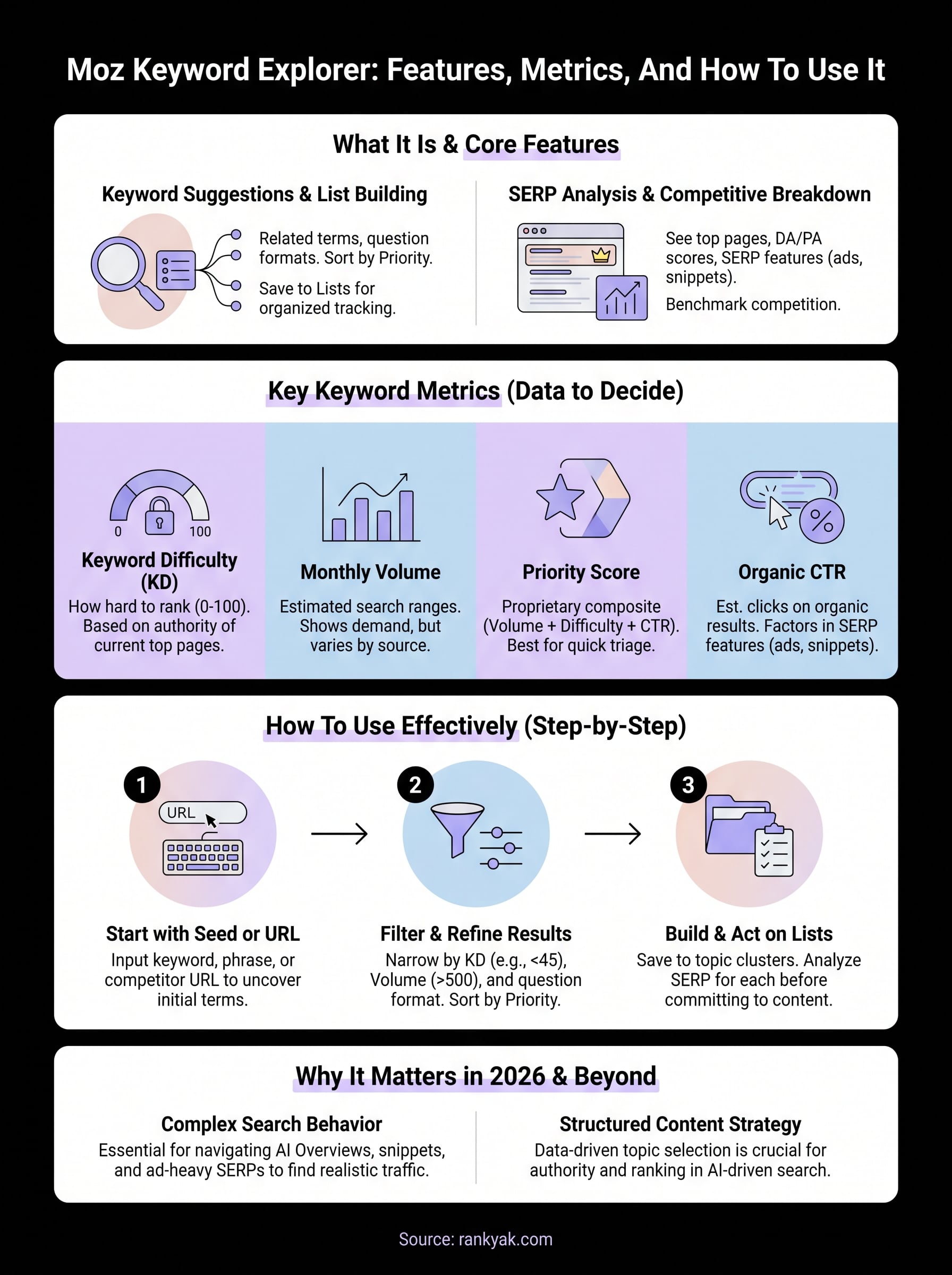
Keyword Suggestions and List Building
When you enter a seed keyword, the tool surfaces related keyword suggestions organized by relevance, question format, and lexical similarity. You can sort these by volume, difficulty, or Priority score, which makes it easy to spot clusters of terms worth targeting together rather than one at a time. Once you find keywords you want to track, you save them directly into keyword lists inside the platform, where you can revisit and compare them against each other without re-running searches.
The list feature is particularly useful when you're planning a content calendar. You can group keywords by topic, assign them to pages, and monitor how the metrics shift over time without losing your research in a spreadsheet somewhere.
Organizing keywords into lists before you start writing keeps your content strategy connected to actual search data rather than gut instinct.
SERP Analysis and Competitive Breakdown
For each keyword, Moz Keyword Explorer shows you the current top-ranking pages along with their Domain Authority and Page Authority scores. This tells you quickly whether the competition is dominated by high-authority sites or whether there are gaps a newer or mid-authority site can realistically fill. You also see SERP feature breakdowns, such as whether featured snippets, ads, or local packs are taking up visible space, which directly affects how much organic traffic you can expect.

Seeing who currently ranks and why gives you a concrete benchmark. Instead of guessing whether a keyword is too competitive, you compare your current authority and content depth against what's already ranking and make a data-driven call.
Moz keyword metrics explained
Moz Keyword Explorer surfaces several distinct metrics for every keyword you research, and knowing how to read Moz volume, CTR, and difficulty prevents you from misreading the data. Each metric answers a specific question about opportunity and competition, so treating them as a complete picture rather than isolated numbers gives you far better decisions.
Keyword Difficulty and Monthly Volume
Keyword Difficulty (KD) runs on a scale from 0 to 100 and reflects how hard it will be to rank organically for a given term, much like other keyword difficulty checkers do. Moz calculates this score based on the authority of pages currently ranking in the top results, so a score of 60 or above typically signals that you're competing against well-established sites with significant domain authority. Volume estimates show how many times a keyword is searched per month, but Moz presents these as ranges rather than exact numbers, which is honest given the inherent uncertainty in volume data across different data sources.
Treating a keyword difficulty score as a hard cutoff rather than a relative signal will cause you to dismiss opportunities your competitors overlook.
When you use these two metrics together, you can filter for terms with moderate volume and manageable difficulty, which is where most realistic ranking opportunities actually live for sites that aren't already dominant in their niche.
Priority Score and Organic CTR
The Priority score is Moz's proprietary composite metric, blending volume, difficulty, and organic CTR into a single number that reflects overall keyword attractiveness. It saves you from manually weighing three separate data points for every term you evaluate.
Organic CTR estimates the percentage of searchers who actually click on an organic result for that keyword. When a search result page is dominated by ads, featured snippets, or knowledge panels, organic CTR drops considerably, which means your real traffic potential is lower than the raw volume figure suggests. Moz Keyword Explorer surfaces this data directly so you can factor realistic click potential into your targeting decisions before you commit to writing.
How to use Moz Keyword Explorer step by step
Using Moz Keyword Explorer effectively comes down to a repeatable process: input the right starting point, filter results by the metrics that matter for your site, and save what you find into organized lists. The tool rewards a structured approach over random searches, so building a consistent workflow from the start saves you significant time as your research scales.
Start with a seed keyword or URL
Enter a broad topic, a specific phrase, or a competitor's URL into the search bar to generate your initial data set. Starting with a URL instead of a keyword surfaces what terms a competing page is already ranking for, which gives you a faster read on gaps in your current content and a shortcut into analyzing your competitors' keywords. From there, the tool returns volume, difficulty, and Priority scores alongside related suggestions you can evaluate as a group rather than one at a time.
Inputting a competitor URL at the start of your research often uncovers high-value keywords you wouldn't have thought to search for directly.
Filter and refine your results
Once you have a results list, use the built-in filters to narrow it down by keyword difficulty range and monthly volume. For most small to mid-sized sites, finding low difficulty keywords with a difficulty below 45 and volume above 500 per month is a practical starting point. You can also filter by question-format keywords, which tend to align well with featured snippet opportunities and content that answers specific reader queries.

A useful filtering sequence looks like this:
- Set difficulty to a ceiling that matches your current Domain Authority
- Filter out very low-volume terms below your minimum threshold
- Sort the remaining list by Priority score, highest first
- Review organic CTR for the top results before finalizing targets
Build and act on your keyword list
Save your filtered keywords directly into a named list inside the platform rather than exporting them to a spreadsheet you'll lose track of. Cluster your keyword list by intent so each list maps to a specific content theme. Once your list is in place, use the SERP analysis for each keyword to confirm that your site can realistically compete before you assign a term to a content piece.
Wrap-up and next steps
Moz Keyword Explorer gives you a reliable set of tools for evaluating keyword opportunity: difficulty scores, volume estimates, organic CTR data, and SERP breakdowns that help you decide where to focus your content effort. When you use those metrics together rather than in isolation, you make faster, better-informed decisions about which terms are worth pursuing and which ones will drain your time for little return.
That said, keyword research is only the starting point. Finding the right keywords matters far less than consistently creating, optimizing, and publishing content around those terms at a pace that actually moves your rankings. If that workflow is currently the bottleneck for your site, RankYak handles the entire process automatically, from keyword discovery to published article, every single day. You get the research, the content, and the publishing without managing it manually. Put your keyword strategy into action with SEO that researches, writes, and publishes every day.
Allan de Wit is a co-founder of RankYak and has worked in SEO since 2015: inside agencies, alongside them, for clients directly, and in-house on the products being ranked. He came to it as a software engineer building for marketers, which is why the platform is built the way it is. He went on to start companies of his own, two of which were acquired. At RankYak he sets the product direction and owns the features, the quality bar, the design, and the UX.
