Semrush Keyword Analysis: Step-by-Step Guide (2026)
Semrush is one of the most powerful SEO platforms on the market, and its keyword analysis tools are a big reason why. But having access to the tool and actually knowing how to use it effectively for keyword research are two different things. If you've ever opened Semrush and felt overwhelmed by the sheer number of reports, filters, and metrics staring back at you, you're not alone.
This guide walks you through Semrush keyword analysis step by step, from finding seed keywords to evaluating difficulty, search volume, and intent so you can build a content strategy that actually moves the needle. Whether you're vetting topics for your next blog post or mapping out a full content plan, you'll leave with a clear process you can repeat.
That said, keyword analysis is only the first piece of the puzzle, and one you can eventually automate keyword research for. Turning research into published, ranking content on a consistent basis is where most teams stall out. That's exactly why we built RankYak, to automate everything from keyword discovery through publishing, so your SEO doesn't stop at a spreadsheet. But first, let's make sure you know how to get the most out of Semrush's data.
What Semrush keyword analysis is and what you need
Semrush keyword analysis is the process of using Semrush's keyword tools to find, evaluate, and prioritize keywords based on data including search volume, keyword difficulty, search intent, and SERP competition. It goes beyond pulling a basic list of terms, because what keyword analysis actually involves is judgement as much as data. Instead, you're running each keyword through multiple reports and filters to determine whether ranking for it is realistic, whether it matches what your audience actually wants, and whether it fits your content strategy at this point in your site's growth. Done well, it gives you a shortlist of keywords worth pursuing rather than a spreadsheet of hundreds of terms you'll never act on.
The goal of keyword analysis isn't to find every possible keyword - it's to find the right keywords for your site's current authority and your audience's real needs.
The core Semrush tools you'll use
Semrush is a large platform with dozens of reports, but keyword research and analysis run through a specific cluster of tools. Knowing which ones matter and what each one does keeps you focused on the workflow that produces results, rather than getting lost in features you don't need right now.
Here are the main tools this guide covers:
| Tool | What it does |
|---|---|
| Keyword Overview | Gives a snapshot of any keyword: volume, difficulty, CPC, trend, and SERP features |
| Keyword Magic Tool | Generates keyword ideas from a seed term, grouped by topic and intent |
| Keyword Gap | Compares your keyword profile against competitors to surface missed opportunities |
| Position Tracking | Monitors how your target keywords rank over time |
| Organic Research | Shows which keywords a domain already ranks for and at what positions |
What you need before you start
Before you run a single search, you need a few things in place to make your analysis accurate and actionable. Skipping this setup step leads to keyword lists that look good in a spreadsheet but don't connect to any real content plan or ranking opportunity.
Here is what to have ready before you begin:
- A Semrush account with sufficient access: The free plan limits you to 10 searches per day. For any serious research, you need at minimum the Pro plan, which unlocks full Keyword Magic Tool access and keyword exports.
- Your target country and language selected: Keyword volume shifts significantly by region. Set your database to match where your audience lives before you pull any data, or your volume numbers will be misleading.
- A list of 3 to 5 seed keywords: These are broad terms that describe your niche, product, or service. You don't need a polished list - just enough starting points to let Semrush expand into relevant subtopics.
- Your domain connected to Semrush: Linking your domain lets the platform flag keywords you already rank for, highlight cannibalisation risks, and surface quick-win opportunities based on your existing positions.
Step 1. Set up Semrush for accurate keyword data
Before you run a single search, you need to configure Semrush so the data it returns actually reflects your market and your site. Skipping this setup is a common mistake that leads to misleading volume numbers, irrelevant keyword suggestions, and missed ranking opportunities. Two minutes of configuration here saves hours of wasted research later.
Connect your domain to Semrush
Head to My Reports or the main Semrush dashboard and add your domain to the platform if you haven't already. Once your domain is linked, Semrush will flag keywords you already rank for, identify content gaps compared to competitors, and surface quick-win keywords where you're sitting in positions 5 through 20 with a realistic chance to move up. You'll use this data constantly throughout your semrush keyword analysis workflow.
To connect your domain, follow these steps:
- Go to Domain Overview in the left-hand navigation
- Type your domain into the search bar and hit enter
- Semrush will generate a full domain report. Bookmark this page for quick access throughout your research
Linking your domain early means every keyword report you run will cross-reference your existing positions, so you're always building on what you have rather than starting blind.
Set the right keyword database
Keyword volume data in Semrush is tied to a specific regional database, and it defaults to the United States. If your audience is in a different country, or if you're running research for a client in another market as part of an international SEO strategy, you need to switch the database before pulling any numbers. Volume for the same keyword can vary dramatically between regions, so the wrong setting produces numbers that look plausible but send you after the wrong targets.
To set your database correctly:
- Click the country flag or database selector next to any search field
- Choose the country that matches where your target audience is based
- Keep this setting consistent across every tool in the platform: Keyword Magic Tool, Keyword Gap, and Position Tracking
Step 2. Build a starter keyword list fast
With your setup complete, you're ready to generate your first batch of keyword ideas. The Semrush Keyword Magic Tool is where your seed terms turn into a full working list, and it's the fastest entry point into any semrush keyword analysis workflow. Start with one seed keyword at a time to keep the results focused and manageable.
Use the Keyword Magic Tool to expand your seeds
Go to Keyword Magic Tool in the left-hand navigation, type in your first seed keyword, and confirm your target database. Semrush will return thousands of related terms grouped into subtopics on the left-hand sidebar. These topic groups are one of the most useful features in the tool because they let you slice a broad seed into specific content angles without manually sorting through hundreds of rows.

Start with your most specific seed keyword rather than the broadest possible term. Narrower seeds return more targeted suggestions that map directly to content you can realistically create.
Work through these steps for each seed keyword:
- Enter your seed term and select the correct regional database
- Click a topic group on the left sidebar to filter by subtopic
- Switch the view to Broad Match first, then check Phrase Match and Questions separately
- Use the Intent filter to separate informational, commercial, and navigational results
- Export the filtered results to a spreadsheet as you go
Filter down to a working list
Exporting everything Semrush returns gives you raw material, not a strategy. Once you have your export, apply three filters to cut the list to a size you can actually act on: keyword difficulty under your site's current threshold, search volume above a floor that justifies the effort, and intent that matches the type of content you plan to create. A working list of 20 to 40 well-filtered keywords is more useful than a bloated spreadsheet of 2,000 terms with no clear path forward.
Once you have your filtered list from the Keyword Magic Tool, run a keyword competitive analysis using the Keyword Gap tool. Go to Keyword Gap, enter your domain alongside two or three competitors, and filter for keywords where your competitors rank but you don't. This gap analysis for finding competitors' best keywords surfaces terms you're missing entirely, which often represent the fastest path to new traffic because the topic relevance is already validated by your competitors' rankings. Export these gap keywords and merge them into your working list before moving to SERP analysis.
Step 3. Confirm intent with SERP analysis and features
Search volume and difficulty numbers tell you part of the story, but they don't tell you what Google actually rewards for a given keyword. Before you commit a keyword to your content plan, you need to look at the live SERP for that term. In Semrush, clicking the SERP Analysis button in Keyword Overview pulls up the current top 10 results so you can see exactly what kind of content ranks and how it's structured.
Read the SERP before you commit to a keyword
Open the Keyword Overview report, enter your keyword, and scroll down to the SERP Analysis section. Scan the top three to five results and ask yourself two questions: what format are these pages (guides, product pages, listicles, videos), and what depth do they cover? If every result is a detailed 2,000-word guide and you planned a 500-word post, the intent signal is clear - ranking means matching the format and effort that Google already rewards at the top.
The SERP is the clearest possible signal of what Google considers the right answer to a query. Match the format and depth before you optimize anything else.
Use SERP features as intent signals
Semrush flags active SERP features for each keyword directly in the Keyword Overview report. These features tell you whether Google treats a keyword as informational, navigational, or transactional before you write a single word. Pay attention to which features appear and let them shape your content structure rather than guessing at intent from the keyword wording alone.
Here is how to interpret the most common SERP features in your semrush keyword analysis workflow:
| SERP feature | What it signals | What to do |
|---|---|---|
| Featured Snippet | Strong informational intent | Structure your answer in a concise, direct paragraph or list |
| Shopping results | Transactional intent | Lead with product-focused content, pricing, and comparisons |
| Video carousel | Visual or tutorial intent | Add step-by-step screenshots or embed a video |
| People Also Ask | Broad informational queries | Cover related sub-questions within your content body |
Step 4. Judge each keyword with the right metrics
Pulling a list of keywords is the easy part. Deciding which ones are actually worth pursuing requires you to evaluate each term against specific metrics rather than gut instinct. Semrush surfaces a lot of numbers in its reports, but not every metric carries equal weight. Focus on the ones that directly predict whether you can rank and whether ranking will drive meaningful traffic.
Read keyword difficulty and volume together
Keyword Difficulty (KD%) in Semrush estimates how hard it is to rank in the top 10 based on the authority of the pages currently sitting there. Like any keyword difficulty checker, Semrush calculates the score by analyzing the backlink profiles and authority scores of the pages currently ranking in the top 10 for that term. It's a page-level metric, not a domain-level one, so a high-authority site can still face high KD% if the specific pages ranking are heavily linked. A low KD% means weaker competition, and knowing how to find low difficulty keywords helps, but they often come with lower volume too. The key is not chasing high volume or low difficulty in isolation. Instead, look for keywords where the volume-to-difficulty ratio gives your site a realistic shot at a page-one result within a reasonable timeline.
A keyword with 500 monthly searches and a KD% of 25 will deliver more actual traffic than a 10,000-search keyword at KD% 80 that you'll never rank for.
Use this scoring framework during your semrush keyword analysis to move through your list faster:
| KD% range | What it means | Best for |
|---|---|---|
| 0-29 | Low competition | New sites or niche content |
| 30-59 | Moderate competition | Sites with growing authority |
| 60-79 | High competition | Established domains with strong backlink profiles |
| 80-100 | Very high competition | Skip unless you have significant authority |
Check CPC and trend data before you commit
Cost-per-click (CPC) tells you what advertisers pay to show up for a keyword, which is a reliable signal of commercial intent and audience buying readiness. A high CPC on an informational keyword often means the topic sits close to a purchase decision, making it worth your attention even if the search volume looks modest. Pay attention to competitive density as well, a metric scored from 0 to 1.00 that shows how aggressively advertisers compete for a keyword in paid search. A competitive density above 0.80 paired with informational intent often signals a keyword with strong commercial potential worth prioritizing in your content plan. Pair CPC and competitive density data with the trend graph in Keyword Overview to confirm the keyword has stable or growing search interest rather than a spike you've already missed.
Step 5. Prioritize keywords and map them to content
After filtering your keyword list and confirming intent, you have a solid batch of vetted terms. The next step in your semrush keyword analysis workflow is turning that list into a content map: a document that assigns each keyword to a specific page or post so every piece of content you create has a clear target and a defined purpose. Without this step, keyword lists sit in spreadsheets and never become actual traffic.
Score your keywords to find the best opportunities first
Not every keyword deserves equal attention, and building a simple scoring system helps you focus on the ones that move the needle fastest. For each keyword on your shortlist, assign a score from 1 to 3 across three dimensions: search volume potential, keyword difficulty relative to your site's current authority, and business relevance to your product or service. Add the scores together and sort your list from highest to lowest. The keywords at the top of that ranked list are where you start publishing.

A scored priority list stops you from defaulting to the highest-volume keywords and keeps you focused on terms where you have a realistic shot at ranking quickly.
Map each keyword to a single page
Before you assign individual URLs, group your scored keywords into topic clusters with a free keyword clustering tool: sets of related terms that share a parent topic and can be connected through internal links. For example, keywords like "best crm for small business," "crm software pricing," and "what is a crm" all cluster under a broader CRM topic. Clustering prevents you from creating isolated pages that compete with each other and instead builds the kind of topical map of pillars and supporting articles that Google rewards with higher rankings across the entire cluster.
Once you have your clusters and priority order, assign each keyword to exactly one URL on your site: either an existing page you plan to update or a new page you will create. This prevents keyword cannibalization, where multiple pages compete for the same term and split your ranking potential. Use the template below to structure your content map:
| Priority | Keyword | Target URL | Page type | Status |
|---|---|---|---|---|
| 1 | best crm for small business | /blog/best-crm-small-business | New blog post | To create |
| 2 | crm software pricing | /crm-pricing | Existing page | To update |
| 3 | what is a crm | /blog/what-is-crm | New blog post | To create |
Keep one primary keyword per page as your default rule. Secondary keywords can appear naturally in the same content, but your page should optimize clearly for a single main target to give Google an unambiguous signal about what the page covers.
Step 6. Track rankings and refresh your keyword targets
Publishing content based on your semrush keyword analysis is not the finish line. You need to monitor how your target keywords perform over time and revisit your list regularly to replace terms that aren't moving and add new opportunities your site is now strong enough to pursue. Tracking without a system leads to guesswork, so set this up before you publish your first piece of content from the plan you've built.
Set up Position Tracking in Semrush
Position Tracking is the tool in Semrush that monitors your daily rankings for a defined set of keywords. To set it up, go to Position Tracking in the left-hand navigation, click Set up tracking, and enter your domain. Then add the keywords from your content map, confirm your target location and device type, and hit start. To add keywords to your tracking campaign later, open the campaign settings and paste new terms into the keyword list. Semrush tracks different numbers of keywords depending on your plan: Pro tracks up to 500 keywords, Guru up to 1,500, and Business up to 5,000. If you need local data, Semrush can give keyword rankings by city, set your target location to a specific city rather than a country when configuring the campaign. This is especially useful for local SEO keyword targeting, where rankings vary significantly between metropolitan areas. Semrush will begin recording your positions daily so you can see exactly when a page moves up, drops, or stabilizes.
Check your Position Tracking report at least once a week during the first 90 days after publishing, when rankings shift most frequently.
To check keyword ranking in Semrush at any time, open the Position Tracking dashboard and use the keyword filter to search for specific terms. Follow these steps each time you review your tracking data:
- Filter by keywords that moved more than 3 positions in either direction
- Flag any page that dropped out of the top 20 for investigation
- Identify pages sitting in positions 5 through 15 as your highest-priority update targets
- Export a weekly snapshot to track progress against your content plan
When to refresh your keyword targets
Your keyword list should not stay static. Search behavior changes, new competitors enter your space, and your site's authority grows, which opens up keywords that were out of reach when you started. Review and refresh your full keyword list every 60 to 90 days using the same Keyword Magic Tool and Keyword Gap workflow from earlier steps. Remove any keywords you've successfully ranked for in the top three, add new targets at the right difficulty level for your current authority, and keep your content map current so every new piece of content you publish has a clear purpose.
Next steps
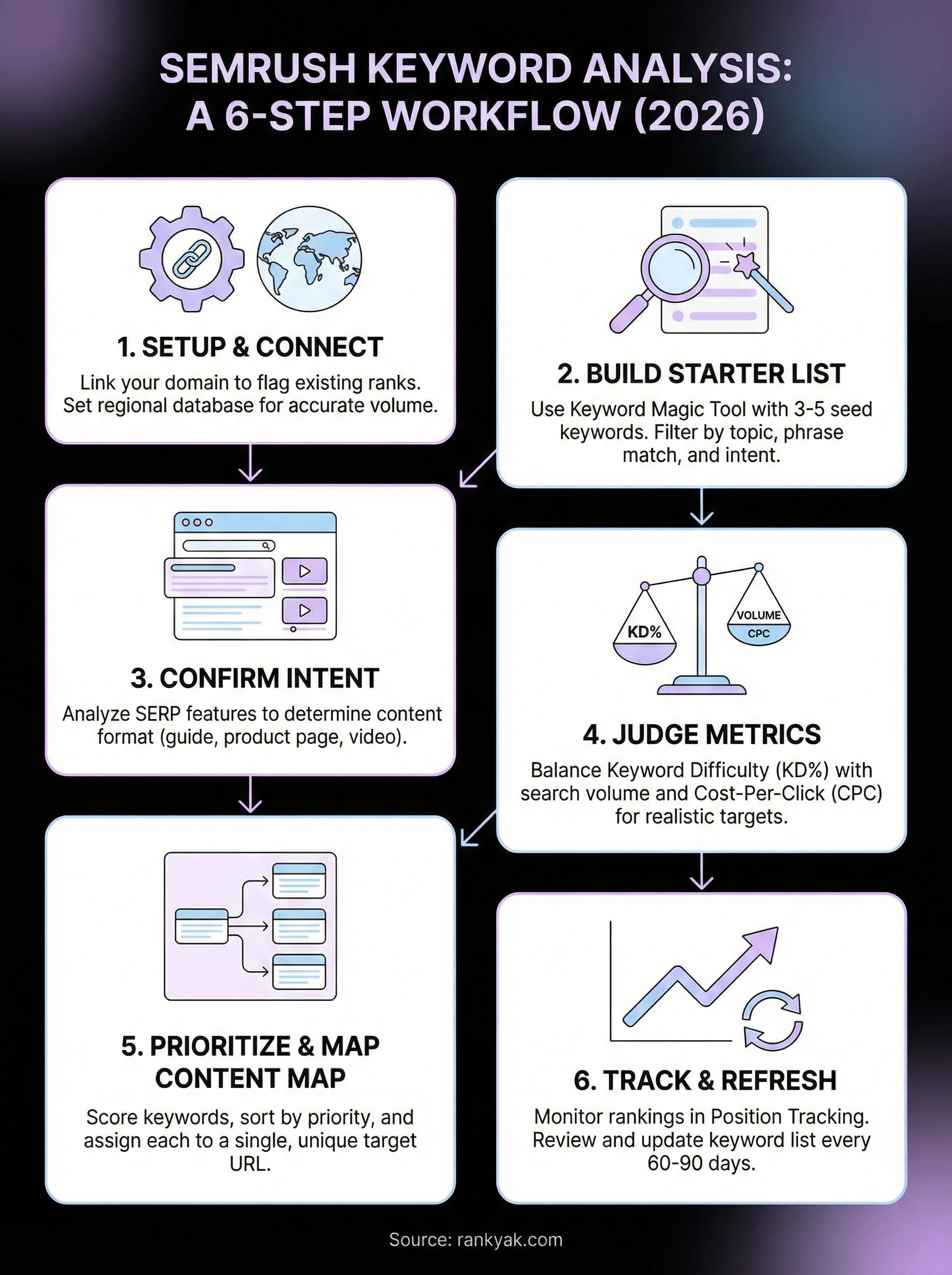
You now have a complete semrush keyword analysis workflow: from setting up your database and building a starter list, through confirming intent, scoring metrics, mapping keywords to content, and tracking rankings over time. Each step in this process builds on the last, so work through them in order rather than jumping to whichever part looks most familiar.
Your next move is to run the Keyword Magic Tool on your first seed keyword and build a shortlist of 20 to 30 vetted terms using the scoring framework from Step 4. Once that list is ready, map each keyword to a specific URL and start publishing.
Publishing consistently is where most keyword strategies stall out. If you want to skip the bottleneck of manually turning keyword research into live content, see how RankYak runs keyword discovery through daily publishing on autopilot, without hiring an agency or a content team.
Allan de Wit is a co-founder of RankYak and has worked in SEO since 2015: inside agencies, alongside them, for clients directly, and in-house on the products being ranked. He came to it as a software engineer building for marketers, which is why the platform is built the way it is. He went on to start companies of his own, two of which were acquired. At RankYak he sets the product direction and owns the features, the quality bar, the design, and the UX.
