Home / Blog / 15 Best Keyword Analysis Software Tools for SEO in 2026

15 Best Keyword Analysis Software Tools for SEO in 2026

Allan de Wit
Allan de Wit
·
January 28, 2026

Choosing the right keyword analysis software can make or break your SEO strategy. Whether you're a solo entrepreneur or managing content for multiple sites, the tool you use determines which opportunities you find, and which ones slip through the cracks. The best keyword analysis software gives you accurate search volume data, competitor insights, and actionable recommendations without requiring a data science degree to interpret the results.

Here's the problem: there are dozens of options out there, each claiming to be the ultimate solution. Some cost hundreds per month. Others are free but frustratingly limited. Finding a tool that balances features, accuracy, and price takes time you probably don't have, especially when every dollar in your marketing budget needs to earn its keep.

At RankYak, we built our SEO automation platform around smart keyword discovery because we understand how foundational this step is to everything that follows. We've tested and evaluated countless keyword tools while developing our own automated content pipeline. This guide breaks down 15 top keyword analysis software options for 2026, covering everything from enterprise-level platforms to genuinely useful free alternatives. You'll get detailed comparisons of features, pricing, and real-world effectiveness, so you can pick the right tool for your specific needs and stop second-guessing your choice.

1. RankYak

RankYak combines keyword discovery with automated content creation and publishing, making it unique among the best keyword analysis software options on this list. Instead of just showing you which keywords to target, RankYak builds your entire content strategy around those opportunities and executes it automatically. You get daily keyword suggestions tailored to your niche, plus SEO-optimized articles written and published to your site without manual intervention. This approach works particularly well if you need consistent content output but lack the time or team to handle keyword research, writing, and publishing separately.

What RankYak does best

RankYak excels at removing the gap between keyword research and content execution. Most tools stop after showing you a list of keywords with volume and difficulty scores. RankYak takes those insights and generates a complete article targeting your chosen keyword, then publishes it directly to your WordPress, Shopify, or Webflow site. You also get internal linking suggestions and topic cluster recommendations that strengthen your site's topical authority over time. The platform analyzes your existing content and brand voice, so the articles it produces match your style instead of sounding generic.

Keyword analysis and discovery workflow

RankYak's keyword discovery process starts by analyzing your website and niche to identify high-potential opportunities. The system evaluates search volume, keyword difficulty, and search intent alignment to recommend keywords you can realistically rank for. You receive daily keyword suggestions through an automated content plan that prioritizes topics based on your site's current authority and content gaps. Each keyword comes with SERP analysis showing what already ranks, so you understand what type of content you need to create. The platform also factors in visibility potential for AI chat platforms like ChatGPT, giving you keyword opportunities that extend beyond traditional Google search.

SEO automation features that affect rankings

Beyond keyword analysis, RankYak automates the entire content lifecycle. Each article includes proper heading structure, meta descriptions, and schema markup based on current SEO best practices. The platform integrates with Google Search Console to track which pages rank and adjusts future content recommendations accordingly. You get competitor analysis baked into every article, with insights pulled from pages currently ranking for your target keyword. RankYak also facilitates backlink building through its exchange network, connecting you with other niche sites for mutual link opportunities.

RankYak doesn't just find keywords, it builds and publishes the content that ranks for them, closing the execution gap that stops most SEO strategies.

Who RankYak fits best

RankYak works best for small to medium-sized businesses that need consistent content output without hiring a full content team. You'll appreciate the automation if you're managing multiple sites or clients, since each site gets its own keyword strategy and publishing schedule. The platform particularly benefits entrepreneurs and marketers who understand SEO fundamentals but lack time to execute manually. You should have a website on a supported platform (WordPress, Shopify, Webflow, or custom CMS) and a commitment to publishing regularly.

RankYak pricing

RankYak offers one all-inclusive plan at $99 per month per website. That price covers unlimited keyword research, one SEO-optimized article daily (up to 5,000 words), automatic publishing, and access to the backlink exchange network. You get a 3-day free trial to test the platform with no payment required upfront, and you can cancel anytime during or after the trial. The single-tier pricing eliminates the confusion of choosing between multiple plans, and there are no hidden fees for features like multi-language support or API access.

2. Semrush

Semrush ranks among the most comprehensive platforms in the keyword analysis space, offering depth that goes far beyond simple volume and difficulty metrics. You get access to over 20 billion keywords across 130 countries, plus competitive intelligence tools that show you exactly what your rivals rank for. The platform combines keyword research with site audits, backlink analysis, and rank tracking in one interface, making it a strong choice if you need multiple SEO functions under a single subscription.

What Semrush does best

Semrush excels at competitive keyword research that reveals gaps in your content strategy. You can enter any competitor's domain and see their top-performing keywords, estimated traffic, and position changes over time. The Keyword Magic Tool generates thousands of related keyword ideas from a single seed term, organized by topic clusters and question-based queries. Semrush also provides accurate SERP features data, showing which keywords trigger featured snippets, local packs, or knowledge panels, so you can adjust your content approach accordingly.

Keyword analysis and SERP research workflow

You start by entering a seed keyword or domain into the Keyword Overview tool, which displays monthly search volume, keyword difficulty, and CPC data instantly. Semrush breaks down search intent categories (informational, navigational, commercial, transactional) for each keyword, helping you match content type to user expectations. The platform shows SERP analysis with domain authority scores and backlink counts for top-ranking pages. You can filter results by keyword difficulty, search volume ranges, or word count to find opportunities that match your site's current authority level.

Competitive keyword gap options

The Keyword Gap tool compares your domain against up to four competitors simultaneously, highlighting keywords they rank for that you don't. You see shared keywords, missing keywords, and untapped opportunities in a visual matrix that makes prioritization straightforward. This feature helps you identify content gaps where competitors capture traffic you're missing, plus keywords where you outrank them but could strengthen your position further.

Competitive keyword gap options

Semrush's competitive keyword gap analysis shows you exactly where competitors win traffic you're missing, turning their success into your roadmap.

Who Semrush fits best

Semrush works best for agencies, in-house SEO teams, and businesses with budget for a premium tool. You'll benefit most if you manage multiple clients or need comprehensive competitor analysis alongside keyword research. The learning curve is steeper than simpler tools, so you should have basic SEO knowledge before diving in.

Semrush pricing

Semrush starts at $139.95 per month for the Pro plan, which includes 5 projects, 500 keywords to track, and 10,000 results per report. The Guru plan costs $249.95 monthly and adds Content Marketing Toolkit and historical data. Enterprise plans start at $499.95 per month with custom limits. All plans include a 7-day free trial that requires a credit card.

3. Ahrefs

Ahrefs built its reputation on backlink analysis but has evolved into one of the best keyword analysis software platforms available today. The tool's keyword database contains over 10 billion keywords across 171 countries, with updates happening monthly to keep data fresh. You get access to accurate search volume figures, click metrics showing how much traffic actually reaches organic results, and a proprietary difficulty score that accounts for more than just domain authority. Ahrefs stands out for its clean interface and fast processing speeds, making it easy to analyze thousands of keyword variations without waiting for reports to load.

What Ahrefs does best

Ahrefs excels at showing you exactly what ranks and why, with deeper SERP analysis than most alternatives. The platform displays referring domains, organic traffic estimates, and backlink profiles for every ranking page, giving you a complete picture of what it takes to compete. You can identify content gaps by comparing multiple competitors simultaneously, revealing keywords where they all rank but you don't. Ahrefs also provides parent topic analysis, showing you when multiple keywords should be targeted in a single piece of content rather than separate articles.

Keyword analysis and SERP research workflow

You begin by entering a seed keyword into Keywords Explorer, which returns comprehensive metrics including search volume across multiple countries, traffic potential, and return rate. Ahrefs shows you four types of keyword matches (exact, phrase, related, and search suggestions) to expand your research quickly. The SERP overview displays ranking pages with their estimated monthly traffic, number of keywords they rank for, and when they were last updated. You can filter results by keyword difficulty, search volume, or word count to narrow down opportunities that match your site's current strength.

Competitor keyword discovery options

The Content Gap tool reveals keywords your competitors rank for that your site doesn't target yet. You enter your domain plus up to 10 competitor URLs, and Ahrefs shows overlap and unique keywords across all domains in a detailed comparison table. This feature helps you spot low-hanging fruit where multiple competitors rank in positions 1-10 but your site doesn't appear at all. You can filter by keyword difficulty to find gaps you can realistically close based on your domain's authority.

Ahrefs gives you the complete ranking picture by combining keyword metrics with backlink data and traffic estimates for every competing page.

Who Ahrefs fits best

Ahrefs works best for SEO professionals, agencies, and businesses that prioritize data accuracy and need comprehensive competitor analysis. You'll appreciate the tool if you're managing client campaigns or building links alongside keyword research. The interface requires some SEO knowledge to interpret effectively, so beginners might face a learning curve initially.

Ahrefs pricing

Ahrefs starts at $129 per month for the Lite plan, which includes 5 projects, 6 months of history, and 500 credits monthly. The Standard plan costs $249 monthly and increases limits to 20 projects and unlimited history. Advanced and Enterprise plans run $449 and $14,990 per year respectively. All plans require annual billing with no monthly payment option available.

4. Google Keyword Planner

Google Keyword Planner offers free keyword data directly from the source that matters most: Google itself. Unlike third-party tools that estimate search volume, Keyword Planner pulls numbers from actual Google Ads data, giving you insights straight from the platform that controls 90% of global search traffic. The tool was built primarily for PPC advertisers but provides valuable intelligence for SEO keyword research, especially when you need reliable volume ranges and geographic targeting options without paying for premium software.

What Google Keyword Planner does best

Google Keyword Planner excels at providing cost-per-click data and competition levels for paid search, making it invaluable when you're planning both SEO and PPC campaigns simultaneously. You get accurate seasonal trends showing how search volume fluctuates throughout the year, plus geographic breakdowns that reveal where demand concentrates. The tool generates hundreds of keyword suggestions based on your seed terms or website URL, organized by relevance and search volume ranges.

Keyword analysis workflow for PPC and SEO

You access Keyword Planner through a Google Ads account (no spending required) and enter seed keywords or a competitor URL to generate ideas. Google returns search volume ranges, competition levels for paid ads, and suggested bid prices that indicate commercial intent. You can filter results by location, language, search network, and date range to narrow your focus. The platform shows average monthly searches rather than exact numbers unless you run active campaigns, but the ranges still help you prioritize opportunities effectively.

Data limitations to know before you trust it

Google Keyword Planner shows volume ranges instead of exact numbers for accounts without active ad spend, making precise comparisons difficult. The competition metric reflects paid search competition, not organic difficulty, so a "low competition" keyword might still be hard to rank for organically. Search volume data gets grouped together for similar terms, meaning you don't always see individual keyword performance.

Google Keyword Planner gives you data from the source, but volume ranges and PPC-focused metrics require interpretation before you apply them to SEO strategy.

Who Google Keyword Planner fits best

Google Keyword Planner works best for beginners and small businesses looking for free keyword data to start their SEO journey. You'll benefit most if you're running or planning Google Ads campaigns alongside organic efforts, since the CPC and competition data becomes immediately actionable.

Google Keyword Planner pricing

Google Keyword Planner is completely free to use once you create a Google Ads account. You don't need to run active campaigns or spend money to access basic features, though exact search volume numbers require maintaining an active advertising budget.

5. KWFinder

KWFinder focuses on one specific challenge that stops many SEO strategies: finding keywords you can actually rank for rather than aspirational targets dominated by high-authority sites. The tool combines search volume data with a proprietary keyword difficulty score that accounts for link profiles and domain authority of ranking pages. You get clean, focused results without the overwhelming feature sets of enterprise platforms, making KWFinder a solid middle-ground option when you need reliable difficulty metrics without paying for tools you won't use.

What KWFinder does best

KWFinder excels at surfacing long-tail keyword opportunities that larger competitors overlook. The platform's difficulty score uses a 0-100 scale that directly correlates with how hard a keyword is to rank for based on actual ranking factors like backlinks and domain strength. You can filter results by difficulty ranges to instantly see keywords within your reach, saving hours of manual SERP analysis across hundreds of possibilities.

Keyword difficulty and SERP analysis workflow

You enter a seed keyword and KWFinder returns volume, CPC, and difficulty metrics in a single view. The SERP analysis shows domain authority, page authority, and link counts for all top 10 results, letting you compare your site's strength against current competitors. KWFinder highlights exact match domains and page titles, revealing patterns in what ranks and helping you craft competitive content angles.

How to spot winnable long-tail keywords

Look for keywords with difficulty scores below 30 if your site is relatively new, or under 40-50 for established domains. Filter results by minimum search volume (usually 100+ monthly searches) to ensure the keyword drives meaningful traffic. KWFinder's autocomplete suggestions often reveal question-based variations that competitors miss entirely.

KWFinder's difficulty score cuts through the noise by showing you exactly which keywords match your site's current authority level.

Who KWFinder fits best

KWFinder works best for small businesses and solo marketers who need straightforward keyword research without complexity. You'll appreciate the focused feature set if you primarily need difficulty analysis and long-tail discovery rather than comprehensive competitor tracking.

KWFinder pricing

KWFinder starts at $49 per month for the Mangools Basic plan, which includes 100 keyword lookups daily and 200 keyword suggestions per search. The Premium plan costs $69 monthly with increased limits, and Agency runs $129 per month for team use.

6. Ubersuggest

Ubersuggest positions itself as a budget-friendly alternative to enterprise SEO platforms while maintaining core functionality most marketers actually need. Neil Patel built the tool to deliver keyword research, content ideas, and competitor analysis at a fraction of what Semrush or Ahrefs charge. You get access to search volume data, keyword difficulty scores, and content suggestions that help you identify both ranking opportunities and topics worth creating content around. The interface prioritizes simplicity over advanced features, making it accessible if you're just getting started with SEO keyword analysis or managing campaigns with limited technical resources.

What Ubersuggest does best

Ubersuggest excels at combining keyword data with content marketing insights in a way that connects research directly to action. The platform shows you top-performing content for any keyword, complete with social share counts and backlink numbers that validate which angles resonate with audiences. You can analyze keyword trends over time to spot seasonal opportunities or declining interest before investing resources. Ubersuggest also provides SEO difficulty scores and paid difficulty metrics side by side, helping you evaluate whether organic or paid strategies make more sense for specific terms.

Keyword overview and content idea workflow

You enter a seed keyword and Ubersuggest returns monthly search volume, SEO difficulty, paid difficulty, and CPC in the overview dashboard. The tool generates related keywords, questions, prepositions, and comparisons that expand your initial idea into dozens of variations. Content Ideas shows you existing articles that rank for your target keyword, sorted by estimated visits, backlinks, or social shares. This workflow helps you understand what type of content performs before you start writing, reducing guesswork about format and angle.

Competitor and backlink context you can use

Ubersuggest's competitor analysis reveals top-ranking pages, organic keywords, and traffic estimates for any domain you analyze. You can view backlink profiles showing referring domains and anchor text distribution, though the database is smaller than Ahrefs or Majestic. The platform highlights content gaps where competitors rank but your site doesn't, prioritizing opportunities based on search volume and difficulty.

Ubersuggest connects keyword research to content performance data, showing you what works before you commit time to creating new articles.

Who Ubersuggest fits best

Ubersuggest works best for small businesses, bloggers, and marketers with limited budgets who need reliable keyword data without enterprise pricing. You'll benefit most if you want straightforward insights without spending hours learning complex tools or interpreting advanced metrics.

Ubersuggest pricing

Ubersuggest offers lifetime deals starting at $290 for individual plans with limited daily searches, or monthly subscriptions at $29, $49, or $99 depending on project and keyword limits. The lifetime option eliminates recurring costs entirely.

7. SpyFu

SpyFu specializes in competitive intelligence that reveals exactly what your rivals pay for in Google Ads and which organic keywords drive their traffic. The platform maintains historical data going back 16 years, showing you how competitor strategies evolved over time and which keywords they've invested in consistently. You get detailed PPC spend estimates, ad copy examples, and organic ranking history in one interface, making SpyFu particularly valuable when you need to understand the complete picture of competitor success across both paid and organic channels.

What SpyFu does best

SpyFu excels at uncovering competitor PPC strategies alongside organic keyword rankings. You can see every keyword a competitor has bid on, their estimated monthly ad spend, and ad variations they've tested over the years. The platform tracks which keywords competitors rank for organically while also buying ads, revealing terms valuable enough to justify dual investment. This insight helps you identify high-intent commercial keywords worth targeting in your own campaigns.

Competitor keyword analysis workflow

You enter a competitor's domain and SpyFu displays their top organic keywords, monthly traffic estimates, and position history. The tool shows ranking changes over time with visual graphs that reveal gains and losses. You can filter results by keyword difficulty, search volume, or position to find opportunities where competitors recently gained ground. SpyFu's Kombat tool compares multiple domains simultaneously, highlighting shared keywords and unique opportunities across your competitive landscape.

PPC and SEO overlap insights to use

SpyFu identifies keywords where top competitors run both organic and paid campaigns, signaling terms with proven conversion value. You see exact match keywords that drive traffic through multiple channels, helping you prioritize content creation around commercially viable topics. The platform also reveals negative keywords competitors exclude from PPC campaigns, teaching you what to avoid in your own strategy.

SpyFu's historical PPC and SEO data reveals which keywords competitors value enough to invest in across multiple channels simultaneously.

Who SpyFu fits best

SpyFu works best for businesses running PPC campaigns alongside organic SEO who need deep competitive intelligence. You'll appreciate the tool if you want to reverse-engineer competitor strategies or identify gaps in their keyword coverage you can exploit.

SpyFu pricing

SpyFu starts at $39 per month for Basic with 10,000 search results and 6 months of historical data. Professional costs $79 monthly with unlimited results and 10 years of history. Team plans run $299 per month with collaboration features and API access.

8. WordStream Free Keyword Tool

WordStream's free keyword tool delivers quick keyword expansion without requiring account creation or payment, making it one of the most accessible options for initial research. You enter a single keyword and get up to hundreds of related suggestions organized by relevance, though the exact number varies based on your seed term. The tool focuses heavily on PPC metrics like suggested bid ranges and competition levels, reflecting WordStream's core business in paid search management. You can segment results by industry and location to refine suggestions, and the interface loads faster than most alternatives on this list.

What WordStream does best

WordStream excels at generating broad keyword variations quickly when you need initial ideas without analysis paralysis. The tool surfaces combinations you might not think of manually, including different word orders and related phrases. You get competition levels and suggested bids that indicate commercial value, helping you spot keywords worth investigating further with more detailed tools.

Fast keyword expansion and PPC-focused metrics

You enter a seed keyword and WordStream returns suggestions within seconds, grouped by relevance scores that prioritize closely related terms first. The platform shows Google and Bing competition levels separately, revealing platform-specific opportunities. Competition metrics reflect paid search difficulty rather than organic, so you need to interpret them accordingly when planning SEO campaigns.

When to double-check numbers elsewhere

WordStream doesn't provide search volume numbers in the free version, showing only competition levels and suggested bids. You need to verify volume in Google Keyword Planner or another tool before committing to any keyword. The suggestions sometimes include very broad or loosely related terms that dilute your results.

WordStream's free tool works best as a quick ideation engine rather than your sole source of truth for keyword selection.

Who WordStream fits best

WordStream fits PPC advertisers and agencies who need fast keyword expansion for campaign planning. You'll benefit most if you're building ad groups and want to capture variations quickly.

WordStream pricing

WordStream's keyword tool is completely free with no registration required, though you'll see prompts to try their paid PPC management platform throughout the interface.

9. Answer Socrates

Answer Socrates takes a different approach to keyword research by prioritizing question-based queries that reveal exactly what your audience wants to know. The platform scrapes Google's autocomplete suggestions across multiple question types (who, what, where, when, why, how) and organizes results into visual topic maps you can use for content planning. You get insights into the natural language patterns people use when searching, making it particularly valuable for voice search optimization and featured snippet targeting. The tool focuses on surfacing questions rather than broad keywords, helping you create content that directly addresses user intent.

What Answer Socrates does best

Answer Socrates excels at revealing question hierarchies that show how users refine their searches from broad inquiries to specific problems. You see patterns in how questions cluster around subtopics, making it easy to identify content pillar opportunities that deserve comprehensive guides. The platform displays results in both list and visual map formats, helping you spot relationships between questions that single-list tools miss entirely.

Question-based keyword analysis workflow

You enter a seed keyword and Answer Socrates returns questions organized by question type and subtopic. The tool shows search volume estimates and related questions that users typically ask after their initial query. You can export results as CSV files or visual maps that reveal logical content structures based on how questions connect to each other.

Topic clustering and intent mapping approach

Answer Socrates groups related questions into clusters that represent distinct content topics or user intents. You see which questions belong together in a single comprehensive article versus which deserve separate pieces. This clustering approach helps you build topical authority by covering all related questions within your niche systematically.

Answer Socrates maps question relationships visually, revealing content structures that match how users actually think about and search for topics.

Who Answer Socrates fits best

Answer Socrates works best for content marketers and bloggers focused on informational content and question-based SEO. You'll benefit most if you create how-to guides, tutorials, or educational resources where addressing specific questions drives traffic.

Answer Socrates pricing

Answer Socrates offers a free plan with limited daily searches plus paid plans starting at $9 per month for Pro with unlimited searches and priority support.

10. AlsoAsked

AlsoAsked mines Google's People Also Ask (PAA) boxes to reveal the cascading question patterns that drive search behavior in your niche. The platform visualizes how questions branch out from your seed keyword, showing you up to three levels deep of related inquiries users explore after their initial search. You get access to question hierarchies that most competitors miss because they only look at autocomplete suggestions or basic keyword variations. This approach uncovers content opportunities that align perfectly with how users naturally expand their research, making AlsoAsked particularly effective for building comprehensive guides and FAQ sections that capture featured snippet positions.

What AlsoAsked does best

AlsoAsked excels at revealing the exact question sequences Google displays in People Also Ask boxes, giving you a complete map of user curiosity around any topic. The tool shows you which questions appear first and which emerge as users dig deeper, helping you understand information hierarchy from Google's perspective. You can export results as visual trees or spreadsheets that make content planning straightforward, eliminating guesswork about which questions deserve attention in your articles.

People Also Ask style keyword discovery workflow

You enter a seed keyword and AlsoAsked scrapes PAA questions that Google shows for that search across different languages and locations. The platform displays results as an interactive tree diagram where each question branches into related follow-up questions. You can expand any branch to see deeper question levels, revealing how topics connect in user search journeys. AlsoAsked tracks search depth, showing you which questions appear at level one versus levels two or three, helping you prioritize coverage based on user intent progression.

People Also Ask style keyword discovery workflow

How to turn questions into article structure

Use AlsoAsked's question trees to build H2 and H3 headings that match natural user curiosity flows. Questions at level one become your main article sections, while level two questions convert into subsections under each main topic. This structure ensures your content addresses complete user intent rather than leaving gaps that send readers back to search results.

AlsoAsked's question tree visualization reveals exactly how users expand their research, giving you a ready-made content outline that matches real search behavior.

Who AlsoAsked fits best

AlsoAsked works best for content creators and SEO specialists targeting featured snippets and comprehensive ranking positions. You'll benefit most if you write long-form guides where covering all related questions in logical order matters more than targeting individual keywords.

AlsoAsked pricing

AlsoAsked offers a free plan with limited searches per month plus paid plans starting at $15 monthly for Pro with unlimited searches and priority locations. Annual plans include discounted pricing.

11. AnswerThePublic

AnswerThePublic visualizes search autocomplete data in distinctive radial graphs that map every question, preposition, and comparison related to your keyword. The tool aggregates suggestions from Google and Bing autocomplete systems, organizing them into categories (questions, prepositions, comparisons, alphabeticals) that reveal different angles users take when searching. You get instant access to hundreds of keyword variations presented in both visual and list formats, making it easy to spot patterns in user intent. The platform updates daily and supports multiple languages and regions, though free users face search limits that require upgrading for extensive research.

What AnswerThePublic does best

AnswerThePublic excels at presenting keyword data in visual formats that make patterns obvious at a glance. The radial visualization shows you which question types dominate your topic (how, what, why, where, when) and how many variations exist within each category. You can identify content angles competitors overlook by exploring preposition-based searches (for, with, versus, without) that reveal specific use cases and comparisons users care about.

Question and modifier keyword workflow

You enter a seed keyword and AnswerThePublic returns results organized into distinct search pattern categories. Questions appear in one visualization, prepositions in another, making it simple to extract ideas for different content types and formats. The platform displays search suggestions alphabetically within each category, helping you spot semantic relationships between related queries quickly.

How to use outputs for content planning

Transform question clusters into FAQ sections or dedicated articles targeting each major question type. Preposition-based results reveal product comparisons, use cases, and feature discussions worth addressing in your content. The alphabetical list helps you build comprehensive keyword maps covering every angle users approach your topic from.

AnswerThePublic's visual keyword mapping reveals search patterns that list-based tools hide, making content gaps immediately visible.

Who AnswerThePublic fits best

AnswerThePublic works best for content strategists and marketers who think visually and need to understand the full question landscape around topics. You'll benefit most if you create educational content or need to identify content angles beyond basic keyword research.

AnswerThePublic pricing

AnswerThePublic offers a free plan with limited daily searches plus paid plans starting at $99 monthly for Pro with unlimited searches, data exports, and comparison features.

12. KeywordTool.io

KeywordTool.io scrapes autocomplete suggestions from multiple search engines and platforms simultaneously, giving you access to keyword ideas that go far beyond Google alone. The tool pulls data from Google, YouTube, Bing, Amazon, Instagram, Twitter, Play Store, and eBay, making it valuable when you need to understand search behavior across different platforms where your audience spends time. You get up to 750+ keyword suggestions from a single seed term, organized by question format, prepositions, and alphabetical variations. The free version provides suggestions without search volume data, while paid plans add metrics like search volume, CPC, and competition levels that help you prioritize opportunities effectively.

What KeywordTool.io does best

KeywordTool.io excels at uncovering platform-specific keyword variations that generic SEO tools miss entirely. You can research what people search for on YouTube versus Google versus Amazon, revealing different intent patterns and language choices unique to each platform. The tool generates question-based keywords automatically, showing you queries users type into search bars rather than just related terms. This approach surfaces natural language phrases that work particularly well for voice search optimization and conversational content.

Autocomplete-based keyword expansion workflow

You select your target platform and enter a seed keyword, then KeywordTool.io returns suggestions based on that platform's autocomplete algorithm. The tool generates variations using every letter of the alphabet plus numbers, producing comprehensive lists that capture long-tail opportunities competitors overlook. Results appear instantly without requiring account creation for basic searches, though you need a paid plan to see search volume and download complete datasets.

Multi-platform keyword research use cases

Use KeywordTool.io for YouTube keyword research when planning video content, since it reveals exactly what users type into YouTube's search bar rather than extrapolating from Google data. Amazon sellers benefit from the product search suggestions that show buying-intent keywords specific to e-commerce searches. The Instagram and Twitter options help you identify hashtag opportunities and trending topics for social media campaigns, making the tool versatile beyond traditional SEO applications.

KeywordTool.io's multi-platform approach reveals how search behavior changes across different sites, helping you tailor content to where users actually look for information.

Who KeywordTool.io fits best

KeywordTool.io works best for digital marketers and content creators managing multi-channel strategies who need keyword data beyond Google search. You'll benefit most if you create YouTube videos, sell on Amazon, or run social media campaigns where platform-specific keyword research drives your content decisions.

KeywordTool.io pricing

KeywordTool.io offers a free plan with unlimited searches but no metrics, plus paid plans starting at $89 monthly for Pro Basic with search volume data and competitor analysis. Pro Plus costs $99 per month and Pro Business runs $199 monthly with increased limits and API access.

13. Soovle

Soovle aggregates autocomplete suggestions from multiple search engines simultaneously, displaying results from Google, Bing, Yahoo, Amazon, YouTube, Wikipedia, and Answers.com in a single interface. You get a quick snapshot of how different platforms suggest variations of your keyword, revealing platform-specific search patterns without switching between multiple tabs or tools. The interface updates in real time as you type, making it useful for rapid brainstorming when you need fresh angles on a topic. Soovle provides suggestions only, with no search volume or difficulty metrics, so you'll need to verify promising keywords in other tools before committing to them.

What Soovle does best

Soovle excels at showing you search behavior differences across platforms that single-source tools completely miss. You see immediately which variations appear on Google versus Amazon versus YouTube, helping you understand where different audience segments look for information. The tool loads instantly without requiring account creation or payment, making it accessible for quick research sessions when you're exploring topic viability or gathering initial ideas.

Cross-engine suggestion workflow

You enter a keyword and Soovle displays suggestions from all supported platforms in separate columns organized by source. The layout makes comparing suggestions across engines straightforward, revealing terms that appear consistently versus those unique to specific platforms. You can click any suggestion to run a search directly on that platform, streamlining the process of verifying what actually ranks for terms you discover.

How to pair it with volume and difficulty tools

Export Soovle suggestions into a spreadsheet, then run them through Google Keyword Planner or KWFinder to add search volume and difficulty scores. This workflow helps you identify which platform-specific variations warrant deeper analysis versus which you can discard immediately. Prioritize suggestions that appear across multiple platforms since consistency signals broader search demand.

Soovle's cross-platform view reveals search pattern variations you'd miss by analyzing any single engine in isolation.

Who Soovle fits best

Soovle works best for content strategists and researchers conducting initial keyword exploration who need fast, multi-platform suggestion access. You'll benefit most if you manage content across different platforms and want to spot keyword variations specific to each channel quickly.

Soovle pricing

Soovle is completely free with no registration required, though the lack of metrics means you'll need additional tools for complete keyword analysis workflows.

Google Trends analyzes search interest over time rather than absolute search volume, giving you insights into whether keywords are gaining or losing popularity in your market. The platform tracks relative search volume from 0 to 100, showing you interest levels compared to peak popularity for any term you analyze. You get access to data spanning back to 2004 in some cases, revealing long-term trends that help you separate temporary spikes from sustained growth. Google Trends supports geographic breakdowns and related query suggestions that expand your keyword research beyond what static tools provide, making it particularly valuable when you need to understand momentum and timing for best keyword analysis software campaigns or any other topic you're targeting.

What Google Trends does best

Google Trends excels at revealing seasonal patterns and trend trajectories that help you time content launches strategically. You see exactly when search interest peaks throughout the year, allowing you to publish articles months before seasonal demand arrives. The platform shows rising related queries that indicate emerging subtopics worth targeting before competition increases, giving you first-mover advantages on trending variations of your core keywords.

Trend and seasonality analysis workflow

You enter a keyword and select your time range, then Google Trends displays a line graph showing interest over time with annotations for significant peaks. The interface lets you filter by geographic region, search type (web, image, news, shopping, YouTube), and category to refine results. Export the data as CSV files to analyze patterns in spreadsheets or overlay multiple trend lines for comparison.

Trend and seasonality analysis workflow

How to compare similar keywords reliably

Google Trends allows you to compare up to five keywords simultaneously, displaying their relative popularity on the same graph. This feature helps you prioritize between similar terms by showing which maintains stronger consistent interest versus which experiences volatile spikes. Focus on keywords with stable or growing trends rather than declining patterns, since downward trajectories indicate shrinking opportunity regardless of current volume.

Google Trends reveals whether a keyword is growing, stable, or dying, helping you avoid investing in declining opportunities that volume-only tools make look attractive.

Who Google Trends fits best

Google Trends works best for content strategists and marketers who need to understand timing and momentum before committing to keyword targets. You'll benefit most if you create seasonal content or want to identify trending topics early in their growth curve.

Google Trends pricing

Google Trends is completely free with no registration requirements or usage limits, though you need additional tools to get actual search volume numbers.

15. Google Search Console

Google Search Console gives you direct access to keyword data Google already associates with your website, making it fundamentally different from every other tool on this list. Instead of showing you theoretical opportunities based on what might rank, Search Console reveals actual queries driving impressions and clicks to your pages right now. You get insights into keywords where you rank on page two or three with minimal optimization effort required to move up, plus click-through rates and position tracking that show exactly how your content performs in real search results. This data comes straight from Google's systems with zero estimation or third-party interpretation, making Search Console an essential complement to any best keyword analysis software in your stack.

What Google Search Console does best

Search Console excels at revealing low-hanging fruit keywords where your pages already rank in positions 8-20 but need minor improvements to break into top positions. You see exact impression counts showing how many times your pages appeared in search results, plus click-through rates that identify when strong rankings fail to generate clicks due to poor titles or descriptions. The platform tracks ranking changes over time, alerting you when pages gain or lose positions so you can investigate causes and replicate successes across other content.

Finding keyword opportunities from existing pages

Navigate to the Performance report and filter results by position ranges (11-20 or 21-50) to find keywords where you rank but miss first-page traffic. Sort by impressions to prioritize terms with actual search volume rather than obscure variations nobody searches for. Search Console shows you which specific pages rank for each query, helping you decide whether to optimize existing content or create new targeted articles for valuable keywords your site already has authority around.

Finding keyword opportunities from existing pages

How to prioritize queries by impact

Focus first on queries with high impressions but low clicks, since these represent rankings that underperform due to optimization gaps rather than authority issues. Calculate potential traffic by multiplying impressions by target CTR for your position, revealing which keywords offer the biggest wins. Queries showing upward position trends deserve immediate attention before momentum stalls, while declining positions need diagnosis to prevent further drops.

Search Console reveals keywords where you already have Google's trust, eliminating the guesswork about whether you can compete for specific terms.

Who Google Search Console fits best

Search Console works best for anyone with an existing website who wants to maximize value from content already published. You'll benefit most if you have articles ranking outside page one that need strategic improvements rather than starting from scratch with new keyword research.

Google Search Console pricing

Google Search Console is completely free for all users with no limitations on data access, reporting, or site count, requiring only verification that you own or manage the domains you monitor.

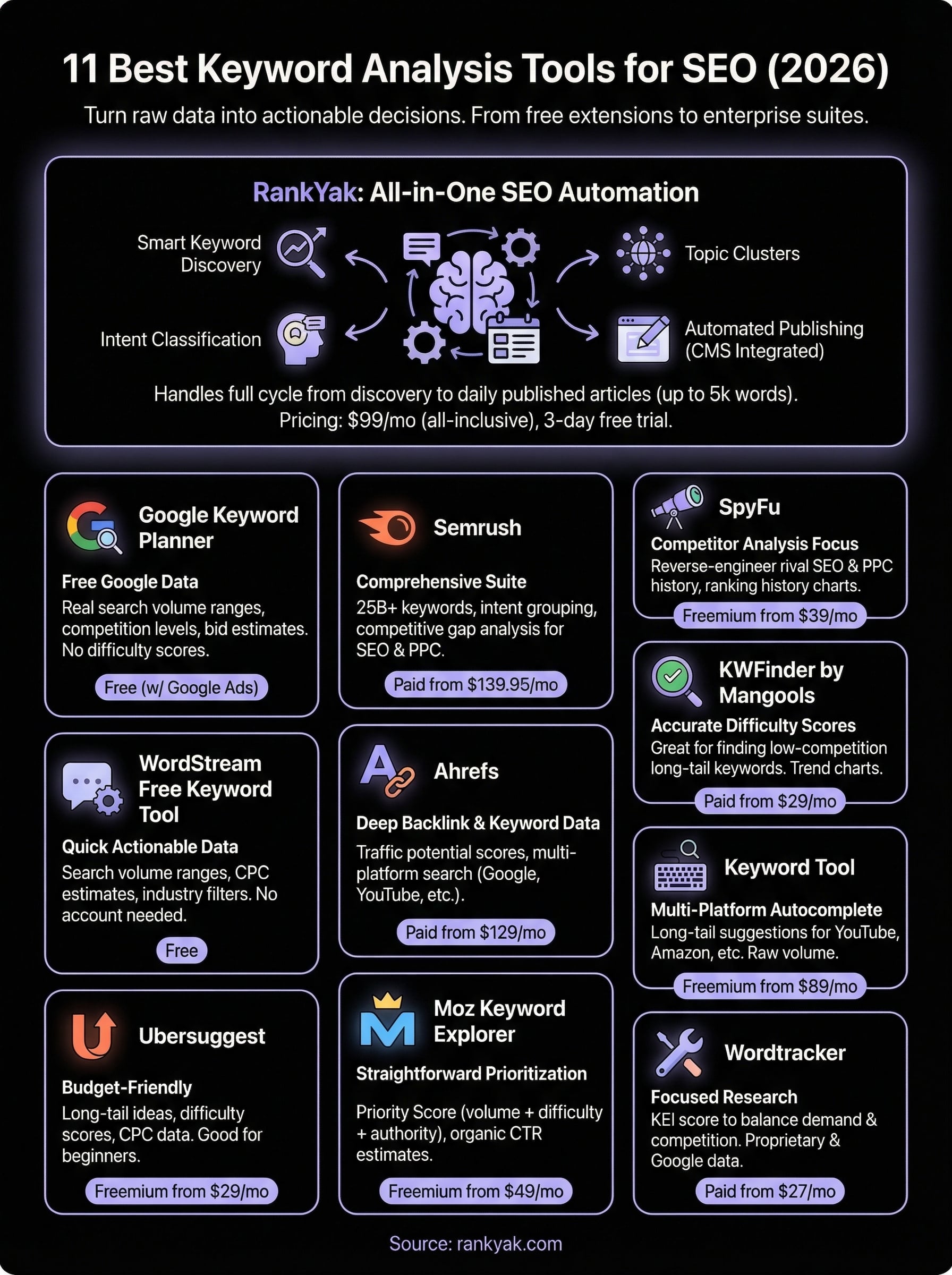
best keyword analysis software infographic

Next steps

Choosing the best keyword analysis software depends on your specific needs and budget. Free tools like Google Keyword Planner and Google Search Console provide solid starting points, while premium platforms like Semrush and Ahrefs offer comprehensive features for agencies and established businesses. Budget-friendly options like Ubersuggest and KWFinder bridge the gap with essential functionality at accessible prices.

The real challenge isn't finding keywords though. Most marketers get stuck between research and execution, watching opportunities slip away while they figure out what to write and when to publish. You need a system that connects keyword discovery directly to content creation and publishing rather than leaving you with another spreadsheet full of good intentions.

RankYak eliminates that execution gap by automating your entire content workflow from keyword research through publication. Start your 3-day free trial today and watch your organic traffic grow while you focus on running your business instead of managing content calendars.