Ahrefs Keyword Analysis: How to Find and Evaluate Keywords
You've got a website that needs traffic, and someone told you Ahrefs is the tool for finding keywords that actually rank. That's true, but opening Keywords Explorer for the first time can feel like staring at a cockpit. Search volume, keyword difficulty, click metrics, parent topics: it's a lot of data with no obvious starting point. Ahrefs keyword analysis only pays off once you know which numbers matter and which ones you can ignore.
This guide walks through exactly how to use Ahrefs to find keyword ideas and judge whether they're worth targeting. You'll learn how to run the Keyword Generator for quick idea lists, dig into Keywords Explorer for volume and trend data, and read keyword difficulty scores without getting misled by them. We'll also cover how to spot search intent from the SERP overview, so you're not writing content that Google has no intention of ranking.
By the end, you'll have a repeatable process for turning raw keyword data into a content plan that targets terms you can realistically win, whether you're doing this research by hand or looking to hand it over to automatic keyword discovery and clustering afterward.
Why Ahrefs keyword analysis matters for SEO
Most websites don't fail at SEO because they write bad content. They fail because they write good content for the wrong keywords. You can publish a well-researched, well-structured article and still get zero traffic if the term you targeted has no search volume, or if it's dominated by ten sites with more backlinks than you'll ever build. Ahrefs keyword analysis exists to prevent exactly that mistake, by showing you what people actually type into Google before you spend hours writing about it.
The cost of skipping keyword research
Writing without data is guessing, and guessing is expensive, which is why keyword research is important before a single draft gets written. A single article takes anywhere from two to six hours to research and draft properly. Multiply that by a year of weekly posts, and you've sunk hundreds of hours into content that might never rank because nobody searches for those phrases. Ahrefs gives you a way to check your assumptions before you commit that time, using real search data pulled from clickstream and search engine sources rather than guesswork.
Every hour spent writing for a keyword nobody searches is an hour you'll never get back.
What Ahrefs shows you that intuition can't
Ahrefs pulls together several data points you simply can't estimate on your own, no matter how well you know your industry. Here's what you're working with once you open Keywords Explorer:
| Metric | What it tells you |
|---|---|
| Search Volume | Estimated monthly searches for the term in a given country |
| Keyword Difficulty (KD) | A 0-100 score estimating how hard it is to rank on page one |
| Clicks | How many searchers actually click a result (some searches get zero clicks) |
| Traffic Potential | Estimated traffic the top-ranking page gets from all its ranking keywords, not just this one |
| Parent Topic | The broader keyword you might rank for even if you don't target it directly |
These numbers matter because they replace opinion with evidence. You stop asking "does this sound like something people search for" and start asking "how many people search for this, and can I realistically outrank what's already there."
Why this matters more for smaller sites
Budget and time are limited if you're running an SMB site or a solo blog, so every article needs to earn its keep. A large publisher can afford to write fifty articles and let ten of them rank. You probably can't. Keyword difficulty scores and traffic potential estimates let you filter out the keywords that would burn your limited content budget on a fight you can't win, and instead point you toward gaps where a newer or smaller site still has a real shot.
How it connects to your broader content strategy
Good keyword analysis isn't a one-time task you do before launching a site. Search behavior shifts, competitors publish new content, and Google's SERPs change shape as AI-generated overviews and chat platforms like ChatGPT and Perplexity pull answers directly from ranking pages. Revisiting your keyword list every few months keeps your content plan aligned with what's actually happening in search, not what was true a year ago.
So before you touch Keywords Explorer, understand what you're solving for. You're not just collecting a list of phrases with high volume. You're building a prioritized map of opportunities where your effort has the best chance of turning into rankings, traffic, and eventually customers. That mindset shapes every step that follows, from picking seed keywords to deciding which clusters get written first.
Step 1. Set up Ahrefs and pick your seed keywords
Before you can run any kind of Ahrefs keyword analysis, you need an account with access to Keywords Explorer and the right starting inputs. This step takes ten minutes, but skipping it means you'll spend your first hour in the tool clicking around aimlessly instead of pulling useful data.
Choosing the right Ahrefs plan
Ahrefs offers several subscription tiers, and the cheapest one restricts how many keyword reports you can pull per month, which is why some site owners end up weighing cheaper sources of keyword and backlink data instead. If you're doing research for a single small site, the Lite plan usually covers you. Agencies or anyone managing multiple client sites will burn through those limits fast and should budget for Standard or above. Check current pricing and report limits directly on Ahrefs' own pricing page before committing, since limits and tiers change periodically.
Where seed keywords come from
A seed keyword is the broad, obvious term that describes what your page or business is about. "Vegan meal prep," "invoicing software," "dog training" are all seeds. You don't need creativity here, you need accuracy. Pull your seed list from sources you already have access to:
- Your own product or service pages (what would a customer call this?)
- Google Search Console's Performance report, filtered for impressions
- Competitor homepages and category pages in your niche
- Customer support tickets or sales calls, where prospects use their own language
Seed keywords don't need to be clever, they just need to match how real customers talk.
Turning seeds into a starter list
Once you've got five to fifteen seed terms, resist the urge to overthink this stage. The goal isn't a perfect list, it's a broad enough net that Keywords Explorer has plenty to work with in the next step. A narrow seed list produces a narrow set of suggestions, and you'll miss keyword clusters you didn't know existed. Write your seeds in a simple spreadsheet with one column, no metrics yet, because you're about to let Ahrefs generate the volume and difficulty data for you. That separation matters: pick seeds based on relevance to your business, not on volume, since you haven't checked volume yet. Mixing those two decisions too early is how people end up chasing high-volume terms that have nothing to do with what they sell.
Step 2. Generate keyword ideas in Keywords Explorer
With your seed list ready, open Ahrefs Keywords Explorer and paste those terms into the search box. Ahrefs pulls back thousands of related phrases in seconds, sourced from its own search database plus Google's autocomplete and related search data. This is the point where Ahrefs keyword analysis stops being guesswork and starts being a numbers game, because you're no longer relying on what you think people search for.
Running the Keyword Generator for quick wins
If you just want a fast list without diving into full reports, use the Keyword Generator tool instead of the main Explorer search. Drop in one seed keyword at a time, choose your target country, and hit search. It spits out a shorter, more digestible list of phrase matches and related terms, which works well when you're brainstorming content ideas rather than building a full research spreadsheet.
A keyword tool is only useful if you know which report to trust, not just which one loads first.
Reading the idea buckets Ahrefs gives you
Once you're in the full Keywords Explorer, Ahrefs splits suggestions into separate reports instead of one giant list. Each one answers a different question:
- Matching terms: keywords that contain your seed phrase somewhere in them
- Related terms: keywords Google associates with your seed, even without shared words
- Search suggestions: autocomplete-style long-tail variations
- Newly discovered: terms Ahrefs recently added to its database, often less competitive
Start with matching terms if you want direct relevance, and check newly discovered if you want an edge before competitors find the same phrases.
Filtering before you export
Don't export every keyword these reports hand you. Set a minimum volume filter, usually 10 or higher depending on your niche, so you're not drowning in zero-search phrases. Exclude branded terms unless you're tracking competitor brand searches on purpose. Group by country if you sell in more than one market, since volume for the same keyword can swing wildly between the US and UK.
Exporting a working list
Once filtered, select the keywords worth a closer look and export to CSV. You'll bring this list back into your spreadsheet next to your original seeds, ready for the metrics work in Step 3. Keeping this export step separate from evaluation stops you from making snap judgments based on volume alone before you've seen difficulty or intent data.
Step 3. Evaluate keywords with key SEO metrics
You've got a filtered export sitting in a spreadsheet. Now comes the part where Ahrefs keyword analysis actually separates winners from time-wasters: reading the metrics correctly instead of chasing the biggest volume number on the page, so it helps to know what search volume and difficulty really mean. Two keywords with identical search volume can have wildly different payoffs once you factor in difficulty and click behavior.
Reading Keyword Difficulty without getting fooled
Keyword Difficulty (KD) estimates how many backlinks the average top-10 page has, on a 0-100 scale. It's not a promise. A KD of 20 next to a page stuffed with thin content can still be beatable even if the score looks intimidating, and a KD of 10 next to a page owned by a major brand can be tougher than it looks. Treat KD as a starting filter, not a final verdict, the same way you would with any keyword difficulty checker tool, and always glance at the actual ranking pages before ruling a keyword out.
A difficulty score tells you how hard the fight looks on paper, not who's actually standing in the ring.
Volume alone doesn't pay the bills
High search volume means nothing if nobody clicks a result, which happens more often than you'd expect on searches Google answers directly in a featured snippet or AI overview. Check the Clicks metric next to volume before committing. A keyword with 2,000 monthly searches but only 800 clicks is worth less than one with 900 searches and 850 clicks.
Weighing traffic potential against your site's size
Traffic Potential shows what the current top-ranking page earns from every keyword it ranks for, not just the one you searched. This number tells you the real ceiling of a topic. Compare it against your site's existing traffic to gauge whether a keyword is worth a dedicated article or better folded into a broader piece.
Use a simple scoring pass on your spreadsheet before moving to Step 4:
| Metric | Green light | Red flag |
|---|---|---|
| Volume | 100+ monthly searches | Under 10 |
| KD | Under 30 for newer sites | Above 60 without strong backlinks |
| Clicks | Close to or above volume | Far below volume |
| Traffic Potential | 3x+ your current best article | Lower than what you already rank for |
Sort by this combination, and you'll trim a 500-keyword export down to a shortlist worth writing about.
Step 4. Check search intent and SERP competition
A keyword can pass every metric check in Step 3 and still be a bad target if you misread what Google actually wants to show for it. Search intent is the piece of Ahrefs keyword analysis that spreadsheets alone won't reveal, so this step means clicking into the actual search results, not just scrolling numbers.
Reading the SERP overview
Open any keyword in Keywords Explorer and scroll to the SERP overview panel. Ahrefs shows you the top 10 ranking pages along with their estimated traffic, referring domains, and word count. Scan the page titles first. If eight of the ten results are product comparison pages and you planned a beginner's guide, Google has already told you what it wants, and you're not going to out-argue that with better writing alone.
If the top results are all one content type, writing a different one won't out-rank them.
Matching content type to intent
Group what you see into one of four buckets, the standard keyword types by search intent, before deciding on a format:
- Informational: how-to guides, definitions, explainer posts
- Commercial: "best," "vs," and comparison-style pages
- Transactional: product pages, pricing pages, sign-up flows
- Navigational: brand or tool-specific searches where users want one specific site
A keyword mixing intents, like "CRM software" showing both blog posts and product pages, usually means there's room for either format, but check which type earns more of the estimated traffic before choosing.
Spotting weak competitors in the results
Look past the difficulty score and check who's actually ranking. Click into two or three results and ask whether the content is thin, outdated, or missing obvious subtopics a searcher would want covered. A five-year-old post with no updates, thin formatting, or a low domain rating sitting in position 3 is a real opening, even if Ahrefs flags the keyword as moderately difficult.
Building an intent checklist
Before you move a keyword to your priority list, run it through a short checklist:
- Does the dominant content format match what you planned to write?
- Are any of the top-10 pages outdated or thin?
- Does a featured snippet or AI overview already answer the query directly?
- Would ranking here actually bring visitors who convert, or just traffic?
Keywords that fail this checklist aren't dead, they just need a different format or a lower spot on your priority list, which is exactly what Step 5 sorts out.
Step 5. Cluster and prioritize your keyword list
By now you've got a shortlist that passed both the metrics check and the intent check, but treating each keyword as its own article is a mistake. Many of those terms are just different phrasings of the same searcher question, and this stage of Ahrefs keyword analysis is where you group them into clusters before deciding what to write first.
Grouping keywords by shared SERPs
The fastest way to cluster isn't guessing which words look similar, it's checking which keywords already share ranking pages, or pasting your export into a free clustering tool and letting it group them by intent. In Keywords Explorer, look at the Parent Topic field on each keyword and group anything pointing to the same parent under one article. If two keywords show significant SERP overlap, meaning the same URLs rank for both, treat them as one target instead of two separate pieces.
Keywords that share a SERP share an article, not a spreadsheet row each.
Mapping clusters to a content plan
Once grouped, assign each cluster a single primary keyword, the one with the highest combined volume and clicks, and list the rest as secondary terms to weave into subheadings and body copy. This keeps you from publishing three thin articles that compete against each other for the same query, a problem Google notices even if you don't.
Scoring clusters instead of individual terms
Apply the same green light and red flag logic from Step 3, but at the cluster level using combined volume across all grouped keywords:
| Priority | Combined Volume | KD Range | Business Relevance |
|---|---|---|---|
| High | 500+ | Under 30 | Directly matches a product or service |
| Medium | 100-500 | 30-50 | Supports a core topic |
| Low | Under 100 | Above 50 | Loosely related, save for later |
Rank your clusters by this table and you'll have a defensible order for what gets written first, rather than picking whatever sounds interesting that week.
Avoiding overlap with existing content
Search your own site for each cluster's primary term before adding it to the plan. Publishing a new article that competes with a page you already have live splits your ranking signals instead of strengthening them, which is exactly what a cannibalization audit is meant to catch. If you find an existing match, update that page with the secondary keywords instead of creating a duplicate, then move to the next cluster on your priority list.
Step 6. Track rankings and refine over time
Publishing your prioritized clusters isn't the finish line. Ahrefs keyword analysis only proves its worth once you can see whether the keywords you picked actually move up in Google, and that means setting up rank tracking the same week you publish, not months later when you've forgotten which article targeted which term.
Setting up your rank tracker
Open Ahrefs' Rank Tracker, or one of the other SEO analytics software tools, and add your target domain along with the primary keyword from each cluster you've published. Set the tracking location to match your target country, since rankings and volume both shift by region. Check positions weekly for new content and monthly once an article stabilizes, since fresh pages swing wildly in the first few weeks before Google settles on a position.
Reading movement without overreacting
Gains and drops happen constantly, and reacting to every wobble wastes time you should spend writing. Give a new article at least eight to twelve weeks before judging it, since that's roughly how long Google takes to fully evaluate a new page against established competitors. Watch average position trends over that window rather than single-day snapshots, and pull up the Organic Keywords report for the page to see if it's picking up related terms you didn't originally target.
Judge a keyword by its trend over months, not by where it sits the day after you hit publish.
Deciding what to refine
Once you've got a few months of position data, sort your tracked keywords into three buckets:
| Status | What you're seeing | What to do |
|---|---|---|
| Stalled | Stuck outside top 20 for 3+ months | Rewrite intro, add missing subtopics, check intent match |
| Climbing | Steady movement toward page one | Leave it alone, add internal links from newer posts |
| Ranking but low clicks | Top 10 position, weak traffic | Improve title and meta description first |
Stalled keywords usually point back to a Step 4 problem: wrong content type, missing subtopics, or a competitor with far more backlinks than you accounted for. Revisit the SERP overview for that keyword before rewriting blindly, since the competitive landscape can shift months after your original research.
Feeding results back into your seed list
Tracking data eventually becomes its own research source. Terms that climbed faster than expected often reveal a topic cluster worth expanding, so feed those winning patterns back into Step 1 the next time you build a seed list, or automate keyword research so the list refreshes itself.
Putting your keyword analysis into action
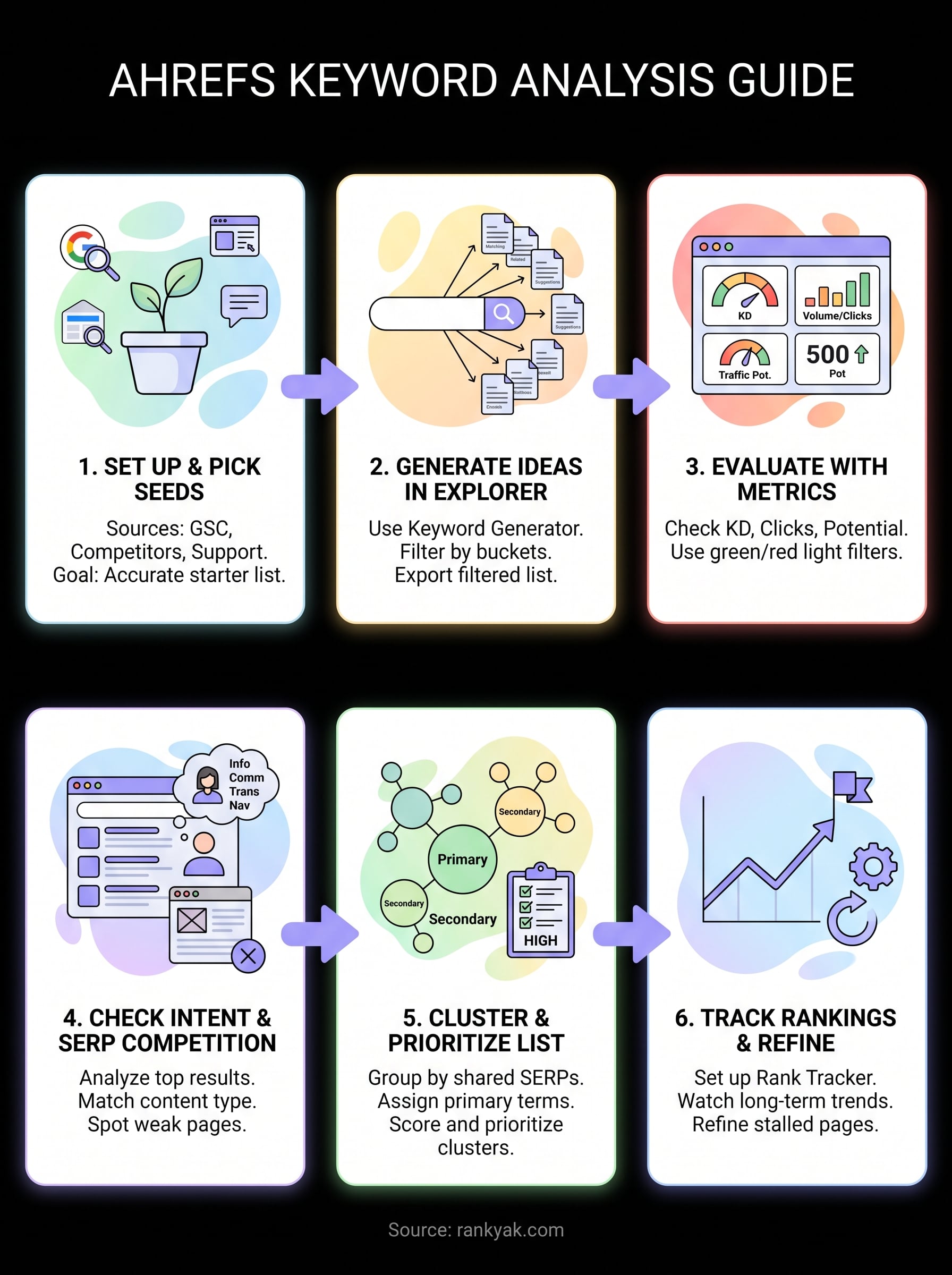
Six steps sound like a lot until you realize they're just one loop repeated on a schedule: find seeds, generate ideas, check metrics, verify intent, cluster, track, then feed the results back in. Ahrefs keyword analysis works because it replaces guesswork with evidence at every stage, not because any single report is magic. The tool gives you the data, but you still have to run the process consistently, month after month, or that shortlist goes stale.
That consistency is where most site owners stall out, not the research itself. If you'd rather hand off the repetitive parts, keeping the same intent-driven judgment calls, RankYak builds your content plan from keyword data, writes the articles, and publishes them on schedule automatically. See how RankYak turns keyword research into published articles, and this exact workflow starts running on its own.
Allan de Wit is a co-founder of RankYak and has worked in SEO since 2015: inside agencies, alongside them, for clients directly, and in-house on the products being ranked. He came to it as a software engineer building for marketers, which is why the platform is built the way it is. He went on to start companies of his own, two of which were acquired. At RankYak he sets the product direction and owns the features, the quality bar, the design, and the UX.
