
15 Best Keyword Analysis Tools (Free/Paid) for SEO in 2026

You need keywords that actually drive traffic and conversions, but choosing the right keyword analyzer feels like navigating a maze. Most platforms promise accurate search volume data and competitive insights, yet they either drain your budget with expensive subscriptions or deliver surface-level metrics that won't move the needle. The best keyword analysis tools should tell you exactly which keywords to target, how difficult they are to rank for, and what your competitors are doing, without requiring a PhD in SEO or a massive marketing budget.
This guide breaks down 15 keyword analysis tools that actually deliver results in 2026. You'll see what each tool does best, where it falls short, and how much it costs. We tested these platforms to show you real features and pricing, not marketing fluff. Whether you need a free keyword analyzer to get started, an seo keyword ranking tool to monitor your positions, or a premium platform to scale your keyword ranking analysis, you'll find exactly what you need to make an informed decision and start ranking faster.
1. RankYak
RankYak automates your entire keyword workflow by discovering high-potential keywords, creating SEO-optimized articles, and publishing them directly to your site. The platform analyzes your website and niche to identify keywords that rank in both Google and AI chat platforms like ChatGPT, then generates a daily content plan that targets those opportunities. You get keyword research, content creation, and publishing under one roof.
Core features and data
The platform delivers smart keyword discovery that automatically identifies opportunities based on your specific niche and existing content. You receive competitor research insights built into every article, along with search intent analysis and keyword difficulty scoring. RankYak generates one fully optimized article daily (up to 5,000 words) with featured images, internal linking suggestions, and proper structure that follows Google's helpful content guidelines.
When this tool works best
You'll see the biggest impact if you need consistent content output without hiring writers or managing freelancers. The automation works well for businesses running multiple websites or agencies managing client portfolios, since you can handle several sites from one account. Small to medium-sized businesses that lack in-house SEO teams get particular value from the end-to-end automation.
"RankYak stands out among the best keyword analysis tools by handling the full content lifecycle, from keyword research to publishing and backlink building."
Key limitations
The platform focuses on content automation rather than deep keyword analytics, so you won't get the granular data filtering that standalone research tools offer. You're limited to one article per day per site, which might feel slow if you need to publish multiple pieces quickly or test different content strategies simultaneously.
Pricing and plans
RankYak costs $99 per month for all features with no tiered plans. You get a 3-day free trial that requires no credit card and can be cancelled anytime. The single pricing tier includes unlimited keyword discovery, daily article generation, automatic publishing, and backlink exchange features.
2. Google Keyword Planner
Google Keyword Planner delivers keyword data directly from Google's advertising platform, giving you access to search volume estimates, competition levels, and bid ranges without spending a dollar. The tool lives inside Google Ads and focuses primarily on helping advertisers plan campaigns, but you can extract valuable SEO insights from the same data. You get two main features: discovering new keywords and analyzing search volume with forecasting capabilities.
Core features and data
The platform shows you monthly search volume ranges for any keyword, along with how that volume changes over time. You'll see competition ratings (low, medium, high) that indicate how many advertisers bid on each term, plus the typical cost-per-click ranges. The discovery tool generates keyword suggestions when you enter seed terms or paste in your website URL, pulling ideas from Google's vast search database.
Forecasting tools predict how your paid campaigns might perform based on different budget scenarios. You can refine results by location, language, and search network, then organize keywords into ad groups for better campaign structure.
When this tool works best
You'll get the most value when planning PPC campaigns or validating organic keyword ideas with Google's own data. The platform works well if you need baseline search volume numbers to compare against other tools or want to identify keywords where high ad costs signal commercial intent. Small businesses with limited budgets benefit from the free access to Google's search data.
"Google Keyword Planner remains one of the best keyword analysis tools for understanding paid search opportunity, even if you never run a single ad."
Key limitations
Search volume data comes in broad ranges rather than precise numbers, making traffic forecasting difficult. The tool lacks advanced filtering options that dedicated SEO platforms offer, and keyword suggestions often feel generic. You must create a Google Ads account to access the tool, which adds an extra setup step even if you never advertise.
Pricing and plans
Google Keyword Planner is completely free forever. You need a Google Ads account to log in, but you never have to run campaigns or add payment information.
3. Ahrefs
Ahrefs delivers comprehensive keyword data through its Keyword Explorer feature, paired with powerful competitor analysis tools that show you exactly which keywords drive traffic to competing sites. The platform maintains one of the largest backlink databases on the market and crawls the web constantly to update its keyword metrics. You can analyze search volume, keyword difficulty, click-through rates, and the specific pages ranking for any term you research.
Core features and data
The Keyword Explorer generates keyword ideas through matching terms that you can filter by specific words, phrases, or keyword difficulty scores. You'll see monthly search volume, traffic potential, keyword difficulty (KD score), and the number of clicks you can expect even if you rank first. Ahrefs shows you which SERP features (featured snippets, image packs, knowledge panels) appear for each keyword and calculates how many referring domains you might need to compete.
Content Gap analysis reveals keywords your competitors rank for that you don't, letting you identify missing opportunities in your content strategy. As a powerful serp keyword tool, the platform tracks ranking history over time and shows you the actual pages that rank, along with their traffic estimates and backlink profiles.
When this tool works best
You'll benefit most from Ahrefs when you need to reverse engineer competitor strategies by analyzing which keywords drive their organic traffic. The platform excels at SERP research, giving you detailed metrics on every result that ranks for your target keywords. Agencies and in-house SEO teams handling multiple clients or large websites get strong value from the advanced filtering and bulk analysis features.
"Ahrefs ranks among the best keyword analysis tools for marketers who need granular competitor insights and comprehensive SERP data in one platform."
Key limitations
The platform carries a steep price tag that puts it out of reach for many small businesses or solo marketers just starting with SEO. Keyword data sometimes appears outdated, and you need to spend extra credits to refresh metrics. Most SEO professionals use Ahrefs, which means you're often analyzing the same keyword opportunities as your competitors.
Pricing and plans
Ahrefs starts at $129 per month for the Lite plan (includes 500 credits monthly, 6 months of history). The Standard plan costs $249 per month (unlimited credits, 2 years of history), Advanced runs $449 per month (3 users, 5 years of history), and Enterprise reaches $14,990 per year (includes API access and custom limits).
4. Semrush
Semrush combines keyword research with a full suite of SEO analytics tools, giving you access to competitive analysis, content optimization, and rank tracking from a single dashboard. The platform serves as a comprehensive keyword ranking tool and maintains extensive keyword databases across multiple countries, delivering granular data that goes beyond basic search volume numbers. You can analyze your competitors' complete keyword portfolios, identify content gaps, and track your rankings over time while getting actionable recommendations for improvement.
Core features and data
The Keyword Magic Tool generates millions of keyword suggestions from a single seed term, letting you filter by intent, difficulty, word count, and specific phrases. You'll see precise search volume numbers (not ranges), keyword difficulty scores, competitive density, and cost-per-click estimates. Semrush breaks down SERP features for each keyword and shows you which competing pages appear in top positions.
Organic Traffic Insights connects with your Google Analytics and Search Console accounts to uncover those hidden "not provided" keywords that drive traffic to your site. The built-in keyword tracking tool monitors position changes across your entire portfolio, alerting you to ranking drops and gains. The Keyword Gap analysis tool reveals exactly which terms your competitors rank for that you're missing, organized by difficulty and traffic potential.
When this tool works best
You'll extract maximum value from Semrush when you need comprehensive competitor intelligence rather than just keyword ideas. The platform excels at revealing your competitors' complete SEO strategies, including their top-performing content and ranking history. Marketing teams managing large websites or multiple campaigns benefit from the integrated approach that combines keyword research with content planning and performance tracking.
"Semrush delivers some of the most detailed competitive analysis among the best keyword analysis tools, making it ideal for data-driven SEO strategies."
Key limitations
The platform requires a significant learning curve to master all its features, which can overwhelm beginners just starting with keyword research. Pricing remains expensive compared to simpler alternatives, and the sheer volume of data sometimes makes it difficult to identify which metrics actually matter for your specific goals.
Pricing and plans
Semrush starts at $139.95 per month for the Pro plan (includes 500 tracked keywords, 10,000 results per report). The Guru plan costs $249.95 per month (1,500 tracked keywords, 30,000 results), Business runs $499.95 per month (5,000 tracked keywords, 50,000 results), and custom Enterprise pricing offers API access and dedicated support.
5. KWFinder
KWFinder delivers keyword research data without overwhelming you with unnecessary features, focusing specifically on finding opportunities you can actually rank for. The platform comes from Mangools, which maintains databases covering multiple countries and provides clean, straightforward metrics that help you make quick decisions. You can analyze search volume, difficulty scores, and ranking competition while getting unique insights like keyword opportunities that flag weaknesses in competing pages.

Core features and data
The platform shows you monthly search volume, keyword difficulty (KD), trend data, and related keyword suggestions for every term you research. You'll see the exact pages currently ranking for each keyword, along with their domain authority, page authority, citation flow, and trust flow metrics. KWFinder identifies which type of content ranks (listicle, product page, blog post, homepage) and reveals the searcher's intent behind each query.
The keyword opportunities column analyzes the top five results and flags exploitable weaknesses like outdated content (over six months old) or missing target keywords in title tags. This feature tells you exactly how you can outrank existing results.
When this tool works best
You'll benefit most from KWFinder when you need straightforward keyword data without the complexity of enterprise platforms. The tool works well for small businesses, freelancers, or content creators who want a reliable keyword analyzer with clear direction without spending hours analyzing data. The 5 searches per day on the free plan suits occasional research needs perfectly.
"KWFinder stands among the best keyword analysis tools for marketers who prioritize simplicity and actionable insights over exhaustive data."
Key limitations
The free plan restricts you to 5 daily searches, which becomes limiting if you're researching multiple topics or managing several clients simultaneously. Paid plans still cap your daily lookups, unlike some competitors that offer unlimited searches.
Pricing and plans
KWFinder costs $29.90 per month for up to 100 lookups daily as part of the Mangools Basic plan. You can access the free version with 5 searches per day indefinitely.
6. Ubersuggest
Ubersuggest provides keyword research wrapped in a user-friendly interface that prioritizes simplicity over complexity, making it accessible for marketers who need reliable data without enterprise-level features. The platform from Neil Patel delivers search volume estimates, difficulty scores, and content suggestions pulled from currently ranking pages. You can track keyword performance, analyze backlinks, and access an AI writer tool, all from a dashboard designed for quick decision-making.
Core features and data
The Keyword Overview displays monthly search volume broken down by country, along with SEO difficulty and paid difficulty scores that help you understand both organic and advertising competition. You'll see Content Ideas pulled from top-ranking results, complete with visit estimates, related keywords, backlink counts, and social media performance across Facebook, Pinterest, and Reddit. Ubersuggest stands out by separating comparison keyword ideas into their own category, which proves valuable when creating competitive content that addresses "versus" or "alternative" searches.
When this tool works best
You'll get maximum value from Ubersuggest when you need straightforward keyword metrics without spending hours learning complicated software. Content marketers benefit from the platform's emphasis on content ideas and social performance data, which helps you understand what types of articles already resonate with audiences. The 3 daily searches on the free plan work well if you research keywords sporadically rather than conducting large-scale analysis sessions.
"Ubersuggest delivers practical keyword insights that make it one of the best keyword analysis tools for marketers focused on content creation rather than technical SEO."
Key limitations
The free plan restricts you to 3 searches per day, which becomes problematic if you manage multiple projects or need to research several content topics simultaneously. Keyword data sometimes lags behind what you'll find in more expensive platforms.
Pricing and plans
Ubersuggest costs $29 per month for the Individual plan (includes 150 searches daily, 125 tracked keywords per domain). You can access the free version with 3 searches per day indefinitely.
7. Moz Keyword Explorer
Moz Keyword Explorer analyzes keyword opportunities by combining search volume data with proprietary metrics that predict your ranking chances. The platform leverages Moz's Domain Authority and Page Authority scores to show you exactly which keywords match your site's competitive strength. You can explore keyword suggestions, analyze SERP features, and track your rankings while getting recommendations based on difficulty scores calibrated to your specific domain.
Core features and data
The platform delivers monthly search volume estimates, organic click-through rate predictions, and priority scores that combine multiple factors into a single metric. You'll see Moz's keyword difficulty calculation alongside the number of root domains currently ranking for each term. The SERP analysis breaks down which features appear (featured snippets, local packs, knowledge panels) and shows you the Domain Authority of competing pages, helping you gauge realistic ranking potential.
When this tool works best
You'll extract maximum value from Moz Keyword Explorer when you need difficulty scores calibrated to your website's authority rather than generic competition metrics. The priority score helps you quickly identify which keywords offer the best balance between search volume, difficulty, and opportunity. Sites with established domain authority benefit from the DA-based recommendations that filter out keywords requiring unrealistic backlink profiles.
"Moz Keyword Explorer ranks among the best keyword analysis tools for marketers who want difficulty assessments matched to their site's actual competitive strength."
Key limitations
The free plan restricts you to 10 queries per month, which becomes problematic if you manage multiple projects or conduct extensive keyword research. Search volume data sometimes differs noticeably from Google's own estimates.
Pricing and plans
Moz offers a free plan with 10 monthly queries. Paid plans start at $99 per month for Moz Pro Standard (includes 150 monthly queries and 300 tracked keywords), scaling up to $599 per month for Premium (unlimited queries, 1,500 tracked keywords).
8. Google Search Console
Google Search Console reveals keyword performance data directly from Google's search index, showing you exactly which queries already drive traffic to your site. The platform operates as Google's own analytics keyword tool and diagnostic tool that monitors your site's presence in Google search results, delivering insights you can't get anywhere else because it's pulled straight from Google's own systems. You gain access to actual search terms people used to find your pages, along with click-through rates, impressions, and average positions for each query.
Core features and data
The Performance report displays every search query that triggered your pages in Google results, organized by clicks, impressions, click-through rate, and average ranking position. You'll see which pages rank for which keywords, enabling detailed keyword ranking analysis as your performance changes over time, with data going back 16 months. The platform identifies queries where you rank high but get few clicks, highlighting opportunities to improve titles and descriptions. Google Search Console also flags technical issues that prevent pages from appearing in search results, including indexing errors, mobile usability problems, and Core Web Vitals metrics.
When this tool works best
You'll extract maximum value from Google Search Console when analyzing existing traffic patterns rather than discovering new keywords. The tool excels at revealing which keywords already drive impressions but fail to generate clicks, letting you optimize meta descriptions or adjust content to improve performance. Sites with steady traffic benefit from the historical data that shows ranking changes and seasonal trends across your keyword portfolio.
"Google Search Console stands among the best keyword analysis tools for understanding your actual search performance rather than relying on third-party estimates."
Key limitations
The platform only shows data for keywords you already rank for, making it useless for discovering new opportunities before you create content. Query data becomes limited at low traffic volumes, and Google groups some searches into "(not provided)" categories that hide specific terms.
Pricing and plans
Google Search Console is completely free with no usage limits. You simply need to verify ownership of your website through DNS records or HTML file upload.
9. Keywords Everywhere
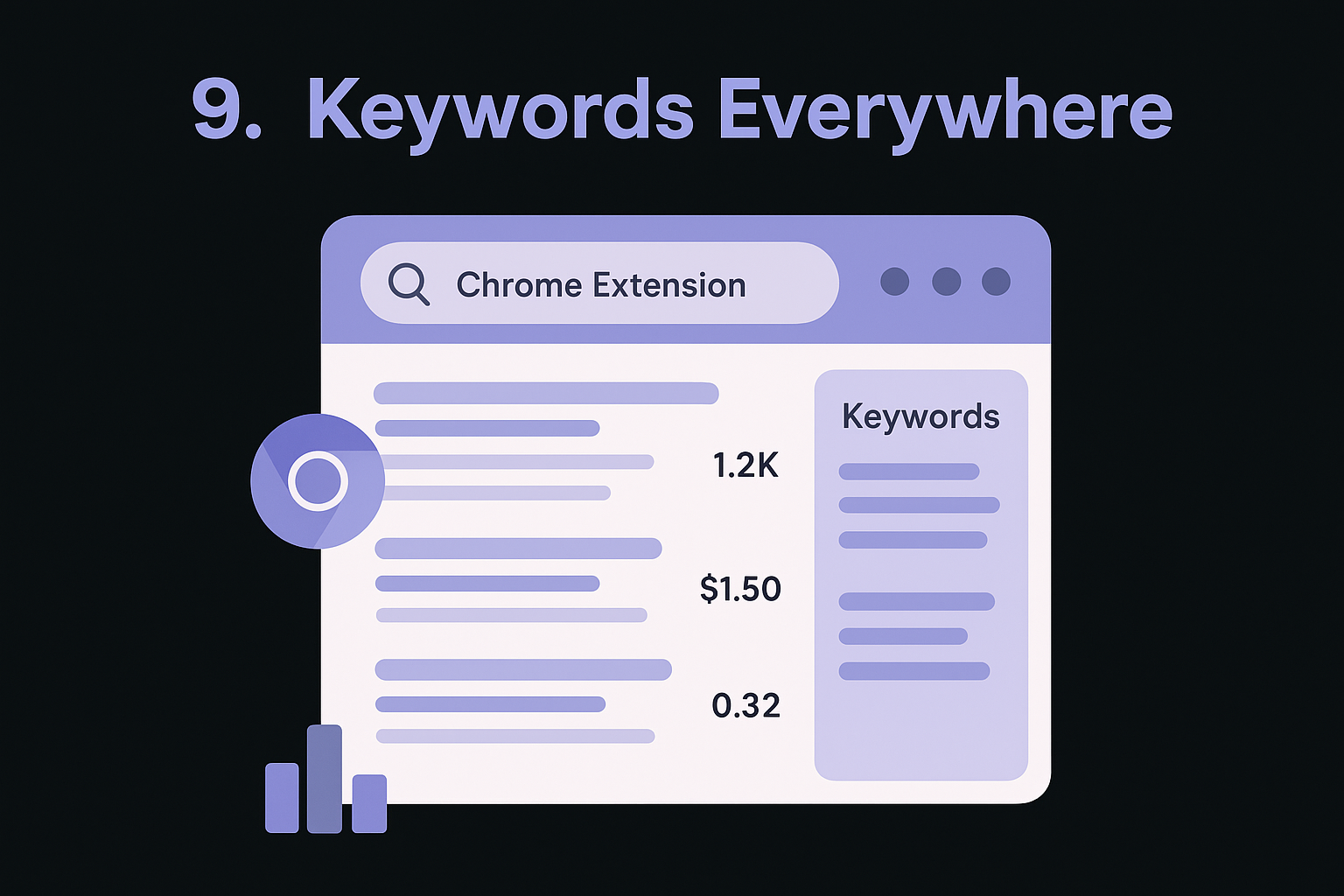
Keywords Everywhere operates as a Chrome extension that embeds keyword data directly into your Google search results, eliminating the need to switch between browser tabs or separate applications. The extension displays search volume metrics alongside autocomplete suggestions and injects matching keyword ideas into a sidebar widget while you research. You get instant access to keyword metrics without leaving your natural search workflow.
Core features and data
The extension shows you monthly search volume, cost-per-click estimates, and competition levels for every keyword that appears in Google's autocomplete dropdown. You'll see keyword suggestions organized by related terms and questions in a sidebar that updates automatically as you search. The platform uses a credit-based system where each keyword lookup consumes credits, letting you control exactly how much data you purchase based on your research volume.
When this tool works best
You'll benefit most from Keywords Everywhere when you conduct keyword research directly in Google rather than using standalone platforms. The extension works perfectly for marketers who prefer discovering keywords organically through search exploration instead of starting with seed terms in traditional tools. SEO professionals handling quick competitive research sessions extract strong value from the instant metrics that appear without disrupting their browsing flow.
"Keywords Everywhere earns its place among the best keyword analysis tools by delivering data exactly where you need it, without forcing you to learn new software."
Key limitations
The extension only functions in Google Chrome and similar Chromium-based browsers, excluding Firefox and Safari users. You must purchase credits upfront before accessing most features.
Pricing and plans
Keywords Everywhere offers a limited free version. Paid plans start at $72 per year for Silver (400,000 credits, 5 user seats), $300 per year for Gold (2 million credits, 20 user seats), and $960 per year for Platinum (8 million credits, 100 user seats).
10. LowFruits
LowFruits analyzes SERP competition to identify keywords where you can actually rank without massive domain authority or extensive backlink profiles. The platform scans search results for weak spots in top rankings, looking for opportunities where forums, user-generated content, or low-authority pages occupy valuable positions. You get keyword suggestions filtered by achievable ranking potential rather than just search volume or generic difficulty scores.
Core features and data
The platform delivers SERP analysis that examines the authority and quality of pages currently ranking for your target keywords. You'll see which keywords have forum results or weak content in top positions, signaling opportunities for well-optimized pages to break through. LowFruits provides Domain Explorer features that extract keywords from competitor sites, plus boosted keyword finder tools that prioritize terms matching your site's competitive strength. The platform includes rank tracking for up to 500 keywords on higher plans, letting you monitor progress as you target identified opportunities.
When this tool works best
You'll extract maximum value from LowFruits when you operate a newer website without established domain authority or substantial backlink profiles. The tool excels at finding keywords that larger competitors overlook, perfect for small businesses or content sites building initial traffic. Sites targeting niche topics benefit from the SERP weakness identification that reveals ranking gaps.
"LowFruits ranks among the best keyword analysis tools for marketers who need achievable targets rather than aspirational keywords beyond their reach."
Key limitations
The platform's keyword database appears smaller than enterprise tools like Ahrefs or Semrush, potentially missing some opportunities in highly competitive markets.
Pricing and plans
LowFruits costs $29.90 per month for Standard (includes 3,000 credits, 100 tracked keywords) or $79.90 per month for Premium (10,000 credits, 500 tracked keywords). Credits power keyword analyses and competitor extractions.
11. AlsoAsked
AlsoAsked generates question-based keyword ideas by mapping out related questions people ask about your topic, pulling data from Google's "People Also Ask" boxes. The platform creates visual mind maps that show how questions branch and connect, revealing content gaps you can fill with targeted subheadings and sections. You can explore multiple layers of related questions to understand exactly what information searchers want when they investigate your target keyword.
Core features and data
The platform displays questions organized in a hierarchical structure that shows primary, secondary, and tertiary question relationships. You'll see exactly which questions Google associates with your seed keyword, helping you identify H2 and H3 subheading opportunities for comprehensive content. The mind map visualization makes it easy to spot question clusters around specific subtopics, letting you plan content that addresses entire question threads rather than isolated queries.
When this tool works best
You'll extract maximum value from AlsoAsked when you need to structure blog posts with question-based headings that match searcher intent. The tool works perfectly for content creators building comprehensive guides or FAQ sections that address multiple related questions. Writers who struggle identifying which subtopics to cover benefit from the clear question hierarchies.
"AlsoAsked ranks among the best keyword analysis tools for marketers who prioritize content structure over raw search volume numbers."
Key limitations
The free plan restricts you to 3 searches per month, which becomes limiting if you create content regularly or manage multiple clients.
Pricing and plans
AlsoAsked offers 3 free searches monthly. Paid plans start at $15 per month for Basic (100 searches), $29 per month for Lite (300 searches), and $59 per month for Pro (1,000 searches).
12. AnswerThePublic
AnswerThePublic generates question-based keywords by pulling data from search engine autocomplete suggestions across multiple platforms, showing you exactly what people ask about your topics. The tool from Neil Patel (acquired in recent years) visualizes search queries in wheel diagrams organized by question words like what, how, why, and which. You can explore keywords beyond Google, including Bing, YouTube, TikTok, Amazon, and Instagram, making it valuable for multi-platform content strategies.
Core features and data
The platform displays autocomplete suggestions organized by question type, prepositions, comparisons, and alphabetical lists. You'll see People Also Ask (PAA) questions that appear in Google search results, perfect for identifying H2 and H3 subheading opportunities. The tool provides cost-per-click data and search volume estimates for each keyword, helping you prioritize which questions to answer in your content. Results can be organized with custom tags for better project management.
When this tool works best
You'll benefit most from AnswerThePublic when creating FAQ sections or comprehensive guides that need to address multiple related questions. The multi-platform keyword discovery works well if you create content for YouTube, TikTok, or Amazon in addition to traditional search engines.
"AnswerThePublic ranks among the best keyword analysis tools for marketers who need question-based keywords across multiple platforms, not just Google."
Key limitations
The Individual plan restricts you to 100 searches daily, which may feel limiting during intensive research sessions.
Pricing and plans
AnswerThePublic costs $11 per month for Individual (1 user, 100 daily searches), $99 per month for Pro (3 users, unlimited searches), and $199 per month for Expert (unlimited users, unlimited searches). All plans include a 7-day free trial.
13. Answer Socrates
Answer Socrates delivers question-based keyword research by applying modifiers like what, how, which, who, why, and will to your seed keywords, revealing the actual questions people type into search engines. The platform operates similarly to AlsoAsked but focuses specifically on autocomplete-style queries that match natural search patterns. You can discover content opportunities by seeing exactly which question formats resonate with searchers in your niche.

Core features and data
The tool generates keyword suggestions organized by question type, making it easy to identify which interrogative phrases people use most frequently. You'll see search volume estimates, cost-per-click data, and competition metrics for each suggested keyword. Answer Socrates provides both standard keyword searches (limited daily) and recursive searches that dig deeper into related question patterns, helping you uncover multiple layers of searcher intent.
When this tool works best
You'll extract maximum value from Answer Socrates when planning FAQ sections or building comprehensive guides that need to address specific question formats. The modifier-based approach works perfectly for content strategists who want to match exact phrasing patterns searchers use.
"Answer Socrates ranks among the best keyword analysis tools for marketers who need question keywords organized by interrogative type rather than generic related terms."
Key limitations
The free plan restricts you to 1 search per day, which becomes impractical for regular content research or managing multiple projects simultaneously.
Pricing and plans
Answer Socrates costs $9 per month for Socrates Lite (100 keyword searches, 30 recursive searches), $29 per month for Seneca (500 keyword searches, 100 recursive searches), and $49 per month for Aurelius (unlimited keyword searches, 500 recursive searches).
14. Local Falcon local keyword tool
Local Falcon's local keyword tool focuses specifically on hyper-local keyword discovery, helping businesses identify search terms that drive traffic in specific geographic areas rather than national markets. The platform analyzes your business location and generates keyword suggestions tailored to local search behavior, providing insights you won't find in generic keyword tools. You get access to both traditional local SEO keywords and AI-focused search phrases designed for AI platforms like ChatGPT and Perplexity.
Core features and data
The platform delivers AI-generated reasoning for each keyword suggestion, explaining exactly why specific terms matter for your local market. You'll see search intent labels (informational, commercial, transactional, navigational) alongside search volume and keyword difficulty metrics. Local Falcon's proprietary Weighted Yield Number (WYN) score measures the actual business potential each keyword holds in your specific market, going beyond generic difficulty scores that ignore local competition dynamics. The tool provides two distinct keyword lists: one optimized for traditional search engines and another designed for AI search platforms that require natural-language phrasing.
When this tool works best
You'll extract maximum value from Local Falcon when targeting geographic-specific searches for local businesses, service providers, or multi-location companies. The tool excels for businesses that depend on local visibility rather than national rankings, such as restaurants, dental practices, or retail stores. Marketers managing multiple locations benefit from the ability to launch Quick Scans or set up ongoing campaigns that track ranking performance across different markets simultaneously.
"Local Falcon stands among the best keyword analysis tools for businesses that prioritize local search visibility over broad national keyword opportunities."
Key limitations
The platform focuses exclusively on local SEO, making it less useful if you target national or international markets without geographic modifiers.
Pricing and plans
Local Falcon offers 100 free credits for new users to test the platform. You'll need to log in to access the local keyword research tool and additional features.
15. ProductRank.ai
ProductRank.ai tracks your visibility in AI search engines like ChatGPT, Claude, and Perplexity rather than traditional search engines, showing you which brands and sources these platforms cite when answering queries. The tool analyzes AI-generated responses to reveal citation patterns and brand mentions across multiple large language models. You can test specific questions or queries to see exactly which competitors get mentioned and how often your brand appears in AI search results.
Core features and data
The platform reveals which citations and brands appear in responses from ChatGPT, Claude, and Perplexity when users ask questions related to your keywords. You'll see the frequency of brand mentions and the sources these AI platforms reference most often. ProductRank.ai operates as a free visibility tracker without requiring account creation, making it accessible for quick competitive research sessions.
When this tool works best
You'll extract maximum value from ProductRank.ai when optimizing content for AI search visibility rather than traditional Google rankings. The tool works perfectly for brands that want to increase citations in AI-generated responses and understand which content formats AI platforms prefer to reference.
"ProductRank.ai represents a new category among the best keyword analysis tools, focused on visibility in AI platforms rather than traditional search engines."
Key limitations
The platform provides visibility tracking only without offering optimization recommendations or keyword discovery features.
Pricing and plans
ProductRank.ai is completely free to use with no account required.
Choose your keyword analysis stack
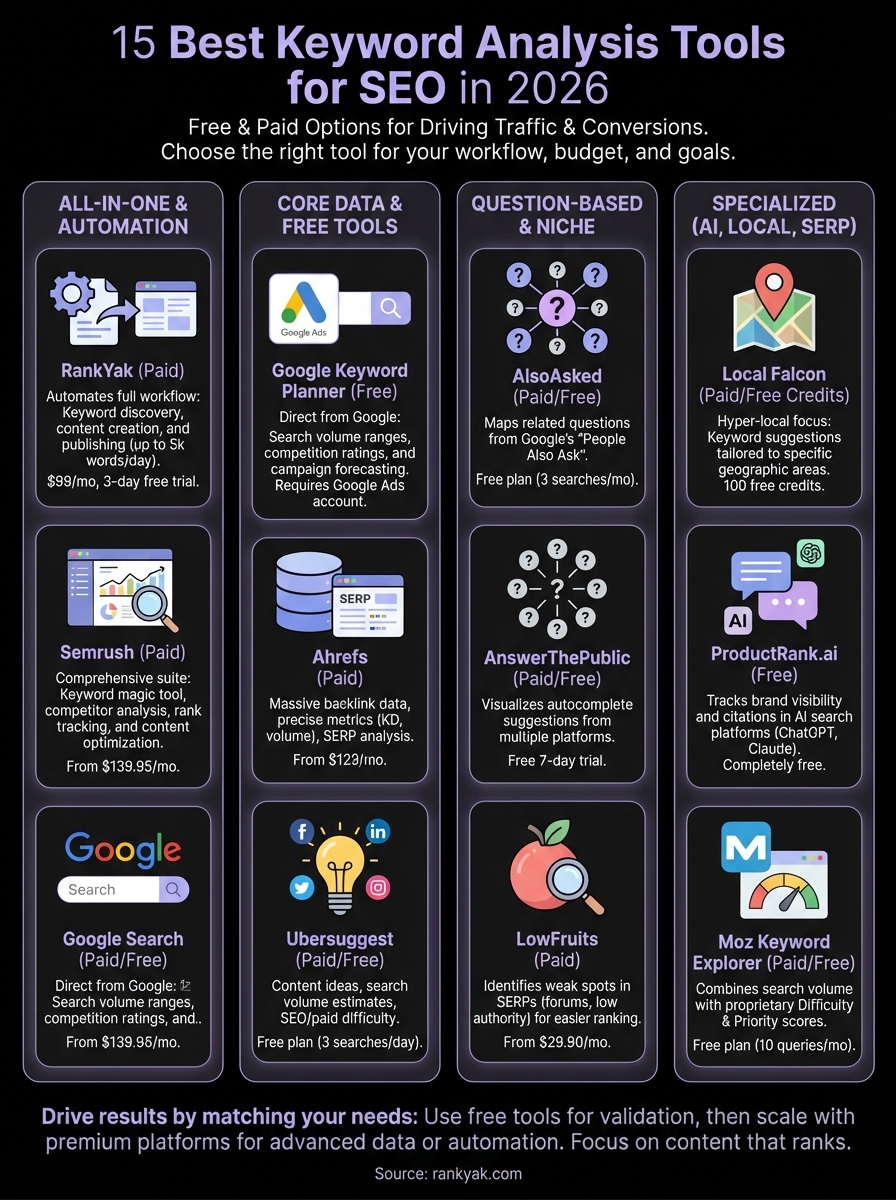
The best keyword analysis tools match your specific workflow, budget, and content goals. You don't need every platform on this list - start with free options like Google Keyword Planner and Google Search Console to validate opportunities, then add specialized tools as your needs grow. Upgrade from free tools when daily search limits restrict your workflow or when you need an seo keyword ranking tool with unlimited rank tracking across hundreds of keywords. Small teams benefit from all-in-one solutions that handle research and execution, while agencies might need enterprise platforms with comprehensive client management features.
Your keyword strategy should drive actual content that ranks and converts. If you spend hours researching keywords but struggle with consistent publishing, consider platforms that connect discovery to creation. Most tools stop at giving you data, leaving you to handle writing, optimization, and publishing separately. RankYak automates the entire process from finding high-potential keywords to publishing optimized articles daily, eliminating the gap between research and results.

Get Google and ChatGPT traffic on autopilot.
Start today and generate your first article within 15 minutes.

SEO revenue calculator
How much revenue is your website leaving on the table?
Take a quick quiz and see exactly how much organic revenue you're missing out on, along with personalized tips to fix it.
-
4 questions, under 1 minute
-
See traffic and revenue potential
-
No email required
Free · takes 1 minute · no signup needed
Question 1 of 4
Question 2 of 4
Question 3 of 4
Question 4 of 4
Your SEO growth potential
Extra visitors / month
after 6-12 months of consistent publishing
Revenue potential / year
at your niche's avg. conversion rate
Articles needed (12 mo)
to reach this traffic level
ROI with RankYak
at $99/mo ($1,188/year)
To hit that number, you'd need to:
- Build a topical authority strategy for your niche
- Research keywords & map out a full topical cluster
- Write, edit & publish an article every single day
- Build backlinks to the articles you publish
RankYak handles all of this automatically, every day.
* Estimates based on industry averages. Results vary by niche, competition, and domain authority. Most SEO results become visible after 3-6 months of consistent publishing.