Image SEO Optimization: A Step-By-Step Guide for 2026
Images make up a significant portion of most web pages, yet they're often overlooked when it comes to SEO. Image SEO optimization isn't just about making pictures look good, it's about helping search engines understand your visual content, improving page load speeds, and capturing traffic from Google Images.
When done right, optimized images can drive substantial organic traffic and boost your overall rankings. At RankYak, we automate content creation and publishing as part of our SEO platform, including generating header images, in-article visuals, and infographics in your brand style, but understanding image optimization helps you maximize every article that goes live on your site.
This guide walks you through the complete process of optimizing images for search engines in 2026. You'll learn practical techniques for file naming, alt text, compression, and technical implementation, everything you need to turn your images into ranking assets rather than performance bottlenecks.
What image SEO optimization means in 2026
Image SEO optimization in 2026 focuses on making visual content discoverable, fast, and useful for both search engines and human visitors. This means balancing technical performance (file size, format, loading speed) with semantic signals (alt text, context, relevance) so Google can understand and rank your images appropriately.
The landscape has shifted significantly. Google's algorithms now evaluate images based on user experience metrics alongside traditional SEO signals. Your images need to load quickly, display correctly across devices, and provide meaningful context through surrounding text and structured data. Simply stuffing keywords into alt text no longer works.
Modern image SEO optimization requires you to think about Core Web Vitals, particularly Largest Contentful Paint (LCP) and Cumulative Layout Shift (CLS). These metrics directly impact how Google ranks your pages, and images are often the biggest contributor to poor scores.
The three pillars of image optimization
Technical performance forms the foundation. You need to compress images without sacrificing quality, use modern formats like WebP or AVIF, and implement lazy loading for images below the fold. Google penalizes pages that load slowly or shift unexpectedly, so your technical setup directly affects rankings.
Semantic optimization helps search engines understand what your images show. This includes descriptive file names, accurate alt text, captions, and relevant surrounding content. Google's visual AI has improved dramatically, but it still relies on textual signals to confirm context and intent.
When you optimize images for both speed and meaning, you create a better experience that search engines reward with higher visibility.
Discoverability optimization ensures your images appear in Google Images search results. This involves structured data, image sitemaps, proper licensing information, and strategic placement within your content. Many websites ignore Google Images entirely, missing out on a significant traffic source.
What's changed since 2024
Google now applies stricter performance thresholds across all page types. Images that cause layout shifts or slow load times create a measurable ranking disadvantage. You can't compensate for poor image optimization with excellent written content anymore.
The search engine also prioritizes original, high-quality visuals over stock photos when determining rankings. If you use generic images that appear on hundreds of other sites, you're less likely to rank in Google Images or receive the same authority signals as pages with unique visuals.
AI-powered visual search has expanded. Google Lens and multimodal search features mean users can now search using images as queries, not just keywords. Your optimization strategy needs to account for reverse image searches and visual similarity matching.
Another shift involves accessibility requirements. Google considers whether images have proper alt text as part of its helpful content evaluation. Pages that ignore accessibility don't just exclude users with disabilities, they also signal lower quality to search algorithms.
Finally, mobile-first indexing means Google evaluates your images based on how they appear and perform on mobile devices, so the same rules you follow when optimizing a site for mobile search apply to your visuals. If your images don't adapt properly to smaller screens or consume excessive mobile data, you'll struggle to maintain rankings regardless of your desktop performance.
Step 1. Choose images that earn clicks and trust
The images you select directly impact whether users click through from search results and whether they trust your content once they land on your page. Google evaluates image relevance, originality, and quality when determining rankings, so your choice of visuals matters as much as technical optimization.
Your first priority should be selecting images that genuinely help users understand your content. Search engines favor pages where images add value rather than just filling space. Before worrying about file formats or compression, you need to choose the right images in the first place.
Pick original visuals over stock photos
Stock photos hurt your image SEO optimization efforts because they appear on hundreds of other websites. Google deprioritizes duplicate images when ranking pages in both standard search and Google Images, which means you lose a significant traffic opportunity by using the same visuals as your competitors.
Original images signal expertise and trustworthiness to both users and search engines. You can create unique visuals through screenshots, custom graphics, photographs, or diagrams that illustrate your specific points. Even simple annotated screenshots carry more weight than generic stock imagery.
When you invest in original visual content, you differentiate your pages and increase the likelihood that Google treats them as authoritative sources.
If you must use stock photos, modify them substantially. Add text overlays, color adjustments, or custom elements that make the image unique to your content. This approach still carries more SEO value than unmodified stock photos that search engines have seen countless times before.
Match images to user intent
Your images need to align with what users expect when they search for your target keywords. If someone searches for "how to tie a tie," they want step-by-step images showing the actual process, not a photo of someone wearing a finished tie.
Look at what already ranks for your target keywords. The top-ranking pages show you what type of images satisfy user intent for that query. You don't need to copy these images, but you should match the general format and subject matter that Google has determined users want to see.
Consider the searcher's goal at every stage. Tutorial content requires clear, zoomed-in process shots. Product comparisons need side-by-side images highlighting differences. Review articles benefit from authentic usage photos that show products in real contexts rather than manufacturer press shots.
Step 2. Use modern formats and clean file names
Modern image formats dramatically reduce file sizes while maintaining visual quality, which directly improves your page load speeds and Core Web Vitals scores. File naming also plays a role in image SEO optimization because search engines use your file names as context signals to understand what your images show.
These two technical elements work together to create a foundation for better rankings. Google evaluates both the performance impact of your images and their semantic clarity, so you need to address format and naming before moving on to more advanced optimization tactics.
Switch to WebP or AVIF format
WebP reduces file sizes by 25-35% compared to JPEG without visible quality loss. Google developed this format specifically for web use, and all modern browsers now support it. You can convert existing images to WebP using free tools or automated plugins that work with your CMS platform.
AVIF offers even better compression, typically achieving 30-50% smaller files than WebP with the same visual quality. Browser support continues to expand, making AVIF increasingly viable for production websites. Consider implementing AVIF with WebP fallback using the picture element to serve the best format to each visitor.
When you switch to modern formats, you immediately improve loading performance without sacrificing image quality or changing your content strategy.
Your implementation should include fallback options for older browsers. Use this HTML structure:
<picture>
  <source srcset="image.avif" type="image/avif">
  <source srcset="image.webp" type="image/webp">
  <img src="image.jpg" alt="descriptive text">
</picture>
Create descriptive file names
Replace generic file names like "IMG_1234.jpg" with specific descriptions that explain what the image shows. Search engines read your file names before the image loads, so descriptive names provide early context about your visual content.
Use hyphens to separate words in your file names, not underscores or spaces, following the same convention as a clean URL slug. Good examples include "red-running-shoes-side-view.webp" or "laptop-battery-replacement-tools.webp" rather than vague names like "photo1.jpg" or "shutterstock_12345.jpg".
Keep file names concise but informative. Aim for 3-5 descriptive words that accurately represent the image content. Front-load the most important keywords naturally, but avoid stuffing multiple variations into one file name.
Step 3. Add alt text, captions, and context
Alt text, captions, and surrounding content tell search engines what your images show when visual recognition algorithms need confirmation. These textual signals form the backbone of image SEO optimization because they provide explicit context that helps Google determine relevance and rank your images appropriately in both standard search and Google Images.
Your approach to these elements should prioritize accuracy over keyword stuffing. Search engines penalize overly promotional or misleading descriptions, so you need to balance SEO value with genuine helpfulness for users who rely on screen readers or encounter broken images.
Write alt text that describes and informs
Alt text should explain what appears in your image using clear, specific language. Aim for descriptions between 10-15 words that capture the essential visual elements without excessive detail. Write for someone who cannot see the image but needs to understand its purpose and content.
Bad alt text looks like "image" or "photo123" or keyword-stuffed phrases like "best red running shoes buy cheap running shoes online," and an image alt text checker will flag every one of them on a page. Good alt text describes what you actually see: "red Nike running shoes on wooden floor" or "laptop keyboard with coffee stain on spacebar".
When you write accurate, descriptive alt text, you help both search engines and visually impaired users understand your visual content.
Skip phrases like "image of" or "picture of" because screen readers already announce that it's an image. Go straight to the description. Also skip alt text entirely for purely decorative images by using an empty alt attribute (alt="") so screen readers ignore them.
Add captions for additional context
Captions appear directly below images and provide supplementary information that alt text doesn't cover. You can use captions to add credits, explain relevance, or highlight specific details that readers should notice. Unlike alt text, captions remain visible to all users.
Effective captions connect your image to your surrounding content. They might explain why you chose this particular visual, credit the source, or draw attention to important features within the image. Keep captions concise, typically one to two sentences.
Surround images with relevant content
Place images near the text they illustrate. Search engines evaluate whether your image placement makes sense contextually. An infographic about email marketing performs better when positioned within a paragraph discussing email strategies rather than randomly inserted at page bottom.
Your heading structure also matters. Images that appear under relevant H2 or H3 headings receive stronger contextual signals than images placed in unrelated sections. This placement helps Google understand how your visual content supports your written content.
Step 4. Reduce file size and improve Core Web Vitals
Large image files slow down your pages and damage your Core Web Vitals scores, which directly impacts your rankings. Google's algorithms prioritize pages that load quickly and provide stable visual experiences, so reducing file sizes sits alongside the other technical SEO best practices that make image optimization work. You need to balance visual quality with performance to maintain rankings.
Your compression strategy should target the specific Core Web Vitals metrics that Google measures: Largest Contentful Paint (LCP), Cumulative Layout Shift (CLS), and First Input Delay (FID). Images affect all three metrics, particularly LCP since large images often represent the largest element on your page.
Compress images without losing quality
Use compression tools to reduce file sizes by 60-80% without visible degradation. Tools like Squoosh or TinyPNG apply lossy compression that removes imperceptible image data while preserving the visual elements that matter to users. Run every image through compression before uploading to your site.
Target specific file size ranges based on image purpose. Hero images should stay under 200KB, blog post images under 100KB, and thumbnail images under 50KB. These thresholds ensure fast loading across different connection speeds while maintaining acceptable quality for most use cases.
When you compress images aggressively, you can cut page load times in half without users noticing any quality difference.
Set your compression quality between 75-85% for photographs and screenshots. This range delivers the best balance between file size and visual fidelity. Lower quality settings create visible artifacts, while higher settings produce unnecessarily large files that hurt performance.
Implement lazy loading and responsive images
Add the loading="lazy" attribute to images below the fold so they only load when users scroll near them. This technique dramatically improves initial page load times and LCP scores by prioritizing visible content. Use this code structure:

<img src="image.webp" alt="description" loading="lazy" width="800" height="600">
Always specify width and height attributes to prevent layout shifts as images load. These dimensions reserve space for your images, which stops content from jumping around and improves your CLS score. Calculate the exact pixel dimensions of your images and include them in your HTML.
Use responsive images with the srcset attribute to serve appropriate sizes for different devices. This prevents mobile users from downloading desktop-sized images that waste bandwidth and slow loading times:
<img srcset="image-400.webp 400w, image-800.webp 800w, image-1200.webp 1200w"
     sizes="(max-width: 600px) 400px, (max-width: 1200px) 800px, 1200px"
     src="image-800.webp" alt="description">
Step 5. Make images discoverable in Google Images
Google Images generates substantial organic traffic for websites that optimize properly, yet most sites ignore this channel entirely. You need to help Google's crawlers find and index your images through technical signals like sitemaps, structured data, and proper metadata, which is largely a question of crawl budget optimization. Image SEO optimization extends beyond your main content pages into dedicated discovery mechanisms that tell search engines exactly which images matter.
Your goal should be making every valuable image on your site visible to Google's indexing systems. This requires both automated tools (sitemaps) and manual markup (structured data) that explicitly identify your visual assets and provide context about their content, licensing, and relevance.
Submit an image sitemap
Create an image sitemap that lists all important images on your site. You can add images to your existing XML sitemap or create a separate image-specific sitemap that Google crawls independently. Use this structure:
<?xml version="1.0" encoding="UTF-8"?>
<urlset xmlns="http://www.sitemaps.org/schemas/sitemap/0.9"
        xmlns:image="http://www.google.com/schemas/sitemap-image/1.1">
  <url>
    <loc>https://example.com/article-url</loc>
    <image:image>
      <image:loc>https://example.com/images/photo.webp</image:loc>
      <image:caption>Red running shoes on wooden floor</image:caption>
      <image:title>Nike Air Max Running Shoes</image:title>
    </image:image>
  </url>
</urlset>
Submit your image sitemap through Google Search Console under the Sitemaps section, after you validate the XML sitemap against the protocol. Update it whenever you add new images to ensure continuous indexing of your visual content.
Add structured data markup
Generate JSON-LD schema markup to give Google explicit information about your images. The ImageObject schema tells search engines about your image's content, creator, and licensing status. Add this JSON-LD code to pages with critical images:
{
  "@context": "https://schema.org",
  "@type": "ImageObject",
  "contentUrl": "https://example.com/image.webp",
  "description": "Red running shoes displayed on wooden floor",
  "name": "Nike Air Max Side View"
}
When you combine image sitemaps with structured data, you give Google multiple pathways to discover and understand your visual content.
Ensure mobile-friendly display
Check that your images scale properly on mobile devices since Google uses mobile-first indexing. Images that break layouts or require horizontal scrolling hurt your visibility in Google Images. Test every page using Google's Mobile-Friendly Test tool to verify that images adapt correctly across screen sizes.
Monitor your Google Images traffic through Search Console's Performance report filtered by image search type. Track which images drive clicks and adjust your optimization strategy based on actual performance data rather than assumptions about what works.
Quick recap and next steps
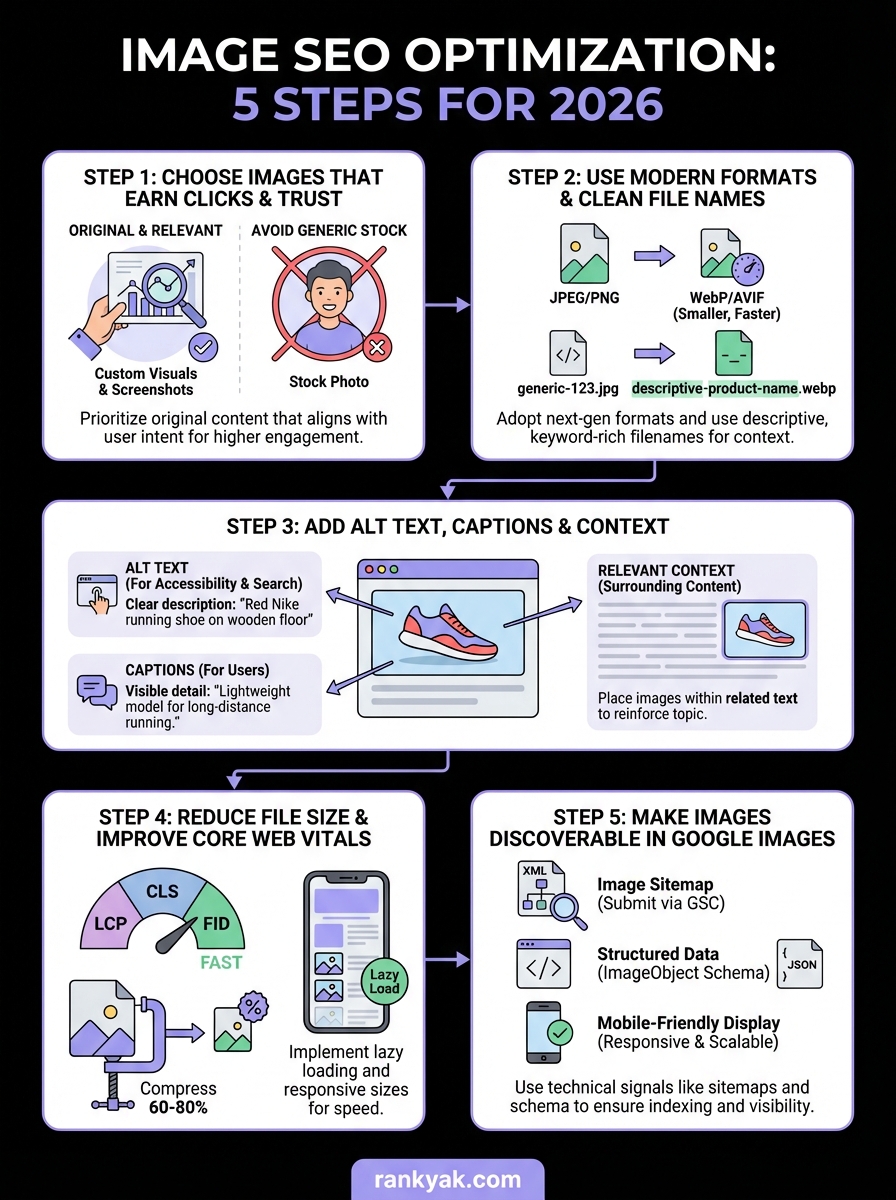
Image SEO optimization requires you to balance technical performance with semantic clarity. You need to choose original, relevant images, convert them to modern formats like WebP or AVIF, write descriptive alt text, compress files aggressively, and make your visuals discoverable through sitemaps and structured data. Each step builds on the previous one to create a comprehensive optimization strategy that improves both your page rankings and Google Images visibility.
Start by auditing your existing images and identifying your biggest performance bottlenecks. Compress oversized files first since they deliver immediate improvements to Core Web Vitals scores. Then work through alt text, file names, and technical implementation systematically. Track your progress using Google Search Console to see which images drive traffic and which need additional optimization work.
If you want to automate your entire SEO workflow, including content creation with properly optimized images, see how RankYak writes researched, ready-to-rank articles with image SEO handled for you. You can focus on your business while the platform manages technical optimization automatically.
Lars Koole is a co-founder of RankYak and has worked in SEO since 2021, on the side where a strategy has to become a live page: inside agencies, alongside them, for clients directly, and in-house on the products being ranked. He is a software engineer by trade, which is how that page gets built. Before RankYak he founded companies of his own, two of which were acquired. At RankYak he owns the engineering and everything AI, and works out the solution and the implementation of each new feature.
