You can have the best content on the internet, but if your on-page SEO techniques aren't dialed in, Google won't know what to do with it. Your pages will sit buried on page two (or worse), collecting digital dust while competitors with mediocre content outrank you. That's the frustrating reality for most website owners who skip the fundamentals.
On-page SEO is the foundation of every page that ranks. It's how you communicate to search engines what your content is about, who it's for, and why it deserves to show up when someone searches. Unlike backlinks or domain authority, things that take months to build, on-page optimizations can move the needle fast. Sometimes within days of making changes.
The challenge? There are dozens of factors to consider, from title tags and header structure to internal links and schema markup. Missing even a few can tank your chances of ranking. And manually optimizing every page? That's a full-time job most businesses can't afford.
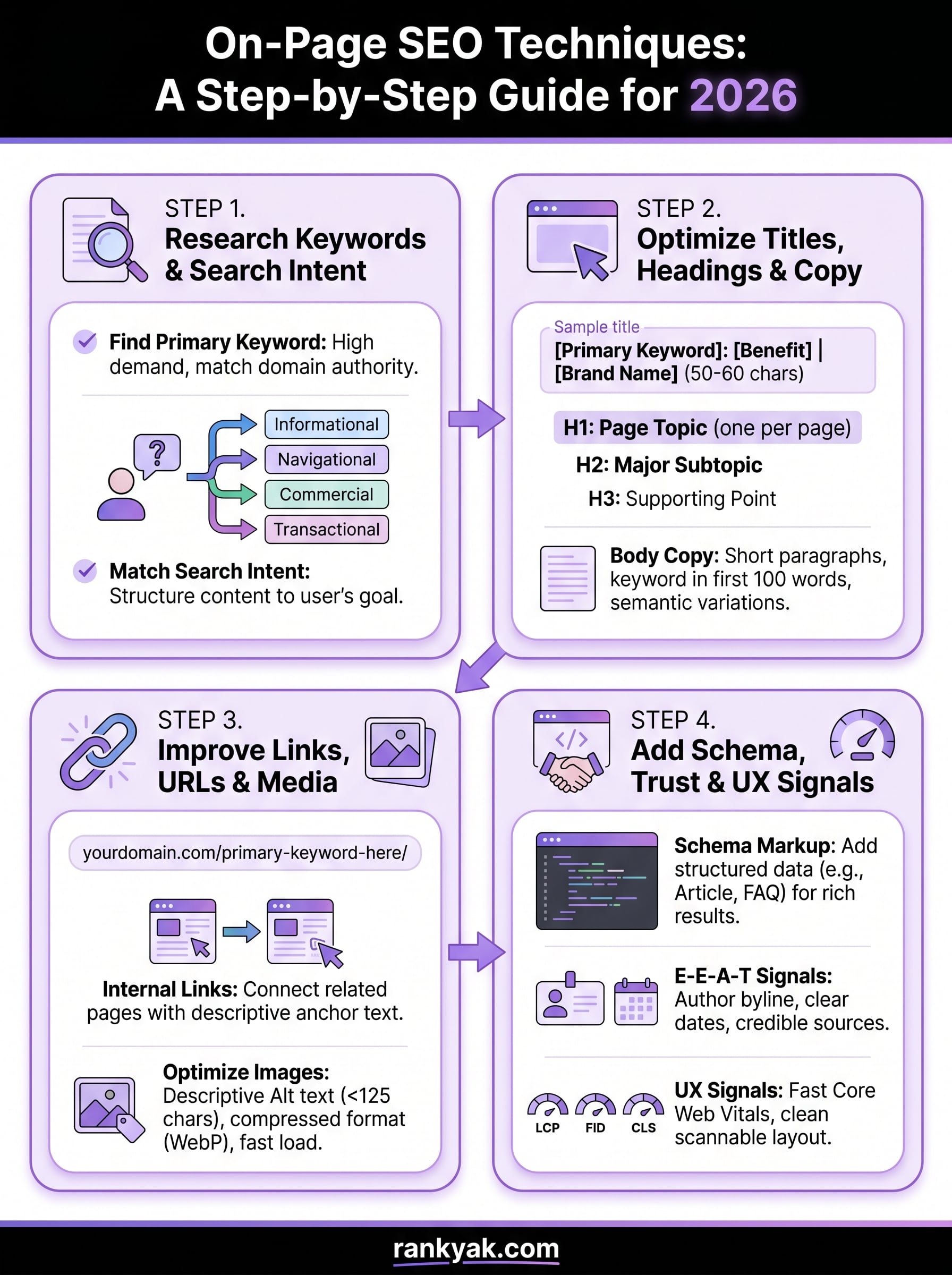
At RankYak, we automate the heavy lifting of SEO, including building every article with these on-page principles baked in from the start. But whether you're using automation or doing it yourself, you need to understand what actually works. This guide breaks down 23 actionable on-page SEO techniques that will help your pages rank higher in 2026, organized so you can implement them today.
The SEO landscape keeps shifting, but on-page optimization remains the most controllable factor in your ranking success. You can't control when someone links to your site or how Google's algorithm will change next month. But you can control every signal you send from your pages. That control matters more than ever as search engines become more sophisticated at understanding content quality and user intent.
Think of on-page SEO as the difference between shouting into a crowded room and speaking directly to someone who wants to hear what you have to say. When you optimize your pages correctly, you're giving Google and other search engines clear signals about what your content covers, who it helps, and why it deserves visibility. Without those signals, even the best content gets lost in the noise.
Off-page SEO requires other people to cooperate. You need someone to link to you, share your content, or mention your brand. That takes time, outreach, and luck. On-page SEO is different. You can log into your site right now and start making changes that impact your rankings within hours or days.
Every element is yours to adjust. Your title tags, headers, content structure, internal links, and technical setup all respond to your direct input. When you spot an opportunity to improve, you don't need to wait for approval or coordination. You implement the change and monitor the results. This speed and autonomy make on-page techniques the foundation of any successful SEO strategy.
Google's crawlers evaluate your individual pages before they consider your broader site authority. They look at how you structure information, whether you match search intent, and if you provide genuine value to readers. Your page-level signals tell search engines if your content deserves to rank for specific queries.
The algorithm prioritizes pages that demonstrate expertise through their structure and content. Clear headings show topical organization. Proper keyword usage signals relevance without stuffing. Internal links connect related concepts and distribute authority. Schema markup provides context that helps search engines understand your content type. All these on-page seo techniques create the framework that search engines use to evaluate your pages.
Strong on-page optimization transforms average content into ranking assets by giving search engines the clarity they need to surface your pages for the right searches.
Your competitors might have more backlinks or higher domain authority, but excellent on-page SEO can level the playing field. When you nail the fundamentals, you give your content the best possible chance to compete, regardless of your site's age or authority.
ChatGPT, Perplexity, and Google's AI Overview all pull information from web pages. These systems need clear structure and authoritative signals to determine which content to feature. They can't rely on backlinks the same way traditional search does, so they lean heavily on how you organize and present information on the page itself.
Your headers, lists, definitions, and factual citations become even more valuable in AI-driven search. When you structure content logically and support claims with sources, AI systems can extract and surface your information confidently. Poor on-page optimization makes your content invisible to these platforms, no matter how accurate or helpful it might be.
Most businesses focus on link building and technical SEO while treating on-page optimization as an afterthought. They publish content without proper header hierarchies, ignore search intent, and skip internal linking strategies. The result is predictable: pages that never escape page two or three of search results.
You can't fix weak on-page SEO with more backlinks. A poorly optimized page wastes every link pointing to it. Google sees the signals you send, decides your content doesn't match user needs, and ranks something else instead. The opportunity cost is massive because you're investing in content creation without maximizing its ranking potential.
Strong on-page techniques multiply the value of everything else you do. When your pages are optimized correctly, your link building efforts work harder, your content gets discovered faster, and your technical improvements translate into visible ranking gains. That's why mastering these fundamentals matters more than chasing the latest SEO trend.
You can't optimize a page until you know what you want it to accomplish. Every page needs a clear purpose tied to a specific search query and user need. Without this foundation, you'll waste time optimizing content that doesn't match what searchers actually want. These first three steps force you to define your target, understand your audience, and align every element of your page with their expectations.

Search intent drives everything in modern SEO. Google rewards pages that deliver exactly what the searcher expects when they type a query. If someone searches "how to install WordPress," they want step-by-step instructions, not a sales pitch for hosting. Matching intent isn't optional, it's the prerequisite for ranking. These on-page seo techniques start with understanding what success looks like for each individual page.
Start by writing down the specific action you want visitors to take after reading your page. This might be signing up for a newsletter, buying a product, downloading a resource, or simply learning something new. Your page goal determines everything from your content structure to your calls-to-action.
Assign each page a primary keyword and a ranking target. If you're targeting "email marketing automation," decide whether you want to rank for informational searches or comparison searches. Document this goal before you write a single word. When you know exactly what outcome you need, every optimization decision becomes clearer and more focused on that specific result.
Type your target keyword into Google and analyze the top 10 results carefully. Look at the content formats that dominate (guides, lists, comparisons, definitions). Note the common sections, depth of coverage, and angle each page takes. This research reveals what Google considers the best match for user intent.
Check the "People also ask" section and related searches at the bottom of the results page. These questions show you the additional information searchers expect to find. If most top-ranking pages include pricing comparisons or step-by-step tutorials, your page needs those elements too. Your content must match or exceed what's already ranking if you want to compete.
Ranking requires delivering the exact format and depth of information that searchers expect, not what you think they should want.
Match your content type to the dominant intent category. Use this framework to structure your page correctly:
| Search Intent | Content Format | Example Keywords |
|---|---|---|
| Informational | How-to guides, definitions, explainers | how to, what is, guide to |
| Navigational | Brand pages, product pages, landing pages | [brand name], login, official |
| Commercial | Comparisons, reviews, best-of lists | best, vs, review, top |
| Transactional | Product pages, service pages, pricing | buy, price, cost, order |
Structure your page to deliver value immediately in the format searchers expect. If the intent is informational, lead with clear answers and actionable steps. For commercial intent, include comparisons and specific recommendations early. Your content format must match the search intent category, or you'll struggle to rank no matter how good your writing is.
Your page structure tells both search engines and readers how your content flows. A messy structure confuses crawlers and frustrates users, which tanks your rankings and drives visitors away. These three steps create the skeleton that holds your content together. When you organize information logically, search engines can parse your content faster and users can scan for the information they need.
Structure isn't just about aesthetics. It's one of the most critical on-page seo techniques because it directly impacts how search engines understand your page hierarchy and topical relevance. Poor structure makes even great content harder to rank because crawlers can't determine what matters most on your page.
Use one H1 tag per page for your main title. This tells search engines what your entire page is about. Every page needs exactly one H1, and it should include your primary keyword naturally. Don't stuff keywords or make it clickbait. Write a clear, descriptive title that matches what users expect to find.

Structure your subheadings (H2, H3, H4) in a nested hierarchy that flows logically from broad topics to specific details. Your H2s should break your content into major sections. H3s divide those sections into subtopics. Never skip levels by jumping from H2 to H4. Search engines use this hierarchy to understand the relationship between different parts of your content.
Here's how proper header nesting works:
H1: Main Page Title (Primary Keyword)
H2: Major Section 1
H3: Subtopic 1A
H3: Subtopic 1B
H2: Major Section 2
H3: Subtopic 2A
H4: Specific Detail
H3: Subtopic 2B
Include keywords naturally in your H2 and H3 tags, but prioritize clarity over optimization. Headers exist to help readers scan and navigate your content. If a header feels forced or awkward, rewrite it until it reads naturally.
Create URLs that describe your page content in 3-5 words maximum. Remove stop words like "and," "the," "of" unless they're necessary for clarity. Use hyphens to separate words, never underscores or spaces. Your URL should give readers and search engines an instant understanding of what they'll find on the page.
Good URL structure: yoursite.com/on-page-seo-techniques
Bad URL structure: yoursite.com/blog/post/12345/the-ultimate-guide-to-on-page-seo-techniques-and-strategies
Avoid changing URLs after publication. Every URL change loses ranking history and requires redirects, which dilute authority slightly. If you must change a URL, implement a 301 redirect immediately from the old URL to the new one.
Clean URLs act as another signal that tells search engines exactly what your page covers before they even parse your content.
Break your content into digestible chunks using short paragraphs, lists, and tables. Readers scan web content, they don't read every word. When you create visual breaks, you make it easier for people to find the specific information they need without getting overwhelmed by walls of text.
Keep paragraphs to 2-4 sentences maximum. Use bulleted lists for items that don't require a specific order. Use numbered lists for sequential steps or rankings. Add tables when comparing multiple options or presenting data. These formatting choices improve readability and increase time on page, which signals to Google that your content satisfies user needs.
Content quality determines whether your on-page seo techniques translate into actual rankings. You can nail every technical detail, but if your content doesn't deliver genuine value, Google won't rank it. These four steps focus on creating content that satisfies both search algorithms and real human needs. The goal isn't just to rank, it's to provide answers that keep visitors on your page and turn them into customers or subscribers.
Writing for SEO doesn't mean sacrificing quality or stuffing keywords into every sentence. It means structuring helpful information in ways that search engines can understand and users can act on immediately. When you balance these elements correctly, your content becomes a ranking asset that compounds value over time.
Answer every question a searcher might have about your topic before they need to click back to Google. Check what the top-ranking pages cover and identify gaps you can fill. Your content should be the last page someone needs to visit to accomplish their goal.
Depth matters more than length. A 2,000-word article that addresses every angle of a topic thoroughly will outrank a 5,000-word article padded with generic filler. Cut sentences that don't add specific value. Replace vague statements with concrete examples, data points, or actionable instructions. Every paragraph should move the reader closer to solving their problem.
Put your main answer in the first 100 words of your content. Readers scan for immediate value, and search engines prioritize pages that deliver answers fast. If someone searches "how to reset a password," your opening paragraph should explain the exact steps, not provide background about authentication systems.
Structure your content so skimmers can extract key information without reading every word. Use the inverted pyramid approach: most important information first, supporting details second, additional context last. This structure works because it matches how people actually consume web content.
Content that front-loads answers captures featured snippets and satisfies user intent faster than content that buries the solution in paragraph twelve.
Place your primary keyword in the first paragraph, at least one H2 heading, and naturally throughout your content. Don't force it into every other sentence. Search engines understand synonyms and related terms, so write for humans first and keywords second.
Include semantic keywords that relate to your main topic. If you're writing about "email marketing," naturally mention terms like "automation," "campaigns," "subscribers," and "open rates." These related concepts help search engines understand your content's full scope without requiring exact-match keyword repetition.
Generic content copied from other sources won't rank well in 2026. Add original research, case studies, or specific examples that readers can't find elsewhere. Share actual results, show real screenshots, or provide templates based on your experience.
Cite credible sources when you reference statistics or claims. Link to authoritative data when supporting your points with external information. Original insights combined with strong sources build trust signals that search engines reward with higher rankings.
Your title tags and meta descriptions are the first impression searchers get before they click through to your page. These elements appear directly in search results and determine whether someone chooses your page over nine others on the same page. Poor optimization here wastes all the work you've done on content quality because nobody clicks to read what you wrote. These four on-page seo techniques focus on maximizing visibility and click-through rates from search results.
Write title tags between 50-60 characters to avoid truncation in search results. Place your primary keyword near the beginning, but make sure the title reads naturally and compels clicks. Include your brand name at the end if space allows, separated by a pipe or dash.

Your title tag appears in the HTML head section like this:
<title>On-Page SEO Techniques: 23 Steps to Boost Rankings | RankYak</title>
Test different formulas based on search intent. For informational content, use "How to [Action]" or "[Number] Ways to [Result]". For commercial content, try "Best [Product] for [Use Case]" or "[Product] vs [Product]". Numbers and specific benefits increase click-through rates more than generic titles.
Create meta descriptions between 140-160 characters that summarize your page value and include a clear benefit. Search engines don't use meta descriptions for ranking, but they influence click-through rates directly, which does impact rankings over time.
Format your meta description like this in HTML:
<meta name="description" content="Learn 23 actionable on-page SEO techniques that help your pages rank higher in 2026. Step-by-step guide with examples you can implement today.">
Include your primary keyword naturally and add a call-to-action or compelling reason to click. Avoid duplicate meta descriptions across multiple pages. Each page needs a unique description that matches its specific content.
Meta descriptions that promise specific outcomes and use action words consistently outperform generic summaries in click-through testing.
Keep URLs under 60 characters when possible and remove all unnecessary parameters. Use your primary keyword in the URL slug, but prioritize readability over exact-match optimization. Static URLs perform better than dynamic URLs filled with numbers and symbols.
Compare these URL structures:
Good: yoursite.com/on-page-seo-techniques
Bad: yoursite.com/blog/post?id=12345&category=seo&date=2026
Implement canonical tags to prevent duplicate content issues when you have multiple URLs pointing to similar content. Add this tag to your page head to specify the preferred version.
Format content to answer specific questions directly in the first paragraph after a relevant heading. Google pulls featured snippets from pages that provide clear, concise answers in list format, paragraph format, or table format.
Structure your content with question-based H2 or H3 headings followed by direct answers in 40-60 words. Use numbered lists for sequential steps, bulleted lists for options, and tables for comparisons. Pages that earn featured snippets get significantly more visibility than the number one ranking alone.
Internal links and external citations are two of the most underused on-page seo techniques that can significantly boost your rankings. Links tell search engines how your content connects and which pages matter most on your site. Citations prove your claims with credible data and build trust signals that Google rewards. Most websites publish content without a linking strategy, which means they waste authority and miss opportunities to guide visitors through related topics.
Strategic linking transforms isolated pages into a connected network that distributes authority and improves crawlability. When you link to related content on your own site, you help search engines discover pages faster and understand topical relationships. External citations to authoritative sources show you've researched your topic thoroughly and aren't just making claims without evidence. These signals matter more in 2026 as search engines prioritize content backed by real data.
Add 3-5 internal links from each page to other relevant content you've published. These links should flow naturally within your content and provide genuine value to readers who want to explore related topics. Anchor text should describe what the linked page covers without being overly optimized.
Structure your internal links like this:
Learn more about <a href="/keyword-research-guide">finding the right keywords</a> for your content strategy.
Point links at pages that expand on concepts you mention but don't fully explain in the current article. If you reference "content clusters" briefly, link to a detailed guide about building topic clusters. This creates a natural reading path that keeps visitors on your site longer and signals to search engines which pages cover related topics.
Create a linking hierarchy that flows authority from high-traffic pages to newer content that needs ranking help. Link from your homepage and popular articles to important pages that deserve more visibility. Use descriptive anchor text that includes target keywords naturally, but avoid exact-match anchors for every link.
Audit your site monthly for broken internal links that lead to 404 errors. These broken connections frustrate users and waste the authority those links could pass. Run your site through Google Search Console to identify crawl errors and pages with no internal links pointing to them.
Every page needs at least one internal link from another page on your site. Orphaned pages that exist without any internal links won't get crawled regularly and will struggle to rank. Create a content hub structure where main pillar pages link to related subtopics, and those subtopic pages link back to the pillar and to each other.
Internal linking distributes authority across your site and creates clear pathways for both search engines and readers to discover your best content.
Back up statistics, research findings, and factual claims with links to credible sources like government websites, academic institutions, or industry research. Google values content that demonstrates accuracy through proper citations. Place these links naturally within your content where you reference specific data.
Format citations as inline links:
According to <a href="https://research.google" target="_blank" rel="noopener">Google's research</a>, pages with strong E-E-A-T signals rank higher.
Add 2-4 external citations per article to demonstrate you've done research beyond surface-level information. Choose sources that readers would recognize as authoritative in your industry. This builds trust with both search engines and your audience by showing you base your content on verifiable information rather than opinions alone.
Images make your content more engaging and help explain complex concepts visually, but unoptimized images slow down your pages and create accessibility barriers that hurt rankings. Search engines can't "see" images the way humans do, so you need to provide clear signals about what each image contains and why it matters. These three on-page seo techniques ensure your images contribute to rankings instead of dragging them down while making your content accessible to everyone who visits your site.
Accessibility isn't just about compliance or being helpful. Google explicitly rewards pages that work well for users with disabilities because accessible pages generally provide better experiences for all visitors. When you optimize images correctly, you improve page speed, increase visibility in image search, and create multiple ranking signals that compound over time.
Convert all images to WebP format for the best combination of quality and file size. WebP images are typically 25-35% smaller than JPEGs with no visible quality loss. Use online converters or image editing tools to batch-convert your existing images, and configure your CMS to upload WebP versions automatically going forward.
Compress images before uploading them to your site. Aim for file sizes under 200KB for photos and under 50KB for graphics and screenshots. Large image files directly impact page load speed, which is a confirmed ranking factor. Your images should be sized correctly for their display dimensions, never upload a 3000px wide image if it only displays at 800px on your page.
Implement lazy loading so images load only when users scroll to them. Add this attribute to your image tags:
<img src="image.webp" alt="descriptive text" loading="lazy" width="800" height="600">
Always specify width and height attributes in your HTML. This prevents layout shift when images load and improves your Core Web Vitals scores, which Google uses as ranking signals.
Add unique alt text to every image that describes what the image shows in 10-15 words. Don't stuff keywords or write "image of" at the beginning. Your alt text should make sense to someone who can't see the image while also helping search engines understand the visual content.
Write alt text like this:
<img src="screenshot.webp" alt="WordPress dashboard showing SEO plugin settings panel" loading="lazy">
Skip alt text only for purely decorative images that don't add meaning to your content. For these, use an empty alt attribute (alt="") so screen readers skip them. Every informational image needs descriptive alt text that serves both accessibility and SEO purposes.
Alt text functions as a ranking signal for image search while ensuring your content remains accessible to visitors using screen readers.
Include captions under important images to provide context for visual information and create additional keyword opportunities. Captions appear directly on the page and get read by all visitors, which makes them more valuable than alt text alone for engagement and comprehension.
Add ImageObject schema markup to help search engines understand your most important images. This structured data can help your images appear in rich results:
<script type="application/ld+json">
{
"@context": "https://schema.org",
"@type": "ImageObject",
"contentUrl": "https://yoursite.com/image.webp",
"description": "Detailed description of what the image shows"
}
</script>
Place this schema in your page head or immediately after the image. Structured data gives search engines explicit information about your visual content that improves visibility in image search results and rich snippets.
Your page can have perfect content and flawless optimization, but if it loads slowly or breaks on mobile devices, you'll lose rankings and visitors before they read a single word. Google's algorithm prioritizes fast-loading pages that work seamlessly on smartphones because that's how most people search. These final technical on-page seo techniques focus on speed and mobile experience, two factors that directly impact your Core Web Vitals scores and user engagement metrics. When your pages load in under three seconds and adapt perfectly to any screen size, you remove friction that costs you rankings.

Mobile traffic accounts for over 60% of all searches, which means your mobile experience matters more than your desktop version for most users. Search engines crawl and index your mobile site first, so optimization for small screens isn't optional anymore. Speed and mobile responsiveness work together to create the foundation that supports all your other SEO efforts.
Measure your current Core Web Vitals scores using Google's PageSpeed Insights tool at https://pagespeed.web.dev. Focus on three critical metrics: Largest Contentful Paint (LCP) should load in under 2.5 seconds, First Input Delay (FID) should be under 100 milliseconds, and Cumulative Layout Shift (CLS) should score under 0.1. These metrics directly influence your rankings because they measure real user experience.
Reduce server response time by enabling browser caching and using a content delivery network (CDN). Add these cache headers to your server configuration:
Cache-Control: public, max-age=31536000
Minimize JavaScript execution by deferring non-critical scripts until after your page content loads. Add the defer attribute to script tags:
<script src="analytics.js" defer></script>
Eliminate render-blocking resources that prevent your page from displaying quickly. Inline critical CSS directly in your page head and load non-essential styles asynchronously using media queries. Remove unused CSS and JavaScript that bloat your file sizes without adding functionality.
Pages that score "Good" on all three Core Web Vitals metrics rank higher on average than pages with poor scores, even when other optimization factors are equal.
Test your pages on actual mobile devices, not just browser emulators. Check that all buttons and links are large enough to tap easily (minimum 48x48 pixels) and spaced far enough apart to prevent accidental clicks. Your content should be readable without zooming, which means using font sizes of at least 16px for body text.
Implement responsive design that adapts your layout automatically to different screen sizes. Use CSS media queries to adjust your design based on viewport width:
@media (max-width: 768px) {
.content {
width: 100%;
padding: 20px;
}
}
Avoid intrusive interstitials and popups that cover content on mobile screens. Google penalizes pages that display full-screen popups immediately after users arrive from search results. If you need popups, delay them until users have engaged with your content or make them easy to dismiss with a clearly visible close button.
Configure your viewport meta tag correctly to ensure proper scaling on mobile devices:
<meta name="viewport" content="width=device-width, initial-scale=1.0">
Test your mobile experience using Google's Mobile-Friendly Test at https://search.google.com/test/mobile-friendly to identify specific issues that need fixing. Address every error the tool reports because mobile-friendliness is a confirmed ranking signal that affects your visibility across all devices.
Schema markup is structured data that tells search engines exactly what your content represents, from articles and products to FAQs and reviews. Without schema, search engines have to interpret your content based on visible text alone, which means they might miss important context. Adding the right schema types to your pages creates explicit signals that unlock rich results like star ratings, FAQ accordions, and breadcrumbs in search listings. These enhanced listings take up more space and attract more clicks than standard blue links. Schema markup is one of the most powerful on-page seo techniques you can implement because it directly influences how your pages appear in search results.
Most websites skip schema completely, which means you gain a competitive advantage simply by implementing it correctly. The technical aspects might seem intimidating at first, but schema validation tools catch errors immediately and show you exactly what search engines see. When you add schema properly and validate it, you remove ambiguity about what your content covers and how it should display in results.
Start by identifying which schema types match your content format. Use Article schema for blog posts and guides, Product schema for items you sell, FAQ schema for question-and-answer sections, and HowTo schema for step-by-step instructions. Review the full list of available types at https://schema.org to find options that fit your specific content.
Match schema types to these common content formats:
| Content Type | Schema Type | Rich Result Benefit |
|---|---|---|
| Blog posts/guides | Article | Article metadata in results |
| Products | Product | Price, ratings, availability |
| FAQs | FAQPage | Expandable Q&A in results |
| How-to guides | HowTo | Step-by-step visual cards |
| Reviews | Review | Star ratings displayed |
| Local business | LocalBusiness | Maps integration, hours |
Select the most specific schema type that describes your content. If you run a restaurant, use Restaurant schema instead of the broader LocalBusiness schema. Specific types provide more fields and unlock more detailed rich results.
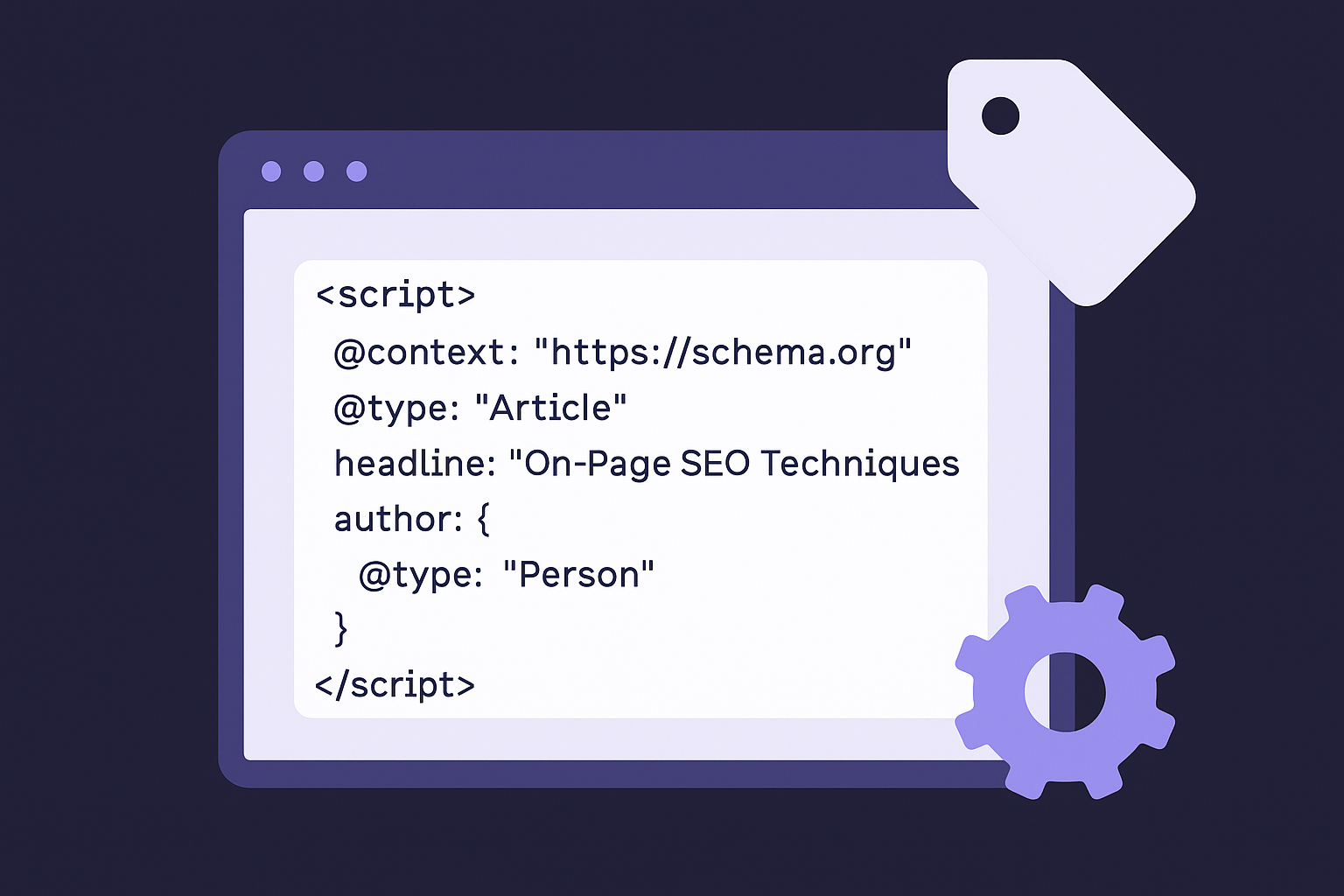
Implement schema using JSON-LD format, which Google recommends because it keeps structured data separate from your visible HTML. Place your schema code in the <head> section or at the end of your <body> tag. Here's a complete Article schema example you can adapt:
<script type="application/ld+json">
{
"@context": "https://schema.org",
"@type": "Article",
"headline": "On-Page SEO Techniques: 23 Steps to Boost Rankings",
"description": "Learn 23 actionable on-page SEO techniques that help your pages rank higher in 2026.",
"author": {
"@type": "Organization",
"name": "RankYak"
},
"datePublished": "2026-01-31",
"dateModified": "2026-01-31",
"image": "https://rankyak.com/images/on-page-seo-guide.jpg"
}
</script>
Replace the values with your actual page information while keeping the structure intact. Add multiple schema types to the same page if needed by placing separate <script> blocks for each type.
Schema markup transforms how your content appears in search results by giving search engines structured information they can display as rich snippets and enhanced listings.
Test every schema implementation using Google's Rich Results Test at https://search.google.com/test/rich-results. Paste your page URL or raw HTML to see if Google can parse your schema correctly and which rich results you're eligible for. The tool highlights errors with specific line numbers and explanations.
Fix all errors before publishing your page. Warnings won't prevent rich results, but errors will disqualify your page entirely from enhanced listings. Common errors include missing required fields, incorrect date formats, and mismatched schema types. After fixing issues, run the validator again to confirm your schema passes without errors.
Monitor your schema performance in Google Search Console under the Enhancements section. This report shows which pages have valid schema, which have errors, and which rich results actually appear in search. Check this report monthly to catch validation problems before they impact your rankings.

You now have 23 actionable on-page seo techniques that cover everything from content structure to schema markup and mobile optimization. The difference between knowing these strategies and implementing them consistently determines whether your pages rank or get buried on page three. Start with the fundamentals like fixing your title tags, header hierarchy, and internal links first. These changes take minutes to implement and often show ranking improvements within days.
Manual optimization across dozens or hundreds of pages becomes a full-time job that most businesses can't sustain. Every page needs attention, from keyword placement to image compression, which adds up fast when you're publishing regularly. RankYak automates these on-page optimizations by building every article with proper structure, schema markup, internal linking, and mobile responsiveness baked in from the start. Try it free for 3 days and let automation handle the technical work while you focus on strategy.
Start today and generate your first article within 15 minutes.