Ahrefs On-Page SEO: A Step-by-Step Optimization Guide
Ahrefs gives you some of the best data available for diagnosing what's holding your pages back. But having access to powerful tools and actually knowing how to use them for on-page SEO are two different things. If you've ever opened Ahrefs' Site Audit or Content Gap report and felt unsure about what to fix first, you're not alone. Most site owners underuse the platform because Ahrefs on-page SEO workflows aren't always obvious out of the box.
On-page optimization is where you have the most direct control over your rankings. It's the meta titles, heading structures, internal links, keyword placement, and content depth that tell Google exactly what your page is about, and whether it deserves to rank. Ahrefs can surface the specific issues dragging your pages down, but you still need a clear process to act on that data. Without one, you end up with a list of recommendations and no real prioritization.
This guide walks you through how to use Ahrefs' tools, step by step, to audit, optimize, and improve your on-page SEO. You'll learn how to find underperforming pages, fix technical issues, close content gaps, and build a repeatable optimization workflow. And if you'd rather skip the manual grind entirely, tools like RankYak automate the heavy lifting, from keyword research to publishing fully optimized articles daily, so your on-page SEO stays consistent without the time sink.
What Ahrefs can and cannot do for on-page SEO
Before you build a workflow around Ahrefs, you need a clear picture of what the platform actually does. Ahrefs is primarily a backlink analysis and keyword research tool that also includes a solid Site Audit crawler and a SERP analysis suite, as our Ahrefs and RankYak comparison breaks down in detail. When you use Ahrefs for on-page SEO, you're pulling data from multiple reports, not a single dedicated on-page optimizer. Understanding where it adds real value, and where it stops short, keeps you from chasing the wrong fixes and wasting time in the wrong reports.
What Ahrefs does well
Ahrefs gives you strong competitive intelligence. You can see exactly which keywords your top competitors rank for, how much search volume those terms carry, and which pages on their sites earn the most organic traffic. That kind of data is invaluable when you're deciding how to structure and position your content against what's already ranking. You can also use the Content Gap tool to find keywords your competitors rank for that you don't, which directly informs what topics or subtopics to add to an existing page you're trying to push up in the rankings.
Site Audit is another standout feature. It crawls your site and surfaces technical on-page issues like broken internal links, missing meta descriptions, duplicate title tags, and pages with thin content. The audit report organizes issues by severity, so you can prioritize fixes that carry the most impact first. For sites with hundreds of pages, this kind of automated crawl data cuts hours off a manual review and gives you a clear starting point every time you revisit an optimization cycle.
Site Audit's ability to flag duplicate tags, broken links, and thin content all in one crawl makes it one of the most practical reports in Ahrefs for systematic on-page work.
Ahrefs Keyword Explorer also plays a direct role here. You can analyze SERP features, look at traffic share across the top-ranking pages, and study which pages Ahrefs marks as the "traffic leader" for a query, which tells you a lot about content format and depth before you write a single word.
Where Ahrefs falls short
Ahrefs does not read your content the way Google does. It won't tell you if your writing is clear, whether your headings match user intent, or if your body copy covers a topic thoroughly enough to satisfy a real reader. Content quality and readability assessments aren't part of what the tool measures, so you're still responsible for making judgment calls about how well your page serves the person reading it.
The platform also lacks a built-in real-time content editor with on-page optimization suggestions, which is one reason teams start looking at tools that can replace Ahrefs. If you want to know how naturally you've used your target keyword throughout your copy, or whether your semantic coverage is deep enough, you need to assess that manually. Ahrefs tells you what opportunities exist and which issues to fix, but it doesn't write or rewrite content for you.
Finally, Site Audit data operates on a crawl schedule, not in real time. If you update a page and want fresh audit results, you need to trigger a new crawl manually. For sites running frequent content updates, that delay is worth factoring into your workflow from the start.
Step 1. Choose your page, keyword, and intent
Every ahrefs on-page seo workflow starts before you open a single report. If you try to optimize a page without first locking in which page, which keyword, and what intent you're targeting, you'll end up making scattered changes that don't move the needle. Getting these three inputs right at the start is what gives every subsequent step its direction.
Identify the right page to optimize
Not every page on your site deserves attention right now. The highest-leverage targets are pages already ranking between positions 5 and 20 for a relevant keyword, since those pages have already proven they can compete but need a push to break into the top positions. Pull your data from Google Search Console by filtering for queries where your average position sits in that range and your click-through rate falls below what you'd expect for those positions.
Pages sitting in positions 6 to 15 often deliver the fastest ranking gains after on-page fixes because they've already cleared Google's initial relevance threshold.
Once you spot a candidate, confirm it in Ahrefs by running the URL through Site Explorer. Check the organic traffic trend over the last 6 months to make sure the page hasn't been in a sustained decline before you invest time in it. A page losing traffic for months may have a deeper issue than on-page optimization can solve.
Pin down your primary keyword and intent
With your page selected, you need one primary keyword to anchor your optimization around. In Ahrefs' Site Explorer, open the Organic Keywords report for that URL and sort by traffic share. The keyword sending the most clicks is almost always your primary target, the same conclusion a full keyword analysis workflow would reach. If two keywords are close in traffic share, look at the SERP for each and pick the term where your current page best matches what's already ranking.
Map that keyword to its search intent using this framework before you touch anything on the page:
| Intent type | What the user wants | Content format to match |
|---|---|---|
| Informational | An explanation or answer | Guide, list, tutorial |
| Navigational | A specific brand or page | Brand-focused landing page |
| Commercial | To compare options | Comparison or review page |
| Transactional | To buy or sign up | Product or service page |
If your current page format doesn't match the dominant intent in the SERP, no amount of keyword optimization will fully close the ranking gap. Confirm your format matches intent first, then move forward with the rest of the process.
Step 2. Analyze top-ranking pages in Ahrefs
Once you know your target page and primary keyword, the next move is to study the pages already outranking you. Ahrefs' Keyword Explorer and Content Gap reports give you direct access to what Google has already decided works for your query. Your job in this step is to extract clear patterns from those top results and use them to benchmark your own content's gaps before you change a single line.
Study content format and depth
Open Ahrefs' Keyword Explorer, enter your primary keyword, and scroll to the SERP Overview section at the bottom of the results page. You'll see the top 10 results with estimated traffic, domain rating, and referring domain counts. Click through to the top 3 to 5 results and review each one manually. Pay attention to how long the content runs, how it's structured, and what format the page takes, whether that's a step-by-step guide, a listicle, a product page, or a comparison piece.
If every top-ranking result is a long-form guide broken into numbered steps, publishing a 400-word overview will not compete, no matter how well you optimize your meta tags.
Look at the headings each competing page uses and note which subtopics they cover that your page skips. You're not copying their structure, but you do need to understand the minimum depth and format the SERP rewards before you move forward with your own edits.
Pull keyword data with Content Gap
This is where ahrefs on-page seo work gets its sharpest competitive edge. Go to Site Explorer, enter one of your top-ranking competitor URLs, and open the Content Gap tool under the "Pages" section. Add two or three more competing URLs in the comparison fields, then paste your own page's URL into the "But the following target doesn't rank for" field and run the report.

The output is a keyword gap analysis: every keyword those competitors rank for that your page currently misses. Filter by keywords with at least 100 monthly searches to remove noise. Look for terms that clearly connect to your primary topic. These gaps represent specific subtopics and phrases to work into your existing content, and they feed directly into the heading and copy fixes you'll tackle in the next step.
Step 3. Audit titles, metas, and URLs
With your competitor research in hand, you now have a clear benchmark to measure against. In Ahrefs' Site Audit, navigate to the "On-page" section and filter for title tag issues. Look for duplicate titles, missing titles, or titles that exceed 60 characters and risk getting truncated in search results, then preview how the title renders in Google before you commit to a rewrite. Cross-reference what you find there with the SERP patterns you documented in Step 2.
Write a title tag that matches intent and includes your keyword
Title tag optimization matters because the title is the first signal both Google and searchers use to evaluate your page. A strong title does three things: places your primary keyword near the front, signals the content format clearly, and stays under 60 characters to avoid truncation in the results. Pull the current title for your target page from Site Audit's "Title" column, then rewrite it using this template:
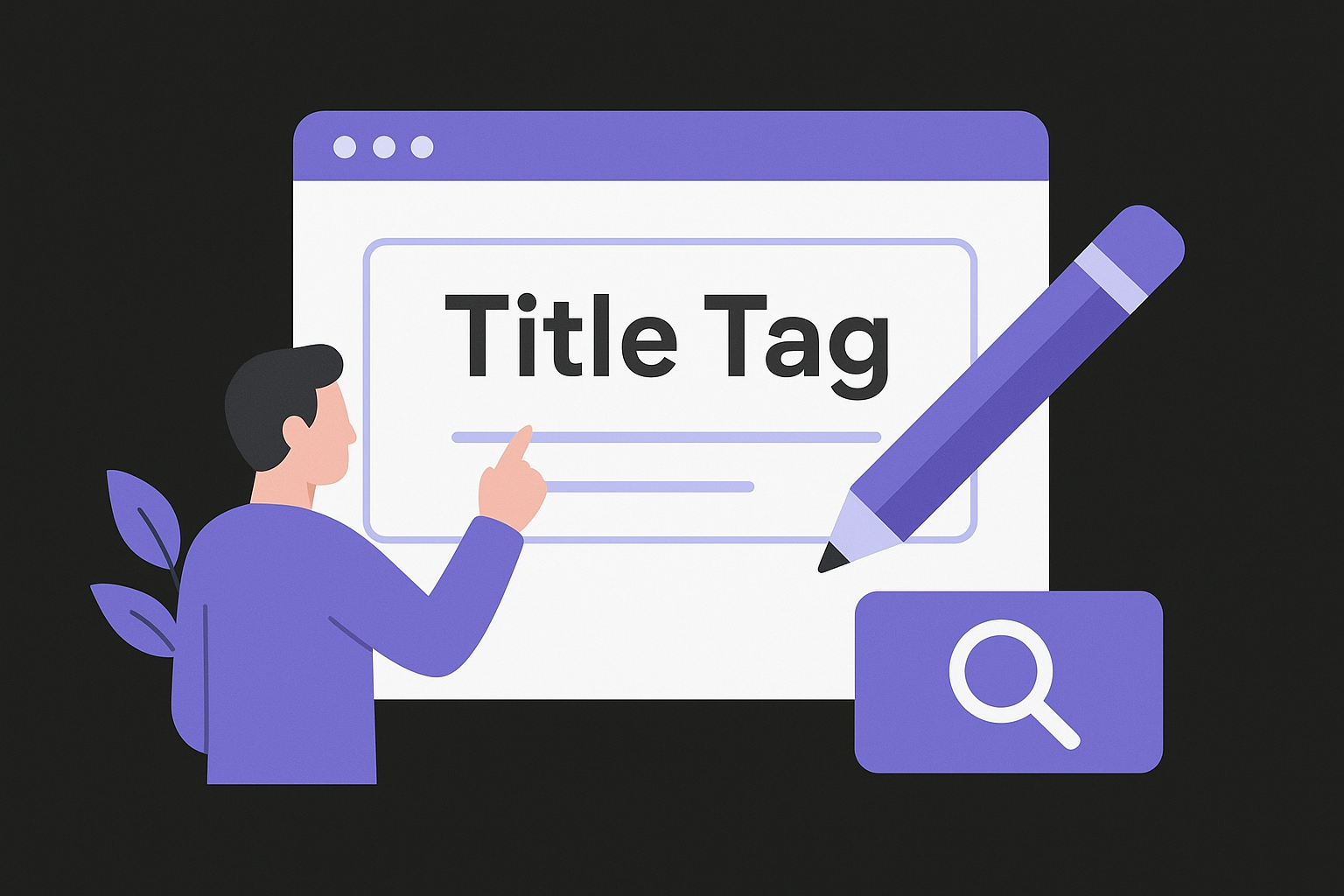
[Primary Keyword]: [Benefit or Format Descriptor] | [Brand Name]

Example:
Ahrefs On-Page SEO: Step-By-Step Optimization Guide | RankYak
Monitor your revised title in Google Search Console after publishing. Check whether click-through rate improves within 2 to 3 weeks as your clearest signal that the updated title resonates before moving forward.
A title tag rewrite is often the single highest-leverage change you can make to a page without touching any body content.
Fix meta descriptions and clean up your URLs
Meta descriptions don't directly influence rankings, but they directly shape click-through rates, which affect how much traffic your page pulls at any given position. In Site Audit, filter for missing or duplicate meta descriptions, or run a bulk meta tag audit across your URLs, then write a unique one for each affected page. Keep it between 130 and 155 characters, include your primary keyword naturally, and close with a direct action.
Your clean URL slugs deserve attention too. Check your target page's URL against these criteria:
- Contains the primary keyword or a close variant
- Uses hyphens between words, not underscores
- Drops stop words like "and," "the," and "of" where possible
- Stays under 75 characters total
For any ahrefs on-page seo audit to hold, you need titles, descriptions, and URLs aligned with each other and with your target intent. If your URL is outdated or bloated, update it with a 301 redirect in place before publishing any other changes so you don't lose the link equity the page has already earned.
Step 4. Fix headings, copy, and content gaps
Your competitor research from Step 2 now becomes your editing blueprint. Every heading you noted from top-ranking pages, and every keyword surfaced in the Content Gap report, tells you exactly what your current page is missing. This step is where you translate that data into direct changes to your headings, body copy, and content structure so your page covers the topic as thoroughly as the pages outranking it.
Restructure your headings to match the SERP
Open your target page, pull its full heading outline, and map your current H2 and H3 structure against the headings you documented in Step 2. If the top results all address a subtopic your page skips entirely, that's a signal to add a new section, not just a few sentences. Use your Content Gap keywords to name those sections naturally. A good heading does two things at once: it tells Google what that section covers, and it tells readers why they should keep reading.
A heading that matches how your target audience phrases their question will consistently outperform a generic one, even if both contain the same keyword.
Rewrite any heading that is vague, keyword-stuffed, or misaligned with what the section actually delivers. Here's a before-and-after template you can apply directly:
| Before | After |
|---|---|
| On-Page Tips | How to Fix Thin Content That Hurts Your Rankings |
| SEO Heading Info | How to Structure H2s and H3s for Google and Readers |
| More About Keywords | How to Place Keywords Without Overloading Your Copy |
Close content gaps with targeted additions
Pull the filtered Content Gap list you built in Step 2 and work through it systematically. For each keyword on that list, ask whether the concept deserves its own section or belongs inside an existing one. A term like "title tag length" likely fits inside a section you already have. A term like "E-E-A-T signals" may need a dedicated H3 with a paragraph of explanation.
When you add new copy, write for the reader first. Place your ahrefs on-page seo gap keywords in headings, introductory sentences, and naturally within the body. Avoid stacking keywords into a single paragraph, and check the keyword density on the page if you are unsure whether a section is overloaded. Instead, distribute new terms across the relevant sections so the additions feel like genuine coverage rather than forced insertions. After editing, read each new paragraph out loud to confirm it adds real information, not filler.
Step 5. Improve internal links and topical hubs
Internal links are one of the most underused levers in any step-by-step on-page SEO checklist. They pass authority between pages, signal to Google how your content is organized, and guide readers toward related topics they haven't discovered yet. In any solid ahrefs on-page seo workflow, internal linking comes right after you've fixed your content gaps, because the new sections you just added in Step 4 are exactly the kind of material that should be connected to other pages on your site.
Find internal link gaps with Ahrefs
Open Site Explorer and enter your target page's URL. Navigate to "Backlinks" and switch the filter to "Internal" to see every page on your site that currently links to this one. If the list is thin, that's your first problem. Then reverse the search: use Site Audit's "Internal pages" report and filter for pages relevant to your target topic that don't yet link to your optimized page. Those are your quick wins.

Use this template to document the internal link gaps you find before you start editing:
| Source page URL | Anchor text to use | Target page URL |
|---|---|---|
| /blog/keyword-research-guide | on-page optimization | /blog/on-page-seo-guide |
| /blog/site-audit-checklist | internal linking strategy | /blog/on-page-seo-guide |
| /resources/seo-glossary | title tag optimization | /blog/on-page-seo-guide |
Every internal link you add is a vote your own site casts for the target page, and you have full control over every one of them.
Structure topical hubs around your core content
A topical hub is a cluster of related pages that builds topical authority, connected by deliberate internal links, with one central "pillar" page covering the broad topic and supporting pages diving deeper into specific subtopics. Your target page should sit somewhere clear in that structure, either as the pillar linking out to supporting content or as a supporting page pointing back to a pillar. Define which role your page plays before you add any new links.
When you write your anchor text, describe the destination page's topic accurately. Avoid generic phrases like "click here" or "read more." Specific anchor text like "how to structure title tags" tells both Google and the reader exactly what they'll find on the linked page, which strengthens the relevance signal for both pages in the cluster.
Step 6. Optimize images and add helpful schema
Images and schema sit near the bottom of most optimization checklists, but both carry more ranking impact than their position suggests. Ahrefs' Site Audit flags common image issues like missing alt text and oversized files under its "On-page" and "Performance" reports. Pull that data before you make any manual edits, because the crawl tells you exactly which pages have unoptimized images rather than leaving you to review every URL by hand.
Optimize image alt text and file names
Alt text is the written description attached to each image on your page. It serves two purposes: it helps screen readers describe images to visually impaired users, and it tells Google what the image depicts so it can appear in image search results. For every image on your target page, write a short, descriptive alt tag that includes your primary keyword where it fits naturally, and run an image alt text checker first to see which images have nothing at all. Avoid stuffing every alt tag with the same keyword phrase.
A well-written alt tag reads like a sentence describing the image to someone who cannot see it, not like a keyword list.
Your file names matter for image SEO too. Before you upload any image, rename it to reflect its content using hyphens between words. Use this naming template as your guide:
Bad:  IMG_4021.jpg
Good: ahrefs-site-audit-overview-report.jpg

Bad:  screenshot1.png
Good: on-page-seo-content-gap-report.png
Add schema markup to your page
Schema markup is structured data you add to your page's HTML that helps Google understand your content at a deeper level. For how-to guides, HowTo schema is the most relevant type. It labels each step in your article so Google can display your steps as rich results in the SERP, which increases visual prominence and click-through rates without requiring a higher ranking position.
Use this basic HowTo schema template in JSON-LD format, or build your own with a JSON-LD schema markup generator, and add it inside a <script> tag in your page's <head>:
{
  "@context": "https://schema.org",
  "@type": "HowTo",
  "name": "Ahrefs On-Page SEO Optimization",
  "step": [
    {
      "@type": "HowToStep",
      "name": "Choose your page and keyword",
      "text": "Identify a page ranking between positions 5 and 20 and confirm its primary keyword."
    },
    {
      "@type": "HowToStep",
      "name": "Analyze top-ranking pages",
      "text": "Use Ahrefs' Content Gap report to find keywords competitors rank for that your page misses."
    }
  ]
}
Validate your schema using Google's Rich Results Test before publishing. This ahrefs on-page seo step pairs image optimization with schema to strengthen both visual and structured signals on the same page.
Step 7. Tackle UX, speed, and mobile issues
User experience, page speed, and mobile readiness are not optional checkboxes in any ahrefs on-page seo workflow. Google uses Core Web Vitals as a direct ranking signal, and a page that loads slowly or breaks on a phone will lose ground to a faster, better-optimized competitor even when your content and keyword optimization are both solid. Ahrefs' Site Audit surfaces a range of performance issues, but for the most granular speed data, you need to pair its findings with Google PageSpeed Insights to get a full picture of what's slowing your pages down.
Find and fix speed issues in Site Audit
Ahrefs' Site Audit flags pages with slow load times and oversized page files under its "Performance" report section. Start there and export the list of pages that fail its speed thresholds. For each affected page, run the URL through Google PageSpeed Insights to see a detailed breakdown of exactly which elements are dragging load time down. The report labels each issue as a direct fix, an opportunity, or a diagnostic, which tells you where to focus development effort without guessing at causes.
Fixing image compression and removing render-blocking JavaScript typically produces the largest speed gains with the least development effort.
Common speed issues and their fixes:
| Issue | Fix | Expected impact |
|---|---|---|
| Uncompressed images | Convert to WebP format | High |
| Render-blocking scripts | Defer non-critical JavaScript | High |
| No browser caching | Set cache-control headers | Medium |
| Unused CSS | Remove or lazy-load stylesheets | Medium |
Check mobile usability and resolve failures
Mobile usability failures are direct ranking risks, not cosmetic problems, and mobile SEO best practices treat them that way. Open Google Search Console, navigate to "Experience," and select "Mobile Usability" to see every page Google has flagged on your site. The most common failures are text too small to read, clickable elements placed too close together, and content wider than the screen viewport.
For each flagged page, apply fixes in this order:
- Set the viewport meta tag:
<meta name="viewport" content="width=device-width, initial-scale=1"> - Increase tap target sizes to at least 48x48 pixels
- Use a minimum font size of 16px for all body text
- Remove fixed-width elements that force horizontal scrolling
After deploying your fixes, request a mobile usability revalidation directly inside Search Console so Google re-crawls the affected pages and clears confirmed errors from your report promptly.
Step 8. Track changes and repeat the process
On-page optimization is not a one-time task. Every change you make to a title tag, heading structure, or internal link needs to be logged, dated, and tracked against your SEO performance data so you can tell what moved the needle and what didn't. Without that record, you're making the same guesses on your next page that you made on your last one, and you lose the compounding benefit that comes from knowing exactly what works on your site.
Log every change with a simple tracking sheet
Before you publish any update from your ahrefs on-page seo workflow, add the change to a running log. This does not need to be complicated. A spreadsheet with a consistent structure is enough to give you a clear before-and-after record for every page you touch. Use this template as your starting point:
| Date | Page URL | Change made | Metric to watch | Baseline value |
|---|---|---|---|---|
| 2026-07-01 | /blog/on-page-seo | Rewrote title tag | CTR | 2.1% |
| 2026-07-01 | /blog/on-page-seo | Added 3 internal links | Position | 14 |
| 2026-07-01 | /blog/on-page-seo | Closed 5 content gaps | Organic traffic | 310/mo |
Log one row per change, not one row per page. That granularity lets you isolate which specific edits drove improvement and which ones had no measurable effect over time.
Monitor results and decide what to repeat
Give each updated page at least four weeks of data before drawing conclusions. Rankings and traffic responses to on-page changes rarely appear in the first week, and pulling data too early leads to false negatives. After four weeks, return to Google Search Console and compare your target page's average position, impressions, and click-through rate against the baseline values in your log.
Pages that improve in impressions but not clicks usually need a better title or meta description, while pages that improve in clicks but not position usually need stronger content depth.
Once you confirm what worked, replicate that same fix across similar pages in the same traffic tier before moving to a new optimization type. Repeating a proven change across ten pages compounds your results faster than running ten different experiments on ten different pages. That's the core loop that turns a single audit into a scalable, repeatable process.
Next steps
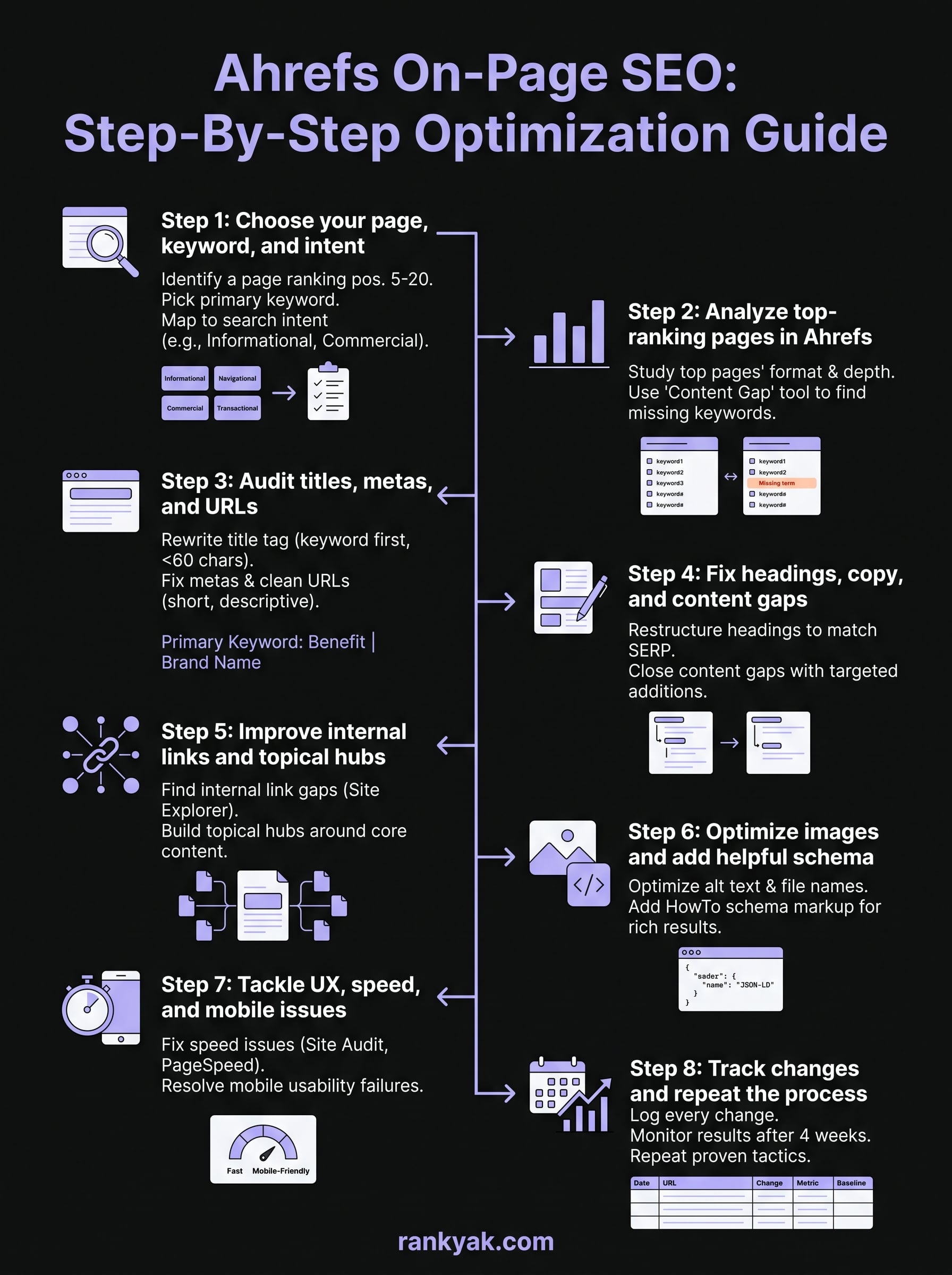
You now have a complete ahrefs on-page seo process: from picking the right page and keyword, through auditing titles, headings, internal links, images, and speed, to tracking every change against a dated baseline. Each step builds on the one before it, so the workflow compounds over time rather than resetting with every new page you touch.
The honest limitation of this process is that it takes real hours. Competitor research, content gap analysis, copy rewrites, and tracking all add up fast, especially if you manage multiple pages or sites at once. If you want the same results without running each step manually, RankYak automates keyword research, content creation, and publishing into a single daily workflow that keeps your on-page SEO consistent without the manual grind. Try RankYak free for three days and see how much ground you can cover without doing it all by hand.
Lars Koole is a co-founder of RankYak and has worked in SEO since 2021, on the side where a strategy has to become a live page: inside agencies, alongside them, for clients directly, and in-house on the products being ranked. He is a software engineer by trade, which is how that page gets built. Before RankYak he founded companies of his own, two of which were acquired. At RankYak he owns the engineering and everything AI, and works out the solution and the implementation of each new feature.
