12 On-Page SEO Factors Checklist for Higher Rankings (2026)
You can have the best product, the sharpest design, and a killer domain name, but if your pages aren't optimized for search engines, none of it matters. On-page SEO factors are the elements you directly control on each page of your site, from title tags to internal links. Get them right, and Google rewards you with higher rankings and more organic traffic. Get them wrong (or ignore them), and you're essentially invisible.
The problem? Most guides either oversimplify these factors or bury you in theory without telling you what to actually do. That's not what this article is about. Here you'll find 12 specific on-page elements that still move the needle in 2026, each with clear steps you can apply today, whether you're optimizing pages yourself or letting a tool like RankYak handle it automatically.
Think of this as your working checklist. We'll cover every factor from content structure and keyword placement to meta tags and Core Web Vitals, so you can audit any page in minutes and know exactly what to fix. If you've been publishing content that sits on page three (or worse), this is where you start climbing.
1. Run an on-page SEO workflow in RankYak
Manually auditing every on-page SEO factor across dozens of pages drains hours you don't have. RankYak automates this entire process by combining keyword research, content creation, and direct publishing into a single daily workflow, so every article that goes live is already optimized before it ever reaches your CMS.
What you get from an automated on-page workflow
RankYak handles the heavy lifting by generating fully SEO-optimized articles with structured headings, internal links, and keyword placement built in from the start. Every piece is grounded in competitor research and search intent analysis, which means you skip the manual audit phase for new content entirely and publish pages that are ready to rank on day one.
Automating your on-page workflow removes the bottleneck between producing content and seeing it perform in search.
How to set up your site and connect key integrations
Start by adding your website to RankYak and connecting your CMS platform, whether that's WordPress, Shopify, Webflow, or Wix. Then link your Google Search Console account so RankYak can pull real performance data and use it to sharpen your content plan. The full setup takes under ten minutes, and you only do it once.
How to turn findings into a weekly optimization plan
Once your integrations are live, RankYak builds a rolling content plan based on keyword gaps and traffic opportunities specific to your niche. Review the suggested topics each week, flag any priority pages that need a refresh, and let the system queue the work. You stay in control of direction without spending hours digging through spreadsheets or running manual audits.
What to review after publishing changes
After RankYak publishes an article or update, check two things immediately: indexing status inside Google Search Console and click-through rate for the page's target keyword. Give new content two to four weeks before drawing any firm conclusions. If a page gets indexed quickly but CTR stays flat, revisit the title tag and meta description to confirm they reflect exactly what your target searchers want to find.
2. Match search intent and cover the full topic
Search intent is the reason someone types a query into Google, and it's one of the most critical on-page SEO factors you can optimize for. If your page format or content depth doesn't match what the searcher expects, Google will rank a competitor's page instead, even if your writing is technically better.
How to identify intent types that show up on the SERP
Open an incognito window and search your target keyword. Look at what Google already ranks on page one: are the results blog posts, product pages, comparison guides, or videos? That pattern tells you the dominant intent type for that query. Match that format before you write a single word.
How to build a page outline that satisfies the query
Study the top three ranking pages and note the main sections they cover. Build your outline around the topics they all share using a writer-ready content brief, then add anything they missed. Your goal is a page that answers the query fully without making the reader go back to Google for more detail.
A page that answers follow-up questions before the reader asks them earns longer dwell time and stronger ranking signals.
How to add missing subtopics without bloating the page
Use Google's "People also ask" section to find related questions searchers expect answered. Add short, focused subsections for each relevant question. Cut anything that doesn't serve the searcher directly, because padding your page with loosely related content hurts quality, not helps it.
How to confirm you met intent after updates
Check Google Search Console for changes in average position and clicks after you publish updates. If impressions rise but clicks stay flat, your title or description likely misrepresents the page. Rising clicks signal that your content now aligns with what searchers actually want.
3. Write title tags that earn clicks and rankings
Your title tag is often the first thing a searcher sees on the results page, and it directly influences whether they click or keep scrolling. Among all on-page SEO factors, the title tag carries significant weight because it tells Google what your page covers while convincing real people to visit.
What Google uses your title tag for
Google reads your title tag to understand your page's primary topic and match it to relevant queries. It also uses the title as the blue clickable link in search results, making it a direct bridge between your optimization work and your click-through rate.
A title that clearly signals the page's topic shortens the distance between your content and the right searcher.
How to write titles that align with intent and keywords
Follow title tag optimization best practices and place your primary keyword near the front of the title, ideally within the first 50 characters. Mirror the search intent you found on the SERP, so if page-one results use "how to" phrasing, match that structure rather than writing a generic label.
How to avoid truncation and rewrites in the SERP
Keep your title tag under 60 characters to prevent Google from cutting it off mid-sentence, and check how your result looks in Google before it goes live. Google also rewrites titles it considers misleading or stuffed with keywords, so write titles that accurately represent your page content rather than chasing clicks with inflated promises.
Title tag mistakes that cost rankings
Avoid these common errors that quietly suppress your rankings:
- Duplicate title tags across multiple pages confuse Google about which one to rank
- Vague titles like "Home" or "Services" give crawlers and searchers no useful information
- Keyword stuffing in titles triggers rewrites that strip out your intended terms entirely
4. Improve meta descriptions for higher CTR
Meta descriptions are one of the on-page SEO factors that directly influence how searchers decide which result to click. While they don't carry direct ranking weight, a well-written description following meta description best practices can meaningfully boost your click-through rate, which brings more traffic to pages that already rank.
What meta descriptions do and do not affect
Your meta description does not directly affect your rankings, but it shapes the first impression searchers get of your page in the SERP. What it does affect is click-through rate, because a compelling description tells the reader exactly what they'll find and why your page is worth their time.
A higher CTR on a ranking page signals to Google that your result satisfies searchers, which can reinforce your position over time.
How to write descriptions that match intent and stand out
Write your description to mirror the search intent you identified on the SERP, drafting options with a meta description generator if you're starting from a blank page. Keep it under 155 characters to avoid truncation, and include your primary keyword naturally since Google bolds matched terms in results, drawing the searcher's eye directly to your snippet.
How to align the description with on-page content
Every description you write should preview what your page actually delivers. If it promises a step-by-step guide but the page is a product listing, searchers will bounce immediately and damage your performance metrics. Match the description's tone and promise to what appears above the fold on the page itself.
Meta description mistakes to avoid
Avoid these errors that quietly suppress clicks even on well-ranking pages:
- Duplicate descriptions across multiple pages signal to Google that your content lacks distinct value
- Vague filler phrases like "learn more here" give searchers no reason to choose your result
- Descriptions that don't match page content increase bounce rates and erode user trust
5. Clean up URLs and manage duplicate pages
Your URL structure is one of the on-page SEO factors that shapes how both Google and real users interpret your content before they even land on the page. A clean, logical URL builds trust instantly, while a messy one signals disorganization to crawlers and readers alike.
What a good URL structure signals to Google and readers
Google reads your URL to understand page context and confirm it matches the linked content. A clear URL also improves user confidence, since people scan the address bar before clicking to make sure the destination is relevant to what they searched.
A URL that mirrors your page topic reinforces relevance signals without requiring any extra optimization work elsewhere.
How to format slugs for clarity and long-term stability
Keep your slugs short and descriptive, using your primary keyword and removing stop words like "a," "the," and "of," or build clean URL slugs from your titles in one pass. Use hyphens to separate words rather than underscores, which Google treats differently. Avoid changing slugs after a page gains traction, since URL changes break inbound links and reset accumulated authority.
When to use canonicals and when to use redirects
Learn when and how to set canonical tags, and use one when you have near-duplicate pages that should coexist, such as filtered product listings or syndicated content. Use a 301 redirect when you permanently consolidate two pages into one or change a slug after publishing. Never leave old URLs returning a 404 without redirecting them somewhere relevant.
URL and canonical issues that break performance
Watch for these problems that quietly drain your rankings:
- Duplicate content without canonicals splits ranking signals across multiple URLs
- Canonical tags pointing to non-indexable pages confuse crawlers and get ignored
- Inconsistent URL formats (trailing slash vs. none) create duplicate versions of the same page
6. Use headings to make your page easy to scan
Headings are one of the most overlooked on-page SEO factors, yet they directly affect how both search engines and real visitors experience your page. A well-structured heading hierarchy tells Google what your content covers at a glance and gives readers a clear path through the page without forcing them to read every word.
How H1, H2, and H3 help SEO and readability
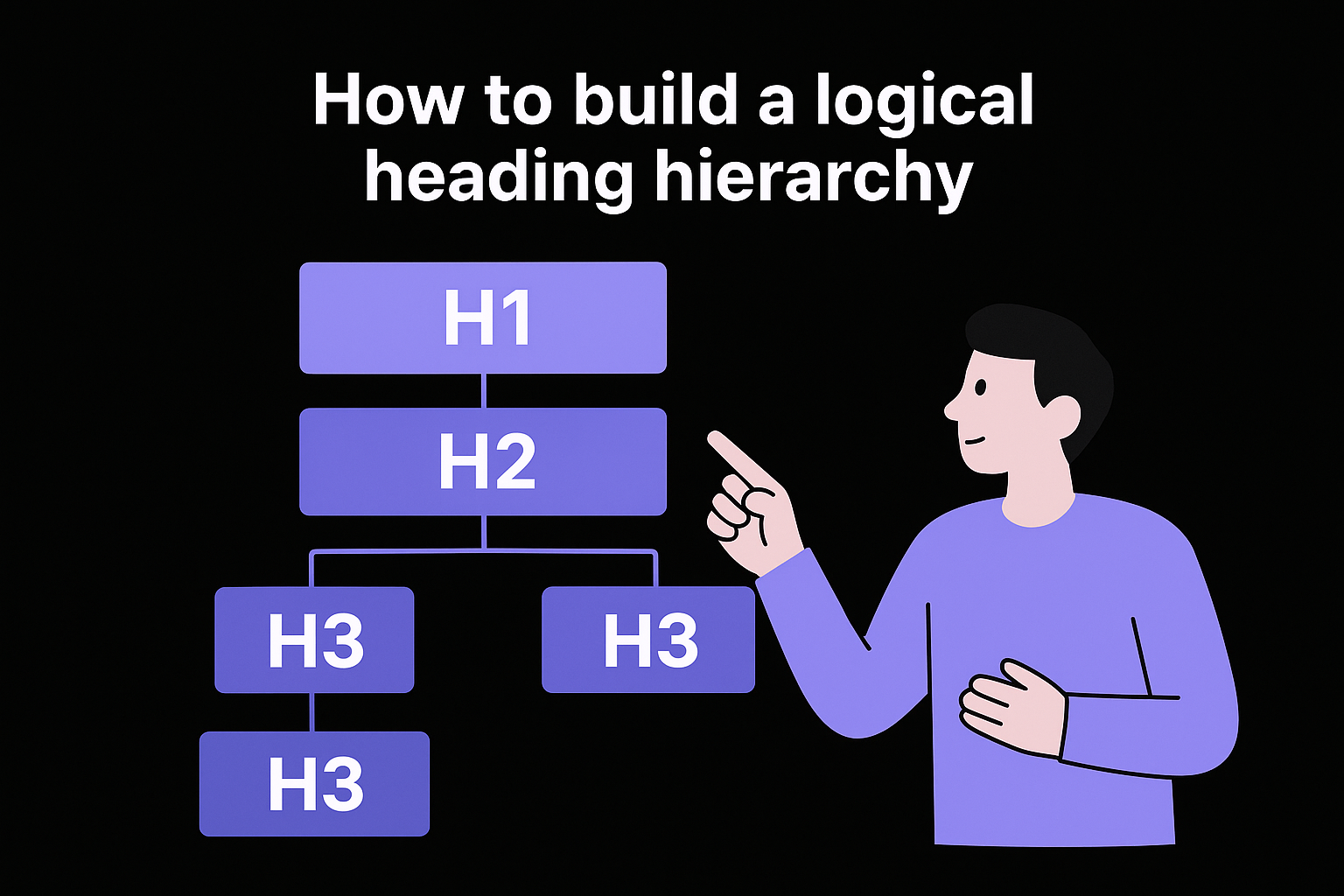
Your H1 tag signals the page's primary topic to Google and should contain your main keyword. H2s break the page into major sections, while H3s organize the details within each section. Together, they create a scannable structure that reduces bounce rate and helps crawlers understand your content's full scope.
A clear heading structure lets both users and bots process your page faster, which reinforces relevance signals across the board.
How to build a logical heading hierarchy
Never skip heading levels or use them for visual styling alone. Start with one H1 per page, follow it with H2s for each main section, nest H3s only under the H2 they support, then pull the heading outline from any URL to confirm the structure holds. This logical nesting makes your content easier to crawl and signals that your page is organized around a coherent topic.
How to place key terms in headings naturally
Write headings that describe what the section actually covers, and weave in primary and secondary keywords where they fit the phrasing naturally. Forced keyword placement in headings reads as spam to both users and Google's algorithms.
Heading mistakes that confuse users and crawlers
Avoid these errors that quietly damage your page's performance:
- Multiple H1 tags on a single page dilute your primary topic signal
- Keyword-stuffed headings trigger quality filters and push rankings down
- Skipping heading levels (jumping from H2 to H4) breaks the structural logic crawlers rely on
7. Strengthen internal linking and navigation paths
Internal linking is one of the most underused on-page SEO factors available to you. Every link you place between your own pages transfers authority, guides crawlers through your site structure, and signals to Google which content matters most to your target audience.
Why internal links influence crawling, relevance, and rankings
Internal links tell Google's crawlers where to go next and how your pages relate to each other. When you link strategically, you push link equity toward your most important pages and help Google understand your site's topical authority across related content.
A well-linked site lets crawlers discover and index new pages faster, which directly shortens the time between publishing and ranking.
How to choose anchor text that stays natural and specific
Use descriptive anchor text that tells both users and crawlers what the linked page covers. Avoid generic phrases like "click here" or "read more," which give Google no relevance signal to work with and waste a clear optimization opportunity.
How to link from high-authority pages to priority pages
Identify your highest-traffic or most-linked pages using Google Search Console, then add contextual links from those pages to newer or lower-ranking content you want to boost. This approach transfers earned authority directly to the pages that need it most.
Internal linking problems that dilute results
Watch for these common issues that quietly hurt your page performance and rankings:
- Orphan pages with no internal links pointing to them are nearly invisible to crawlers
- Overloading a single page with dozens of links spreads link equity too thin to be effective
- Broken internal links waste crawl budget and frustrate users who land on dead ends
8. Show experience, expertise, and trust on the page
E-E-A-T (Experience, Expertise, Authoritativeness, and Trustworthiness) is one of the on-page SEO factors that separates pages Google actively promotes from pages it quietly suppresses. You can signal all four qualities directly on the page without rebuilding your entire site.
What on-page E-E-A-T signals look like in practice
Google's quality raters look for clear evidence that real people with relevant knowledge produced your content. Practical signals include author bylines, cited sources, recent update dates, and specific details that only someone with hands-on experience would know to include.
Key on-page signals to build in:
- Author bylines linked to a bio page with verifiable background
- Cited sources from authoritative organizations or research
- Visible update dates showing the content is actively maintained
How to add author, sourcing, and update transparency
Add a named author byline to every important page and link it to a bio that explains the author's background. Cite reputable sources where you make factual claims, and display the date your content was last updated so readers know the information is current.
Transparent sourcing tells both Google and real readers that your content is grounded in verifiable facts rather than recycled opinions.
How to write with first-hand experience and verifiable detail
Write from direct experience wherever you can, and include specific outcomes, real numbers, and concrete examples rather than broad generalizations.
Specific detail is difficult to fabricate, which is why both Google's systems and human quality raters treat it as a strong indicator of genuine expertise.
Trust killers to remove from important pages
Review important pages for these elements that quietly undermine credibility:
- Unsourced statistics presented as established facts
- Missing author information on health, finance, or legal pages
- Stale content with no visible update date or revision history
9. Optimize keyword and entity usage without stuffing
Keyword placement remains one of the core on-page SEO factors, but modern search algorithms read far more than exact-match terms. Google's systems understand topics, entities, and semantic relationships, so your goal is to write content that covers a subject thoroughly rather than repeat the same phrase until it sounds robotic.
How modern SEO uses semantics and entities
Google uses natural language processing to identify entities such as specific people, places, products, and concepts, then connects them to related topics. When your page mentions relevant entities naturally, it strengthens topical relevance without requiring keyword repetition.
Where to place primary and secondary terms on the page
Put your primary keyword in the H1, the first paragraph, at least one H2, and the meta title. Distribute secondary keywords across subheadings and body text where they fit naturally, without forcing placements that read awkwardly to a real person.
Placing keywords where a human writer would naturally use them is the fastest way to signal relevance without triggering quality filters.
How to use synonyms, related questions, and definitions
Use synonyms and varied phrasing throughout the page to cover the full semantic range of your topic. Pull related questions from Google's "People also ask" section and answer them briefly inline, which broadens your coverage without padding the page unnecessarily.
Over-optimization patterns that trigger rewrites and drops
Watch for these over-optimization signals, and run a keyword density check when you suspect your keyword usage has crossed a threshold Google penalizes:
- Exact-match phrases repeated in every paragraph or heading
- Unnatural phrasing that exists only to hit a keyword density target
- Thin filler sentences added purely to increase keyword count on the page
10. Optimize images and videos for search and speed
Images and videos are among the on-page SEO factors that most site owners overlook until their pages slow to a crawl. Every unoptimized media file you publish adds unnecessary load time and missed visibility in image and video search results, which is why image SEO optimization deserves its own pass.
How media affects rankings, UX, and visibility in search features
Media files directly affect your Core Web Vitals scores, particularly Largest Contentful Paint, which measures how fast the main content loads. Google's image search and video carousels also drive additional organic traffic that most text-only optimization strategies ignore entirely.
Treating every image as a separate ranking opportunity doubles the surface area your page covers in search results.
How to handle filenames, alt text, and captions correctly
Rename every image file to describe its actual subject before uploading it, using hyphens between words rather than underscores or random strings. Write alt text that describes the image clearly and includes your target keyword only where it fits naturally, then list every image on a page with its alt text to catch the ones you missed.
How to compress and deliver media for fast loading
Convert images to WebP format, which delivers smaller file sizes than JPEG or PNG at comparable quality. Use lazy loading so below-the-fold images only load when a user scrolls toward them, which reduces initial page load time significantly.
Image and video mistakes that cause slow pages and lost traffic
Avoid these errors that quietly drain your page performance and rankings:
- Missing alt text on important images cuts you out of image search results entirely
- Uncompressed original files uploaded directly from a camera slow every visitor's experience
- Auto-playing videos without user interaction increase bounce rates and hurt dwell time
11. Add structured data for richer search results
Structured data is one of the on-page SEO factors that gives you direct control over how your pages appear in the SERP beyond the standard blue link. By adding schema markup to your HTML, you give Google the context it needs to display rich results like star ratings, FAQs, and article details that draw more clicks without requiring a higher ranking position.
What structured data helps Google understand
Google uses structured data to confirm relationships between elements on your page, such as connecting an author name to an article or a price to a product. It does not replace your written content but it reinforces what your page already communicates in a format Google can parse without ambiguity.
Structured data closes the gap between what your page says and what Google confidently understands about it.
Which schema types matter most for content pages
Generate valid JSON-LD and match your schema type to your page format and purpose:
- Article for blog posts and editorial content
- FAQPage for pages that answer a defined set of questions
- BreadcrumbList to reinforce your site hierarchy in search results
- Product for product detail pages with pricing and availability
How to validate and monitor structured data issues
After adding markup, run your page through Google's Rich Results Test to confirm your schema is error-free and eligible for enhanced display. Then monitor the Rich Results report in Google Search Console for ongoing warnings or validity drops, and check the JSON-LD on live pages whenever a rich result disappears.
Structured data pitfalls that create errors or no impact
Avoid these mistakes that waste your markup effort:
- Marking up content not visible on the page violates Google's guidelines and triggers manual actions
- Using incorrect schema types for your page format produces zero rich result eligibility
- Ignoring Search Console warnings allows silent errors to block your rich result appearance for weeks
12. Fix page experience issues that block performance
Page experience covers the technical and usability layer that sits beneath your written content. It's one of the on-page SEO factors that Google measures directly through Core Web Vitals, and poor scores here can suppress rankings even when your content is strong.
How Core Web Vitals influence real-world results
Google's Core Web Vitals measure three specific signals: Largest Contentful Paint (LCP) for load speed, Interaction to Next Paint (INP) for responsiveness, and Cumulative Layout Shift (CLS) for visual stability. Pages that fail these thresholds rank below comparable pages that pass them, all else being equal.
Improving your Core Web Vitals scores gives your existing content a ranking advantage without changing a single word on the page.
How to improve speed, stability, and responsiveness
Reduce server response time by enabling caching and using a content delivery network. Fix layout shift by setting explicit width and height attributes on every image and embedded element so the browser reserves space before the asset loads.
How to ensure mobile usability and basic accessibility
Check your pages in Google Search Console's Mobile Usability report to find tap targets that are too small or content wider than the screen. Fix these issues first, following mobile SEO best practices, since Google indexes your mobile version of every page before the desktop version.
Technical issues that prevent crawling, indexing, and ranking
Block these problems before they quietly erase your progress:
- Noindex tags left on live pages after staging migration
- Blocked CSS or JavaScript in robots.txt that prevents Google from rendering your page
- Slow TTFB caused by unoptimized hosting that delays every subsequent load metric
Next steps
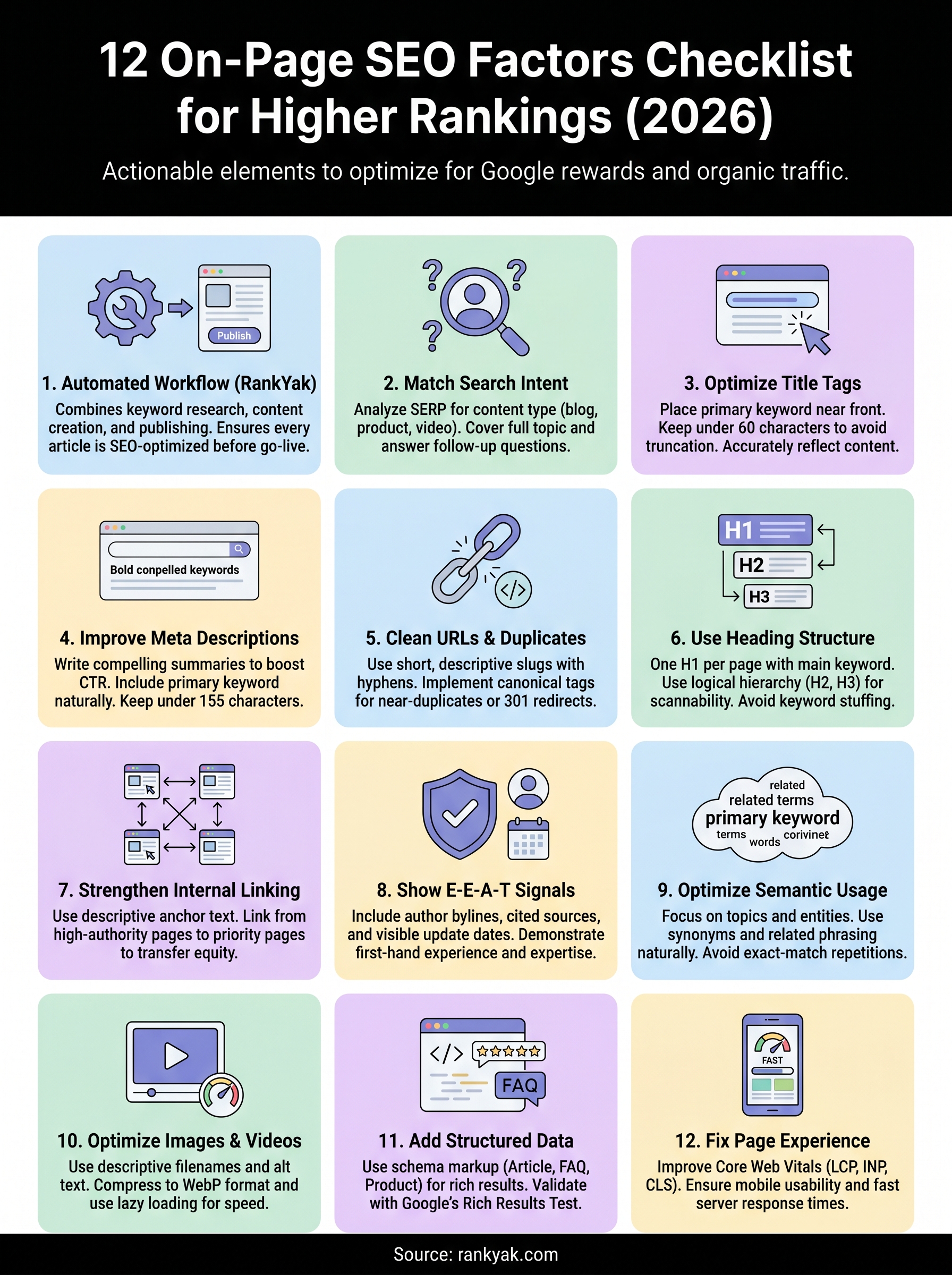
You now have a complete working checklist covering every major on-page SEO factor that drives rankings in 2026. Each of the 12 factors covered here gives you a specific, actionable lever you can pull today, from tightening your title tags to fixing Core Web Vitals scores that quietly block your strongest pages.
Working through this list manually takes time, especially when you're managing multiple pages or publishing new content every week. RankYak automates the most time-consuming parts of this process by building keyword research, content structure, internal linking, and on-page optimization directly into every article it generates and publishes for you.
Start with the factors that have the biggest gap on your current pages, then build a repeatable process around them. If you want to skip the manual grind entirely, hand your daily SEO content to RankYak with a free 3-day trial and see how fast consistent, optimized publishing compounds into real organic traffic.
Allan de Wit is a co-founder of RankYak and has worked in SEO since 2015: inside agencies, alongside them, for clients directly, and in-house on the products being ranked. He came to it as a software engineer building for marketers, which is why the platform is built the way it is. He went on to start companies of his own, two of which were acquired. At RankYak he sets the product direction and owns the features, the quality bar, the design, and the UX.
