Home / Blog / 16 On-Page SEO Best Practices: A Step-by-Step 2026 Checklist

16 On-Page SEO Best Practices: A Step-by-Step 2026 Checklist

Lars Koole
Lars Koole
·
January 14, 2026

You know your content deserves to rank higher. You've written solid articles, answered real questions, and built something valuable. But when you check Google, your pages sit on page three or worse. The problem isn't your topic or your effort—it's that on-page SEO best practices get missed, skipped, or half-implemented. A missing title tag here, weak internal links there, and suddenly your content becomes invisible to both search engines and the people who need it.

This checklist walks you through 16 actionable on-page SEO tactics you can implement right now. You'll learn how to match search intent, write titles that actually get clicks, structure content for both humans and AI tools, and build an internal linking framework that spreads authority across your site. Each practice includes clear steps, real examples, and ways to measure results. Whether you're optimizing a single page or overhauling your entire site, you'll find techniques that work in 2026—and a path to finally get your content ranking where it belongs.

1. Automate on-page SEO with RankYak

Manual on-page optimization takes hours per page. You research keywords, write content, add internal links, optimize images, and then repeat the process tomorrow. RankYak automates every step of this workflow so you can focus on strategy instead of execution. The platform handles keyword discovery, content creation, publishing, and backlink building in one unified system that runs daily without your constant input.

Why automating on-page SEO matters

You face a choice: spend 90% of your time implementing on-page SEO best practices manually, or automate the process and spend that time growing your business. Manual SEO creates bottlenecks because every article needs keyword research, competitor analysis, proper heading structure, meta tags, internal links, and image optimization before you publish. RankYak removes these bottlenecks by generating fully optimized content that follows Google's helpful content guidelines and E-E-A-T principles automatically.

Automation doesn't mean generic AI content. It means applying proven SEO frameworks consistently across every page you publish.

How RankYak handles keywords, content, and links

RankYak discovers high-potential keywords based on your niche, then creates daily content plans that target those terms strategically. Each article includes proper title tags, meta descriptions, heading structures, and internal links that connect to your existing pages. The system analyzes search intent, researches competitors, and adapts to your brand voice while building content that ranks in both Google and AI chat platforms like ChatGPT.

Set up RankYak and connect your website

You connect your website through native integrations with WordPress, Shopify, Webflow, Wix, or custom CMS platforms. After connecting, RankYak analyzes your existing content, identifies content gaps, and starts generating optimized articles that fill those gaps. The 3-day free trial lets you test the system before committing to the $99 monthly plan.

Scale content output with RankYak daily articles

RankYak publishes one 5,000-word SEO-optimized article every day, complete with featured images and proper on-page elements. This consistent output helps you build topical authority faster than manual processes allow while maintaining quality standards that satisfy both search engines and readers.

2. Match every page to a clear search intent

Search intent determines whether your page ranks or disappears. Google matches user queries to page types that satisfy specific goals, so a mismatch between what searchers want and what you deliver kills rankings before other on-page seo best practices even matter. You need to identify intent first, then build pages that deliver exactly what users expect when they click your result.

Define the core types of search intent

You encounter four main intent types when researching keywords. Informational intent drives searches like "what is on-page SEO" where users want knowledge. Navigational intent appears in branded searches like "RankYak login" where users seek specific sites. Commercial intent shows up in comparison searches like "best SEO tools" where users research before buying. Transactional intent dominates terms like "buy domain name" where users are ready to act immediately. Each type expects different content formats, structures, and calls to action.

Define the core types of search intent

Research intent for your target keywords

You discover intent by analyzing the top 10 Google results for your target keyword. Look at the dominant content types: are they blog posts, product pages, comparison guides, or tools? Check the headings and topics those pages cover. Notice what questions they answer and what actions they prompt. This pattern reveals what Google considers the correct match for that query.

Matching intent means building the same type of page that already ranks, then making yours better.

Align page format and offers with intent

Your page format must match what users expect. Informational pages need comprehensive guides with clear explanations, examples, and supporting data. Commercial pages require detailed comparisons, pros and cons lists, and feature breakdowns. Transactional pages demand clear pricing, strong calls to action, and simple paths to conversion. Build the format first, then optimize the details.

3. Publish helpful, original content that earns trust

Google rewards content that demonstrates real expertise and helps people accomplish goals. Your on-page seo best practices fall apart if the content itself fails to meet quality standards. You need pages that answer questions thoroughly, provide unique value, and show clear signals of experience, expertise, authoritativeness, and trustworthiness. Building this type of content takes deliberate effort, but it creates the foundation for everything else you optimize.

Follow Google helpful content and E-E-A-T

Your content must follow Google's helpful content guidelines by prioritizing people over search engines. Write for readers first, then optimize for rankings. Google evaluates experience, expertise, authoritativeness, and trustworthiness (E-E-A-T) to determine which pages deserve top positions. Trust matters most among these factors because it underlies everything else. Build trust by demonstrating clear credentials, citing reliable sources, and keeping information accurate.

Content created primarily to manipulate rankings instead of helping people violates Google's spam policies.

Add first hand experience and unique insights

You separate your content from generic competitors by adding original research, case studies, and real examples from your own work. Share actual results, specific numbers, and lessons learned from implementing what you teach. Include screenshots, data visualizations, or photos that prove you've done the work yourself. This first-hand experience signals to both Google and readers that your content comes from genuine expertise rather than recycled information.

Keep content fresh, accurate, and up to date

Your pages lose trust when they contain outdated information or broken examples. Review your top-performing content quarterly to verify facts, update statistics, and refresh screenshots. Add new sections covering recent developments in your topic without changing URLs or losing accumulated authority. Date stamps and clear author bylines help readers understand when content was published and who maintains it.

4. Use smart keyword targeting and placement

You need a strategic keyword approach that goes beyond stuffing your main term into every paragraph. Smart keyword placement means building topic-based content clusters where each page targets specific variations while supporting your broader SEO goals. This framework helps you avoid internal competition, strengthen topical authority, and give search engines clear signals about what each page covers.

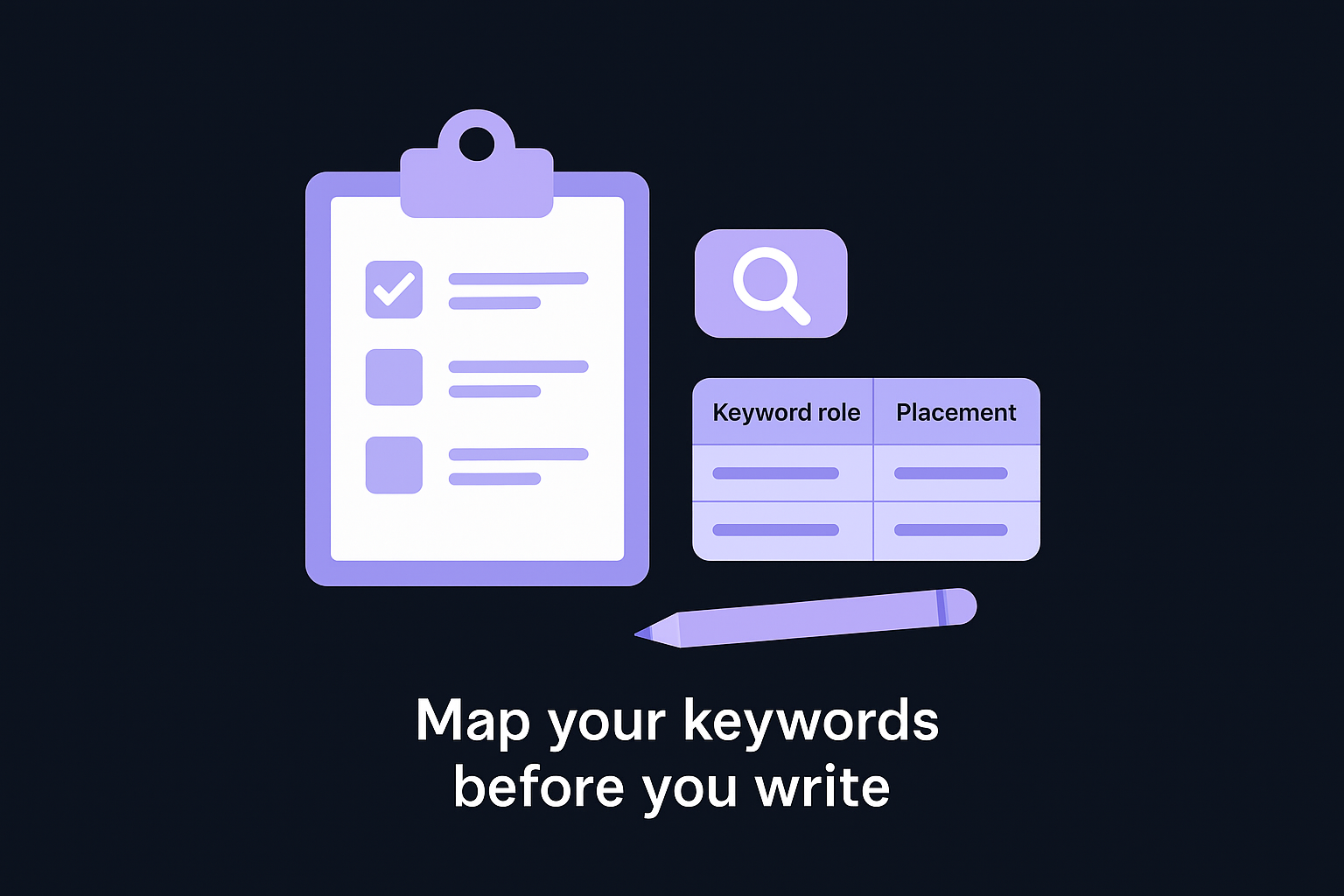
Build topic based keyword maps for your site

Your keyword map connects related terms to specific pages across your site. Start by grouping keywords into topic clusters where one pillar page targets a broad term like "on-page SEO" while supporting pages target narrower variations like "title tag optimization" or "internal linking strategy." Each page in the cluster links back to the pillar and connects to related supporting pages. This structure tells Google you cover the topic comprehensively rather than creating scattered, competing pages.

Place primary and secondary keywords strategically

Your primary keyword belongs in the title tag, H1, first paragraph, and URL where it carries the most weight. Secondary keywords fit naturally into H2 headings, subheadings, and body paragraphs throughout the content. Place keywords where they make sense for readers, not in awkward positions that break flow. Search engines recognize semantic relationships, so related terms and synonyms strengthen your page without requiring exact-match repetition.

Strategic placement means putting keywords where both humans and search engines expect to find them.

Avoid keyword stuffing and cannibalization

You damage rankings when you force keywords into every sentence or create multiple pages targeting the same term. Keyword stuffing triggers spam signals that hurt your page, while cannibalization splits authority across competing URLs. Check your site for duplicate target keywords by searching "site:yourdomain.com keyword" and consolidating overlapping pages. Use one page per primary keyword, then differentiate with unique secondary terms and angles that serve different search intents.

5. Write title tags that rank and get clicks

Your title tag serves as the first impression in search results and directly impacts both rankings and click-through rates. Google uses title tags to understand page topics while searchers use them to decide which result to click. A well-optimized title balances keyword placement with compelling language that promises clear value. These on-page seo best practices for titles help you attract both search engines and real users who want what your page offers.

5. Write title tags that rank and get clicks

Follow title length and keyword placement rules

You should keep title tags between 50 and 60 characters to prevent Google from truncating them in search results. Place your primary keyword near the beginning of the title where it carries the most weight and catches attention immediately. Front-loading keywords helps both search engines and users quickly understand what your page covers. Avoid stuffing multiple keywords into one title because it creates awkward phrasing that reduces clicks even when you rank.

Position your most important keyword in the first half of your title tag for maximum impact.

Use emotional but honest language in titles

Your titles need emotional appeal that motivates clicks without crossing into clickbait territory. Words like "proven," "ultimate," "essential," or "complete" add weight when they accurately describe your content. Numbers in titles grab attention and set clear expectations, as in "16 On-Page SEO Best Practices" rather than vague promises. Match the emotional tone to your content so readers feel satisfied rather than deceived after clicking through.

Test and refine titles for higher CTR

You improve titles by monitoring click-through rates in Google Search Console and testing variations on underperforming pages. Track which title patterns generate more clicks in your niche, then apply those lessons to new content. Small changes like adding years, specific benefits, or question formats can lift CTR significantly without requiring content rewrites.

6. Write meta descriptions that boost CTR

Your meta description appears below the title in search results and directly influences whether users click your link or scroll past it. Google doesn't use meta descriptions as a ranking factor, but a compelling description can double your click-through rate even when you rank in the same position. These on-page seo best practices for descriptions help you write copy that converts searchers into visitors.

Summarize the page and promise a clear benefit

You need to explain what your page delivers in 120-160 characters that fit within Google's display limits on both desktop and mobile devices. State the primary benefit or solution your page provides in the first sentence so users immediately understand why they should click. Focus on outcomes rather than features by showing what readers will learn, accomplish, or gain after visiting your page.

Include keywords and a strong call to action

Your target keyword should appear naturally in the description because Google bolds matching terms when they align with the search query. This visual emphasis draws attention to your result and confirms relevance. Add a clear call to action like "Learn how," "Discover," or "Get started" that tells users what action to take next.

Meta descriptions that combine benefit-focused language with action verbs generate higher click rates than generic summaries.

Customize descriptions for key page types

Different page types require different description approaches based on user intent. Blog posts need engaging summaries that preview key insights. Product pages should highlight core features and benefits with pricing or availability when relevant. Category pages work best with descriptions that explain what the collection offers and why users should browse it.

7. Use headings to structure topics and answers

Your heading structure creates the information hierarchy that both search engines and readers use to navigate your content. Well-organized headings break complex topics into digestible sections that make it easy to find specific information quickly. This becomes critical for on-page seo best practices because Google extracts heading text to understand page structure, generate featured snippets, and power passage-based ranking that surfaces individual sections in search results.

Plan a logical heading outline before writing

You should map out your complete heading structure before drafting body content so you create a clear flow from broad concepts to specific details. Start with H2s that cover major subtopics, then nest H3s and H4s under them to break down complex points into manageable chunks. This planning prevents heading chaos where levels jump randomly or important topics get buried under vague labels that fail to communicate value.

Use headings to answer questions directly

Your headings need to mirror actual search queries that users type into Google rather than creative labels that sound clever but hide meaning. Replace vague headings like "Getting Started" with specific question-based headings like "How to audit your site for heading issues" that tell readers exactly what they'll learn. This approach helps your content appear in AI-generated answers and featured snippets because systems can extract clear question-answer pairs.

Headings that directly answer questions perform better in both traditional search and AI platforms.

Optimize headings for skimmers and AI tools

You attract skimmers by writing descriptive headings that communicate key takeaways even when readers only scan your page without reading every word. Include keywords naturally in H2s and H3s where they strengthen topical signals for search engines. Break dense sections with additional subheadings when paragraphs exceed 300 words so readers can quickly jump to the specific information they need.

8. Create short, descriptive SEO URLs

Your URL structure communicates page hierarchy to search engines and users before they click. Clean, descriptive URLs that include relevant keywords help Google understand page topics while giving users confidence about where links lead. These on-page seo best practices for URLs create addresses that work for humans first, then satisfy search engine requirements automatically.

Follow best practices for URL structure

You should keep URLs under 60 characters and use hyphens to separate words rather than underscores. Place your primary keyword near the beginning, as in "rankyak.com/on-page-seo-checklist" rather than "rankyak.com/articles/12345/checklist." Avoid dynamic parameters, session IDs, and unnecessary numbers that create messy addresses.

Short, keyword-rich URLs outperform long, cryptic strings in both rankings and click-through rates.

Map URLs to your site architecture

Your URL paths should reflect logical content organization through consistent category structures. Use subfolders to show relationships between pages, such as "rankyak.com/blog/seo-guides/on-page-optimization" where each level adds context. This hierarchy helps search engines crawl efficiently and understand how pages connect within your site.

Fix messy legacy URLs with care

You need 301 redirects when updating old URLs to preserve accumulated authority and avoid broken links. Audit your site for URLs containing parameters, dates, or random strings, then redirect them to clean alternatives. Track redirects to prevent chains where one URL redirects to another, creating slow paths that waste crawl budget.

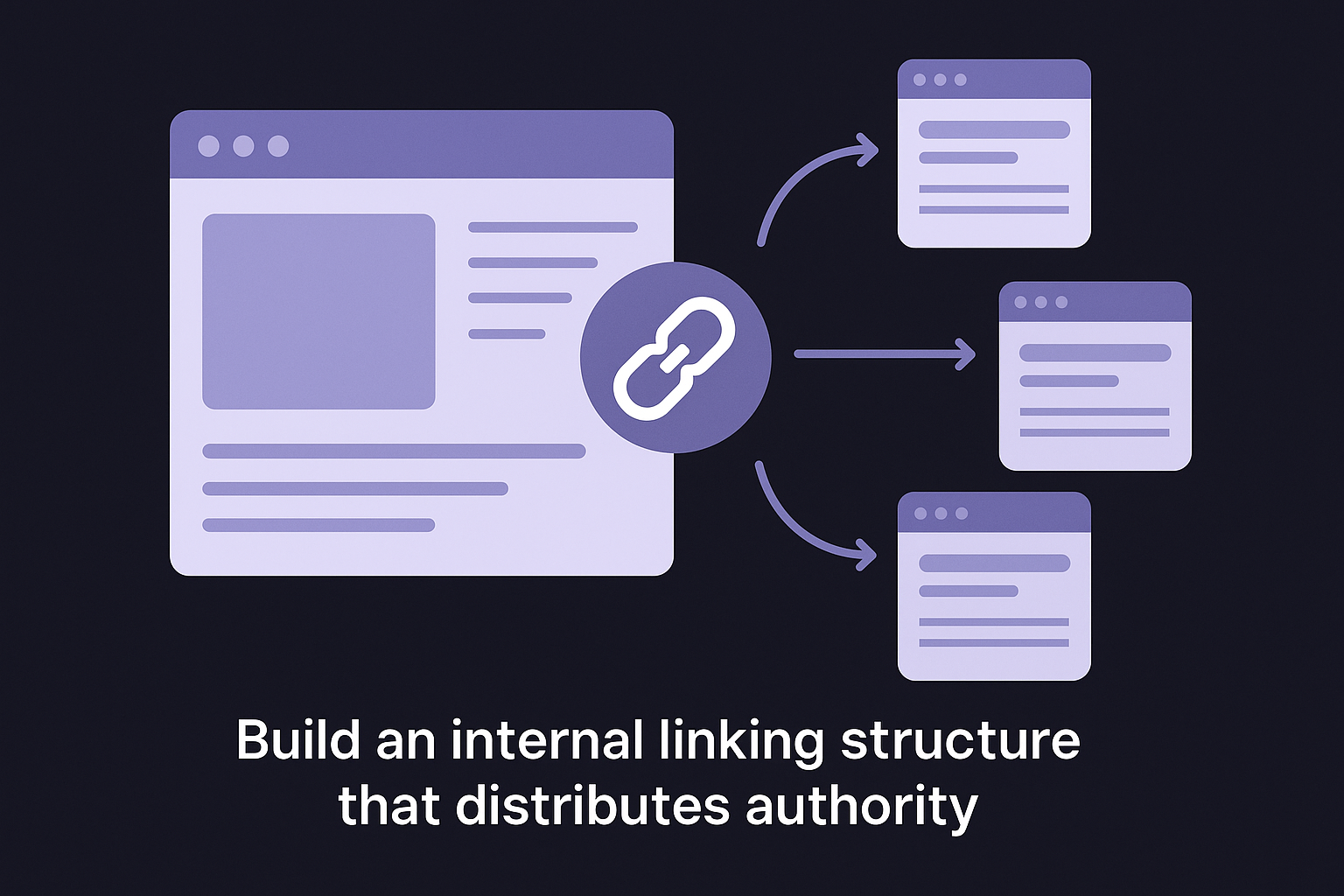
9. Build a strategic internal linking framework

Your internal links distribute page authority across your site and help search engines discover content efficiently. A strategic framework connects related pages through deliberate paths that strengthen topical clusters while guiding users to valuable resources. These on-page seo best practices for internal linking transform scattered content into a cohesive network that signals expertise to Google and makes navigation intuitive for visitors.

Identify pillar pages and supporting content

You need to designate high-value pillar pages that target broad topics and earn the most backlinks or traffic on your site. Map supporting articles that cover specific subtopics within each pillar's subject area. Link supporting pages back to their pillar and to related supporting pages within the same cluster. This structure concentrates authority around your most important content while helping Google understand topical relationships across your site.

Identify pillar pages and supporting content

Use descriptive anchor text that guides users

Your anchor text should tell users exactly what they'll find when they click rather than using vague phrases like "click here" or "read more." Include relevant keywords in anchor text naturally, as in "learn how to write title tags" instead of generic text. Vary your anchor text across different links to the same page so you avoid repetitive patterns that look manipulative to search engines.

Descriptive anchor text improves user experience while sending stronger topical signals to search engines.

Maintain healthy link depth and crawl paths

You want important pages accessible within three clicks from your homepage so search engines can crawl them easily. Audit your site to find orphaned pages with no internal links pointing to them, then add connections from relevant content. Avoid excessive links on individual pages because too many dilute the authority each link passes while overwhelming users with choices.

Your outbound links signal to Google that you connect your content to credible information sources rather than keeping readers isolated in a closed system. Strategic external links to authoritative resources support your claims, provide additional context, and demonstrate that you care about directing users to helpful information beyond your own site. These on-page seo best practices for outbound linking help you build trust with both search engines and readers while showing that your content exists within a network of quality information.

Choose trustworthy sources worth linking to

You should link to established authorities in your industry like Google's official documentation, government websites, university research, and recognized industry leaders. Prioritize sources with strong domain authority and clean reputations that enhance your content's credibility rather than dragging it down. Verify that linked sites maintain current information, secure connections, and professional standards that reflect well on your decision to reference them.

Add outbound links where they add real value

Your outbound links need to serve readers first by providing deeper information, alternative perspectives, or supporting data they can't find on your page alone. Place links where they naturally support claims you make or offer paths to explore related topics further. Avoid linking just to manipulate rankings or appear helpful when the destination adds nothing meaningful to the reader's experience.

External links work best when they genuinely help users rather than checking boxes on an SEO list.

Handle nofollow and sponsored links correctly

You must add rel="nofollow" or rel="sponsored" attributes to paid links, affiliate relationships, or user-generated content to comply with Google's guidelines. Keep standard dofollow links for editorial references to quality resources where you genuinely recommend the destination. Mixing both types naturally across your site shows Google you understand proper linking practices.

11. Optimize images and media for SEO and speed

Your images impact both rankings and user experience through file size, format, and descriptive attributes that help search engines understand visual content. Unoptimized images slow page loads, create accessibility barriers, and waste opportunities to rank in Google Images where millions of searches happen daily. These on-page seo best practices for media help you balance visual appeal with technical performance so your pages load fast while giving search engines clear signals about what your images show.

Choose formats and compress files effectively

You should use WebP format for most photographs because it delivers quality comparable to JPEG with 25-30% smaller file sizes. Save logos and icons as SVG files when possible since vector formats scale perfectly at any size without adding weight. Compress images before uploading them to reduce file sizes below 100KB for standard content images and below 200KB for featured images. Tools compress files without visible quality loss, keeping your pages fast while maintaining professional appearance.

Write clear, descriptive alt text for each image

Your alt text needs to describe what the image shows in 125 characters or fewer so screen readers can convey meaning to visually impaired users. Include your target keyword naturally when it accurately describes the image content, but never force keywords into descriptions that don't fit. Skip alt text only for purely decorative elements that add no information value.

Descriptive alt text serves both accessibility and SEO by helping humans and search engines understand visual content.

Use images to support understanding and UX

You strengthen content by adding images that clarify complex concepts through diagrams, screenshots, or data visualizations rather than generic stock photos. Place images near the text they illustrate so readers make immediate connections between visual and written explanations. Break up long text sections with relevant visuals that give readers natural pause points while reinforcing key messages.

12. Improve page experience and loading speed

Your page speed directly affects rankings and user retention because slow pages frustrate visitors who abandon sites before content loads. Google considers loading speed a confirmed ranking factor through its Core Web Vitals metrics that measure real-world user experience. Fast pages keep visitors engaged, reduce bounce rates, and signal quality to search engines. These on-page seo best practices for performance help you identify bottlenecks and implement fixes that make your content accessible within seconds rather than forcing users to wait.

Measure Core Web Vitals and key metrics

You need to track Largest Contentful Paint (LCP), First Input Delay (FID), and Cumulative Layout Shift (CLS) as your primary performance indicators. LCP measures how long your main content takes to become visible, with a target under 2.5 seconds. FID tracks how quickly your page responds to user interactions, with a goal under 100 milliseconds. CLS quantifies unexpected layout shifts that frustrate users when buttons move as they try to click. Use Google PageSpeed Insights to audit individual pages and identify which metrics need improvement.

Measure Core Web Vitals and key metrics

Core Web Vitals measure real user experience rather than theoretical performance scores.

Fix common speed issues across your site

Your biggest performance gains come from compressing images and enabling browser caching across all pages. Large image files slow loading dramatically, so compress them before uploading and implement lazy loading for images below the fold. Minimize CSS and JavaScript files to reduce the code browsers must download and process. Choose reliable hosting that delivers fast server response times consistently. Remove unused plugins and scripts that add weight without providing value to users.

Balance performance with rich content

You face tension between fast loading times and engaging visual content that makes pages worth visiting. Prioritize speed for critical elements like text and navigation, then progressively load images, videos, and interactive features as users scroll. Avoid sacrificing helpful content just to improve speed scores because stripped-down pages that load instantly but answer nothing still fail users. Find the balance where pages load within three seconds while delivering the comprehensive information that satisfies search intent and keeps visitors engaged.

13. Make your pages mobile friendly and accessible

Your mobile experience determines whether most visitors can actually use your site since mobile devices generate over 60% of web traffic globally. Google's mobile-first indexing means the search engine evaluates your mobile version primarily when ranking pages, making responsive design essential rather than optional. These on-page seo best practices for mobile and accessibility ensure your content reaches everyone who needs it while satisfying Google's technical requirements for modern websites.

Design layouts that adapt to small screens

You need responsive layouts that automatically adjust to different screen sizes without requiring separate mobile URLs or configurations. Set viewport meta tags correctly so browsers render pages at appropriate widths for each device. Make buttons and clickable elements at least 48 pixels tall so users can tap them accurately without frustration. Avoid intrusive interstitials or popups that cover content and trigger Google's mobile usability penalties.

Follow basic accessibility best practices

Your pages should work for users with disabilities or assistive technologies that help them navigate the web. Use sufficient color contrast between text and backgrounds so content remains readable for users with visual impairments. Add keyboard navigation support so visitors can move through your site without a mouse. Structure HTML properly with semantic tags that screen readers interpret correctly when announcing page content to blind users.

Accessible pages benefit everyone while expanding your potential audience significantly.

Test real devices and improve tricky pages

You discover mobile issues by testing pages on actual smartphones and tablets rather than relying solely on desktop browser tools that simulate mobile views. Check how forms, navigation menus, and interactive elements perform under real touch conditions where fat fingers and small screens create challenges desktop users never face. Fix pages where text becomes too small, images overflow containers, or buttons stack awkwardly in ways that break usability.

14. Use schema markup to clarify your content

Your schema markup adds structured data that helps search engines understand specific details about your content that plain HTML cannot communicate clearly. This code tells Google whether your page contains a product, recipe, event, article, or other defined content type so the search engine can display enhanced results like star ratings, price information, or availability directly in search listings. Schema markup ranks among the most technical on-page seo best practices, but implementing it correctly can earn rich snippets that dramatically improve click-through rates by making your result stand out visually from competitors.

Choose schema types that fit your pages

You should select schema types that match your actual content rather than adding markup for features your page doesn't contain. Product schema works for e-commerce pages where you sell items and can provide genuine pricing and availability data. Article schema fits blog posts and guides where you can specify the headline, author, publish date, and featured image. FAQ schema applies when you genuinely answer common questions within your content. Review schema displays star ratings only when you have legitimate customer reviews to reference. Local business schema helps physical locations appear in map results with hours, address, and contact information.

Implement and validate structured data

Your schema implementation uses JSON-LD format placed in your page's head section because this approach keeps structured data separate from visible content and makes maintenance simpler. Add schema through your CMS, plugins designed for your platform, or manual code insertion depending on your technical capabilities. Validate your markup using Google's Rich Results Test to confirm the code works correctly and qualifies for enhanced display in search results.

Schema markup that validates correctly doesn't guarantee rich results, but invalid schema definitely prevents them.

Monitor rich results and fix errors

You need to check Google Search Console's enhancements reports regularly to see which pages earn rich results and identify schema errors that prevent enhanced displays. Fix validation warnings and errors quickly because they block your pages from appearing with the visual enhancements that improve click rates. Test changes on a few pages first before rolling out schema updates site-wide to avoid creating problems across your entire domain.

15. Format content for snippets and AI answers

Your content competes for visibility in featured snippets, AI-generated responses, and passage-based rankings that surface specific sections rather than entire pages. Formatting for these features requires deliberate structure that makes it easy for algorithms to extract, understand, and present your answers. These on-page seo best practices for snippet optimization help you capture valuable search real estate that appears above traditional organic results while increasing your chances of getting cited by ChatGPT, Perplexity, and other AI platforms.

Write concise definitions and step lists

You need to answer questions directly in the first sentence after each heading, then expand with supporting details afterward. Place clear definitions within 40-60 words that stand alone without requiring context from surrounding paragraphs. Format processes as numbered lists with action verbs that describe each step concretely. Keep list items under 50 words each so they fit within snippet character limits while delivering complete instructions users can follow immediately.

Direct answers positioned at the beginning of sections perform best in both traditional snippets and AI responses.

Mark up FAQs and how to content clearly

Your FAQ sections should use question-based H2 or H3 headings followed immediately by concise answers that resolve the query completely. Structure how-to content with clear step numbers and descriptive action phrases that tell users exactly what to do at each stage. Add FAQ schema markup when you genuinely answer common questions to help Google display your content in People Also Ask boxes that expand your visibility beyond your main result.

Support passage ranking and AI citations

You make content extractable by writing self-contained paragraphs that convey complete ideas without relying on pronouns or vague references that require reading previous sections. Break complex topics into distinct sections with specific subheadings that match natural language queries users type into search engines. Include precise data, statistics, and factual statements that AI systems can cite confidently because they come with clear context about what the numbers represent.

16. Measure and refine your on-page SEO over time

Your on-page seo best practices deliver results only when you track performance consistently and adjust based on actual data rather than assumptions. Pages that rank well today can slip tomorrow if competitors improve faster or if Google's algorithms shift. You need systematic measurement processes that identify what works, what fails, and where opportunities exist to strengthen your content. This ongoing refinement separates sites that maintain rankings from those that watch their traffic disappear as the search landscape evolves.

Track rankings, traffic, and engagement

You should monitor keyword positions weekly to catch ranking drops before they cost significant traffic. Use Google Search Console to track which queries drive impressions and clicks to each page, then identify underperforming pages where high impressions produce low click rates. Check organic traffic trends monthly in your analytics platform to spot patterns that indicate whether your optimizations improve visibility. Measure engagement through bounce rate, time on page, and scroll depth to determine if visitors find your content valuable after clicking through from search results.

Use SEO audits to spot on-page gaps

Your regular audits reveal technical issues like missing title tags, duplicate content, broken internal links, or slow loading times that damage rankings silently. Crawl your site quarterly to find pages with weak optimization, then prioritize fixes based on traffic potential and existing authority. Check for keyword cannibalization where multiple pages compete for the same term, then consolidate or differentiate them to eliminate internal competition.

Regular audits prevent small on-page issues from compounding into major ranking problems.

Build an ongoing optimization routine

You maintain rankings by establishing monthly review cycles where you audit recent content, update older pages, and refine underperformers systematically. Schedule time to refresh your top 20 traffic-driving pages every quarter with new data, updated examples, and expanded sections that address emerging questions. Document what changes you make so you can correlate specific optimizations with traffic and ranking shifts that follow.

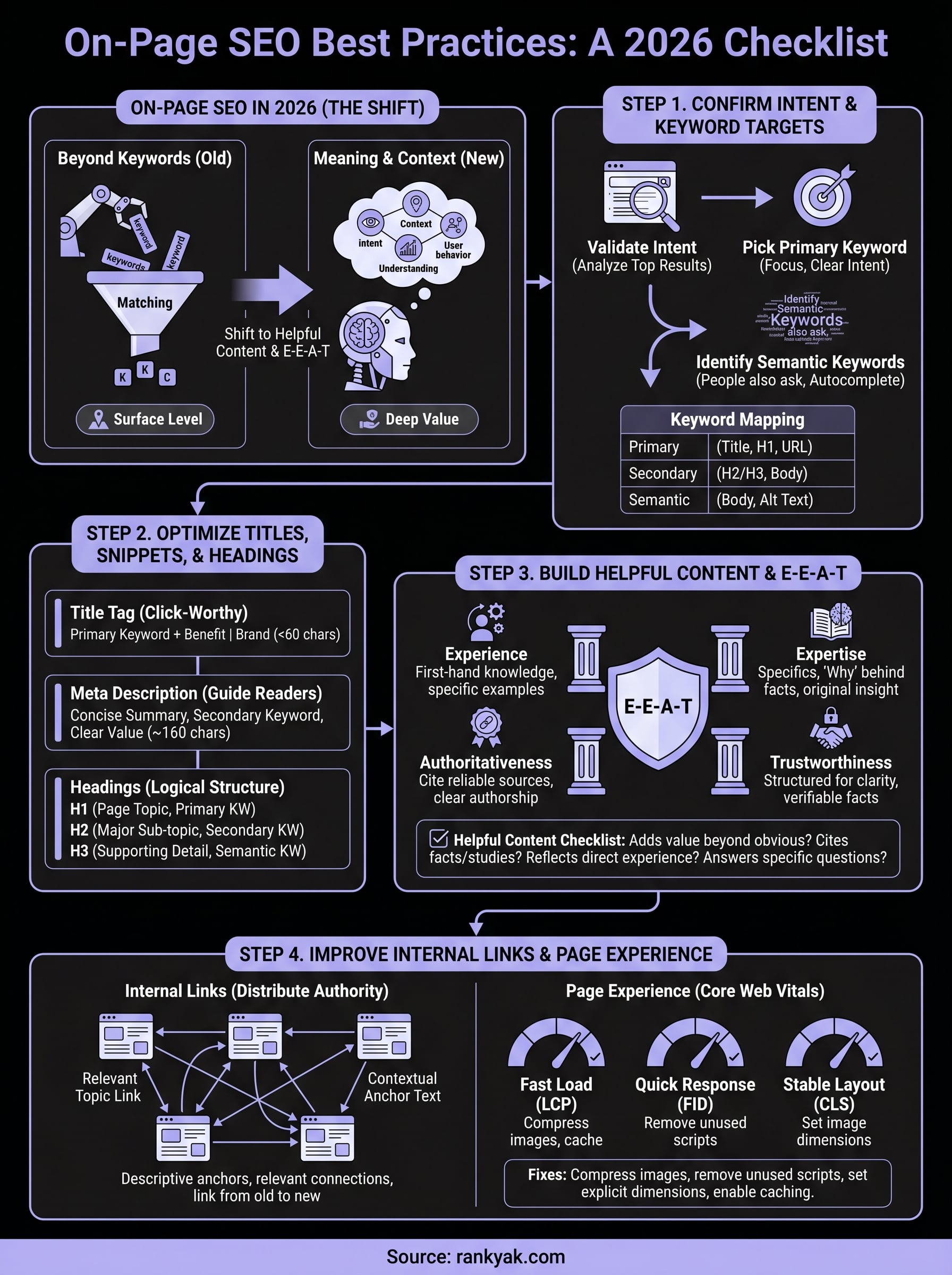
on-page seo best practices infographic

Level up your on-page SEO

You now have a complete framework for implementing on-page seo best practices that drive rankings and traffic in 2026. Each tactic in this checklist builds on the others to create pages that satisfy both search engines and real users. Your success depends on consistent implementation across every page you publish, tracking results over time, and refining your approach based on actual performance data.

The choice ahead is simple: spend months implementing these optimizations manually on each page, or let RankYak handle the execution while you focus on strategy. RankYak automates keyword research, content creation, internal linking, and publishing so you generate fully optimized articles daily without the constant effort. The platform applies these best practices to every article automatically, building topical authority while you work on business growth. Start your free 3-day trial and watch your site grow with content that ranks.