SEO for Small Business: How to Rank Higher and Grow Traffic
You know your business deserves to show up when people search for what you sell. But SEO for small business owners often feels like a second job you never applied for, one with confusing jargon and no clear finish line. Meanwhile your competitors keep grabbing the top spots on Google, and every month without traffic is money left on the table.
Here's the direct answer: ranking higher isn't about tricks, it's about consistent, targeted work on keywords, content, and technical basics, done week after week. This guide walks through the exact steps that move a small business website from page three to page one, without requiring an agency retainer or a full-time SEO hire.
We'll cover finding the right keywords for your niche, structuring pages so both Google and AI search tools understand what you offer, publishing content on a schedule that actually builds momentum, and earning backlinks that add real authority. If you've searched for small business SEO advice that skips the fluff and gets to what works, you're in the right place. And if you'd rather automate most of this than do it by hand, we'll show you where tools like RankYak fit in.
, ens't be will.
Step 1. Audit your website and current search performance
Before you touch a single keyword, find out where you actually stand. Small business website SEO work without a baseline is guesswork, and guesswork wastes the little time you have. Start by connecting your site to Google Search Console, which is free and shows exactly which queries already bring you clicks, which pages get impressions but no clicks, and which pages Google can't even find.
Check your indexing and crawl status
Open the Pages report in Search Console and look for anything marked "not indexed." A page Google hasn't indexed can't rank, no matter how good the content is. Common culprits include accidental noindex tags, so it pays to check every page for a stray noindex, along with orphaned pages that have no internal links pointing to them and duplicate content Google chose to ignore. Fix these before moving to anything else, since every later step assumes Google can actually see your pages.
Score your current pages
Run through your top ten pages by traffic and rate them honestly against a short checklist:
- Does the title tag include a keyword a customer would actually type?
- Is there one clear H1 that matches the page's purpose?
- Does the page load in under three seconds on mobile?
- Is there a single, obvious call to action?
- Does the content answer the question that brought someone there, or just talk about your company?
If a page fails three or more of these checks, it's costing you more traffic than it's earning.
Look at your competitors too
Search your top three services or products in an incognito browser and note who ranks in the first five spots. These are your real competitors, not necessarily the businesses you compete with locally. Open their pages and see what they cover that you don't, what questions they answer, and how long their content is. This isn't about copying; it's about understanding what Google already considers a satisfying answer for that query.
An audit like this usually takes an afternoon, and a step-by-step website audit changes what you prioritize next. Businesses skip this step constantly because it feels like busywork compared to writing new content, but SEO optimization for small business sites built on a clear audit moves faster because you're not fixing the same mistakes twice. Once you know where your site stands, you're ready to figure out exactly what your customers are searching for.
Step 2. Research the keywords your customers use
Guessing at keywords is how most small business SEO marketing efforts stall out. You need to know the exact words your customers type before you write a single sentence, because a beautifully written page targeting the wrong phrase never gets found. Start with what you already know about your customers' language, then confirm it with data instead of assumptions.
Start with real customer language
When you work out how to find keywords for SEO, listen to how customers actually describe their problems, not how your industry describes them internally. Check your email inbox, chat logs, and reviews for the exact phrases people use, then check the "People also ask" and related searches sections at the bottom of a Google results page for those same terms. A plumber might call it "drain cleaning," but customers search "why is my sink draining slow." That gap is where SEO tips for small business owners find easy wins.
The keyword that matches your customer's exact words beats the one that sounds professional every time.
Use free tools to check volume and difficulty
Once you have a list of candidate phrases, run them through a keyword tool to see if anyone's actually searching for them. Google's own Keyword Planner gives rough volume ranges for free, and Search Console's Performance report shows queries you already rank for on page two, which are often the fastest wins available.
Build a simple table so you can compare options at a glance:
| Keyword | Monthly searches | Competition | Matches a page you have? |
|---|---|---|---|
| "seo for small business website" | 1,200 | Medium | No, needs a new page |
| "local seo checklist" | 480 | Low | Yes, needs updating |
| "small business seo advice" | 320 | Low | No, needs a new page |
Group keywords by intent, not just volume
High search volume means nothing if the searcher isn't ready to buy or learn from you specifically. Cluster your keyword list by intent into three buckets: informational ("what is local SEO"), commercial ("best SEO tools for small business"), and transactional ("hire small business SEO help near me"). Prioritize a mix, since informational content builds trust and links, while transactional pages convert visitors into customers. This grouping tells you exactly what to write in Step 3, so nothing on your content calendar exists without a clear purpose.
Step 3. Optimize your pages and content for search intent
Once you know what someone's searching for, build the page that actually satisfies that search instead of one that just mentions the keyword. Search intent is the reason behind a query, and Google rewards pages that match it precisely. A page selling a service ranks poorly for a question the searcher wanted answered in plain text, and a blog post ranks poorly when the searcher actually wanted to compare prices. This is where most seo optimization for small business sites falls apart, since owners skip content optimization in SEO and write what they want to say instead of what the searcher came to find.
Match the format to the query
Look back at the first five results you studied in your competitor research from Step 1. If they're all how-to guides with numbered steps, a product page won't outrank them no matter how well it's written. If they're all comparison tables, write a comparison table. Google has effectively already told you the expected format; your job is to deliver it better, not differently.
Structure content so people and AI tools can skim it
Break every page into short sections with descriptive H2 and H3 headers, and pull your heading outline to check them, since both human readers and AI answer engines like ChatGPT and Google's AI Overviews pull from clearly labeled sections rather than dense paragraphs. Lead each section with the direct answer, then add supporting detail underneath. This structure is exactly what separates generic small business seo content from pages that actually convert visitors.
Answer the question in the first two sentences of a section, then explain, never the other way around.
Nail the on-page basics
With the structure set, work through this 20-step on-page SEO checklist and tighten these elements on every page you publish or update:
- Title tag: under 60 characters, keyword near the front
- Meta description: under 155 characters, includes a reason to click
- URL: short, readable, no dates or random strings
- H1: one per page, matches the title's intent
- Internal links: at least two links to related pages on your site
Think about what a customer actually wants to walk away knowing, then write toward that instead of toward the keyword count. Yak-level automation tools like RankYak build this intent matching into every article automatically, but if you're writing by hand, treat this checklist as non-negotiable before you hit publish. Nail this step and your technical setup in Step 4 has far less work to do.
Step 4. Fix technical SEO and site speed issues
Great content on a slow, broken site still loses. Technical SEO covers everything happening behind the scenes that lets Google crawl, render, and rank your pages, and this 15-step technical SEO checklist is the part most small business seo guides skip because it sounds intimidating. It isn't. Most fixes here take an afternoon and pay off for years.
Speed up your mobile experience first
Google ranks sites primarily using their mobile version, a practice it calls mobile-first indexing. Run your homepage and top three pages through PageSpeed Insights and look at the Core Web Vitals scores. Oversized images are the most common culprit for slow load times, so image SEO optimization starts with compressing every image before upload and using modern formats like WebP. Following mobile SEO best practices, a site that loads in two seconds on a phone keeps visitors around long enough to convert; one that takes six seconds loses them before they read a word.
A fast mobile site beats a beautiful slow one every single time.
Clean up crawl errors and broken links
Broken internal links and 404 pages waste the limited crawl budget Google gives smaller sites, and they frustrate real visitors too. Pull your list of broken links from Search Console's Pages report, then fix or redirect each one with a 301. Check these items on every page you publish:
- HTTPS is active sitewide, no mixed-content warnings
- URLs are short and free of tracking parameters
- One clean XML sitemap submitted to Search Console
- No duplicate title tags across pages
- robots.txt isn't accidentally blocking pages you want indexed, which you can confirm by testing whether a URL is blocked for Googlebot
Make your site structure logical
Organize pages so a visitor, and a crawler, can reach any page within three clicks from the homepage. Flat, logical structure helps Google understand which pages matter most and helps AI tools summarize your site accurately when someone asks ChatGPT or Perplexity about your industry. Group related content into clusters, linking service pages to relevant blog posts and back again, so authority flows between them instead of sitting isolated on one page. This is also where seo for small business websites built on clunky, outdated platforms tend to struggle most, since older themes often carry bloated code that slows everything down regardless of how well the content itself is written.
Step 5. Build local visibility and backlinks
Local signals and backlinks are the trust layer that ranking algorithms use to decide whether your site deserves attention beyond your own pages. This is where a local SEO checklist for small business gives owners with a physical location or service area an edge over national competitors, since Google weighs proximity and local relevance heavily for these searches. Skip this step and even a technically flawless site struggles to outrank businesses with fewer links but stronger local footprints.
Claim and complete your Google Business Profile
Most seo marketing for small business efforts overlook the single highest-leverage local asset available: a fully filled-out Google Business Profile. Optimizing your Google Business Profile step by step means adding your exact business name, address, phone number, hours, categories, and photos, then keeping them updated whenever anything changes. Ask happy customers for reviews directly after a completed job or sale, since review volume and recency both influence local pack rankings.

A complete, active Google Business Profile often moves the needle faster than a month of blog posts.
Get your citations consistent
Check that your business name, address, and phone number match exactly across every directory you're listed on, including Yelp, industry-specific directories, and your local chamber of commerce site. Inconsistent citations confuse Google about which details are correct, which quietly suppresses local rankings. Run a quick search of your business name plus "reviews" to catch old listings with outdated information you can correct or remove.
Build backlinks that actually carry weight
With local link building tactics, one link from a locally relevant, real website beats a hundred spammy directory submissions. Focus your effort here:
- Sponsor a local event, team, or nonprofit that links back to you from their site
- Get listed in local news roundups by pitching a genuinely useful story or resource
- Guest post on niche sites your customers already read
- Trade backlinks with complementary, non-competing businesses in your area
RankYak's automated backlink building handles this last tactic by connecting you with relevant niche sites looking for the same kind of link trade, which saves the outreach hours most owners never have. Treat every link you earn as a vote of confidence that compounds over time, the same way consistent content does.
Building on this local foundation is what turns steady small business SEO effort into rankings that outlast any single algorithm update.
Keeping your SEO momentum going
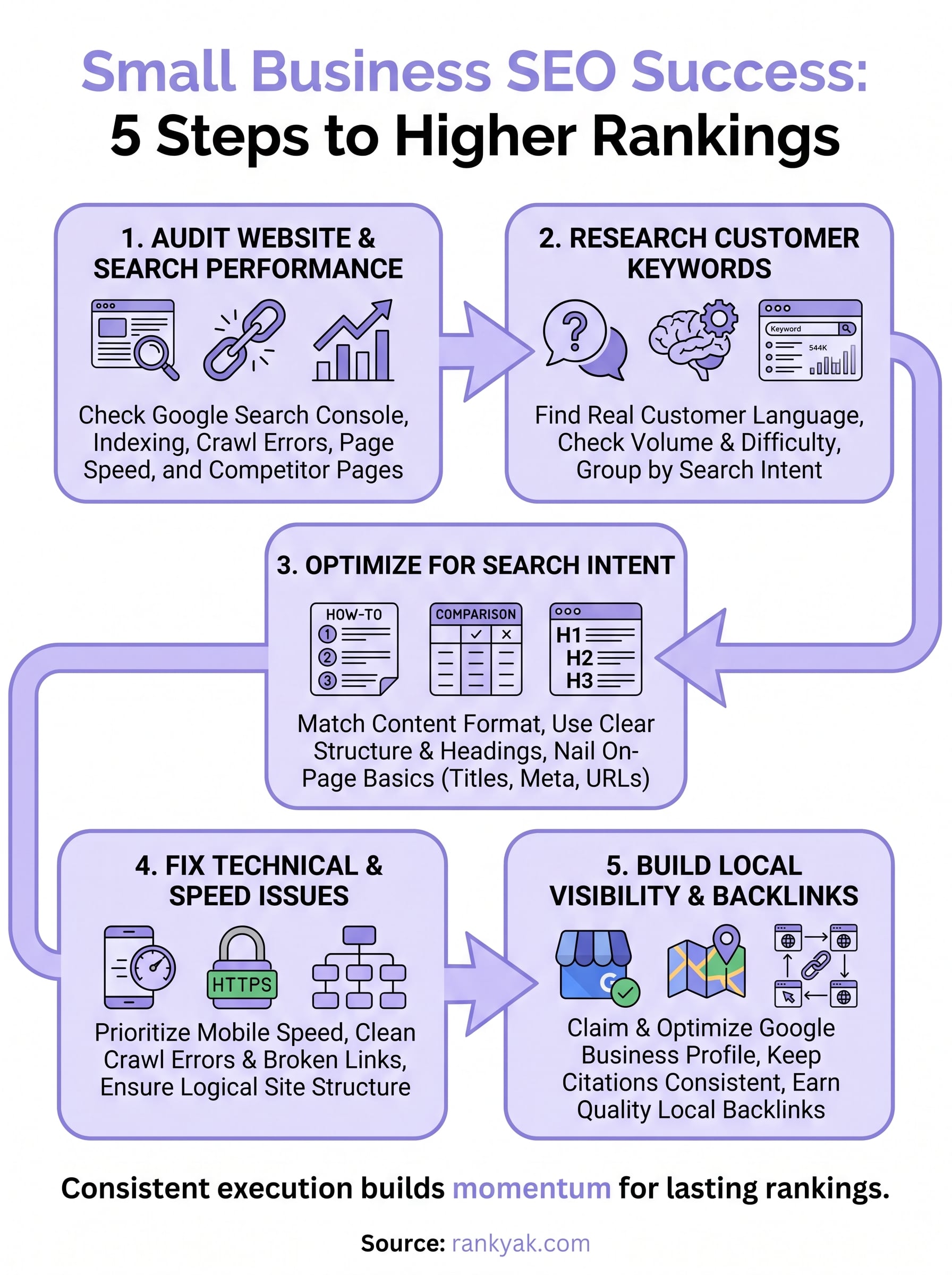
Ranking higher isn't a project with an end date, it's a habit you keep running. The five steps above, auditing your site, researching real customer keywords, matching search intent, fixing technical issues, and building local authority, work together, not in isolation. Skip one and the others carry more weight than they should. Small business SEO rewards the businesses that publish consistently and fix problems as they crop up, not the ones that do a big push once and walk away.
Getting there by hand takes real hours every week, which is exactly why we built RankYak to handle keyword discovery, content creation, and publishing on autopilot, with backlink exchange built in to keep your authority growing too. If you'd rather spend your time running your business than managing an SEO checklist, start your free trial with RankYak and let it handle the momentum for you.
Allan de Wit is a co-founder of RankYak and has worked in SEO since 2015: inside agencies, alongside them, for clients directly, and in-house on the products being ranked. He came to it as a software engineer building for marketers, which is why the platform is built the way it is. He went on to start companies of his own, two of which were acquired. At RankYak he sets the product direction and owns the features, the quality bar, the design, and the UX.
