Keyword Research For Ecommerce: A Step-By-Step Blueprint
Most ecommerce stores pour money into paid ads while ignoring the one channel that compounds over time: organic search. The difference between a store that gets buried on page five and one that consistently pulls in buyers often comes down to keyword research for ecommerce, knowing exactly what your potential customers type (or speak) when they're ready to browse, compare, or buy. Get this wrong, and you'll either target terms no one searches for or compete against giants you can't outrank. Get it right, and every product page, category page, and blog post becomes a magnet for high-intent traffic.
But here's where most store owners get stuck. Ecommerce keyword research isn't the same as keyword research for a blog or a local business. You're dealing with product-level intent, seasonal shifts, long-tail modifiers, and a buying funnel that can span dozens of search queries before someone clicks "Add to Cart." The process requires a clear system, not guesswork, and definitely not copying your competitors' meta titles and hoping for the best. That's exactly why tools that automate keyword discovery based on your niche, like RankYak, have become essential for store owners who want to scale without spending hours buried in spreadsheets.
This guide breaks down the entire process step by step. You'll learn how to find high-intent ecommerce keywords, map them to the right pages, and build a research workflow you can repeat every month. Whether you run a single Shopify store or manage multiple ecommerce sites, this blueprint gives you a concrete framework to turn search demand into revenue.
What you need before you start
Jumping into keyword research for ecommerce without the right setup is like stocking shelves before you know what your customers want. Before you pull your first search volume number, you need three things in place: the tools to gather data, access to your own site's performance metrics, and a basic picture of where you sit competitively. Skipping this preparation phase means you'll spend hours building a keyword list that doesn't connect to anything actionable.
The tools you'll need
You don't need a stack of expensive subscriptions to do this well. A free or low-cost keyword research tool combined with Google's own free tools gives you everything you need to start. Here's what to have ready before you begin:
- Google Search Console: Free, connects directly to your site, and shows you what queries already drive clicks and impressions. Set it up here if you haven't already. This is non-negotiable.
- Google Keyword Planner: Also free with a Google Ads account. It gives you search volume ranges and related keyword ideas tied to real search data from Google's index.
- A keyword research tool with competitive data: Ahrefs, Semrush, or Moz give you keyword difficulty scores and competitor gap data, and it is worth comparing the options on price and data quality first. Even a trial account gives you enough to build an initial list.
- A spreadsheet: Google Sheets or Excel. You'll organize, filter, and prioritize your entire keyword universe here.
Your own site data
Before you research a single external keyword, pull your existing performance data from Google Search Console. Go to the Performance report, filter by your top pages, and export the queries that are already driving impressions but few clicks. These are keywords where you have some visibility but haven't optimized properly, making them the fastest wins available to you.
Your own site data is often the most valuable starting point because it shows real demand from real buyers who are already searching for what you sell.
Also pull your analytics data to identify which product and category pages get the most organic sessions. This tells you where to focus first rather than starting from scratch on pages that have no momentum.
A snapshot of your competitive landscape
You need a rough picture of who ranks for your core terms before you invest time targeting them. Search your top three to five main product categories on Google and note which types of pages dominate: big retailers, niche stores, or content sites. If the first page is entirely filled with Amazon, Walmart, and Target listings, long-tail and modifier-based keywords will be your entry point, not the broad head terms.
Write down two or three direct competitors, meaning stores that sell similar products at a similar price point to a similar buyer. You'll reference these throughout the entire process to find gaps and opportunities they've already validated with their own content and category pages.
Step 1. Define your products, categories, and goals
Before you touch any keyword tool, you need a clear picture of what you're selling and what success looks like. Skipping this step leads to a fragmented keyword list that doesn't map to real pages on your site. Effective keyword research for ecommerce starts with understanding your own catalog and then connecting that catalog to specific traffic and revenue targets.
Map your product and category hierarchy
Your site structure determines which pages you need keywords for. Pull up your store and list every category, subcategory, and product type you carry. This doesn't need to be exhaustive at the SKU level, but you need to understand the tiers. For example:

| Level | Example |
|---|---|
| Category | Women's Running Shoes |
| Subcategory | Trail Running Shoes |
| Product | Lightweight Trail Shoe (specific model) |
Each tier needs its own set of keywords because the search intent shifts at every level. A shopper searching "trail running shoes" is browsing; someone searching "lightweight trail shoe for rocky terrain" is close to buying. Map your hierarchy before you research anything, so every keyword you find has a clear home on your site.
Set measurable keyword goals
Vague goals produce vague results. Instead of "rank better," set specific targets tied to pages and timeframes. A useful goal looks like this:
- Rank in the top 10 for three subcategory terms within 90 days
- Grow organic sessions to the top product pages by 20% in six months
- Capture 10 informational keywords that feed buyers into the purchase funnel
Tying your keyword goals to specific pages forces you to stay focused instead of chasing every search term that looks attractive.
Write your goals down in your spreadsheet before you move to the next step. When you have 300 keywords in front of you later in this process, those goals will act as a filter that keeps your effort concentrated on terms that actually move the needle for your business.
Step 2. Build a strong seed keyword list
Your seed keyword list is the foundation of all your keyword research for ecommerce. These are short, broad terms that describe what you sell at the category and product type level, the same starting point any practical keyword research workflow uses. You're not looking for volume data or competition scores yet. Your only job at this stage is to capture the raw language your buyers use when they're thinking about products like yours.
Start with your own product knowledge
Pull up your product hierarchy from Step 1 and write down two to four plain-language phrases for each category, subcategory, and key product type. Think like a customer who doesn't know your brand name, someone typing into Google to find what you sell for the first time.
Use this simple template to keep your seed list organized from the start:
| Page Type | Page Name | Seed Keywords |
|---|---|---|
| Category | Women's Running Shoes | women's running shoes, running shoes for women |
| Subcategory | Trail Running Shoes | trail running shoes, off-road running shoes |
| Product Type | Lightweight Trail Shoe | lightweight trail shoes, minimalist trail shoes |
Fill in every row in your hierarchy before you move on. This keeps your seed list directly tied to real pages rather than becoming a random collection of ideas.
The goal at this stage is breadth, not precision. You'll filter and score these terms later, so err on the side of adding more rather than less.
Pull language directly from buyers
Your customers are already telling you how they describe your products, and you can collect that language without any tool. Check your own product reviews, your support chat logs, and the Q&A sections on any Amazon listings in your category. Note the exact words buyers use to describe problems, features, and product types.
Add those phrases directly to your seed list alongside the terms you generated from your product hierarchy. Real buyer language often surfaces long-tail variations you won't find in a tool, and those variations frequently carry the highest purchase intent in the entire category.
Step 3. Expand your list with tools and SERP clues
Your seed list gives you the starting point, but it won't show you search volume, related modifiers, or the hundreds of long-tail variations buyers actually use. This step is where keyword research for ecommerce gets its real depth. You'll use tools and the Google search results page itself to build a much larger, richer list before you start filtering in the next step.
Mine keyword tools for volume and variations
Take each seed keyword from Step 2 and run it through Google Keyword Planner or your keyword research tool of choice. Export every suggestion with at least 100 monthly searches and paste them directly into your spreadsheet. Don't filter yet, just collect. For each seed term, look for three specific types of expansion keywords:
- Modifier-based terms: add words like "best," "cheap," "women's," "waterproof," or "under $50" to capture buyers who are further along in their decision
- Problem-based terms: phrases like "shoes for plantar fasciitis" or "non-slip work boots for concrete floors" that describe what the product solves
- Comparison terms: searches like "trail shoes vs road shoes" signal a buyer who is actively deciding and close to a purchase
Long-tail modifiers often drive more revenue per click than broad head terms because the buyer's intent is already focused before they reach your page.
Read the SERP for clues tools miss
After running your seeds through a tool, search each core term directly in Google and scroll through every feature on the results page. The "People also ask" box and the "Related searches" section at the bottom show you real queries Google associates with your term, many of which won't appear in any keyword tool's database. Write every relevant one into your spreadsheet immediately. Also check the autocomplete suggestions that appear when you start typing your seed term into the search bar. These reflect actual search behavior and frequently surface high-intent product and category phrases your tool missed entirely.

Step 4. Pick winners with intent, value, and difficulty
By now your spreadsheet likely has hundreds of keywords. The next job in your keyword research for ecommerce process is cutting that list down to the terms actually worth targeting. You need a scoring system that considers three factors together: search intent, commercial value, and how difficult the keyword is to win. Evaluating any one of these in isolation will lead you toward the wrong keywords.
Score each keyword across three dimensions
Add three columns to your spreadsheet and score each keyword on a simple 1-3 scale across intent, value, and difficulty. This gives you a quick composite score you can sort by, rather than making gut-feel decisions on hundreds of rows.
| Dimension | Score 1 | Score 2 | Score 3 |
|---|---|---|---|
| Intent | Informational (researching) | Comparative (deciding) | Transactional (buying) |
| Value | Low price point, thin margin | Mid-range product | High price, strong margin |
| Difficulty | Hard (DA 70+ sites dominate) | Medium (mix of sites ranking) | Easy (weak or thin pages ranking) |
Add the three scores together for each keyword. Any term scoring 7 or higher is a priority target. Terms scoring 4 or lower either lack buying intent, sit in an unwinnable competitive position, or won't generate meaningful revenue even if you rank.
Prioritizing by all three dimensions together prevents you from chasing high-volume terms that look attractive in a tool but convert poorly or sit behind unbeatable competition.
Prioritize high-intent terms first
Transactional and comparative keyword types generate revenue faster than informational ones, so work from the top of your scored list downward. A keyword like "buy waterproof hiking boots online" scores a 3 on intent immediately, while "what are hiking boots" scores a 1. Both have a place in your content plan eventually, but your product and category pages need the high-intent terms first because those pages drive direct purchases.
Flag every keyword in your top tier with the specific page type it belongs to: product page, category page, or blog post. This mapping connects directly to the next step.
Step 5. Turn keywords into a page and content plan
A scored keyword list is only useful when every term has a clear destination page and a scheduled publishing date. This step converts your prioritized keywords from Step 4 into a structured plan that connects existing pages, new pages, and supporting blog content into a coherent site architecture. Without this mapping, you'll end up with keywords floating in a spreadsheet that never actually improve your rankings.
Map every keyword to a specific page type
Your keyword research for ecommerce produces three distinct types of targets, and each one belongs on a different kind of page. Forcing a transactional keyword onto a blog post or an informational keyword onto a product page kills your conversion rate and confuses search engines about what the page is for.
Use this template to map your top-priority keywords before you build or update any page:
| Keyword | Monthly Volume | Intent Score | Page Type | URL Destination | Status |
|---|---|---|---|---|---|
| trail running shoes women | 8,100 | 3 | Category page | /collections/womens-trail-shoes | Needs optimization |
| best trail shoes for rocky terrain | 1,200 | 3 | Blog post | /blog/best-trail-shoes-rocky-terrain | New page needed |
| trail shoes vs road shoes | 900 | 2 | Blog post | /blog/trail-vs-road-running-shoes | New page needed |
| lightweight trail shoe review | 500 | 2 | Product page | /products/lightweight-trail-shoe | Needs optimization |
Mapping keywords to URLs before you write a single word prevents duplicate content problems and ensures every page on your site serves a distinct purpose in the funnel.
Build a prioritized publishing schedule
Once every keyword has a destination, rank your pages by revenue impact and assign a realistic publishing or optimization date to each one as you build a content calendar. Start with existing pages that already pull in some impressions but aren't fully optimized, because those deliver faster gains than building brand-new pages from scratch.
A simple weekly schedule works well: dedicate the first two weeks of each month to optimizing existing pages and the last two weeks to publishing new category or blog content. This cadence keeps your output consistent without overwhelming your team or production process.
Step 6. Optimize pages and avoid keyword cannibalization
Once you have your keyword-to-page map from Step 5, the next job is putting those keywords to work on the actual pages. Proper on-page optimization places your target keyword in the right elements so search engines understand each page's purpose clearly, and the step-by-step on-page process is the same for every page you touch. Your keyword research for ecommerce only pays off when the right terms land on the right pages in the right places. Avoid spreading the same keyword across multiple pages, because that is exactly how cannibalization starts and why strong pages stall in rankings.
Place your primary keyword in the right elements
Every product and category page needs your primary target keyword in five specific locations: the title tag, the H1 heading, the first 100 words of the body copy, at least one image alt tag, and the URL slug. Use this template as a standard checklist for every page you optimize:
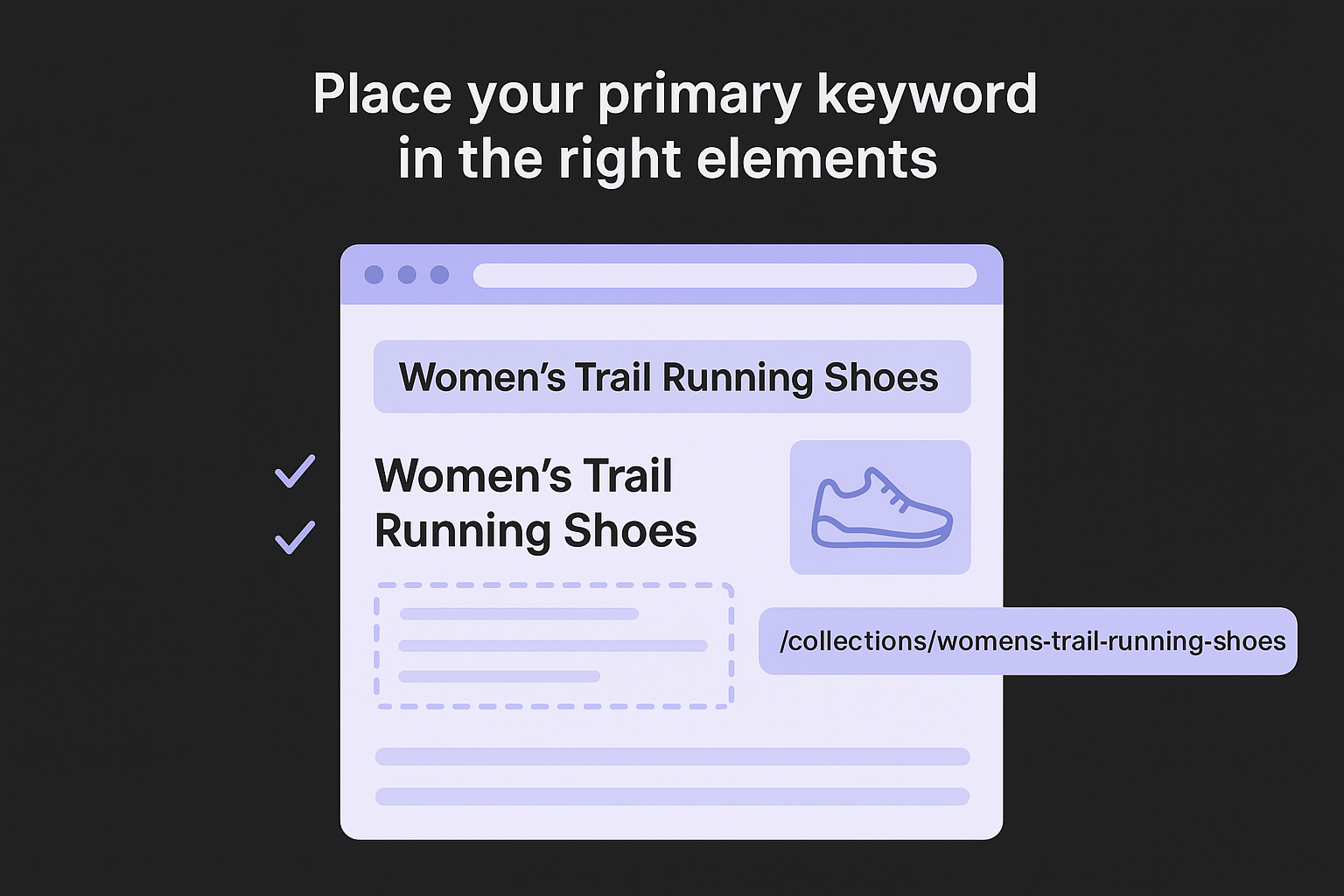
| Element | Example |
|---|---|
| Title tag | Women's Trail Running Shoes | Store Name |
| H1 | Women's Trail Running Shoes |
| URL slug | /collections/womens-trail-running-shoes |
| First paragraph | "Shop our full range of women's trail running shoes..." |
| Image alt tag | lightweight women's trail running shoes on trail |
Secondary keywords belong in your H2 subheadings and naturally distributed through the body copy. If placement feels forced anywhere on the page, pull back rather than stuffing terms where they don't belong, because over-optimization signals are a real ranking risk.
Identify and fix keyword cannibalization
Keyword cannibalization happens when two or more pages on your site compete for the same keyword, splitting link authority and leaving Google uncertain about which URL to rank. Audit this by searching site:yourdomain.com "target keyword" directly in Google for each of your top 10 priority terms. If more than one page surfaces, you have a conflict to resolve before rankings can improve.
Cannibalization is one of the most common reasons well-optimized pages plateau despite strong content and consistent publishing.
Fix the problem by consolidating overlapping pages into a single, stronger destination and setting up a 301 redirect from the weaker URL to the stronger one. If the pages genuinely serve different intents, rewrite each one so the distinction is unmistakable to both readers and search engines.
Step 7. Track results and iterate every month
Keyword research for ecommerce is not a one-time project. The market shifts, competitors publish new pages, and seasonal demand creates new search patterns every few months. You need a monthly review routine that checks whether your targeted keywords are moving in the right direction and surfaces new opportunities before your competitors find them first.
Set up your monthly review cadence
Schedule a fixed day each month to pull the metrics and reports that show SEO performance. Google Search Console gives you the most direct view of what's working: go to the Performance report, filter by date to compare the past 28 days against the previous 28-day period, and look at which pages gained or lost clicks and impressions. Use this tracking template in your spreadsheet to log the data each month:
| Page URL | Target Keyword | Avg. Position (Month 1) | Avg. Position (Month 2) | Clicks Change | Action |
|---|---|---|---|---|---|
| /collections/womens-trail-shoes | trail running shoes women | 14 | 8 | +42% | Monitor |
| /blog/trail-vs-road-running-shoes | trail shoes vs road shoes | 31 | 24 | +18% | Add internal links |
| /products/lightweight-trail-shoe | lightweight trail shoe | 47 | 49 | -5% | Refresh content |
Pages moving from positions 11 to 20 into the top 10 are your highest-leverage targets because a small ranking improvement there produces a large jump in clicks.
Adjust based on what the data tells you
When a page stalls or drops in ranking, the fix usually falls into one of three categories: the content is thinner than competing pages, the page lacks internal links from stronger pages on your site, or the target keyword intent no longer matches what Google is surfacing in the results. Check the current SERP for the stalled keyword and compare the top-ranking pages against yours in terms of depth, format, and structure.
When you spot new keyword opportunities during your monthly review, add them directly into your content plan with a scheduled publish date. This keeps your pipeline full without requiring a separate research session and ensures your ecommerce site builds compounding organic momentum month after month.
Next steps to keep your SEO moving
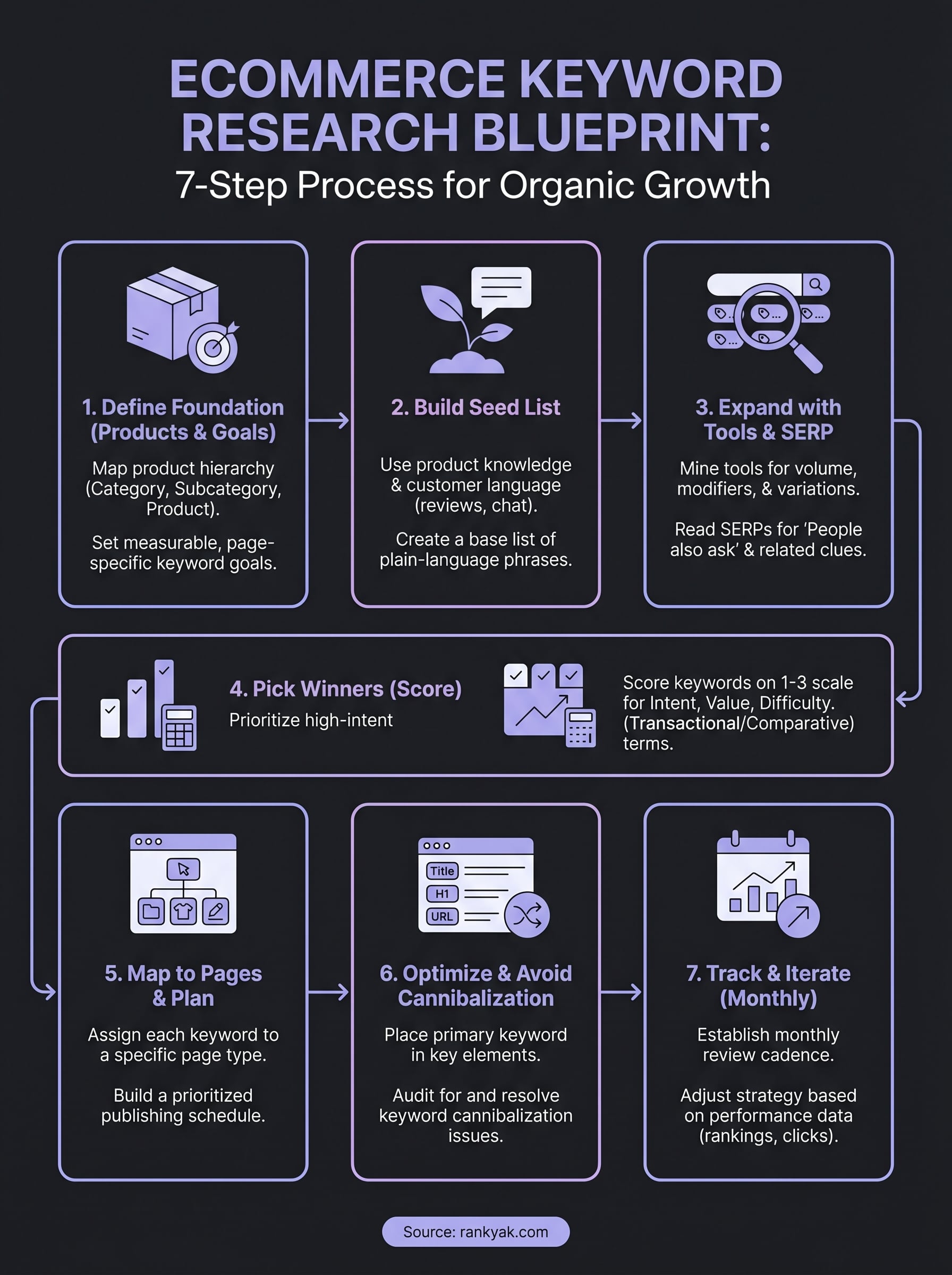
You now have a complete system for keyword research for ecommerce, from building your seed list to tracking rankings month after month. The blueprint only produces results if you actually run it on a consistent schedule. Start with Step 1 this week, map your top five category pages to target keywords, and schedule your first monthly review before you do anything else.
The biggest obstacle most store owners hit is consistency. Researching keywords once and then letting the list sit in a spreadsheet for six months produces nothing. You need a reliable content production process that keeps publishing on track without requiring hours of manual work each week. If you want to automate the keyword discovery, content creation, and publishing steps so your site builds organic momentum on autopilot, see how RankYak ranks online stores for every category they sell and how much faster your ecommerce SEO can move.
Lars Koole is a co-founder of RankYak and has worked in SEO since 2021, on the side where a strategy has to become a live page: inside agencies, alongside them, for clients directly, and in-house on the products being ranked. He is a software engineer by trade, which is how that page gets built. Before RankYak he founded companies of his own, two of which were acquired. At RankYak he owns the engineering and everything AI, and works out the solution and the implementation of each new feature.
