HubSpot SEO Strategy: How To Build Topic Clusters That Rank
Topic clusters changed how search engines evaluate website authority, and HubSpot played a major role in popularizing this approach. If you're exploring a HubSpot SEO strategy, you've likely realized that ranking individual pages isn't enough anymore. Google now rewards websites that demonstrate comprehensive expertise on interconnected subjects, which is exactly what HubSpot topic clusters deliver.
The challenge? Building topic clusters requires consistent content production, strategic internal linking, and ongoing keyword research. Many businesses start strong but struggle to maintain momentum. That's where understanding HubSpot's methodology becomes valuable, and where tools like RankYak can help you execute at scale by automating the content creation that makes topic clusters actually work.
This guide walks you through implementing HubSpot topic clusters step by step, from identifying pillar topics through tracking results in 2026's search landscape.
What HubSpot means by topic clusters
HubSpot's approach to topic clusters revolves around organizing your content library into interconnected groups rather than treating each page as an isolated asset. You start with a pillar page that covers a broad topic comprehensively, then create multiple cluster pages that dive deep into specific subtopics. Internal links connect these cluster pages back to the pillar, creating a web of related content that demonstrates expertise to both search engines and readers.
The anatomy of a topic cluster
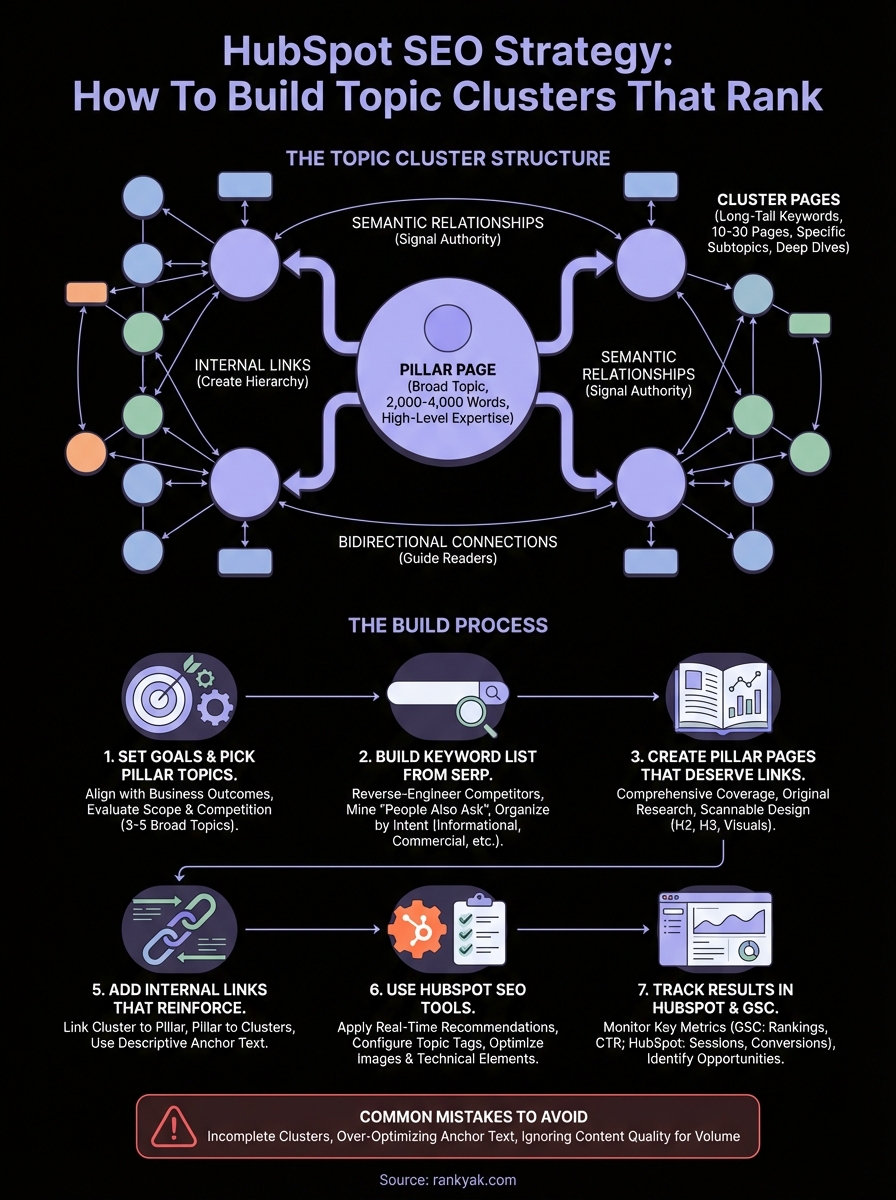
A topic cluster consists of three essential components working together, visible in almost any topic cluster example you study. Your pillar page serves as the central hub, covering a broad topic at a high level (think "Email Marketing" or "Content Strategy"). This page typically ranges from 2,000 to 4,000 words and provides enough depth to answer fundamental questions while linking out to more detailed resources.
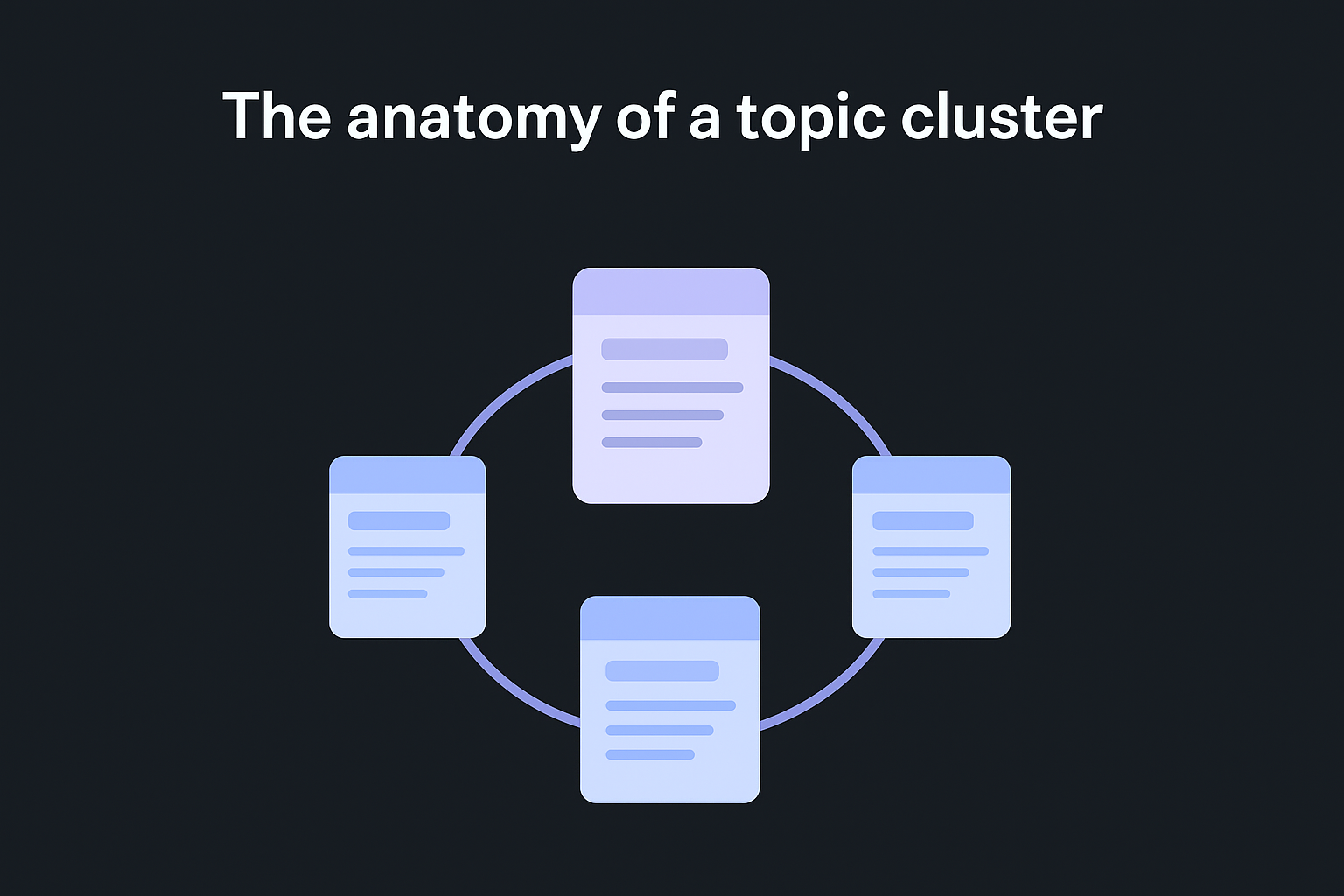
Cluster content forms the supporting structure around your pillar. Each cluster page targets a long-tail keyword related to the pillar topic. For example, if your pillar covers "Email Marketing," your HubSpot cluster content might address "email subject line formulas," "A/B testing email campaigns," or "email list segmentation strategies." You create 10 to 30 cluster pages per pillar, depending on how expansive the topic is.
Topic clusters work because they mirror how people actually search for information, moving from general questions to specific implementation details as their understanding deepens.
The internal linking structure completes the cluster. Every cluster page links back to the pillar page using relevant anchor text, and the pillar page links out to each cluster. This creates a clear hierarchy that search engines can crawl and understand, signaling that your site owns this topic space.
How clusters signal topical authority
Google's algorithms evaluate your website's topical authority on specific subjects, not just individual pages. When you build a content cluster in HubSpot, you create multiple pages that collectively prove your expertise. Each cluster page reinforces the others, and the pillar page benefits from this concentrated relevance.
Search engines assess semantic relationships between your pages through internal links, content overlap, and keyword themes. HubSpot content clusters make these relationships explicit. When someone searches for your pillar topic, Google sees that you've published 15 related articles, all interlinked and covering different angles. Your site becomes the obvious choice for comprehensive information, which often translates to higher rankings and increased visibility.
Why HubSpot's approach differs from basic interlinking
Many websites add internal links without strategic intent, connecting pages randomly or only through navigation menus. HubSpot's topic cluster methodology requires deliberate planning before you create content. You decide which pillar topics align with your business goals, research the subtopics that support each pillar, and build a content roadmap that fills out the entire cluster systematically.
The difference shows up in results. Random internal linking might help users navigate your site, but it doesn't build topical authority. Strategic HubSpot clusters create a semantic footprint that search engines recognize. HubSpot's approach also emphasizes consistency: you commit to completing full clusters, which requires producing sustained content volume over weeks or months to see meaningful traction.
Step 1. Set goals and pick your pillar topics
Your content pillar strategy begins with selecting pillar topics that align with your business objectives, not just what ranks well. You need to identify 3 to 5 broad subjects where your company can demonstrate genuine expertise and where your target audience actively searches for solutions, and a free topical map generator can sketch the coverage under each one.
Align pillar topics with business outcomes
Start by mapping potential pillar topics to specific business goals. Ask yourself which topics drive the most valuable traffic: leads, conversions, or customer retention. If you sell marketing automation software, a pillar on "Email Marketing" connects directly to your product. A pillar on "Social Media Trends" might generate traffic but rarely converts visitors into customers.
The strongest pillar topics sit at the intersection of what your audience searches for and what your business actually delivers.
Document your pillar topics using this framework to ensure they support your HubSpot SEO strategy:
| Pillar Topic | Business Goal | Target Audience Segment | Est. Cluster Articles |
|---|---|---|---|
| Email Marketing | Generate leads for automation tool | Small business marketers | 15-20 |
| Content Strategy | Position as thought leader | Content managers, directors | 12-18 |
| Lead Generation | Drive product trials | Sales teams, founders | 20-25 |
This table forces you to justify each pillar before you commit to building it. You'll create dozens of articles per pillar, so choose topics you can sustain for months without running out of relevant subtopics.
Evaluate topic scope and competition
Your pillar topics need to be broad enough to support 10+ cluster articles but focused enough that you can realistically compete. "Marketing" is too vague and competitive. "Email Subject Lines" is too narrow for a pillar. "Email Marketing" hits the right balance, letting you create clusters around deliverability, automation, segmentation, analytics, and design without diluting your authority.
Check whether competitors have already built comprehensive clusters around your chosen topics. Search Google for your potential pillar topic and review the top 5 results. If you see multiple sites with 20+ interlinked articles covering every angle, you're facing established competition. Prioritize pillar topics where you can offer unique perspectives based on your company's direct experience.
Step 2. Build your keyword list from the SERP
Once you've selected your pillar topics, you need to find the specific keywords that will form your cluster content. Instead of relying solely on traditional keyword research tools, start by examining what already ranks on Google's search results page. This SERP analysis reveals the actual content types and keyword angles that Google rewards for your chosen topics.
Reverse-engineer competitor keyword targeting
Search Google for your pillar topic and open the top 10 ranking pages in separate tabs. Scan each page's headings, subheadings, and content structure to identify the specific questions and subtopics they address. You're looking for patterns across multiple high-ranking pages.
Create a spreadsheet with columns for keyword phrase, search intent, content format, and estimated difficulty. As you review competitors, extract the long-tail variations they target within their content. If a page about "email marketing" dedicates sections to "automated welcome sequences" and "cart abandonment emails," those become potential cluster keywords for your HubSpot SEO strategy.
Pay special attention to keyword gaps through a proper keyword gap analysis, since these are subtopics your competitors cover that you haven't addressed yet. These gaps represent opportunities to strengthen your cluster and rank ahead of competitors using HubSpot SEO. Document every gap you find; even low-volume keywords contribute to topical authority when they fill holes in your cluster.
Mine "People Also Ask" and related searches
Google's "People Also Ask" boxes contain high-value cluster keywords phrased exactly how users search. Expand each question in the PAA box to reveal additional related queries. These questions represent real search demand and often have lower competition than primary keywords.

Scroll to the bottom of the SERP and note the "Related searches" section. These terms show semantic variations and adjacent topics that Google associates with your pillar. Add each related search to your keyword list, then search for those terms individually and repeat the process.
Organize keywords by cluster intent
Group a pasted keyword list into clusters by search intent categories: informational (learning), navigational (finding specific resources), commercial (comparing options), and transactional (ready to buy). Build a simple framework to map keywords to content:
| Keyword | Search Intent | Content Type | Priority |
|---|---|---|---|
| email automation workflows | Informational | How-to guide | High |
| best email marketing software | Commercial | Comparison | Medium |
| email subject line templates | Transactional | Resource list | High |
This organization ensures you create cluster content that covers all stages of the user journey, not just informational queries that rarely convert.
Step 3. Create pillar pages that deserve links
Your pillar page needs to earn links naturally by being the most comprehensive resource on your topic, which is exactly what makes resource page link outreach work. A weak pillar page undermines your entire HubSpot SEO strategy, no matter how strong your cluster content becomes.
Structure your pillar for comprehensive coverage
Start with an outline that addresses every major subtopic within your pillar theme before you write a single sentence. Build your pillar page following this content framework:
| Section | Purpose | Approximate Length |
|---|---|---|
| Introduction | Define topic, explain relevance | 150-200 words |
| Core concepts | Cover 5-8 fundamental subtopics | 300-400 words each |
| Advanced strategies | Provide expert-level tactics | 200-300 words each |
| Common mistakes | Address pitfalls and solutions | 300-400 words |
| Summary & next steps | Recap and link to clusters | 150-200 words |
Each core section should link to relevant cluster articles where readers can dive deeper. Your pillar establishes the framework while cluster content delivers the implementation details.
The best pillar pages educate readers so thoroughly that they bookmark the page as their go-to reference, creating natural opportunities for links and shares.
Add original research and real examples
Generic advice won't earn links from reputable sites. You need proprietary data, case studies, or unique perspectives that readers can't find elsewhere. Include screenshots from actual campaigns, anonymized client results, or surveys you've conducted within your industry. These elements transform your pillar from another SEO article into a citable resource.
Design for scanning and deep reading
Format your pillar page with clear H2 and H3 headings that let readers jump to relevant sections. Add a table of contents at the top using anchor links. Include visual elements like charts, comparison tables, or process diagrams every 500 words to break up text blocks.
Step 4. Plan cluster content and publishing cadence
Planning your cluster content before you start writing prevents scattered efforts and ensures you complete full topic clusters rather than abandoning them halfway through. This systematic approach is critical when implementing HubSpot topic clusters at scale.
Create a cluster content calendar
Map out your entire cluster before writing the first article. List every cluster keyword you identified in Step 2, then assign each one a target publish date based on your production capacity, or let a rolling content plan set those dates for you.
Use this content planning template to structure your cluster calendar:
| Article Title | Target Keyword | Search Intent | Priority | Draft Due | Publish Date |
|---|---|---|---|---|---|
| Email Automation Workflows Guide | email automation workflows | Informational | High | March 3 | March 10 |
| How to Segment Email Lists | email list segmentation | Informational | High | March 10 | March 17 |
| Email Subject Line Templates | subject line templates | Transactional | Medium | March 17 | March 24 |
This calendar gives you a complete overview of cluster coverage and identifies gaps where additional articles strengthen topical authority.
Set realistic publishing frequency
Your publishing cadence needs to balance consistency with quality. Publishing one high-quality cluster article per week outperforms churning out three mediocre pieces that don't rank. Commit to a schedule you can maintain for at least three months.
Clusters gain momentum as you add more interconnected content, so stopping after five articles wastes the foundation you've built.
Calculate your capacity by estimating hours per article (research, writing, editing, optimization) and available team bandwidth. If you can produce one article weekly, a 15-article cluster takes four months to complete. Tools like RankYak can accelerate this timeline by automating content production while maintaining quality standards.
Prioritize by search intent and competition
Start with informational cluster articles that target lower-competition keywords. These pieces establish your topical presence and link back to your pillar page immediately. Save high-competition keywords for later when your domain authority has increased through the accumulated link equity from your growing cluster.
Step 5. Add internal links that reinforce clusters
Internal links transform disconnected articles into a cohesive topic cluster that search engines can understand and rank, which is why site architecture for SEO matters so much. You need to implement a consistent linking pattern that connects every cluster article to your pillar page and strategically links related cluster articles to each other.
Link from clusters back to the pillar
Every cluster article must link to your pillar page using natural anchor text that includes your target keyword. Place this link within the first 200 words of your cluster content to establish the relationship immediately. Add 1 to 3 additional contextual links throughout the article when you reference concepts covered in your pillar.
Update your pillar page with links to new cluster articles as you publish them. Add these links within relevant sections of your pillar content where you introduce subtopics, using descriptive anchor text that tells readers exactly what they'll find.
Strategic internal linking distributes authority throughout your cluster, ensuring that ranking improvements to any single page benefit your entire topic ecosystem.
Use descriptive anchor text strategically
Your anchor text should tell readers what information they'll find on the linked page without stuffing keywords unnaturally. Apply these anchor text patterns across your HubSpot SEO strategy:
- Topic-focused: "email automation workflows" instead of "automation strategies"
- Action-oriented: "how to segment email lists" instead of "segmentation"
- Specific questions: "what makes subject lines effective" instead of "subject lines"
Vary your anchor text even when linking to the same page from different articles. This variation appears more natural and avoids repetitive patterns that search engines might flag.
Create bidirectional cluster connections
Link related cluster articles to each other when discussing overlapping concepts, not just back to the pillar. If your article about email automation mentions segmentation strategies, link to your dedicated segmentation cluster article. These horizontal connections strengthen the semantic network within your cluster. Limit cross-cluster links to 2 to 4 per article to maintain focus.
Step 6. Use HubSpot SEO tools to optimize pages
HubSpot's platform includes built-in SEO features that streamline optimization tasks you'd otherwise handle manually or through third-party tools. You access these features directly within the content editor while drafting articles, eliminating the workflow friction of switching between multiple platforms. These tools analyze your content against on-page SEO factors and provide specific recommendations that align with your HubSpot SEO strategy.
Apply SEO recommendations in real time
Navigate to your content editor and locate the SEO tab in the right sidebar. HubSpot scans your draft and generates a checklist of optimization opportunities ranked by impact. You'll see specific guidance on title tag length, meta description quality, header structure, image alt text, and keyword placement based on your focus keyword setting.

Work through each recommendation systematically, starting with high-priority items that HubSpot flags in red. Common issues include title tags exceeding 60 characters, missing meta descriptions, or insufficient keyword usage in your first paragraph.
HubSpot's recommendations translate complex SEO requirements into actionable fixes that anyone on your team can implement without technical expertise.
Set your focus keyword for each cluster article to match the target keyword from your content calendar. HubSpot then evaluates whether you've used that keyword naturally in critical locations: your title, URL, H1 heading, introduction, subheadings, and image alt attributes.
Configure topic tags for cluster organization
The HubSpot topic cluster tool (found under Settings > Content Strategy > Topics) is where you formally define pillar-cluster relationships within the platform, though other topic cluster tools handle the same job outside HubSpot. Add topic tags to every cluster article you publish, using your pillar page title as the tag name. This creates a filterable system within HubSpot that groups related content together and lets you track which articles belong to each cluster. The tool also provides a visual map of your cluster, showing connected subtopics and identifying coverage gaps at a glance.
Apply multiple tags when appropriate. An article about email automation workflows might receive tags for both "Email Marketing" (your pillar) and "Marketing Automation" (a related pillar). This cross-tagging reflects the semantic relationships that strengthen topical authority across overlapping subject areas.
If you want to deepen your understanding of how search engines rank content and how HubSpot's tools fit into a broader SEO workflow, HubSpot Academy offers a free SEO certification course covering on-page and technical SEO, keyword research, link building, rich results optimization, and SEO reporting. Completing the certification gives you a structured foundation for running an HubSpot SEO analysis of your own site and refining your cluster strategy.
Optimize images and technical elements
Upload images with descriptive filenames before adding them to your content, one of the basics of image SEO optimization. Replace generic names like "IMG_1234.jpg" with keyword-rich alternatives like "email-automation-workflow-example.jpg" that help search engines understand your visual content. HubSpot automatically compresses images, but you should still resize oversized files before uploading to maintain fast page load speeds.
Complete the alt text field for every image using specific descriptions that incorporate your target keywords naturally. Write alt text that would help someone understand the image without seeing it, aiming for 125 characters or fewer while being descriptive and relevant.
Step 7. Track results in HubSpot and GSC
Tracking SEO performance across your clusters requires monitoring multiple data sources that reveal different aspects of your SEO success. HubSpot's analytics show how visitors interact with your content, while Google Search Console provides the search visibility data that proves your cluster strategy works.
Set up tracking dashboards
Connect your Google Search Console account to HubSpot by navigating to Settings > Marketing > Search Console and following the authentication prompts. This integration pulls GSC data directly into your HubSpot dashboard, eliminating the need to switch between platforms when analyzing performance.
Create a custom dashboard in HubSpot that tracks cluster-specific metrics for your pillar topics. Add report widgets that filter content by topic tags, showing traffic trends, conversion rates, and ranking positions for all articles within each cluster. Update this dashboard weekly to spot patterns early.
Monitor key performance metrics
Track these essential metrics to evaluate your HubSpot SEO strategy effectiveness:
| Metric | Data Source | What It Reveals | Target Benchmark |
|---|---|---|---|
| Average position | GSC | Ranking improvement over time | Top 10 within 90 days |
| Click-through rate | GSC | Title/description effectiveness | 3-5% for positions 3-10 |
| Organic sessions | HubSpot | Actual traffic growth | 15-20% monthly increase |
| Pages per session | HubSpot | Internal link engagement | 2.5+ pages per visit |
| Conversion rate | HubSpot | Business impact | Varies by goal type |
Export your GSC data monthly to track long-term trends that HubSpot's 16-month data retention might not capture. Filter by query to identify which keywords drive the most qualified traffic versus vanity metrics that generate clicks without conversions.
Regular performance tracking reveals which cluster articles strengthen your pillar page rankings and which need optimization or content refreshes.
Identify and act on ranking opportunities
Review your GSC performance report to find keywords where you rank between positions 11 and 20. These near-miss rankings represent your fastest path to traffic growth, since small improvements move them to page one. Update the corresponding articles with additional depth, better internal links, or refreshed examples to capture those positions.
Monitor your pillar page performance separately from cluster articles. Your pillar should gradually climb rankings as you add more cluster content that links to it. If your pillar stalls after publishing 10+ cluster articles, audit your internal linking structure to ensure every cluster links back with relevant anchor text and your pillar links out to each published cluster piece.
Common mistakes to avoid with topic clusters
Building topic clusters creates opportunities for ranking success, but implementation mistakes undermine your efforts before you see results. Understanding these common pitfalls helps you avoid repeating the same errors that cause most cluster strategies to fail.
Publishing incomplete clusters
You damage your HubSpot SEO strategy when you publish five cluster articles and then abandon the topic to chase new keywords. Search engines need to see comprehensive coverage before they recognize your authority, which means completing at least 10 to 15 interconnected articles within a cluster before moving to your next pillar topic.
Commit to finishing one cluster completely rather than starting multiple clusters simultaneously. Track your progress using this completion checklist:
- Pillar page published with 2,500+ words
- Minimum 10 cluster articles drafted
- All cluster articles link to pillar
- Pillar page links to all clusters
- Cross-links added between related clusters
- Topic tags applied consistently in the HubSpot topic cluster tool
Incomplete clusters waste your content production resources without delivering the compounding SEO benefits that make topic clusters effective in the first place.
Over-optimizing internal anchor text
You trigger spam signals when every internal link uses exact-match anchor text stuffed with your target keywords. Vary your anchor text across different articles linking to the same page, mixing exact-match keywords with partial matches and descriptive phrases that sound conversational. This diversity signals organic linking behavior rather than manipulative SEO tactics.
Ignoring content quality for volume
You hurt your rankings when you rush through cluster articles to hit publishing targets without ensuring each piece delivers genuine value. Thin content that rehashes existing information doesn't strengthen your topical authority, regardless of how many internal links you add.
Maintain quality standards by allocating sufficient time for research and writing on each cluster article. Set a minimum word count of 1,200 words for cluster content and require at least three unique insights or examples that readers won't find in competing articles. Quality clusters with fewer articles outperform bloated clusters filled with mediocre content.
Wrap up and keep momentum
Building topic clusters through a HubSpot SEO strategy requires commitment to consistent content production and strategic organization. The framework works when you execute it completely rather than abandoning clusters halfway through.
Your biggest challenge isn't understanding the methodology. It's maintaining the publishing velocity needed to complete full clusters before search engines recognize your topical authority.
If you need help maintaining momentum, RankYak runs SEO from keyword research to published article, letting you build complete topic clusters in weeks instead of months. You'll publish one optimized article daily, ensuring your clusters reach completion quickly and start generating the traffic your business needs. Start your next cluster today and commit to seeing it through.
Lars Koole is a co-founder of RankYak and has worked in SEO since 2021, on the side where a strategy has to become a live page: inside agencies, alongside them, for clients directly, and in-house on the products being ranked. He is a software engineer by trade, which is how that page gets built. Before RankYak he founded companies of his own, two of which were acquired. At RankYak he owns the engineering and everything AI, and works out the solution and the implementation of each new feature.
